Answering Service for IT Company: A Practical Buyer's Guide
Your monitoring platform fires at 2:14 a.m. A healthcare client's core system is unavailable, the on-call engineer doesn't answer, and the person who does answer your phone service records a message instead of opening or escalating an incident. By morning, the client's CIO isn't asking whether your team was technically capable of fixing the outage. They're asking why nobody took ownership.
That's the buying question behind an answering service for IT companies. You're not purchasing a nicer voicemail greeting. You're deciding who owns the first human response when your staff is asleep, your alert rotation fails, and a client's patience is measured in minutes.
The distinction matters for law firms too. Research on why small firms need IT monitoring makes the broader point clearly: smaller organizations still depend on systems that can fail outside office hours. The same operational logic applies to a legal practice. A missed call, a delayed intake response, or a silent escalation can cost more than the staffing decision was meant to save.
Table of Contents
- The 2am Call That Cost a Contract
- What an Answering Service for IT Companies Actually Does
- Core Features That Matter in an IT Answering Setup
- Comparing the Main Service Models
- How to Evaluate Vendors Without Getting Sold To
- When You Are Actually Ready to Buy
The 2am Call That Cost a Contract
The managed IT provider had a lean team supporting roughly 30 seats across several clients. Its monitoring tool detected a severe outage at 2:14 a.m. The alert went to the on-call engineer, who was already handling another issue and silenced the notification, expecting to investigate shortly.
The healthcare client called the provider's main number. The after-hours service answered, collected the caller's name, client account, and a short description, then sent the message into an inbox. Nobody reached a human. The service didn't recognize the call as a priority incident, didn't follow a timed escalation tree, and didn't confirm that anyone had accepted responsibility.
By morning, the client's CIO had escalated internally and started the termination process. The provider lost the recurring monthly revenue attached to the account, damaged a reference relationship, and pulled senior staff into an emergency effort to explain an outage that was only part of the problem. The technical failure was serious. The intake failure made it look unmanaged.
Operational rule: A message is not an incident response. It's evidence that the incident response has not started.
This is why firms should treat phone coverage as part of their operating model, not as a receptionist feature. Legal practices have the same exposure. A 2024 Clio-based legal trends summary reported that only 40% of law firms answered an incoming call from a prospective client, down from 56% in 2019; only 20% of firms that missed a call returned it, while 64% of prospective clients received no follow-up (Oklahoma Bar Association). A firm can spend heavily on marketing and still leave the front door unattended.
The fix isn't “hire more people.” It's defining the response, documenting the escalation, and making someone accountable for the handoff. The practical guidance in this resource on missed calls applies beyond legal intake: unanswered calls need a recovery workflow, not a hopeful assumption that the caller will try again.
What an Answering Service for IT Companies Actually Does
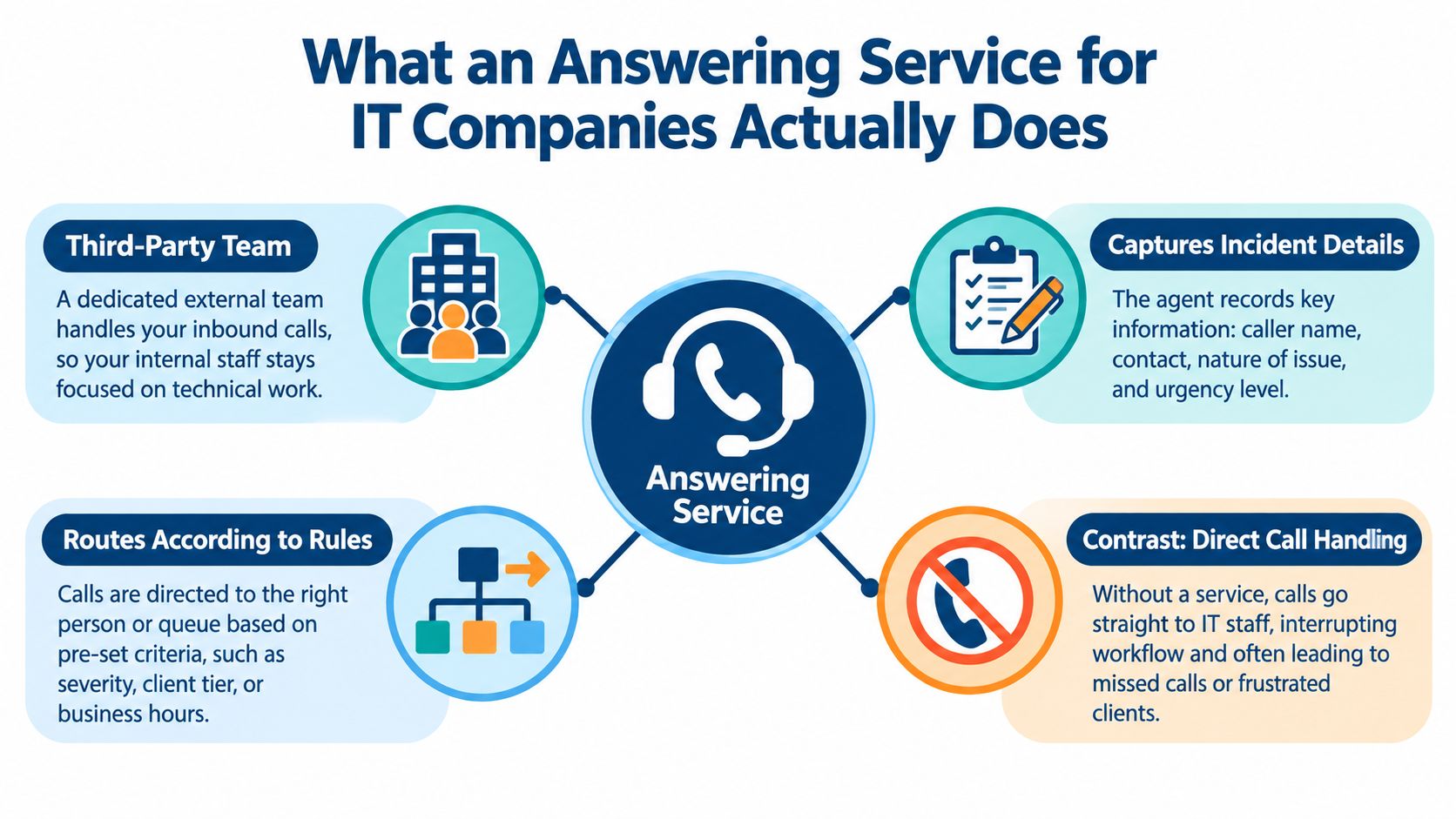
An answering service for IT companies is a third-party team that answers inbound calls on your behalf, records the relevant details, and routes the call according to rules you define. Depending on the provider, agents may identify the client, capture the affected system, classify urgency, notify an on-call person, or create a ticket.
That description covers a wide range of services. Some providers only take messages. Others perform structured triage. A true 24/7 help desk goes further by using technicians who can investigate, troubleshoot, and potentially resolve the issue without waiting for your internal team.
Separate the three jobs
The expensive mistake is treating these models as interchangeable.
- Message-taking records who called and why. It can be adequate for routine requests, but it doesn't establish severity or ownership.
- Triage gathers enough information to classify the issue, check the caller's client tier, and trigger the correct escalation path.
- Resolution requires technical capability, system access, and authority to work the incident through the help desk process.
A provider that promises “24/7 support” may mean that a person answers the phone. Ask what happens after the greeting. Does the agent open a ticket? Can they identify a Sev-1 incident? Do they call the first engineer, wait for a response, then move to the next contact? Can a technician perform approved troubleshooting?
For an IT shop, the service must do three jobs reliably:
- Answer without forcing clients into voicemail.
- Capture structured information that your team can use.
- Route and escalate according to severity, client, and time of day.
Everything beyond that should be evaluated as a separate capability. A phone agent isn't a help desk technician merely because they can pronounce “ServiceNow.”
Core Features That Matter in an IT Answering Setup
A polished demo usually succeeds by showing you the greeting. The contract usually fails in the handoff. Evaluate the parts that operate after the caller explains the problem.
Routing must reflect actual risk
Routing should account for client, severity, and time of day. A priority client with a business-critical outage shouldn't follow the same path as a password-reset request. The system should also distinguish between business-hours ownership, after-hours rotation, weekends, holidays, and known maintenance windows.
Ask the vendor to demonstrate a failed escalation. Give them a named contact who doesn't answer, then watch what happens. If the call loops back to the same person, lands in a shared inbox, or ends with “the team will be notified,” you've found the gap before production does.
Ticket integration is not optional
Email-only delivery creates duplicate entry, weak audit trails, and missed context. The service should write structured data into the platform your team already uses, whether that's ConnectWise, Autotask, or ServiceNow. At minimum, confirm that the integration preserves caller identity, client account, urgency, transcript or notes, callback details, and escalation status.
Run a field-mapping test. Sales teams often say “integrated” when they mean “we can send an email to an address associated with your help desk.” That's not integration. That's a letter wearing a tiny software hat.
Escalation needs ownership and time limits
A useful escalation tree names people, channels, and timeout thresholds. It should define what happens when the primary contact doesn't answer, the secondary contact is unavailable, or the incident changes severity.
Require reporting that shows each step. You should be able to see when the call arrived, when the ticket opened, who was contacted, whether the handoff was accepted, and when the next escalation occurred. If the provider can't show that trail, you can't verify the SLA.
Security belongs in the buying decision
Call recordings and transcripts may contain client names, system details, credentials, or regulated information. Ask where recordings are stored, who can access them, how long they're retained, and whether they can be disabled for sensitive queues. Review data residency, encryption, access controls, audit logs, and contractual obligations that apply to your clients.
Bilingual coverage also deserves a direct question. If your client base needs English and Español support, verify that both languages are available during the hours and escalation scenarios that matter. Don't accept “multilingual capability” as a decorative checkbox.
| Feature | What It Should Do | Common Failure Point |
|---|---|---|
| Routing logic | Direct calls by client, severity, schedule, and issue type | One generic queue sends every caller to the same rotation |
| Ticket integration | Create or update structured records in ConnectWise, Autotask, or ServiceNow | Email delivery loses fields and leaves staff to re-enter data |
| Escalation tiers | Contact named people with defined timeouts and fallback rules | The tree loops, stalls, or stops after one unanswered call |
| Recording controls | Protect sensitive information with retention and access rules | Recordings remain broadly accessible or violate client requirements |
| Language coverage | Support the languages your callers use during required coverage windows | “Available” agents aren't available when the queue is busiest |
For legal practices evaluating after-hours answering services, the same discipline applies. Live coverage matters, but the handoff, follow-up, and recordkeeping determine whether the call becomes useful work.
Comparing the Main Service Models
There are three common ways an IT firm can outsource inbound coverage. The right choice depends on who owns the call at 2 a.m., not on which package has the friendliest monthly price.
Pure answering is the simplest model. An agent answers, follows a script, and sends a message. It can keep a phone from ringing into silence, but the internal team still owns classification, ticket entry, escalation, and callback. This model is often appropriate for routine inquiries. It's a poor fit for clients who expect incident ownership.
Co-managed overflow shares responsibility. The external team handles calls during defined periods or when internal staff are busy, while your team retains the technical escalation. This can work well when you have an established help desk and need protection during peaks, meetings, vacations, or simultaneous incidents.
A full after-hours desk combines live answering, structured triage, ticketing, escalation, and, where contracted, first-call technical resolution. It requires more onboarding and tighter controls. It also gives leadership a clearer answer to the question every client eventually asks: who was responsible when the issue arrived?
| Dimension | Pure Answering | Co-Managed Overflow | Full After-Hours Desk |
|---|---|---|---|
| 2 a.m. ownership | Internal team after message delivery | Shared according to the escalation plan | External desk owns intake and escalation |
| Triage depth | Basic caller and issue capture | Structured qualification | Technical triage and defined response actions |
| Ticket workflow | Often manual or email-based | Integrated if configured carefully | Ticket creation, updates, and status reporting |
| Internal staffing effect | Reduces ringing, not workload | Protects staff during peaks | Extends coverage and reduces overnight interruption |
| Main risk | Message disappears in an inbox | Ambiguous responsibility | Complex onboarding and governance |
| Best fit | Routine calls and low-risk coverage | Established teams with overflow pressure | Contractual after-hours obligations and critical clients |
Pricing hides in the unit of measurement. Vendors may charge per call, per minute, per ticket, or through a bundled arrangement. Per-call pricing can make a short but complicated incident look inexpensive until the vendor treats every escalation as a separate event. Per-minute pricing can reward long conversations rather than useful outcomes. Per-ticket pricing requires a precise definition of what counts as a ticket, update, transfer, and reopened incident.
Ask for a model using your own call recordings and historical queue patterns. Don't compare a low-cost message service with a technical desk as though they're competing products. They're different ownership models.
For law firms, live answering services should be judged by the same principle. An answered call has value only when the firm captures the right information and takes the next action.
How to Evaluate Vendors Without Getting Sold To
Start with a written RFI. Don't let the vendor define the evaluation criteria by giving the most enthusiastic demo.
Score the response on integration depth, escalation tiering, agent training, reporting, security, and operational accountability. Call time matters, but it's a weak primary metric. A short call that creates the right ticket and reaches the right engineer is more useful than a long call that produces a beautifully written message nobody owns.
Send these questions before the demo
Require specific answers, not product adjectives.
- Integration: Which ticket-write APIs and native connectors do you support? Ask the vendor to name the exact versions or workflows they support for ConnectWise, Autotask, or ServiceNow.
- Escalation: How many contacts can a rule include? What happens after each timeout? Can the vendor show the complete audit trail?
- Training: How are agents trained on client tiers, severity definitions, technical vocabulary, and prohibited actions?
- Security: Can the vendor provide SOC 2 documentation? If healthcare information may appear in calls or tickets, can they provide a BAA? How are recordings and transcripts controlled?
- Coverage: How is after-hours staffing organized? What happens during simultaneous calls, holidays, and major incidents?
- Reporting: Which metrics can you export? Can you distinguish answered calls, abandoned calls, escalations, accepted handoffs, ticket creation, and resolution?
- References: Can the vendor provide reference accounts in MSP or SaaS environments with comparable escalation requirements?
A vendor that refuses to name supported platforms is telling you something. So is one that describes escalation as “we notify the appropriate team.” Appropriate according to whom, and after how many unanswered attempts?
Watch the demo for failure behavior
Ask the presenter to run a P1 scenario with incomplete caller information. Then make the primary engineer unavailable. Next, change the caller's client tier and ask whether the route changes. Finally, ask what appears in the ticket and who can edit the record.
The failure path tells you more than the happy path. Look for dropped fields, duplicate tickets, untracked transfers, unclear acceptance, and alerts that reach an engineer without enough context. If the provider only demonstrates a clean call from a cooperative caller during business hours, you haven't seen the product you'll operate.
Use the same scrutiny for communication controls. Teams that handle sensitive client conversations may benefit from reviewing a privacy-first communication solution, but the label alone proves nothing. Ask how the provider limits access, handles retention, and documents user activity.
Reference-call question: “Tell me about the last serious incident where your primary escalation contact didn't answer. What did your team do next, and where can I verify it?”
Score outcomes, not theater
Build a weighted scorecard around operational results:
- Incident capture: Did the provider collect the fields your technicians need?
- Escalation completion: Did a named person accept responsibility?
- Ticket integrity: Did the record appear correctly in the system of record?
- Visibility: Can managers audit the entire sequence?
- Client experience: Did the caller receive a clear, accurate response?
Run a short pilot with real scripts, real queues, and a controlled escalation test. Don't evaluate only whether agents sound pleasant. Pleasant agents can still create operational debris.
When You Are Actually Ready to Buy
The opening failure wasn't caused by a lack of technology. The provider had monitoring, an on-call rotation, and a phone service. It lacked a dependable operating sequence that connected those pieces.
Before you buy, document the intake script. Define what the agent must collect, what they must never promise, which issues qualify as urgent, and how the caller should be updated. Then make sure your ticketing workflow can receive the information without forcing someone to copy it from an email at an unreasonable hour.
Confirm internal readiness
A vendor can extend a process. It can't invent one responsibly while a client is waiting.
Your internal checklist should include:
- Severity definitions: Document what distinguishes Sev-1 through Sev-4 and give concrete examples.
- Escalation ownership: Name the primary and backup contacts, with valid channels and authority to act.
- Ticket workflow: Define how new incidents are created, assigned, updated, and closed.
- Client rules: Record special handling for regulated clients, critical systems, maintenance windows, and contractual commitments.
- Review cadence: Decide who examines missed calls, failed escalations, ticket errors, and client complaints.
You're ready to engage a provider when the gap is coverage, not confusion. That usually means recurring after-hours demand, multi-region clients, regulated environments, or an internal team that can resolve incidents but can't reliably answer every call and perform every handoff.
You may need internal process work first if nobody agrees on severity, the ticketing system isn't trusted, or every escalation depends on one person's memory. Buying coverage for an undefined process moves the chaos to a vendor invoice.
Readiness test: If an agent followed your written rules perfectly, would your team know what to do next?
Attorney Assistant is built for law firms rather than IT shops, with Frontline providing 24/7 live intake for answering, qualifying, following up with, and signing appropriate cases, while Staffline provides dedicated legal support professionals who work inside a firm's systems. For a legal practice reviewing its own coverage and administrative capacity, visit Attorney Assistant to assess where live intake, follow-up, or dedicated operational staff could strengthen the handoff.
Related Articles
Case Management App for Law Firms in 2026: How to Choose
Compare case management app options for law firms on intake, documents, calendaring, security and pricing, with a checklist to pick the right fit.
Call Answering Service for Law Firms: What Actually Works
A call answering service for law firms should sign cases, not take messages. Learn pricing models, vendor criteria, and 24/7 intake that converts.
Case Management Notes: A Law Firm's How-To Guide
Learn how to write case management notes that hold up, with a defensible structure, privilege safeguards, handoff tips, and a smarter way to staff the work.