Attorney Calendaring Software: How to Choose the Right One
It's Friday at 4:47 p.m., and someone just found the response deadline in an email thread, a shared inbox, and an attorney's personal calendar. All three say different dates. Only one of them will matter to the court.
Table of Contents
- Why Your Calendar Decides Whether Deadlines Survive
- Calendaring Options Compared at a Glance
- Feature Comparison Across Core Capabilities
- How to Test Deadline Calculations Before You Trust Them
- Integrations and Who Owns Each Event
- Reliability Controls That Prevent Silent Failures
- Pricing Models and Hidden Costs
- Choose Your Setup and Run a Two-Week Pilot
Why Your Calendar Decides Whether Deadlines Survive
Say a paralegal counts a response deadline from the date on an email, but the matter was served by mail. The attorney gets a reminder right on schedule. The problem is the schedule was wrong from the first entry, and the calendar performed exactly as designed.
Attorney calendaring software is the system that stores court dates, deadlines, client meetings, and reminders, and links each one to a matter. That last phrase matters. A floating appointment called "Response due" helps nobody when the attorney is in trial, the paralegal is out, and nobody can tell which case it belongs to.
Most comparisons score attorney calendaring software on color coding, mobile apps, and booking pages. Those are fine. They're also not where firms get hurt. Costly failures usually come from deadline calculation, rule updates, and unclear ownership of who checks a date before it becomes firm gospel.
You'll get a practical way to choose here: five calendaring approaches, including the shared spreadsheet many solos still use, a capability comparison, a deadline test you can run this week, an ownership model for integrated events, reliability controls, a pricing checklist, and a two week pilot.
Software supports the calendar. It doesn't replace checking current court rules, local rules, and standing orders, and this guide doesn't provide legal advice.
Start with the options, then test the date math, assign ownership, check the controls, price the whole setup, and pilot before you commit.
Calendaring Options Compared at a Glance
Firms usually shortlist four serious approaches, plus one they pretend they've outgrown. A general email calendar with add-ons builds on Outlook or Google. A practice-management calendar lives inside case software. A dedicated docketing tool focuses on court rules. An integrated legal suite bundles calendaring with documents, billing, and e-filing.
The fifth option is a shared spreadsheet with phone alerts. Many solo practices start there because it's free, familiar, and held together by one person's discipline. That's also exactly where it breaks.
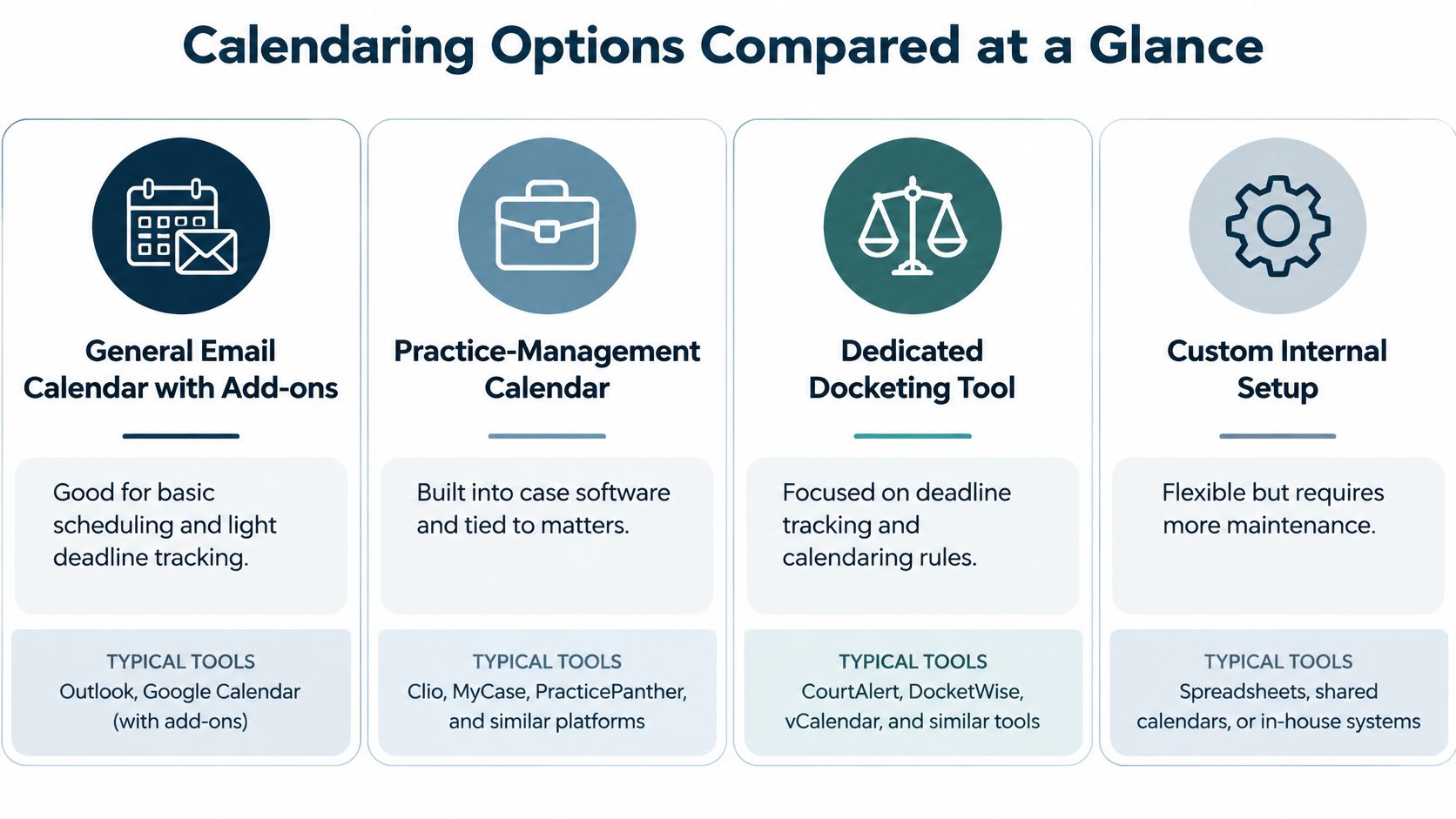
| Option | Best fit | Biggest weakness |
|---|---|---|
| General email calendar with add-ons | Firms already standardized on Outlook or Google Workspace | Built for meetings, so legal deadlines depend on add-ons |
| Practice-management calendar | Small firms wanting matters, contacts and calendar in one system | Rule coverage varies by jurisdiction and practice area |
| Dedicated docketing tool | Litigation-heavy firms working across several jurisdictions | Higher cost and one more system to keep synced |
| Integrated legal suite | Firms wanting calendar, billing, documents and e-filing together | Heavier implementation and training burden |
| Shared spreadsheet with phone alerts | Solo practices with low deadline volume | No audit trail, no rule engine, and easy to break |
How to Read the Fit Column
This table ranks fit, not quality. Your deadline volume, number of jurisdictions, and number of staff touching calendars usually decide the winner faster than any feature list. A spreadsheet fails on auditability. An email calendar fails when deadlines need rules, not reminders. A practice-management calendar fails when its rule library stops at your county line. A dedicated tool fails if the team won't maintain the sync. A suite fails if implementation drags and staff keep using the old system anyway, which is a very expensive way to own two calendars.
Product names in this category change often, so treat any name here as a category illustration. Confirm current features in a live demonstration using your own matters.
Feature Comparison Across Core Capabilities
A vendor checkmark tells you a feature exists somewhere in the building. It doesn't tell you it works on your matter, in your court, after someone edits the trigger date.
| Capability | Email calendar with add-ons | Practice-management calendar | Dedicated docketing tool |
|---|---|---|---|
| Conflict checking | Manual or limited to calendar overlaps | Searches matter and contact records, depth varies | Searches parties and related matters, confirm depth |
| Court rule library | Usually none, or a plug-in with unclear update timing | Varies, often limited to common court types | Typically the broadest, confirm the update source |
| Deadline calculation | Simple add-days math in most cases | Rule-aware in some products, fixed-day in others | Rule-aware with triggering events and holiday tables |
| Practice-management integration | Two-way sync rarely native | Native, and the main reason to choose this option | Usually connects through an integration, verify sync direction |
| Reminders and escalation | Basic reminders, escalation rare | Multiple reminders common, escalation varies | Multiple reminders and escalation chains often included, verify both |
| Security and audit logs | Depends on the email provider's controls | Role permissions and logs, verify change history is retained | Role permissions and logs, verify change history is immutable |
What to Verify in the Demo
Conflict checking should search more than overlapping meetings. Ask whether it checks adverse parties and related matters, or only tells you two attorneys can't be in the same room at 10 a.m. One is risk management. The other is a calendar noticing the obvious.
For the court rule library, make the vendor show the source and last update date on screen. "We update rules regularly" is not a process. Ask who maintains the rules, how amendments reach you, and whether you can see which rule version generated a deadline.
Deadline calculation gets one plain test: change the triggering event and watch what happens. Dependent dates should recalculate, old dates should be preserved in history, and the system should show its work. If the salesperson needs to ask engineering, you've learned something useful.
The preference for built-in calendaring is real. The American Bar Association 2023 practice management report reports that 59% of legal professionals prefer calendaring built into their primary operating software, alongside time tracking and billing at 65%. For buyers, that means bidirectional synchronization among matter records, deadlines, email, tasks, documents, and billing matters more than polished event creation. The same reporting also reflects mixed stacks, with Microsoft Outlook widely used and specialized products such as Compulaw named for docketing.
Reminders and escalation should support multiple advance notices, acknowledgment, and a named backup when nobody responds. Security and audit logs should show who created, viewed, changed, or deleted a date, with permissions that separate entry from approval.
If you want broader context on how firms evaluate practice systems before narrowing to calendaring, a technology guide for Australian lawyers offers a useful companion perspective on management software selection. The test that still counts is local: does the feature work on a real matter with an amended trigger date?
How to Test Deadline Calculations Before You Trust Them
A clean demo proves nothing. Demo data has never missed a filing, and the person running it has never had to explain a late response to a client. Before you sign, run the software against closed matters where you already know the right answers and can catch it in a confident error.
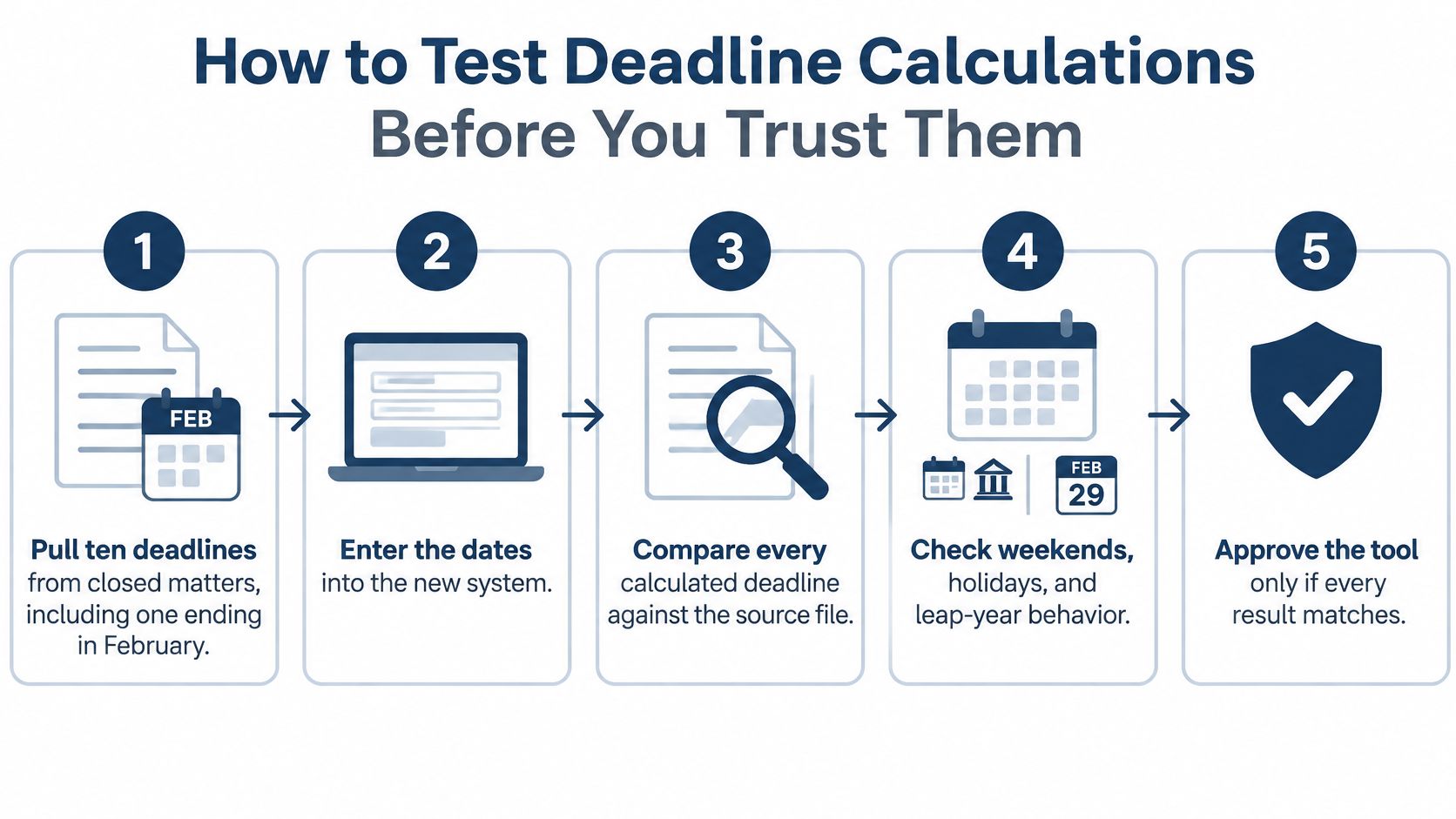
The Eight Step Test
- Pull ten closed-matter deadlines: Include one ending on a weekend, one on a holiday, one served by mail, one e-filing, and one changed by an amended order. Easy cases only prove the software can add.
- Calculate each manually: Record the controlling rule citation and the date you last checked it. This becomes your answer key, so build it before the vendor's demo environment does.
- Enter triggers normally: Have a paralegal enter each triggering event exactly as they would on a busy Tuesday, with no weekend pre-corrections and no helpful hints. You are grading the system.
- Compare and log mismatches: Note every difference and the rule that explains it. A mismatch with a clear explanation may be fine. A mismatch nobody can explain is a stop sign.
- Change a trigger date: Simulate a continuance or amended pleading. Dependent deadlines should recalculate while superseded ones are archived and visible, not deleted into a convenient void.
- Check the court's time zone: Electronic deadlines should display the cutoff in the court's local time, not your laptop's. Firms that file across state lines get ambushed by this more often than vendors admit.
- Require second-person approval: Critical dates need a reviewer who is not the person who entered them. The software should enforce that separation, because a sticky note that says "double check" is not a control.
- Name the rule-update owner: One person owns verifying rule sources and vendor updates. If the answer is "everyone," the practical answer is no one.
Why Adding Days Is Not Enough
Under Federal Rule of Civil Procedure 6, the triggering day is generally excluded, intermediate Saturdays, Sundays, and legal holidays are counted, and the final day is included. When that last day lands on a Saturday, Sunday, or legal holiday, the period generally extends to the next day that is not.
Filing method moves the endpoint too. An electronic filing deadline ordinarily ends at midnight in the relevant court's time zone, while a paper deadline ends when the clerk's office is scheduled to close. Which clerk's clock governs depends on the court and the filing type, so confirm it for each jurisdiction rather than assuming your office time zone carries over. A system that merely adds a fixed number of days can be punctual, confident, and legally wrong.
Practical rule: Approve attorney calendaring software only when every test result either matches your manual calculation or produces a documented, rule-based explanation you can defend.
Fold the results into a wider court deadline tracking workflow so calculation, reminder, and approval live in one operating routine rather than three people's inboxes.
Integrations and Who Owns Each Event
Which system wins when Outlook, your practice-management platform, a court notice, and a calendar assistant all touch the same matter and disagree? If your firm can't answer that in one sentence, integration isn't your first problem. Ownership is.
Legal tools keep moving into the places lawyers already work. Litera's March 2025 platform announcement describes a platform connecting drafting, contract review, and firm-performance tools within Microsoft Word and Outlook. That direction makes sync rules more urgent, because more systems can now create or alter the same operational record.
Questions Most Comparisons Skip
- Source of truth: Which system is authoritative for court deadlines, client meetings, internal tasks, and consultations?
- Conflict handling: How are duplicate events, time-zone errors, canceled hearings, permission problems, and failed syncs detected?
- Booking collisions: What happens when reception books a consultation minutes after an attorney's availability changes?
- Change evidence: Can you still see who changed an event, when, and from what value?
A calendar that overwrites a court date because someone dragged a meeting in Outlook hasn't integrated your systems. It has given your error a faster distribution network.
A Workable Ownership Model
Assign an owner for each event type, not each software product. Court-generated deadlines belong in the docketing or practice-management record. Client consultations may start in intake, but they need a matter ID or prospect ID, structured metadata, and a rule for what happens after signing. Internal work sessions can live in Outlook if they don't masquerade as filing deadlines.
Preserve change logs, create an exception queue for failed syncs, and review it daily. Measure confirmation, rescheduling, and no-show rates for client-facing events, because a calendar full of unconfirmed consultations isn't full. It's speculative fiction.
This is also where staffing and software meet. Our Executive Assistant service covers calendar and inbox management, and the CRM is determined by the client, so we integrate with whatever systems the firm already uses. A dedicated Staffline professional can work inside your existing calendar and case tools, follow your ownership rules, and clear exception queues before they become Monday archaeology. If you're also tightening the platform underneath, review how a case management system should hold the matter record that every event points back to.
Reliability Controls That Prevent Silent Failures
Page-load speed is the least interesting thing about attorney calendaring software. A fast calendar can deliver the wrong date to everyone instantly.
The risk is measurable. The Wisconsin Lawyer article citing Wisconsin Lawyers Mutual data reports that "failure to calendar correctly" and "failure to react to calendar" together represented 20% of reported claims from 2010 through 2020. The same article states that administrative errors, including calendaring, accounted for 19% of ABA legal-malpractice claims from 2016 to 2019.
Controls to Verify During the Pilot
- Multiple advance reminders: Use distinct intervals for preparation, drafting, review, and filing, not one lonely alert the day before.
- Acknowledgment tracking: A reminder that fired is not a deadline a person reviewed. Track who confirmed it.
- Overdue and unreviewed reports: Attorneys should be able to pull a clean list without asking someone to build a spreadsheet, which recreates the original problem with extra steps.
- Escalation to a named backup: Unacknowledged critical dates should move to a specific person, with a timestamp.
- Duplicate prevention: The system should warn before the same hearing exists three times with two locations.
- Separated permissions: Entering a deadline and approving a deadline should not automatically be the same authority.
- Immutable change history: Prior values should remain visible after edits, continuances, and recalculations.
- Sync conflict flags: Failed updates should surface in an exception view, never overwrite without notice.
Security testing should verify audit logging sufficient to monitor, investigate, and report unauthorized activity, consistent with NIST guidance. For firms formalizing that side of operations, compliance program guidance from MR2 Solutions can help structure the questions you ask about access, monitoring, and accountability.
These controls matter most in small and mid-sized firms because they reduce dependence on one assistant's memory. If your deadline system lives primarily inside someone's head, you've built the world's least reliable backup. Pair the software controls with disciplined case management best practices so ownership stays visible when the usual calendar person is sick, on vacation, or buried in trial prep.
Pricing Models and Hidden Costs
The monthly fee is usually the smallest cost you'll argue about later. Price attorney calendaring software as total cost of ownership: licenses, migration, training, integrations, rule updates, and the staff time spent fixing sync exceptions by hand.
| Pricing model | How it is billed | Usually fits | Hidden cost to check |
|---|---|---|---|
| Per-user subscription | Fixed monthly fee per named user | Firms with stable headcount | Assistants and paralegals may need paid seats |
| Per-matter pricing | Fee tied to open or active matters | Firms with predictable case volume | Cost rises as caseload grows |
| Tiered plans | Feature-based tiers, with rules or integrations unlocked at higher levels | Firms wanting a low-cost start | The integration you need may sit in a higher tier |
| Bundled suite pricing | Calendar included in a broader practice platform | Firms consolidating several tools | Paying for modules the firm will not use |
| One-time license with maintenance | Upfront license plus annual maintenance | Firms preferring fixed ownership costs | Maintenance renewals and manual rule updates |
Per-user pricing looks predictable until every paralegal, assistant, and intake staffer who edits events needs a paid seat. Per-matter pricing sounds aligned with growth until growth arrives and sends you an invoice for succeeding.
Tiered plans deserve the closest read. The demo often happens in the tier you'd need, while the quote happens in the tier you'd like. Confirm whether rule libraries, escalation, audit logs, e-filing connections, and two-way sync are included or gated.
Bundled suites can be smart consolidation or expensive shelfware. One-time licenses can stabilize costs, but only if maintenance includes current rule updates rather than a PDF and optimism.
Ask for written quotes listing every seat type and integration, migration and onboarding hours, training, payment or e-filing fees, and renewal pricing. Compare cost per deadline handled as well as cost per user. A cheaper system that needs an hour of manual exception handling every Friday isn't cheaper. It's just billing you in a less visible currency.
Specific dollar figures are intentionally absent here because vendor prices vary by configuration and change often. Quote the setup you'll run.
Choose Your Setup and Run a Two-Week Pilot
The right choice depends less on firm size in the abstract and more on how many deadlines, jurisdictions, and human hands touch the calendar each week.

Verdict by Firm Situation
Solo, low deadline volume: A well-maintained shared calendar with a docketing add-on can be enough if it passes the deadline test. I'd still insist on second-person review for limitations dates, even if that reviewer is outside counsel or a trusted contractor. The drawback remains brutal and simple: no dependable audit trail if you're relying on a spreadsheet and phone alerts.
Small firm already on practice-management software: Start with the built-in calendar. It's often the best value because events already attach to matters, contacts, tasks, and billing. Keep it only if rule coverage passes your test and ownership is explicit. The drawback is uneven rule depth by jurisdiction and practice area, which vendors tend to describe right up until you ask about your specific court.
Mid-sized or litigation-heavy firm across jurisdictions: Choose a dedicated docketing tool or a suite with proven rule coverage, escalation, permissions, and change history. You'll pay more and maintain another connection, but this is the profile where manual calculation and informal backup stop being frugal and start being exposure.
The Two-Week Pilot
- Run three matter types: Put a routine matter, a deadline-heavy litigation matter, and one messy matter with a continuance through each shortlisted option.
- Score what matters: Rate deadline accuracy, sync behavior, reminder reliability, exception handling, and time needed to produce a useful overdue report.
- Include the accountable attorney: The person who would be blamed for a missed date reviews the scores. Not eventually. During the pilot.
- Decide from the record: Choose after scores are written down, not after the nicest demo lunch.
Software alone won't assign the daily work. Our admin assistants coordinate internal meetings, client calls, and court dates to keep schedules aligned and conflict-free, and a dedicated Staffline professional can own calendar hygiene, exception queues, and follow-up inside your systems. That's the unglamorous work that makes good attorney calendaring software keep working after implementation week.
If you want help deciding who should own each calendar task, you can reach us at +1 (215) 337-2677 or book a call. Bring your pilot scores. We'll happily talk about the staffing around the software, because a calendar nobody maintains is just a colorful place for deadlines to go unacknowledged.
Your attorneys went to law school to practice law, not to reconcile three calendars on a Friday afternoon. Attorney Assistant provides dedicated Staffline support for calendar and inbox management, case support, and firm administration, plus Frontline 24/7 live intake that answers, qualifies, follows up, and signs appropriate cases. Visit us to map where deadline ownership, follow-up, and administrative capacity are breaking down, then build the support structure your calendar needs.
Related Articles

Case Management App for Law Firms in 2026: How to Choose
Compare case management app options for law firms on intake, documents, calendaring, security and pricing, with a checklist to pick the right fit.

Writing a Demand Letter: How to Get a Real Response
Writing a demand letter that works: required elements, deadlines, amounts and the mistakes adjusters use to dismiss claims.
Lawyer Billable Hours Average Benchmarks for 2026
Lawyer billable hours average near 1,600 a year in median benchmarks, but firm size changes the target. Here is how to read the numbers.