Call Back Service: How It Works and Why It Matters
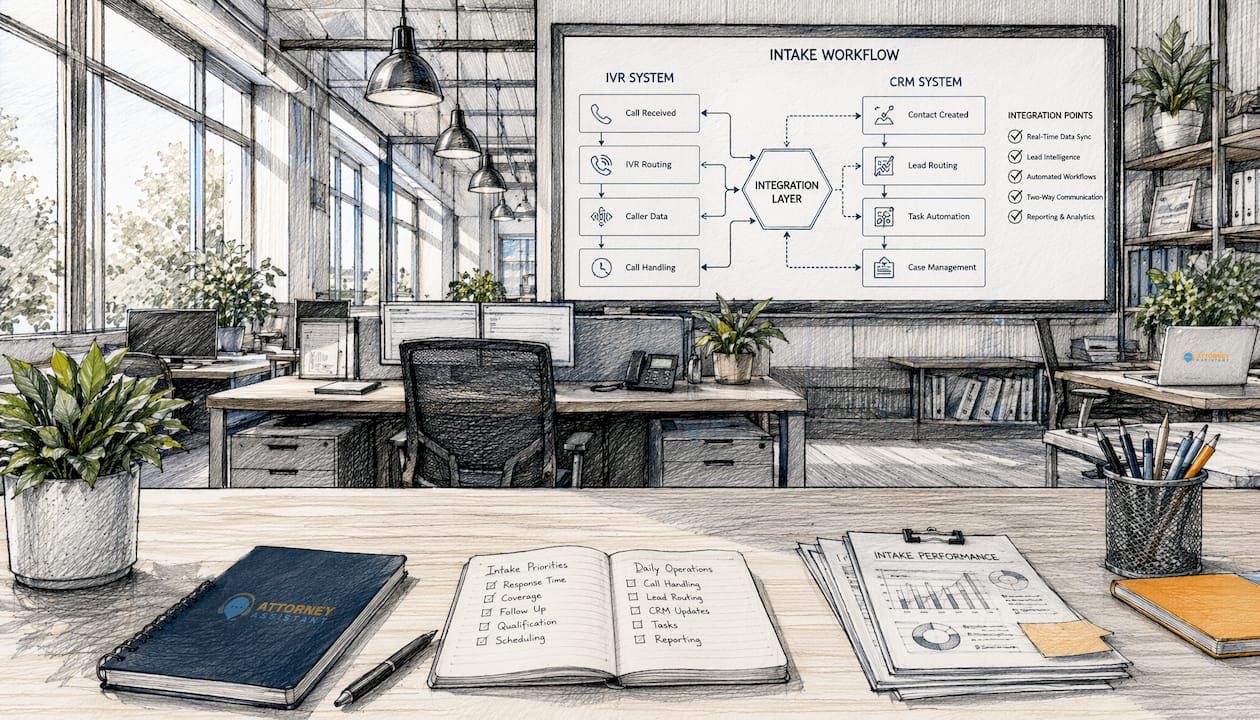
A call back service lets customers request a return call instead of waiting on hold. The system captures their phone number, holds their place in a virtual queue, and releases the active line until an agent is free. Platforms like Nextiva, Zendesk, and VoiceNEXT have built this into their contact center offerings because the operational case is hard to argue with.
The core benefits at a glance:
- Cuts wait time without adding staff
- Reduces abandoned calls
- Lowers per-minute telephony costs
- Improves customer satisfaction scores
- Frees agents to handle calls at a steady pace
For law firms specifically, a missed call is often a missed case, as explained on the Criminal Defense Blog | Rubin Law, P.C.. A call back system turns a potential drop-off into a scheduled conversation.
How a call back service works step by step
The process is more automated than most people realize. Here is the typical flow:
- Threshold detection. The system monitors wait times in real time. When hold time crosses a set limit (often 60 seconds), it triggers the callback option automatically.
- Customer prompt. The IVR menu offers the caller a choice: stay on hold or request a callback.
- Number capture. The caller confirms their phone number, either by speaking it or pressing keys to confirm the number on file.
- Virtual queue placement. The system logs the request and holds the caller’s exact position in line. They do not lose their spot.
- Line release. The caller hangs up. The active phone line is freed immediately, reducing per-minute charges.
- Availability monitoring. The system tracks agent status in real time and assigns the callback the moment a suitable agent becomes free.
- Outbound call. The system dials the customer automatically. If there is no answer, automated retry logic attempts the call again based on predefined rules before escalating to voicemail or SMS.
- SMS confirmation. Many platforms send a text confirming the request and an estimated wait window, which reduces missed connections.
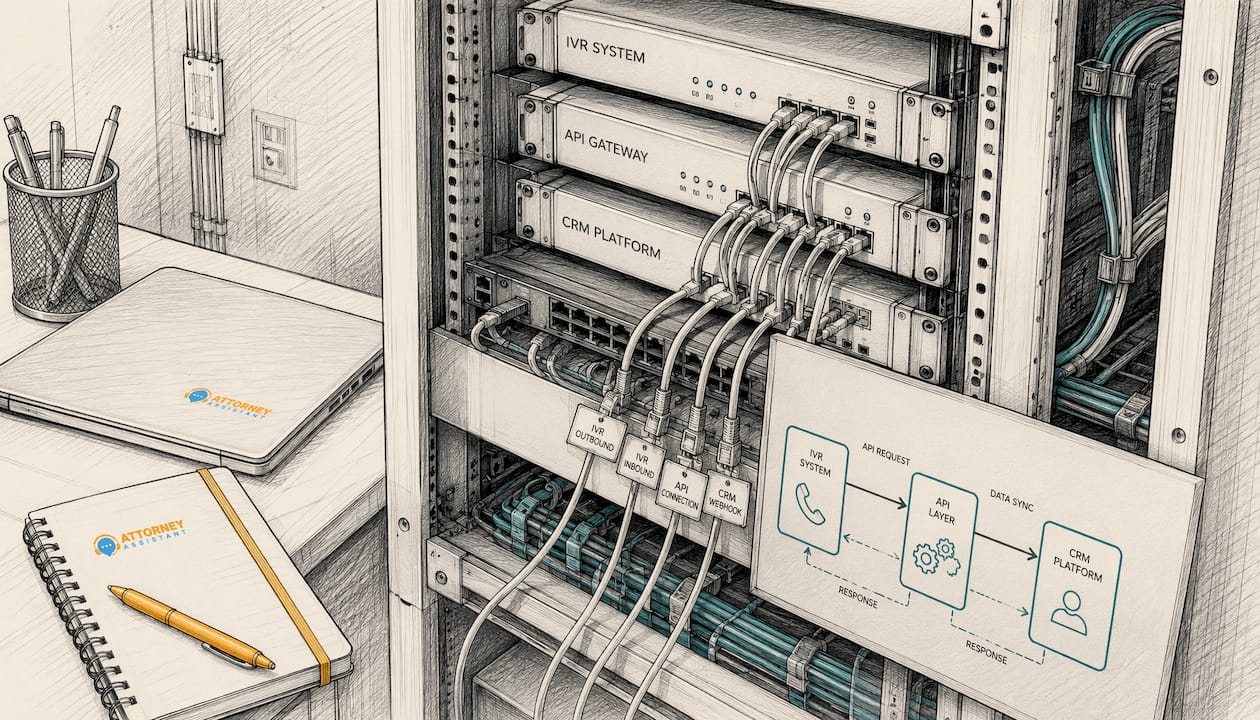
The entire process runs through IVR and CRM integrations via API, so no separate infrastructure is required.
Key benefits of using a call back service
The numbers tell a clear story. 75% of customers prefer a callback over waiting on hold, and offering that option signals that you respect their time. That alone tends to lift satisfaction scores.
- Reduced call abandonment. Studies show callback services cut abandoned calls by at least 32%. Fewer abandoned calls also means fewer repeat dials clogging the queue later.
- Volume management without extra headcount. Virtual queues let teams smooth out call spikes without hiring more agents, whether the surge is hourly, seasonal, or tied to a campaign.
- Lower telephony costs. Every minute off hold is a minute you are not paying for. Eliminating hold time on high-volume days adds up fast.
- Better agent morale. Agents who answer callbacks speak with callers who have not been stewing on hold for 20 minutes. The conversations are shorter and less hostile, which reduces average handle time.
Stat to know: 32% of customers will hang up after more than five minutes on hold. A callback option stops that leak before it starts.
Types of callback services available
Not every callback setup works the same way, and the right model depends on your call volume and customer expectations.
- Queue-based callbacks. The most common type. The system holds the caller’s place in line and calls them back in order when an agent is free. The caller gets the equivalent of waiting without actually waiting.
- Scheduled callbacks. The customer picks a specific time slot for the return call, say Tuesday at 2:00 PM. This works well for customers in different time zones or with fixed schedules. It also prevents missed connections because both sides know when to expect the call.
- Automated callbacks. These are triggered by system events rather than customer requests. A form submission, a payment failure, or a case status update can all fire an outbound call automatically. This shifts the model from reactive support to proactive outreach.
One important distinction: *69 is a consumer feature, not a business callback system. Dialing *69 on a landline simply redials the last incoming number. It stores only one call, cannot manage a queue, and does not support scheduling or automated routing. Professional callback platforms operate on an entirely different level.
Who benefits most from a call back service?
Businesses with high inbound call volume and stretched agent capacity get the clearest return. Specifically, a callback system makes sense when:
- Hold times regularly exceed two to three minutes
- Call abandonment rates are climbing
- The same customers call back repeatedly because they could not get through
- Call volume spikes at predictable times (mornings, Mondays, post-campaign launches)
- The team is handling intake without a consistent follow-up process
Law firms fit this profile almost exactly. Client response time directly affects whether a potential client signs with your firm or calls the next one on their list. A callback system integrated with your intake CRM keeps every inquiry in the queue, even when the front desk is at capacity.
Pro Tip: Set your callback threshold low. Offering the option after 60 seconds of hold time captures far more callers than waiting until they have already been on hold for five minutes.
Operational insights: how callbacks affect intake efficiency and revenue
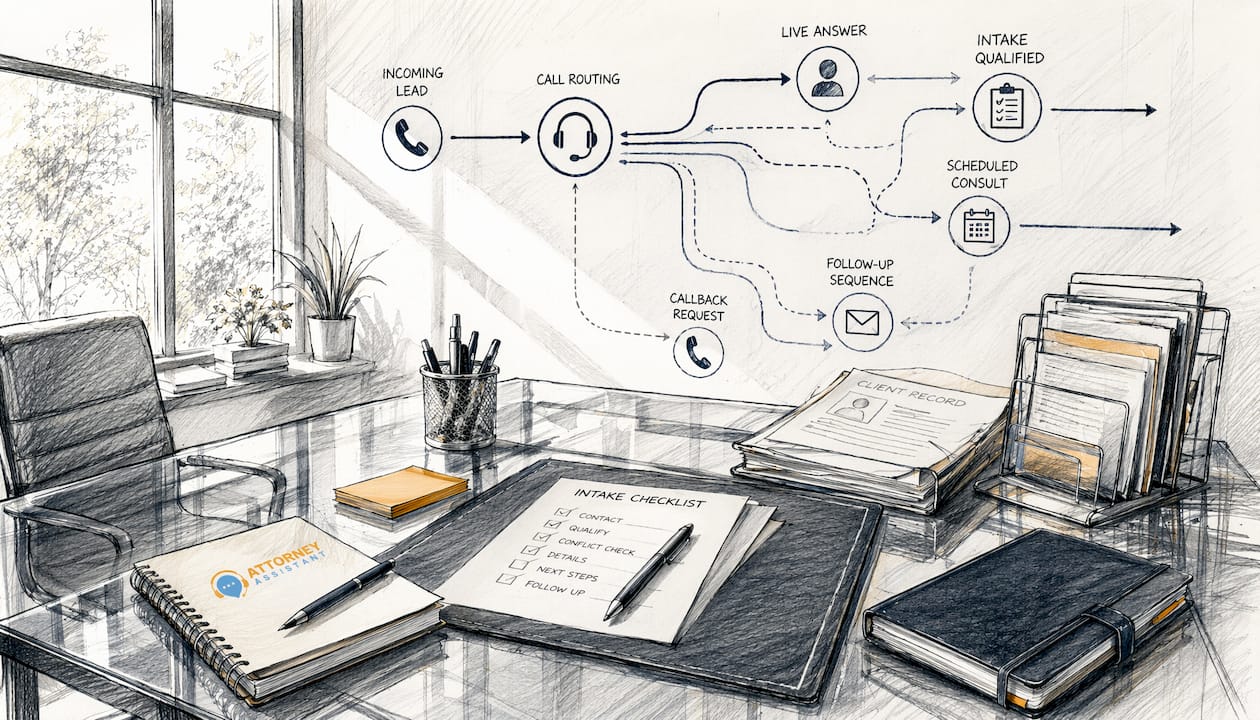
Speed is the variable most firms underestimate. 78% of customers buy from the first business to respond to their inquiry. A callback system enforces that speed automatically, without relying on a staff member to notice a missed call and manually follow up.
For law firms, the math is direct. A potential client calls during a busy period, hits a long hold, and hangs up. Without a callback system, that lead is gone. With one, the system captures the number, holds the position, and calls back within minutes. Attorney Assistant builds this kind of intake infrastructure into law firm operations, combining automated callback workflows with 24/7 coverage so no inquiry falls through after hours or during peak volume.
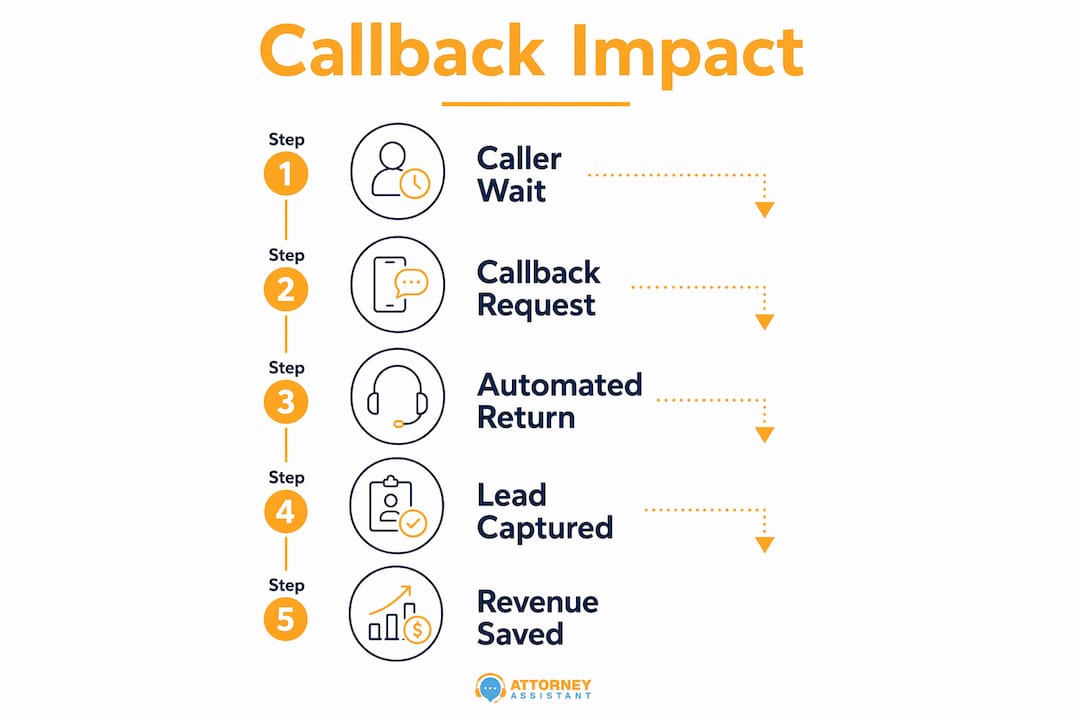
Automated callbacks also reduce duplicate calls by giving callers confidence that someone will reach them. Repeat dialing from frustrated callers inflates queue volume and skews intake data, making it harder to measure actual demand.
Pro Tip: Pair your callback system with a CRM integration so every returned call is logged against the lead record automatically. Manual logging after a callback is where follow-up gaps start.
Implementation challenges and best practices
The technology is straightforward. The harder part is configuring it correctly and getting staff to trust it.
Common challenges:
- Setting thresholds too high, so the callback option only appears after callers have already given up
- Failing to send SMS confirmations, which leads to missed callbacks when customers forget they requested one
- No retry logic, meaning a single unanswered callback marks the lead as lost
- Poor CRM integration, so callback data sits in the phone system and never reaches the intake team
Best practices that actually work:
- Offer the callback option early, before hold time becomes frustrating
- Configure at least two to three retry attempts with a gap of several minutes between each
- Send an SMS confirmation immediately after the request is logged
- Sync callback records to your CRM in real time so agents have context before the call connects
- Review callback completion rates weekly and adjust thresholds based on actual abandonment data
The firms that get the most from callback systems treat them as part of their intake process, not a phone feature they turned on and forgot.
Technology platforms and software options
Most modern contact center platforms include callback as a native feature. Nextiva offers queue-based and scheduled callbacks with IVR integration and CRM sync. Zendesk Talk includes callback from queue with SMS confirmation and per-minute cost tracking. VoiceNEXT provides callback functionality designed for business phone systems with multi-location support.
For law firms evaluating options, the key questions are whether the platform integrates with your existing case management system, whether it supports after-hours callback scheduling, and whether retry logic is configurable. Entry-level phone systems often include basic callback features. Enterprise contact center platforms add analytics, priority routing, and API access for custom integrations.
If your firm uses a legal-specific CRM like Clio or Filevine, confirm that the callback platform can push call records directly into matter files. That integration is what turns a returned call into a documented intake event.
Measuring the effectiveness of callback services
A callback system you cannot measure is one you cannot improve. The metrics that matter most:
| KPI | What it tells you |
|---|---|
| Callback completion rate | Percentage of requested callbacks that connect successfully |
| Call abandonment rate | Share of inbound calls that end before reaching an agent |
| Average speed of answer | How quickly agents pick up returned calls |
| First-call resolution rate | Whether the callback resolved the issue without a follow-up |
| Customer satisfaction score (CSAT) | Caller-reported experience after the callback |
| Net Promoter Score (NPS) | Longer-term loyalty signal tied to service quality |
Track abandonment rate before and after implementation. A well-configured callback system should show a measurable drop within the first 30 days. If it does not, the threshold settings or retry logic need adjustment.
Cost considerations and pricing models
Callback features are rarely sold as standalone products. They come bundled with contact center or VoIP platforms, which means cost depends on the broader plan you are already on or evaluating.
Pricing generally follows one of three models: per-seat monthly subscription, per-minute usage billing, or a hybrid of both. Usage-based pricing makes callback economics easy to calculate. If your current average hold time is 10 minutes across 100 daily calls, eliminating that hold time removes 1,000 minutes of billed telephony per day.
For law firms, the ROI calculation is different. The cost of the platform is secondary to the cost of a missed intake call. One signed case from a recovered callback can cover months of platform fees. Attorney Assistant’s intake and reception services include callback coverage as part of a broader intake system, so firms are not paying for a phone feature in isolation.
If your firm is losing leads to missed calls or slow follow-up, a free intake audit from Attorney Assistant shows exactly where the gaps are and what they are costing you.
Key Takeaways
A call back service reduces abandoned calls by at least 32% and is preferred by 75% of customers over waiting on hold, making it one of the highest-return operational changes a business can make.
| Point | Details |
|---|---|
| Core function | Captures caller’s number, holds their queue position, and calls back when an agent is free. |
| Abandonment reduction | Callback systems cut abandoned calls by at least 32%, per published studies. |
| Customer preference | 75% of customers prefer a callback over staying on hold. |
| Speed-to-lead impact | 78% of customers buy from the first business to respond, making fast callbacks a conversion tool. |
| Law firm relevance | Missed intake calls cost firms signed cases; callback systems with CRM integration prevent that leak. |
FAQ
What does “call back service” mean?
A call back service lets a caller request a return call instead of waiting on hold. The system holds their place in a virtual queue and dials them automatically when an agent is available.
What happens when you get a “callback service” message?
It means the phone system has detected a long wait time and is offering you the option to hang up and receive a return call. Your position in line is saved, and an agent will call you back when it is your turn.
Is *69 the same as a call back service?
No. *69 is a consumer feature that redials the last number that called you. It stores only one call and cannot manage queues, scheduling, or automated outreach. Business callback systems are a separate category entirely.
What is an automated call back service?
An automated callback service triggers outbound calls based on system rules rather than manual action. It can fire when a customer submits a form, when hold time crosses a threshold, or when a previous callback attempt goes unanswered, without any staff involvement.
How do I request a callback from a company?
Most systems prompt you through the IVR menu when hold times are high. You confirm your number, hang up, and the system calls you back in order. Some platforms also let you schedule a specific time through a web form or mobile app.
Recommended
Related Articles

How to Find Clients for Cleaning Business in 2026
How to find clients for cleaning business with local search, referrals, partnerships, and a five-minute follow-up that books paid work.
Sentence for Counsel: 7 Examples Law Firms Can Use
Sentence for counsel examples for law firms: seven ready-to-adapt lines for intake replies, status updates, document requests, and engagement confirmations.
Customer Service Calls: How to Handle Them Well
Learn what customer service calls involve, which metrics matter, how to script and score them, and the tech and staffing choices that keep them working.