Case File Organization: A Practical Guide for Legal Teams

The fastest path to reliable case file organization is a matter-based top folder with 14 numbered subfolders, a three-part naming convention, and a single designated owner for intake and filing. Apply the folder tree below to every new matter this week, enforce the naming rule from day one, and you will cut retrieval time before the month is out.
Three rules to enforce immediately:
- Consistent naming: Every file follows the pattern
[Matter#]_[YYYY-MM-DD]_[DocType]_[ShortDesc]_[AuthorInitials].pdfwith no exceptions. - Single source of truth: One document lives in one location. No duplicates across folders, drives, or email threads.
- Clear ownership: One person at intake creates the matter folder and files the opening documents. Ambiguous ownership is the primary cause of unfiled emails and missing records.
ABA standards provide the ethical baseline for file handling, retention decisions, and privileged-document management. OCR (optical character recognition) makes every scanned page full-text searchable, which is the single biggest retrieval upgrade most firms can make without changing their software. Attorney Assistant works with firms as an operations partner to enforce these standards at intake and throughout the matter lifecycle.
Key Takeaways
Reliable case file organization requires a numbered folder structure, a consistent naming convention, and a single designated owner at intake — everything else builds on those three foundations.
| Point | Details |
|---|---|
| Use a numbered folder tree | Apply 14 numbered top-level folders to every matter so cross-staff navigation is predictable from day one. |
| Enforce naming at intake | Use the [Matter#]_[YYYY-MM-DD]_[DocType]_[ShortDesc]_[AuthorInitials] pattern on every file, with no exceptions. |
| OCR every scanned document | Produce searchable PDF at the time of scanning so full-text search works across the entire matter archive. |
| Run a 2-week pilot first | Measure time-per-retrieval on your highest-volume matter type before rolling out firm-wide. |
| Attorney Assistant as operations partner | Attorney Assistant enforces intake, file QA, and retention standards as a co-managed partner, not a staffing vendor. |
Table of Contents
- What does a well-organized case file need to contain?
- What should your folder structure actually look like?
- How should you name files and handle version control?
- How do you handle paper, electronic, and hybrid files?
- What does the intake-to-archive workflow look like step by step?
- How do you make files findable fast?
- How do you keep files clean over time?
- How do you roll out this system in 30, 60, and 90 days?
- What file failures actually cost law firms
- Attorney Assistant handles the operational work your firm keeps deferring
- Sources
- FAQ
What does a well-organized case file need to contain?
A case file is only as useful as its completeness. Before you redesign any folder structure, audit every active matter against this component checklist.
Core components and what belongs in each:
- Administrative: Engagement letter, signed fee agreement, conflicts check record, client ID, and matter-opening form.
- Correspondence: All client emails, opposing counsel letters, court notices, and demand letters, filed by date.
- Pleadings: Filed and draft complaints, answers, counterclaims, and amended pleadings.
- Discovery: Interrogatories, requests for production, requests for admission, responses, and subpoenas, organized by direction (propounded vs. received) and type.
- Research and memos: Legal research memos, case law summaries, and internal strategy notes.
- Depositions: Transcripts, errata sheets, and deposition exhibits.
- Motions: Filed motions, supporting briefs, opposition briefs, and reply briefs.
- Court orders: All signed orders, judgments, and scheduling orders.
- Exhibits and evidence: Exhibit files, exhibit indices, and chain-of-custody records.
- Expert materials: Retained expert CVs, reports, invoices, and correspondence.
- Settlement: Demand packages, settlement agreements, release documents, and lien payoff letters.
- Trial materials: Trial briefs, witness lists, jury instructions, and trial exhibits.
- Billing: Retainer agreements, invoices, payment records, and trust account ledgers.
- Client documents: Client-provided records, medical records, photographs, and authorizations.
High-risk items requiring special handling:
- Privileged notes: Attorney work product and attorney-client communications must be stored in a subfolder with access restricted to attorneys only. Never commingle these with general correspondence.
- Medical records: In personal injury matters, medical records and bills should be organized by provider and treatment date, not dumped into a single folder.
- Lien documents: Medicare, Medicaid, and health insurance lien correspondence needs its own subfolder within Settlement so nothing gets missed at resolution.
- Billing and retainer records: Trust account records carry ethical obligations under state bar rules. Keep them separate from case documents and back them up independently.
Quick audit checklist: Pull any active matter and confirm it has a signed engagement letter, a conflicts check record, at least one entry in Correspondence, and a populated billing folder. If any of those four are missing, the file has a gap that needs closing today.
| Component | What it contains | Risk level if missing |
|---|---|---|
| Administrative | Engagement letter, conflicts check, client ID | High — ethical exposure |
| Correspondence | All client and counsel communications | High — missed deadlines |
| Pleadings | Filed and draft pleadings | High — version confusion |
| Discovery | Production, responses, subpoenas | High — sanctions risk |
| Billing | Invoices, retainer, trust ledger | High — bar complaint risk |
| Privileged notes | Work product, strategy memos | High — waiver risk |
| Expert materials | Reports, CVs, invoices | Medium — trial prep gaps |
| Settlement | Demand, agreement, lien payoffs | High — disbursement errors |
What should your folder structure actually look like?
A A universal numbered folder structure eliminates the debate over folder names and makes cross-staff navigation predictable from day one. The numbering forces correct sort order in every operating system and DMS.
Universal matter template (litigation and transactional)
[Matter#] — [ClientLastName] — [MatterShortName]
  01 Administrative
      01.1 Engagement and Fee Agreement
      01.2 Conflicts Check
      01.3 Client ID and Intake Form
  02 Correspondence
      02.1 Client
      02.2 Opposing Counsel
      02.3 Court Notices
  03 Pleadings
      03.1 Filed
      03.2 Drafts
  04 Discovery
      04.1 Propounded
      04.2 Received
      04.3 Subpoenas
  05 Research and Memos
  06 Depositions
      06.1 Transcripts
      06.2 Exhibits
  07 Motions
      07.1 Filed
      07.2 Drafts
  08 Court Orders
  09 Exhibits and Evidence
  10 Experts
  11 Settlement
      11.1 Demand Package
      11.2 Agreement and Release
      11.3 Liens
  12 Trial Materials
  13 Billing
  14 Client Documents
Condensed template for solo practitioners and small firms
Fewer matters and a smaller team mean fewer subfolders, but the numbered top-level structure still applies:
[Matter#] — [ClientLastName]
  01 Admin
  02 Correspondence
  03 Pleadings and Motions
  04 Discovery
  05 Evidence and Exhibits
  06 Settlement
  07 Billing
Practice-area adaptations
Personal injury: Add a Medical Records subfolder inside 14 Client Documents, organized by provider name and treatment date. Add Liens inside 11 Settlement. For PI-specific workflow guidance, optimizing PI matter workflows covers how to connect medical records to matter stage to reduce administrative lag.
Corporate/transactional: Replace 12 Trial Materials with 12 Due Diligence and add a Closing Binder subfolder inside 11 Settlement.
Shortcuts vs. duplicates: Use shortcuts or aliases to reference a document from a second location. Never copy the actual file. A duplicate is a version-control failure waiting to happen.
| Template | Top-level folders | Best for |
|---|---|---|
| Universal (litigation) | 14 numbered folders | Multi-attorney firms, litigation-heavy practices |
| Condensed (solo/small) | 7 numbered folders | Solo practitioners, transactional boutiques |
| PI adaptation | Universal + Medical Records, Liens subfolders | Personal injury, mass tort |
| Corporate adaptation | Universal + Due Diligence, Closing Binder | M&A, transactional, corporate |
How should you name files and handle version control?
Harvard Medical School’s data management guidance is direct: strict, documented file-naming conventions make files machine-searchable and reduce human error when multiple staff touch the same records. That principle applies to every law firm regardless of size.
Three filename patterns that work:
-
Matter-first (recommended):
[Matter#]_[YYYY-MM-DD]_[DocType]_[ShortDesc]_[AuthorInitials].pdfExample:2024-001_2025-03-15_Motion_SummaryJudgment_KL.pdf -
Client-first (for client-facing delivery):
[ClientLastName]_[Matter#]_[YYYY-MM-DD]_[DocType].pdfExample:Johnson_2024-001_2025-03-15_SettlementAgreement.pdf -
Date-first (for chronological logs):
[YYYY-MM-DD]_[Matter#]_[DocType]_[ShortDesc].pdfExample:2025-03-15_2024-001_CourtOrder_MSJDenied.pdf
Use ISO date format (YYYY-MM-DD) in every pattern. It sorts correctly in every system without configuration.
Essential metadata fields to capture on every document:
- Matter number
- Client name
- Document type (Motion, Order, Correspondence, Invoice, etc.)
- Date of creation or receipt
- Author or originating attorney
- Provider name (for medical records and expert reports)
- Status (Draft, Filed, Executed, Superseded)
- Privilege flag (Attorney-Client, Work Product, or None)
Versioning rules:
- When a DMS provides version history, use it. Never create
_v2filenames in a system that tracks versions natively. - When filenames must carry version numbers, use
_v01,_v02with author initials and date:2024-001_2025-03-10_Motion_SJReply_KL_v02.pdf. - Move superseded drafts to a
Drafts — Archivedsubfolder. Do not delete them; they may be relevant to privilege or work-product analysis later.
Pro Tip: Enforce metadata at intake by using required profile fields in your DMS or a template upload form. Relying on staff to fill metadata after the fact produces gaps within weeks.
How do you handle paper, electronic, and hybrid files?
Most firms run hybrid files longer than they plan to. The goal is to make paper behave like digital as quickly as possible.
Scanning standards:
- Scan at 300 dpi minimum for text documents; 600 dpi for photographs and exhibits.
- Always produce searchable PDF (PDF/A for archival matters) using OCR at the time of scanning, not as a separate step.
- Name the file immediately after scanning using the firm’s naming convention. A file named
scan0047.pdfis effectively lost. - The Alabama State Bar’s e-filing guidance for small firms covers practical scanning and submission tips that reduce errors during court filing and improve file completeness.
When to keep originals vs. authorize destruction:
Keep originals when: the document has independent legal significance (executed contracts, original wills, notarized affidavits, court-stamped filings). For everything else, a certified scan with a destruction log is defensible. Log the destruction date, the person who authorized it, and the method used.
Storage strategy:
- Primary storage: your DMS or cloud drive is the single source of truth. No local desktop copies.
- Offsite archival: closed matters should move to encrypted cloud archival or physical offsite storage within 30 days of closure.
- Backups: daily incremental backups for active matters; weekly full backups for all firm data. Test recovery quarterly.
Unmanaged paper files create governance and productivity risks at scale, particularly during mergers or lateral hires. Barcode-driven batch scanning with consistent profiling is the practical solution for firms digitizing large legacy archives.
Security principles:
- Role-based access: paralegals access their assigned matters; attorneys access their practice group; billing staff access billing folders only.
- Audit trails: every DMS should log who opened, edited, or downloaded a document.
- Secure sharing: use expiring links with password protection for external sharing. Never email unencrypted PDFs containing medical records or financial data.
- Encryption in transit and at rest is a baseline requirement, not an optional feature.
| Task | Standard | Owner | Frequency |
|---|---|---|---|
| Scan paper documents | 300 dpi, searchable PDF, named on scan | Paralegal or legal assistant | At receipt |
| Backup active matters | Daily incremental | IT or DMS admin | Daily |
| Full firm backup | Weekly full | IT or DMS admin | Weekly |
| Recovery test | Restore a sample matter | IT or DMS admin | Quarterly |
| Destruction log update | Log date, authorizer, method | File manager | At destruction |
What does the intake-to-archive workflow look like step by step?
Intake is where most file failures start. A matter created without mandatory metadata fields, a folder template, or a named owner will generate filing chaos within 30 days. Legal administrative workflows that assign clear roles and SLAs at each step prevent that drift.
Intake-to-open sequence:
- Capture intake data: client name, contact information, matter type, referral source, conflict check, and retainer status.
- Run conflicts check before creating the matter.
- Create the matter in your DMS or case management system with all required metadata fields populated.
- Apply the numbered folder template to the new matter.
- File the engagement letter, signed fee agreement, and client ID documents into
01 Administrative. - Schedule all known deadlines in the calendar system and link them to the matter.
- Confirm retainer receipt and file the trust account record in
13 Billing. - Assign a primary paralegal as the file owner for ongoing maintenance.
Intake checklist fields to capture:
- Client full name and date of birth
- Contact information (phone, email, address)
- Matter type and practice area
- Date of incident or transaction
- Referral source
- Conflicts check result and date
- Retainer amount and payment method
- Signed engagement letter (attached)
- Statute of limitations date
Case-closure checklist:
- Reconcile all billing and confirm final invoice is sent and paid.
- Deliver client documents per the engagement letter terms.
- Archive the matter folder to closed-matter storage.
- Apply a retention tag with the calculated destruction date.
- Schedule destruction review for the applicable retention period.
- Document the closure date in the matter record.
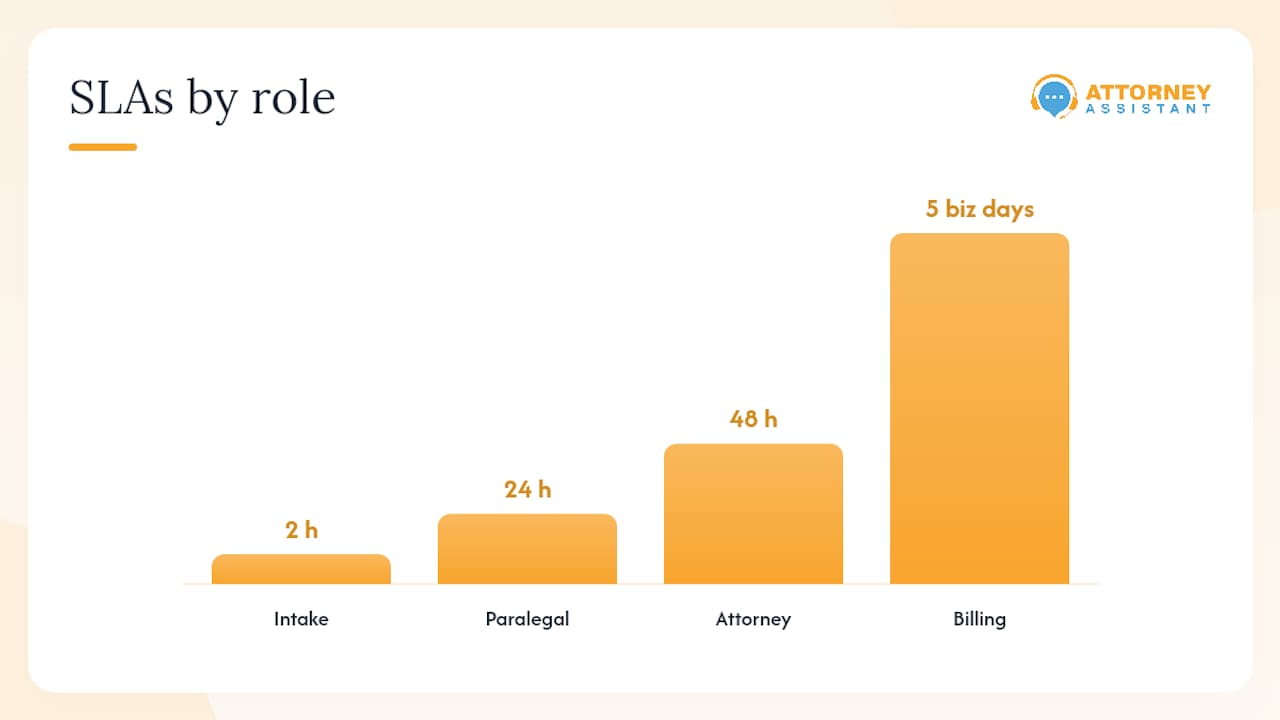
SLAs by role:
- Intake specialist or receptionist: Create matter and apply folder template within 2 hours of signed engagement.
- Paralegal: File all incoming documents within 24 hours of receipt.
- Attorney: Review and approve filed pleadings and orders within 48 hours.
- Billing staff: Reconcile and close billing within 5 business days of matter closure.
Implementation timeline: Run a 2-week pilot on one matter type (e.g., new PI intakes) before firm-wide rollout. Measure time-per-retrieval at the start and end of the pilot. That single metric will tell you whether the system is working.
How do you make files findable fast?
A well-named file in a well-structured folder is findable by a human. A well-tagged file with full-text OCR is findable by a machine in under three seconds. You need both.
Matter-based organization with metadata, full-text search, version history, and role-based access are the baseline features that materially improve document workflows. If your current system lacks any of these four, that gap is costing your team time every day.
Full-text indexing and OCR:
Every scanned document should be OCR-processed at the time of scanning. If you have a legacy archive of non-searchable PDFs, batch OCR processing is a one-time project that pays for itself quickly. Most DMS platforms (Clio, NetDocuments, iManage) run OCR automatically on upload.
Manual tags for edge cases:
Some documents resist clean categorization. A single email that contains a settlement offer, a medical record attachment, and a billing dispute needs manual tags: Settlement, Medical, Billing. Tags supplement folder structure; they do not replace it.
Saved searches to build:
- All documents for a matter with status “Draft” (pre-filing review)
- All medical records for a matter, filtered by provider
- All invoices with status “Pending” across all matters
- All documents filed in the last 7 days (weekly QA check)
- All documents tagged “Privilege” for a specific matter
Taxonomy principle: Use folder structure for human navigation and metadata for machine queries. A paralegal browsing a file uses folders. A search query pulling all expert reports across 50 matters uses metadata. Both layers must be maintained.
| Saved search | Filter criteria | Primary use case |
|---|---|---|
| Active drafts | Status = Draft, Matter = [active] | Pre-filing review |
| Medical records by provider | Doc type = Medical Record, Provider = [name] | PI case management |
| Pending invoices | Doc type = Invoice, Status = Pending | Billing follow-up |
| Recent filings | Date filed = last 7 days | Weekly QA |
| Privileged documents | Privilege flag = Attorney-Client or Work Product | Privilege log prep |
How do you keep files clean over time?
Files degrade without maintenance. The most common failure mode is not a catastrophic loss; it is slow accumulation: unfiled emails, duplicate copies, missing metadata, and documents sitting in a paralegal’s desktop folder instead of the matter record.
Separating active, closed, and financial records and applying a written retention policy prevents the clutter that makes files unreliable and audits painful.
Maintenance cadence:
- Weekly: Check for unfiled documents in email and desktop folders. Confirm new matters have complete metadata.
- Monthly: Folder hygiene pass on all active matters. Remove duplicates, move archived drafts to
Drafts — Archived, and verify that all correspondence is filed. - Quarterly: Metadata audit. Pull a report of documents with missing fields (no document type, no privilege flag, no status). Assign corrections.
- Annual: Retention review. Identify matters past their retention trigger date and schedule destruction.
Retention triggers:
- Matter closed date plus the applicable statute of limitations for the matter type.
- Final billing date (some state bar rules use this as the trigger).
- Litigation hold: any matter subject to a litigation hold must be flagged and excluded from routine destruction until the hold is lifted.
Common errors and fixes:
- Inconsistent naming: Run a quarterly filename audit. Any file that does not match the naming convention gets renamed and refiled.
- Duplicate copies: Use DMS duplicate detection or a manual search for identical filenames. Delete duplicates; keep the version in the correct folder.
- Unfiled emails: Assign a daily email-filing SLA to the matter paralegal. Emails older than 48 hours that are not filed are a QA flag.
- Missing metadata: Required fields at upload prevent this. If your DMS allows it, make document type and matter number mandatory on upload.
- Unsecured sharing: Audit external sharing links monthly. Revoke any link without an expiration date.
Disposal checklist:
- Confirm retention period has elapsed.
- Confirm no litigation hold is active.
- Obtain attorney authorization.
- Log the destruction: date, matter number, method, authorizing attorney.
- Update the matter record to reflect destruction.
How do you roll out this system in 30, 60, and 90 days?
A 30/60/90 rollout focused on a single matter type is the fastest path to firm-wide adoption and produces measurable retrieval improvements during trial prep. Trying to migrate everything at once produces resistance and incomplete results.
30/60/90 checklist:
-
Days 1–30 (Pilot):
- IT: Configure folder template in DMS; set required metadata fields at upload.
- Paralegals: Apply template to all new matters opened during the pilot period.
- Attorneys: Review and approve naming convention; sign off on the SOP.
- Admin: Run weekly QA on pilot matters; log retrieval time for three common document types.
-
Days 31–60 (Active matter migration):
- Paralegals: Migrate all active matters to the new folder structure.
- IT: Enable full-text indexing and OCR on all uploaded documents.
- Admin: Build saved searches for the five most common retrieval needs.
- Attorneys: Complete a 30-minute training session on the naming convention and metadata fields.
-
Days 61–90 (Legacy archive and firm-wide enforcement):
- Paralegals: Begin legacy file review; tag closed matters with retention dates.
- IT: Run batch OCR on legacy PDFs; digitizing legacy paper at scale requires governance standards to avoid importing decades of inconsistent labels into the DMS.
- Admin: Publish quick-reference card for naming convention and post it in the shared drive.
- Manager: Conduct first quarterly metadata audit; report results to firm leadership.
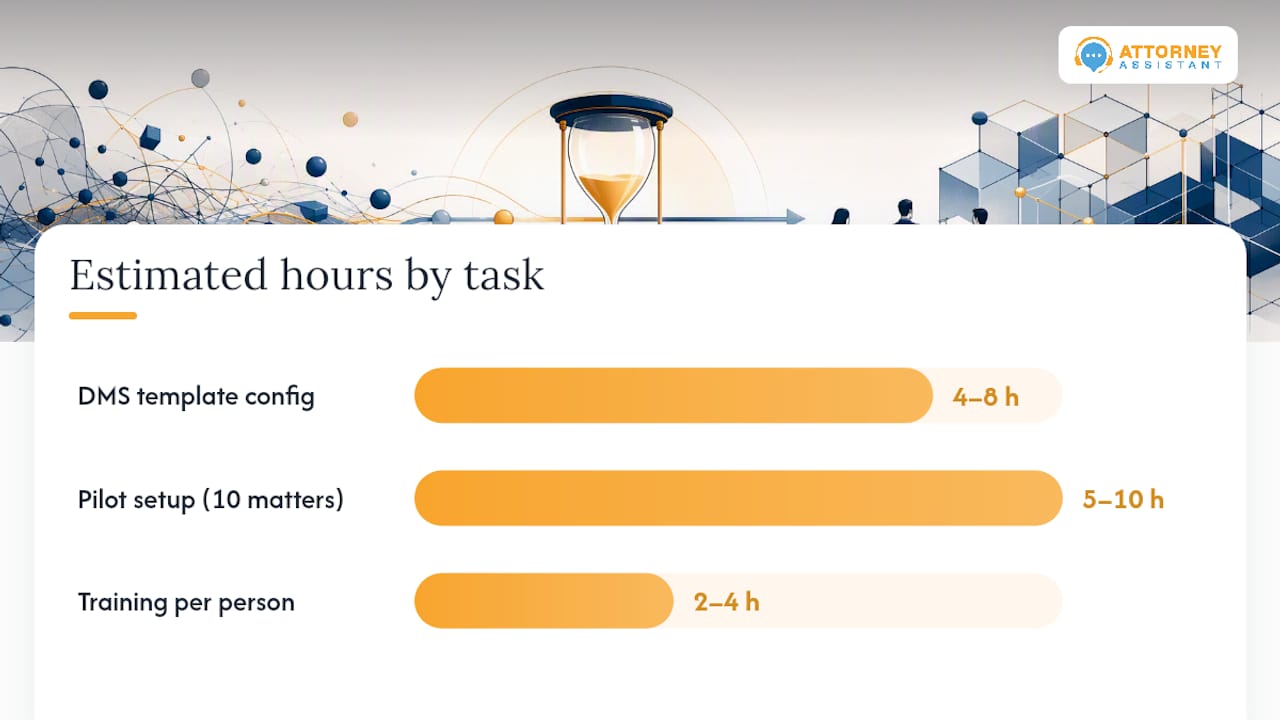
Hours estimate:
| Task | Estimated hours | Role |
|---|---|---|
| DMS template configuration | 4–8 hours | IT |
| Pilot matter setup (10 matters) | 5–10 hours | Paralegal |
| Active matter migration | several dozen hours | Paralegal team |
| Legacy archive review | several dozen hours | Paralegal or legal assistant |
| Training (all staff) | 2–4 hours per person | Admin/manager |
Sample SOP outline:
- Scope: All matters opened after [rollout date].
- Roles: Intake specialist (matter creation), paralegal (ongoing filing), attorney (QA approval), IT (DMS configuration).
- Naming standard:
[Matter#]_[YYYY-MM-DD]_[DocType]_[ShortDesc]_[AuthorInitials].pdf - Intake rule: Matter folder created within 2 hours of signed engagement.
- Filing rule: All documents filed within 24 hours of receipt.
- Exception handling: Documents that do not fit the standard folder structure go to
00 Exceptionspending paralegal review. - Audit schedule: Weekly QA, monthly hygiene, quarterly metadata audit.
- Escalation: Unresolved filing gaps escalate to the supervising attorney within 48 hours.
Productivity improvements in legal offices come from systems that are simple enough to follow under deadline pressure. A two-page SOP beats a 20-page manual every time.
Pro Tip: Run a 2-week pilot on your highest-volume matter type. Measure time-per-retrieval for three document types at the start and end. That data makes the case for firm-wide rollout better than any argument about best practices.
What file failures actually cost law firms
The firms that struggle most with file organization share a specific pattern: intake happens inconsistently, documents get filed by whoever has time rather than whoever owns the matter, and metadata never gets populated because the system does not require it. Within six months, the DMS is a dumping ground and retrieval requires a phone call to the paralegal who handled the matter.
The connection to revenue is direct. When a file is disorganized at intake, the retainer agreement takes longer to execute, the matter takes longer to open, and the first deadline is more likely to be missed. Case management efficiency is not an abstract operational goal; it determines how many matters a firm can carry without adding headcount. Attorney Assistant’s intake data consistently shows that firms lose around 20% of leads at the moment of first contact, before a file is ever created. A disorganized file system compounds that problem: even the leads that convert take longer to move from signed retainer to active case.
The fix is not a new software platform. It is ownership. When one person is responsible for creating the matter, applying the template, and filing the opening documents, the chaos stops. Paralegals drowning in pleadings, demands, and liens are not failing at their jobs; they are operating without a system that assigns clear ownership and enforces it.
Attorney Assistant handles the operational work your firm keeps deferring
Firms that implement the folder structure and naming convention in this guide still need someone to enforce it daily. That is where most rollouts stall: the SOP exists, but intake is inconsistent, emails go unfiled, and the quarterly audit never happens because everyone is billing.
Attorney Assistant works as an operations partner, not a staffing vendor. The services map directly to the gaps this guide covers: intake enforcement (matter creation, folder setup, metadata population), file scanning and indexing support, ongoing file QA, lien and billing verification, and administrative co-management across the matter lifecycle. The model is co-managed, meaning Attorney Assistant’s team is embedded in your daily operations with accountability for measurable outcomes: faster intake-to-retainer conversion, fewer unfiled documents, and retention enforcement that does not slip.
If your firm has intake gaps, unfiled correspondence, or a DMS that no one trusts, book a short call to review your intake-to-archive workflow. The conversation takes 20 minutes and produces a clear picture of where the revenue leak is.
Sources
The following references support the naming, retention, scanning, and ethical standards covered in this guide:
- Plan and design: File naming conventions — Harvard Medical School Data Management
- E-Filing Tips for Small Firms — Alabama State Bar
- Best Legal Document Management Tips & Solutions — GAIN Servicing
- How paper records undermine law firm integration — DocSolid (2026)
- How to organize case files efficiently — NotuDocs
- File systems in law office management — UniversalClass
FAQ
How should a case file be organized?
Use a matter-based top folder with 14 numbered subfolders (Administrative, Correspondence, Pleadings, Discovery, Research, Depositions, Motions, Orders, Evidence, Experts, Settlement, Trial, Billing, Client Documents). Apply a consistent naming convention to every file and assign one person to own intake and ongoing filing.
What are the four types of file organization in a law office?
Law offices typically use alphabetical (by client name), numerical (by matter number), chronological (by date), and subject-based (by document type or practice area) systems. Most modern firms combine numerical matter-based organization with subject-based subfolders for the most reliable retrieval.
What is the best way to manage digital case files?
Store all documents in a single DMS or cloud drive (one source of truth), OCR every scanned document at upload, enforce required metadata fields, and use saved searches for common retrieval needs. Role-based access and audit trails are baseline security requirements, not optional features.
How do you handle version control in a case file?
Use your DMS’s native version history when available. When filenames must carry version numbers, append _v01, _v02 with author initials and date. Move superseded drafts to a Drafts — Archived subfolder rather than deleting them, since earlier versions may be relevant to privilege or work-product analysis.
How long should a law firm retain closed case files?
Retention periods vary by matter type, state bar rules, and applicable statutes of limitations. The general practice is to retain files for the duration of the relevant statute of limitations plus a buffer, calculated from the matter close date or final billing date. Consult your state bar’s ethics guidance and confirm current rules with a qualified professional before setting firm policy.
Recommended
Related Articles

Case Management System for Law Firms Explained
What a case management system actually does for law firms: core features, integrations, deployment models, and realistic ROI expectations without the hype.

8 Case Management Goals for Law Firms
Learn the 8 case management goals that improve efficiency, visibility, compliance, and client experience, with practical KPIs and examples for law firms.

9 Case Management Best Practices for Law Firms
Explore 9 case management best practices for law firms covering intake, documentation, deadlines, communication, QA, and scalable operations.