Duplicate Contact Cleanup for Law Firms: A Prioritized Plan
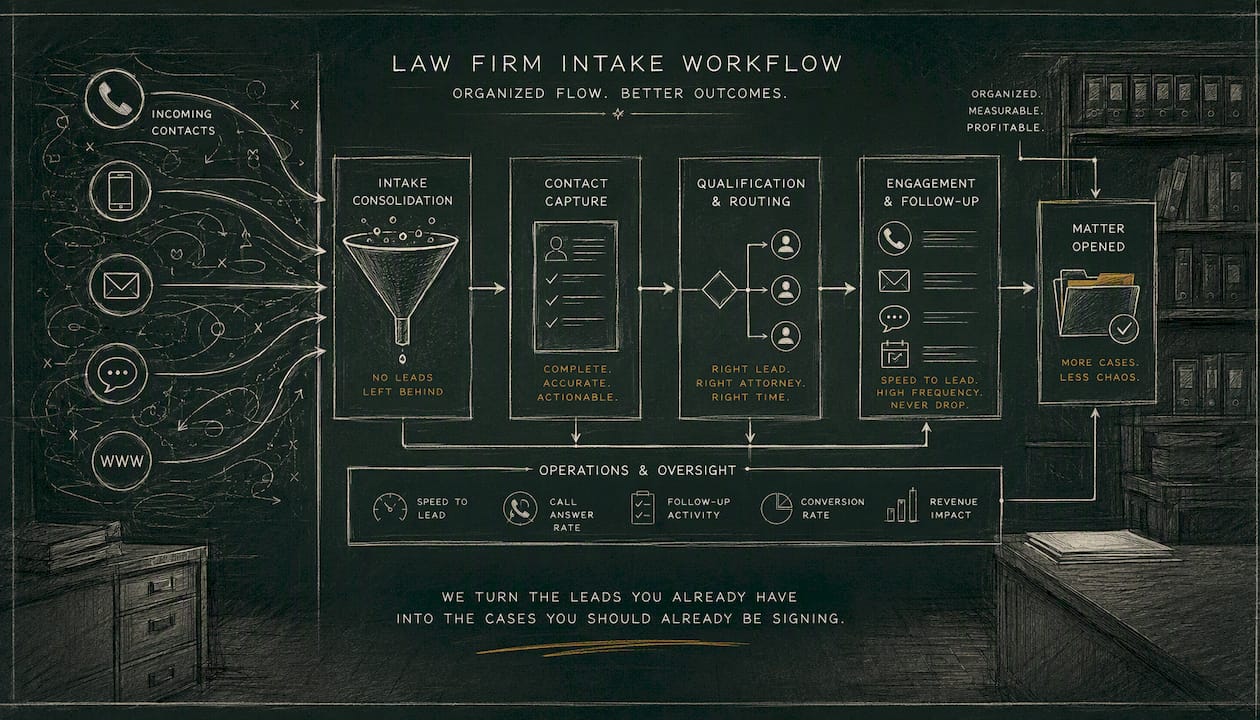
Run a scoped dedup audit and one prioritized merge cycle this week. That single action stops more intake leakage than any new lead-generation campaign. Duplicate contact cleanup in a law firm CRM is not a housekeeping task; it is a revenue and compliance issue. CRM records go stale within 6–12 months, and every duplicate you carry is a missed follow-up, a potential conflicts-check failure under ABA Model Rule 1.7, or a signed case that never got a second call. Start here:
- Run a one-week secret-shopper intake audit to see exactly how new leads enter your CRM and where duplicates are born.
- Export your priority segment — active clients plus every lead from the last 24 months — and flag records missing a primary email or phone number.
- Require primary email and phone on every intake form before the next lead comes in.
Attorney Assistant offers a free intake audit that surfaces these failure points in days, not weeks.
Key Takeaways
A clean CRM is not a one-time project; it is a recurring operational habit that directly protects conflicts compliance, intake conversion, and revenue.
| Point | Details |
|---|---|
| Audit before you merge | Run a secret-shopper intake audit and export your priority segment before touching any records. |
| Sample first, then scale | Test merge rules on 10% of your highest-priority segment; confirm rollback works before running bulk operations. |
| Prevent at intake | Require primary email and phone on every form; enable email-match-before-create to stop duplicates at the source. |
| Assign clear ownership | A named data steward running monthly automated jobs and quarterly audits keeps the database clean long-term. |
| Attorney Assistant option | Attorney Assistant provides a free intake audit, prioritized cleanup planning, and co-managed CRM hygiene for law firms. |
Table of Contents
- Why duplicate contacts are costing your firm more than you think
- A phased plan: Assess, Clean, Enrich, Prevent, Govern
- How to set merge rules that protect matter history
- Treat bounced email and returned mail as live dedup signals
- How to prevent duplicates at the intake source
- Who owns CRM hygiene and how to measure it
- Choosing the right tools for your dedup project
- When to handle cleanup internally vs. when to outsource
- Realistic timelines and cost bands
- What we see in the field
- Attorney Assistant handles the cleanup and keeps it clean
- Useful sources
- Sources
- FAQ
Why duplicate contacts are costing your firm more than you think
Duplicates are not just messy. They are operationally dangerous. A contact record split across two entries means your conflicts check may clear a matter it should flag, exposing the firm to a Rule 1.7 violation. Duplicate client records cause missed conflicts, billing errors, and fragmented case histories — and name normalization across systems is required to make conflict searches reliable.
The operational cost compounds fast. Duplicate remediation events consume measurable staff hours, and those costs scale monthly. Beyond labor, duplicates degrade your marketing: the same lead receives two outreach sequences, your email sender reputation drops from duplicate bounces, and your intake team loses confidence in the CRM data they rely on to prioritize callbacks.
The five consequences that matter most:
- Conflicts-check failures from split client histories
- Billing errors when time or costs post to the wrong record
- Duplicate outreach that irritates prospects and inflates unsubscribe rates
- Slower speed-to-first-contact when intake staff see multiple records and hesitate
- Reduced CRM trust, which causes staff to bypass the system entirely
Stat to know: CRM records commonly age stale within 6–12 months. A database untouched for a year likely contains a significant share of dead or duplicated records.
A phased plan: Assess, Clean, Enrich, Prevent, Govern
Work through these phases in order. Skipping ahead to automation before cleaning your backlog replicates errors across every connected system.
-
Assess. Export your full contact list. Segment by priority: current clients, leads from the last 24 months, and high-value prospects. Run a secret-shopper audit to map how new records enter the CRM. Count records missing email or phone. That number is your baseline. Starting with an audit and prioritizing high-value segments is the foundation of any effective data cleaning program.
-
Clean. Work the highest-priority segment first. Back up your data before touching anything. Run a sample merge on 10% of that segment to test your rules, check for errors, and confirm your rollback path works. Then scale.
-
Enrich. Before merging records with missing identifiers, run an enrichment pass to append email addresses, phone numbers, and company names. Better data means more accurate matching and fewer false positives in the merge queue.
-
Prevent. Add validation rules to intake forms: require primary email and phone, enable email-match-before-create settings, and canonicalize phone formats and name fields. Enforcing required intake fields and running scheduled deduplication jobs is more reliable than ad hoc manual cleanup.
-
Govern. Assign a data steward, set a monthly automated dedup cadence, and schedule quarterly full audits. Define KPIs: duplicates removed, percentage of records with a primary email, and speed-to-first-contact.
One bad rule on 500 records is recoverable. The same rule on 50,000 is not.*
How to set merge rules that protect matter history
The most common data loss in a dedup project happens not from deleting records but from merging them with the wrong field precedence. Get specific before you run anything.
Primary matching keys:
- Email address (when present) is the strongest single identifier
- Phone number as a secondary key when email is absent
- Fallback for organizations: last name + company name + postal code
Field precedence rules for the surviving record:
- Retain the non-empty attorney-assigned field over a blank one
- Keep the earliest engagement date (not the most recent, which may belong to the duplicate)
- Preserve the longest activity history; never overwrite a record with fewer notes onto one with more
When to route to an exception queue instead of auto-merging:
- Ambiguous name matches with no shared email or phone
- Any record with an open matter attached
- Any record that returns a hit on a conflicts search
Some practice-management CRMs provide guided merge workflows that let you choose which field values to keep, which reduces the risk of silent data loss. Whatever tool you use, preserve original record IDs in a merged-history field and log the merge operator and timestamp. That audit trail is your compliance and rollback safety net.
Treat bounced email and returned mail as live dedup signals
Most firms treat a bounce as a dead end. It is actually a data signal. Build a process around it:
- Route all bounce reports to a central inbox monitored by your data steward
- Flag the contact record automatically on the second hard bounce
- Assign a review task: run a 48–72 hour enrichment attempt to find a current email before quarantining the record
- For returned hard mail, use any forwarding address to update the physical address field and check whether a second record exists under the new address
Using bounces and returns as real-time signals during iterative clean cycles keeps your database current between full audits and often surfaces duplicate client records you would not catch otherwise.
How to prevent duplicates at the intake source
The cheapest duplicate is the one that never gets created. Three areas to lock down:
Intake forms: Require primary email and phone on every form. Enabling form-match-by-email and requiring Email (Primary) on web forms significantly reduces duplicate records from submissions. Where email is absent, make last name and city required as fallback identifiers.
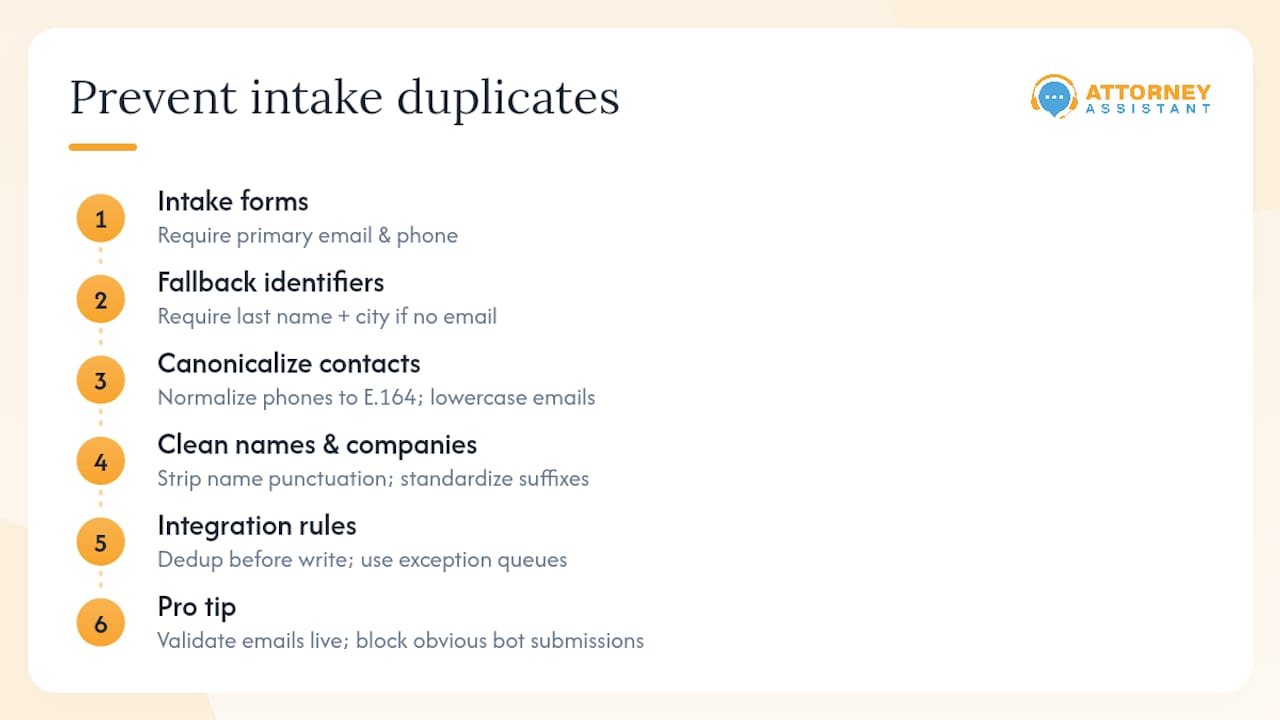
Canonicalization: Normalize phone numbers to E.164 format, lowercase all email addresses before storing them, strip punctuation from name fields, and standardize company suffixes (LLC, Inc., LLP) to a single form. Two records for “Smith LLC” and “Smith, LLC” are the same client.
Integration rules: Enforce dedup-before-write in any middleware connecting your intake forms, call center software, and CRM. Create exception queues for ambiguous matches rather than letting them auto-create new records.
Pro Tip: Validate email addresses in real time on web forms. Blocking obvious bot submissions at entry prevents sparse, unmatched records from polluting your database before a human ever reviews them.
Who owns CRM hygiene and how to measure it
CRM hygiene fails when nobody owns it. LexisNexis InterAction recommends a program of corrective and preventive maintenance with data stewards working alongside business development and marketing to sustain accuracy for compliance and decision-making.
Roles:
- Data steward: owns the dedup queue, runs monthly jobs, escalates conflicts issues
- Intake coordinator: enforces required fields at the point of entry
- Intake QA reviewer: spot-checks new records weekly for missing identifiers
- Managing partner escalation path: for any merge that touches an open matter or conflicts hit
Cadence and KPIs:
| Cadence | Activity | KPI |
|---|---|---|
| Weekly | Triage bounced and flagged records | Bounce rate, open review tasks |
| Monthly | Automated dedup job on new records | Duplicates removed, % records with primary email |
| Quarterly | Full audit + secret-shopper check | Speed-to-first-contact, conversion lift post-cleanup |
Choosing the right tools for your dedup project
Three method categories cover most law-firm scenarios:
- In-CRM dedup rules: built-in matching and merge workflows inside your practice-management platform. Low cost, limited fuzzy matching. Best for ongoing prevention after a clean baseline.
- Enrichment services: email and phone append vendors that fill missing identifiers before you merge. Improves match accuracy on records with incomplete data.
- Vendor-managed bulk cleanup: third-party tools or services that run fuzzy matching across name, email, and phone variants, generate review queues for ambiguous matches, and handle large record volumes. Fuzzy matching tools can catch name and email variants, support bulk cleanup, and generate review tasks for ambiguous matches.
When to handle cleanup internally vs. when to outsource
The decision comes down to scale and risk.
DIY makes sense when:
- Your database has fewer than 5,000 contacts
- You have a staff member who can own the project for 4–8 hours per week
- Your CRM has built-in merge tools and your records are relatively clean
Outsource or use a hybrid model when:
- Your database exceeds 10,000 records
- You have open matters attached to potentially duplicate clients (conflicts risk)
- Internal staff time is the bottleneck
Questions to ask any vendor:
- Can you run a sample merge on 5–10% of our data before the full project?
- What is your rollback procedure if a merge causes data loss?
- How do you handle records with attached matters vs. contact-only records?
- What is your SLA for post-clean support questions?
- How do you handle PII, and will you sign a data processing agreement?
A hybrid model works well for most mid-sized firms: a vendor handles the backlog cleanup, then an internal data steward and automated dedup rules maintain the baseline going forward.
Realistic timelines and cost bands
Plan your project against these ranges, then add a buffer for conflict review and stakeholder approvals.
- Quick win (up to 5,000 records): 1–2 weeks. Suitable for a priority segment like recent leads. Mostly internal labor.
- Standard cleanup (10,000–50,000 records): 4–8 weeks. Likely requires enrichment services and a phased merge approach.
- Large project (50,000+ records): 8–16+ weeks with phased rollouts and dedicated vendor support.
On cost: internal labor is your primary variable. Multiply staff hours by loaded hourly rate to estimate DIY cost. Duplicate remediation events carry measurable per-event labor costs that scale with monthly volume, which is why a one-time vendor engagement often costs less than absorbing the ongoing internal drag. Always budget a backup and rollback window into every phase before you start merging.
What we see in the field
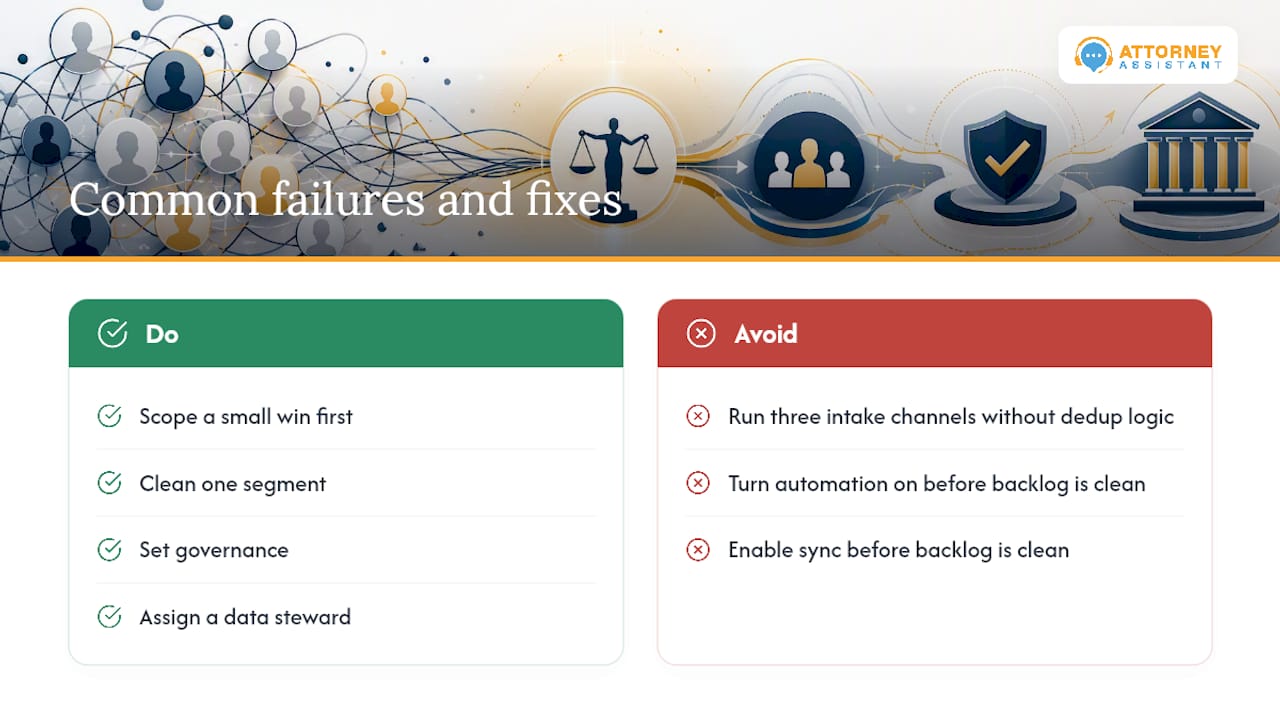
The most common failure mode is not a bad CRM. It is three intake channels running in parallel with no shared dedup logic: a web form, a call center, and a referral intake sheet, each creating records independently. By the time a firm notices the problem, the same lead exists four times under slightly different names, and the follow-up sequence has fired twice.
The second most common failure: automation turned on before the backlog is clean. Bidirectional sync between a CRM and a phone system will replicate every duplicate into both systems within days.
The fix is always the same. Scope a small win first. Clean one segment, set governance, assign a data steward, and build from there. Momentum matters more than perfection.
Attorney Assistant handles the cleanup and keeps it clean
Firms that have gone through a lead follow-up and CRM hygiene engagement with Attorney Assistant typically start with a scoped audit, move to a prioritized merge cycle on their highest-risk segment, and then hand off ongoing governance to a co-managed steward model.
The intake audit is free and takes about a week. It maps every channel where duplicates enter your system, scores the severity, and produces a prioritized cleanup plan you can run internally or hand to us. From there, Attorney Assistant covers CRM hygiene, intake coverage, and admin support as part of an ongoing operational engagement, so the problem does not come back six months later.
If your firm is ready to scope the work, book a call and we will walk through your current intake setup and database size in the first conversation.
Useful sources
- Deduplication Best Practices — Insycle Support: field-level matching rules, required fields, and scheduled job guidance.
- Data quality: The unsung hero to your law firm’s CRM success — LexisNexis InterAction: data steward role, corrective and preventive maintenance model for law-firm CRMs.
- Do’s and Don’ts of Data Cleaning — National Law Review: audit-first approach, iterative segment cleaning, and using bounces as live signals.
- CRM Data Entry Costs Law Firms $28K/Year — US Tech Automations: stale-record timelines, per-event remediation cost estimates, and automation sequencing guidance.
- Dataclean: conflicts-check failures, billing errors, and entity-matching requirements for law-firm data.
Sources
Multiple intake channels running without shared dedup logic are the primary cause: web forms, call centers, and referral intake sheets each create records independently. Missing required fields like primary email make matching impossible, so the CRM creates a new record instead of updating an existing one.
- Deduplication Best Practices — Insycle Support
- Do’s and Don’ts of Data Cleaning — National Law Review
- CRM Data Entry Costs Law Firms $28K/Year — Cut It in 2026 | US Tech Automations
- Dataclean
FAQ
How often should a law firm run a deduplication job?
Monthly automated dedup jobs on new records, combined with a quarterly full audit and secret-shopper check, keep most databases clean. Weekly triage of bounced and flagged records catches fast-moving issues between scheduled runs.
What is the biggest risk of merging duplicate contacts incorrectly?
Merging the wrong records can fragment matter history, post billing to the wrong client file, or clear a conflicts check that should have flagged a prior representation. Always preserve original record IDs in a merged-history field and log the merge operator and timestamp for rollback and compliance.
When does duplicate contact cleanup require outside help?
Databases over 10,000 records, or any database with open matters attached to potentially duplicate clients, carry enough conflicts risk to justify a vendor or managed service. The per-event labor cost of internal remediation at that scale typically exceeds the cost of a one-time vendor engagement.
How does Attorney Assistant help with CRM hygiene?
Attorney Assistant starts with a free intake audit that maps where duplicates enter the system, then delivers a prioritized cleanup plan and co-managed governance so the problem does not recur. Ongoing services cover CRM hygiene, intake coverage, and lead follow-up as part of a single operational engagement.
Recommended
Related Articles

Sentence for Counsel: 7 Examples Law Firms Can Use
Sentence for counsel examples for law firms: seven ready-to-adapt lines for intake replies, status updates, document requests, and engagement confirmations.

Customer Service Calls: How to Handle Them Well
Learn what customer service calls involve, which metrics matter, how to script and score them, and the tech and staffing choices that keep them working.
Medical Record Review for Attorneys: A Step-by-Step Guide
Medical record review for attorneys, step by step: request records, build a verified chronology, audit summaries, and know when to delegate the work.