Legal Staff Solutions: Models, Costs and How to Choose

Say it's Tuesday. You've just returned from a hearing to an inbox full of unread messages, a records request that still hasn't gone out, and news that a prospective client called Friday, reached voicemail, and never heard back. This is an illustrative scenario, not a customer story. It's also a useful starting point for choosing legal staff solutions: find the work nobody owns before deciding whom to hire.
Table of Contents
- Why Law Firms Run Out of Capacity Before Clients
- Where Leads Leak Before an Attorney Hears About Them
- Three Legal Staffing Models Compared
- What Actually Drives Legal Staffing Costs
- Which Tasks Belong to Staff, AI and Attorneys
- How to Match Your Firm to the Right Model
- Confirm the Model Before You Scale
Why Law Firms Run Out of Capacity Before Clients
Most firms don't just have a lead problem. They have an operations and staffing problem that becomes harder to ignore when marketing works. More inquiries won't clear a records backlog or give an overloaded paralegal another afternoon.
In the 2026 Admin Misery Index, a survey of 400 legal professionals, including attorneys, paralegals, and legal-operations staff, nearly 40% reported losing four or more billable hours weekly to administrative tasks, equivalent to roughly 200 hours annually at that weekly rate before allowing for vacation or firm-wide duplication, according to the ABA Journal's account.
The visible problem is a crowded desk. The operational problem is that nobody has protected attorney time.

Capacity needs a specific job description
Legal staff solutions are ways to add trained operational capacity, including in-house employees, outsourced vendors, and co-managed virtual assistants working inside the firm's systems. The useful question isn't whether help would be nice. It's which work needs an owner, what that owner must deliver, and what the arrangement costs.
Your attorneys went to law school to practice law. Ideally, they should occasionally get to do that.
Evaluate the choice through leaked leads, staffing trade-offs, fully loaded costs, and the division of work among staff, AI, and attorneys. Then test a defined role before expanding.
Name where time and opportunities disappear before spending anything. Otherwise, the next hire may inherit the same confusion with a new email address.
Where Leads Leak Before an Attorney Hears About Them
A prospect can disappear before an attorney evaluates the matter. The break often happens between answering, explaining next steps, scheduling, and returning a call. Those are separate actions, and completing the first doesn't guarantee the others happen.
Lead response benchmarks from Clio research
| Measure | Result | Source and basis |
|---|---|---|
| Email inquiries answered at all | 40% | Clio secret-shopper study contacting 1,000 firms |
| Email replies that were timely, answered a question and explained booking or cost | 29% of responses | North Carolina Bar Association summary of Clio's study |
| Phone calls answered by a person | 56% | Clio secret-shopper study |
| Calls routed to voicemail | 39% | Clio secret-shopper study |
| Voicemails not returned within 72 hours | 57% | North Carolina Bar Association summary of Clio's study |
| Voicemail or web-form inquiries with no response for at least three days | 42% | Separate Clio firm-response testing |
| Prospective clients expecting a response within 24 hours | 79% | Clio consumer research reported with its response testing |
These are distinct measures, not interchangeable conversion rates. Together, they identify a practical failure: firms receive inquiries without reliably moving people toward a decision.
Give every inquiry a next action
- Log the contact. Record its source, arrival time, and contact details in the CRM.
- Acknowledge it within a defined window. Assign a human response owner, not just an automated receipt.
- Ask approved qualifying questions. Capture information without giving legal advice.
- Offer a consultation or clear next step. Document whether the prospect accepted.
- Run structured follow-up. Record attempts, outcomes, deadlines, and the reason outreach ends.
For scheduling handoffs, automated appointment booking with Expressify AI is a resource to evaluate alongside calendar permissions and human escalation. Booking technology doesn't replace qualification or ownership.
A review of lead leakage in law firms should include nights and weekends. Those inquiries wait until morning unless someone owns them: our Frontline team provides 24/7 live intake, qualification, structured follow-up, and signing of appropriate matters under firm-approved processes, alongside the option of staffing coverage internally.
Three Legal Staffing Models Compared
In-house staff are employed and supervised by the firm. Traditional outsourcing means a vendor delivers contracted tasks. Co-managed virtual assistants are sourced and vetted by a provider, then trained and directed within the firm's workflows, with both parties reviewing performance.
None is automatically the economical choice. Each puts responsibility, institutional knowledge, and continuity somewhere different.
Legal staffing models compared on six criteria
| Criterion | In-house staff | Traditional outsourcing | Co-managed virtual assistants |
|---|---|---|---|
| Who directs daily work | The firm | The vendor, against contract terms | The firm and provider jointly, with explicit responsibilities |
| Control over quality | High, subject to the hire and supervision | Limited to what the contract specifies | High when shared quality review is defined |
| Cost structure | Salary, benefits, overhead, and turnover | Per-hour or per-project fees | Dedicated monthly capacity |
| Time to productive | Recruiting plus onboarding, potentially months | Fast for simple tasks, slower for firm-specific work | Pre-training can shorten preparation, followed by firm-specific training |
| Scaling up or down | Through hiring or layoffs | Contract capacity can change quickly; a new vendor introduces another learning curve | Flexible within the agreement |
| Main risk | One departure leaves a gap | Knowledge stays with the vendor and workers may rotate | Coordination overhead when roles are vague |
In-house staff offer proximity, not automatic resilience
An experienced employee learns how a partner wants a demand package assembled, which clients need extra explanation, and which exceptions deserve immediate attention. That shared institutional knowledge is valuable when work requires frequent coordination.
But proximity can hide fragile processes. Say the records coordinator resigns in March, and nobody else knows which providers need follow-up because the working list lives in a personal spreadsheet. The firm didn't just lose an employee. It lost its operating instructions.
An in-house model works better when employees maintain shared queues, document exceptions, and cross-train colleagues. Hiring locally doesn't remove the need for those controls.
Outsourcing works best with an observable finish line
A defined records backlog can suit a project vendor: specify the files, required index, completion criteria, and accepted deliverables. Clear project pricing makes the purchase easier to evaluate than an open-ended promise to help with administration.
The trade-off appears at acceptance. A contract might count pages processed without requiring accurate provider names, service dates, or duplicate removal. Someone at the firm then repairs the index, usually the person whose workload the project was supposed to reduce.
Require an acceptance sample before approving the full deliverable. Paying for volume is reasonable only when the firm also defines usable quality.
Co-management keeps execution inside the firm
A dedicated assistant working in the same case-management system can maintain context across records requests, billing reconciliation, and case-status updates. Shared review gives the firm operational control while making the provider responsible for addressing performance problems.
Our staffing process follows that division: we source and vet personnel, the firm embeds and directs them, and both parties co-manage performance. We train legal-support fundamentals; the firm teaches its procedures, preferences, and matter-specific requirements.
The drawback is coordination. If the assistant and an existing paralegal both believe they own provider follow-up, they may duplicate calls while neither updates the actual task record.
Practical rule: Assign one accountable owner to each queue. Helpers are welcome. Competing owners are not.
Most co-management drawbacks are management gaps that can exist under any model. Co-management tends to expose them sooner because an external team can't reliably operate on unwritten assumptions.
What Actually Drives Legal Staffing Costs
The hourly or monthly rate is the smallest part of the cost analysis, even when it's the largest visible invoice. It tells you what capacity costs to purchase, not what useful output costs to produce.
A cheaper arrangement can become expensive when attorneys spend their time correcting it. A higher-priced employee can be economical when the role reliably removes work that shouldn't reach an attorney.
Cost drivers and what to check for each
| Cost driver | What it changes | What to check |
|---|---|---|
| Role scope | Task volume and complexity | Whether any tasks need attorney judgment |
| Hours and coverage | Full-time or part-time, business hours or 24/7 | Whether the coverage gap is real and measured |
| Location and pay market | Local wages and available labor pools | Time-zone fit with the firm's working hours |
| Recruiting and onboarding | Time before useful output | A ramp-up period expressed in weeks, with deliverables |
| Training and supervision | Attorney and manager teaching time | Who owns the written procedures |
| Systems and software access | Licenses, permissions, and CRM compatibility | Whether existing systems are ready for the person's first day |
| Turnover and replacement | Replacement expense and downtime | Who arranges and pays for replacement |
| Performance gaps | Rework, missed deadlines, and escalations | How underperformance is detected and corrected |
Compare the same job, not similar titles
Say you're weighing an in-house records coordinator against a dedicated remote assistant. Include recruiting time, benefits, equipment, software, onboarding, supervision hours, and the cost of an empty desk during rehiring. Then compare the records work each arrangement can complete to the same acceptance standard.
A vacancy costs the firm even when nobody sends an invoice for it. Someone still answers the inbox, chases providers, or explains why the demand isn't ready.
For general market context, Virtustant's discussion of virtual assistant cost is a starting point, not a legal-operations budget. Use a virtual legal assistant cost assessment to frame the more relevant question: what supervision, systems access, and role complexity will your firm require?
Budget for execution, not another unused platform
The ABA's 2024 Legal Technology Survey found that 41% of solo firms budgeted for technology, compared with 90% of firms with 100 or more attorneys. Smaller firms need workable staffing without assuming a large implementation budget.
Start with the systems already in place. A task queue in Clio or Filevine, maintained consistently, is more useful than another platform nobody has time to configure.
Compare fully loaded staff hours and measured output, not job titles. A title describes a position; it doesn't tell you how many complete files reach attorney review.
Which Tasks Belong to Staff, AI and Attorneys
A records request stalls at the handoff, not at the provider. One person verified the authorization, a second assumed someone else would send the follow-up, and nobody owned the date the records were due back. Dividing work by role fixes that only when the line is drawn around risk and decision authority rather than whoever happens to be free that afternoon.
Staff execute defined processes, AI assists with bounded drafting and analysis, and attorneys exercise legal judgment. Everyone who touches a matter should be able to see where those lines fall.
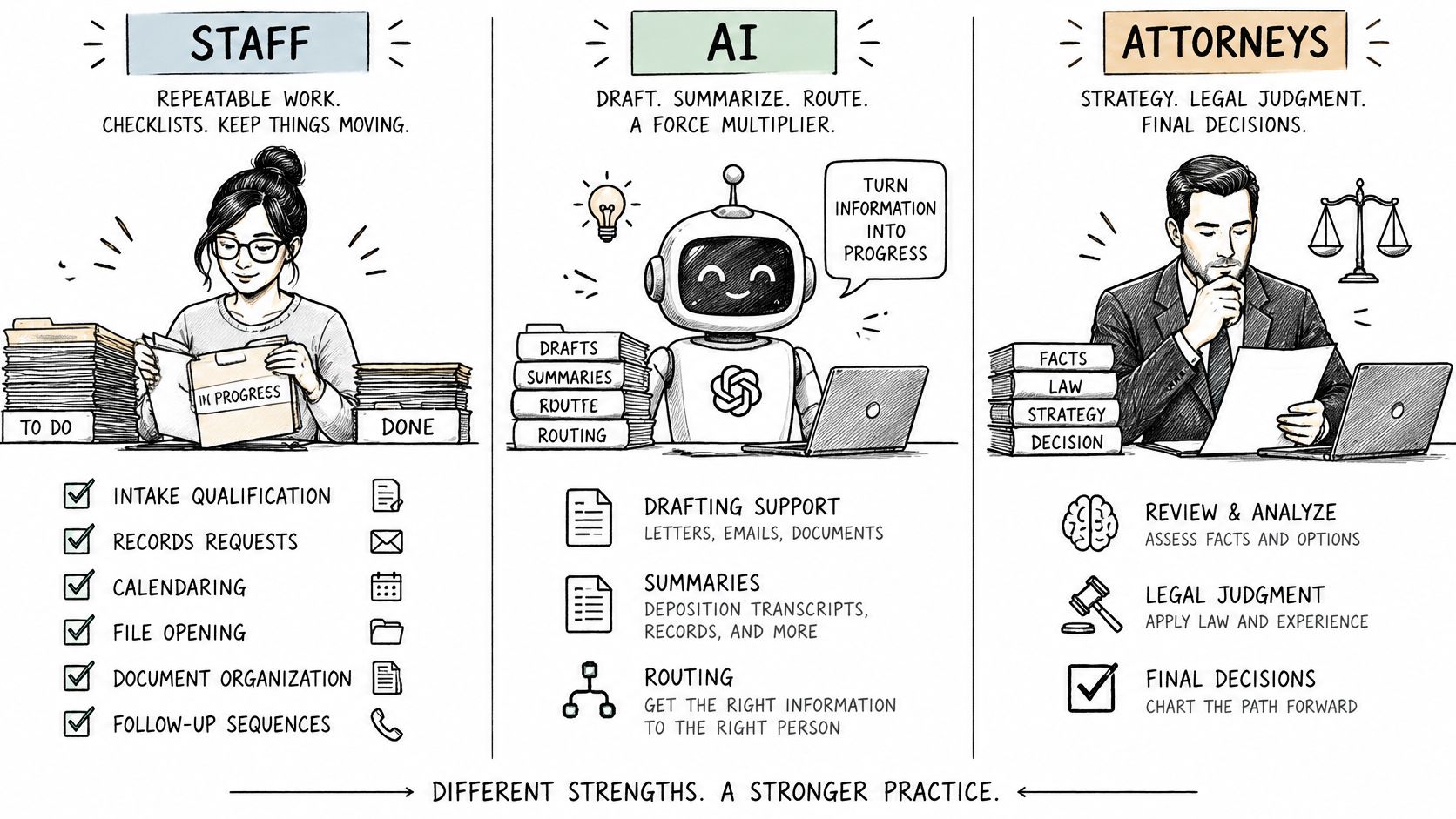
- Staff own repeatable execution. Intake qualification under approved criteria, records requests, calendaring, file opening, document organization, and follow-up belong in written workflows with named owners.
- AI produces reviewable assistance. Routine correspondence drafts and records summaries need a named reviewer, source checking against the underlying document, and an error log someone reads. An attorney who re-drafts every AI output from scratch has bought no capacity, only a second opinion.
- Attorneys retain legal authority. Legal advice, eligibility decisions, privilege calls, and final work product stay with the firm.
The ABA's technology survey release reported that 73% of firms used cloud-based legal tools, while 53% reported case or practice-management software availability. Owning the software and running a disciplined process are two different achievements. A task queue inside the case management system, kept current, beats a platform nobody has configured.
Build the role around stage gates
Records work gives you a clean sequence: authorization verified, provider contacted, follow-up date assigned, records received, billing reconciled, lien status updated, and attorney review completed. Each stage needs an owner, completion evidence, and a trigger for escalation when it slips.
Staff can flag a discrepancy between a bill and the records received. An attorney decides what that discrepancy means for the matter, and that call stays where it belongs. Audit a sample for authorization validity, index accuracy, missing pages, and documented next actions. The role description should follow this workflow, so a new hire inherits the controls instead of recreating someone's personal habits.
Use the following video alongside the written responsibility map.
Supervision stays with the firm
Under the rules of professional conduct adopted in your state, lawyers remain responsible for supervising nonlawyer assistance, whether internal or vendor-provided. Require confidentiality terms, restrict access to the matters a person needs, and put a written data policy in place before staff or AI tools touch client files.
Attorney Assistant isn't a law firm and doesn't give legal advice or exercise legal judgment. Every legal decision stays with the client's firm.
AI and trained staff complement each other. Neither one justifies putting confidential information into an unapproved public tool.
How to Match Your Firm to the Right Model
Answer the operational questions before choosing the employment arrangement. A firm's headcount tells you less than the work's frequency, complexity, and required coverage.
Write down answers to these questions:
- Recurring or one-off? A continuing provider-follow-up queue needs continuity; a closed-file indexing project needs a finish line.
- Legal judgment or operational discretion? Distinguish deciding legal eligibility from identifying missing intake fields.
- Business hours or extended coverage? Identify when work arrives and when a person must act.
- Who supervises? Name someone with time and authority to review results.
Firm situations and the staffing model that usually fits
| Firm situation | Model that usually fits | Why it fits |
|---|---|---|
| Solo or small firm with intake gaps after hours | Co-managed virtual assistant with scheduled after-hours coverage | Dedicated coverage without a full in-house salary |
| Firm with steady volume and judgment-heavy admin | In-house staff | Institutional knowledge and daily presence matter most; legal judgment still stays with attorneys |
| Firm needing a one-time records backlog cleared | Traditional outsourcing | A defined project with a defined end |
| Personal injury firm with growing records and lien work | Co-managed virtual assistant | Recurring, stage-gated work needs consistent owners |
| Firm with a strong operations manager and high volume | In-house staff, supplemented by project vendors | The manager can supervise, and vendors absorb spikes |
| Firm unsure how much work exists | Co-managed virtual assistant on one defined role | A proposed 90-day review tests real demand before expansion |
Read the first column as a work situation, not a firm-size ranking. Also, a dedicated assistant's schedule isn't automatically round-the-clock coverage. Match the actual agreement to the hours you need.
Turn the choice into a role
Before committing, prepare a short operating worksheet:
- Name the workflow and its owner. Be specific enough to identify its task queue.
- List the tasks. Assign execution, tool assistance, and legal decisions separately.
- Estimate weekly hours lost. Use calendars, task histories, and an activity log rather than memory alone.
- Mark out-of-hours work. Separate urgent response needs from tasks that can wait.
- Assign a weekly reviewer. Specify what evidence that person will inspect.
For law firms with remote staff, this worksheet also clarifies communication expectations and handoffs. Start with one defined role, not a loosely described department.
A model that fits on paper can still fail when nobody owns the workflow.
A sound staffing choice is also a management decision. Without an accountable owner, even a well-matched arrangement becomes another queue someone assumes somebody else is handling.
Confirm the Model Before You Scale
Treat the initial role as an operating test, not a verdict on outsourcing, remote work, or the future of law practice. Define what success looks like before anyone starts.
A bounded pilot makes it easier to distinguish useful capacity from additional activity.
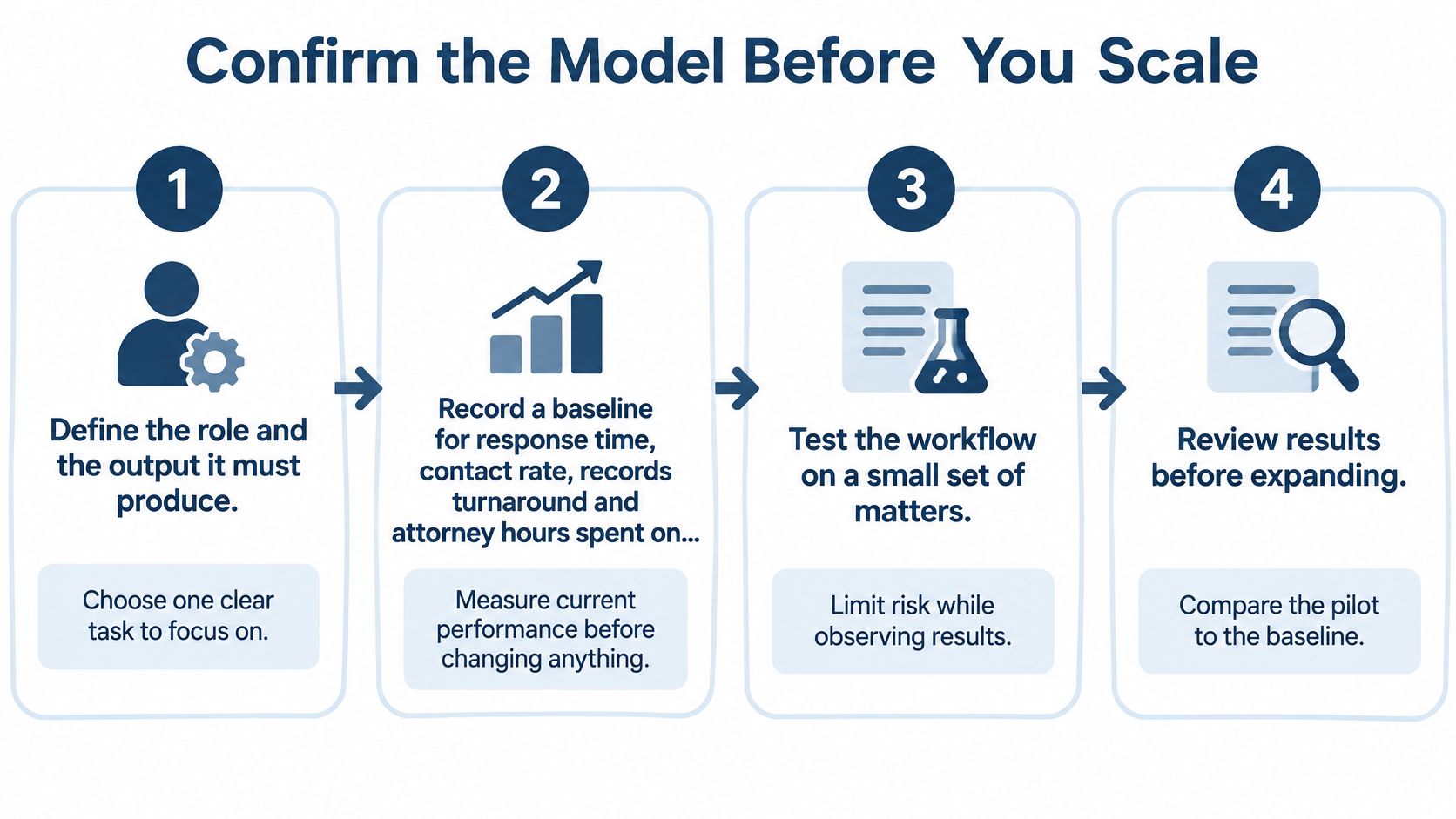
- Define the role and required output. Specify complete deliverables, such as indexed records with missing items flagged, rather than records assistance.
- Record the baseline. Capture response time, contact rate, records turnaround, and attorney hours spent on administration.
- Write procedures and stage gates. Include acceptance criteria, exceptions, escalation routes, and review responsibilities.
- Run a proposed 60-to-90-day pilot. Limit the initial scope to one role and a manageable set of matters.
- Compare results with the baseline. Inspect completed work, not just dashboards or impressions.
- Expand only when agreed targets are met. Resolve recurring errors before multiplying the workflow.
The checkpoints below keep the review focused on evidence.
Measure economics and quality together
More coverage doesn't automatically produce better economics. Track consultation attendance, signed retainers, cost per retained matter, qualified-lead rate, errors, and escalations alongside response speed. Faster answers can generate more consultations without improving case quality.
The Thomson Reuters 2025 professional-services report found that 48% of law-firm professionals lacked a formal GenAI policy. Adoption alone isn't an operating control, and neither is a busy team.
Before crediting a staffing change, check whether marketing sources, matter mix, seasonality, or software configuration changed too. Compare similar inquiries and matter stages. Otherwise, a particularly good campaign can make a weak workflow look competent for a while.
Make onboarding part of the test
Our co-managed onboarding sequence is role scoping, match and onboarding, integration into the firm's case-management system, and ongoing co-management with quality review and coaching. The firm supplies its procedures and matter-specific direction; we review the work and coach performance.
The test should answer a plain question: does this arrangement help appropriate matters progress while returning usable time to the firm? Recovered hours only have economic value when attorneys can put them toward legal work, client service, or another deliberate priority.
Good legal staff solutions reduce avoidable handling, not just visible workload. Expand the roles that demonstrate that difference.
Attorney Assistant offers a free intake audit to identify where calls, inquiries, and follow-up gaps are leaking revenue. Visit Attorney Assistant to review those gaps and determine whether Frontline's 24/7 live intake, Staffline's dedicated full-time case support, or a process correction is the right next step.
Related Articles

Virtual Front Desk for Law Firms: What It Really Does
Learn what a virtual front desk does for law firms, how it compares to in-house reception, and how to roll one out without risking client confidentiality.

Virtual Case Manager Role, Duties, and Fit
See what a virtual case manager owns in records, discovery, liens, and file admin, plus metrics and when virtual beats hiring in-house.

Call Answering Service for Law Firms: What Actually Works
A call answering service for law firms should sign cases, not take messages. Learn pricing models, vendor criteria, and 24/7 intake that converts.