Virtual Legal Assistant Guide for Law Firms That Need Results

A virtual legal assistant is a remote, nonlawyer professional who handles repeatable intake, administrative, and legal-adjacent tasks under attorney supervision. If your firm is losing leads to slow response times, the single best first move is a 30 to 90 day intake pilot: assign a VLA to phone coverage, lead follow-up, and calendar booking before you hand off anything else.
That order matters. Firms that start VLAs on discovery support or general admin work miss the fastest payback available. Median law firm response time to a new lead sits around 13 minutes, and only a minority of firms respond within five. Every minute past that window costs conversions.
Three things happen almost immediately once a firm puts a VLA on intake and follow-up:
- Lead response time improves due to calls being answered and follow-up occurring beyond business hours.
- Attorneys reclaim hours previously spent on scheduling, data entry, and chasing signatures.
- Fixed overhead falls because you are not paying for a full-time front desk hire with benefits and downtime.
Key Takeaways
Assigning a virtual legal assistant to intake and follow-up first, backed by clear KPIs and documented access controls, produces the fastest measurable return for most law firms.
| Point | Details |
|---|---|
| Start with intake, not admin | Run a 30 to 90 day pilot on intake and follow-up before expanding scope. |
| Lock down security first | Require MFA, unique logins, and a signed NDA before any system access. |
| Track five KPIs | Monitor speed-to-lead, answer rate, booked-consult rate, conversion, and rework rate. |
| Assign a supervising attorney | Every VLA needs one accountable attorney reviewing client-facing output. |
| Attorney Assistant fits the intake use case | Its service is built specifically around answering calls and following up fast, not general staffing. |
Table of Contents
- What Does a Virtual Legal Assistant Actually Do?
- Which Engagement Model Fits Your Firm?
- How Do You Vet and Hire a Virtual Legal Assistant?
- What Does Onboarding Look Like in the First 90 Days?
- Which Tools Should a Virtual Legal Assistant Master?
- What Does a Virtual Legal Assistant Cost, and What’s the ROI?
- What Ethics and Compliance Rules Apply to a Virtual Legal Assistant?
- Which KPIs Prove a Virtual Legal Assistant Is Working?
- Sample Job Description and 30/60/90 Rollout
- An Operator’s View on Why Intake Fails
- How Attorney Assistant Fixes the Intake Gap
- Sources
- FAQ
What Does a Virtual Legal Assistant Actually Do?
A VLA is not a substitute lawyer and never gives legal advice. The role is bounded by design: nonlawyer, remote, working from documented procedures, and supervised by an attorney who retains accountability for every legal judgment call. Clio’s guidance frames the VLA as an extension of the lawyer for administrative work, not a replacement for legal reasoning.
Inside those boundaries, the work breaks into a few recurring categories. Intake triage covers answering inbound calls, screening for case fit, and scheduling consultations. Inbox and calendar management means clearing routine emails, confirming appointments, and flagging anything that needs attorney eyes. Document work includes assembling filings from templates, formatting exhibits, and organizing client files, always with a lawyer reviewing before anything goes out. Billing follow-up covers chasing outstanding invoices and verifying liens. CRM upkeep means logging every touchpoint so nothing falls through when a case moves between team members.
Two examples show how this plays out day to day. In the first, a lead calls after hours. The VLA answers, runs an intake script, confirms the case type fits the firm’s practice areas, and books a consult directly on the attorney’s calendar before the lead has time to call a competitor. In the second, a new file opens. The VLA pulls the right template, populates client details, checks the file against a document checklist, and routes it to the attorney for review and signature. Neither task requires legal judgment. Both require reliability and consistency.

| Task Category | Typical VLA Action | Attorney’s Role |
|---|---|---|
| Intake triage | Screen and qualify leads, book consults | Final case acceptance decision |
| Calendar management | Confirm appointments, send reminders | Approve schedule conflicts |
| Document prep | Assemble filings from templates | Review and sign off |
| Billing follow-up | Send reminders, track AR aging | Approve write-offs or disputes |
| CRM upkeep | Log calls, update lead status | Audit pipeline weekly |
Intake and follow-up sit at the top of that list for a reason. They connect directly to revenue in a way document formatting never will. A remote legal assistant who answers every call and follows up on every lead is doing the one job that determines whether your marketing spend turns into signed cases.
Which Engagement Model Fits Your Firm?
Firms hiring virtual legal support generally choose from four models, and the right one depends less on budget than on how much supervision you can realistically provide.
- Dedicated VLA (hired directly or through a staffing platform): best for firms that want one consistent person learning their systems over time.
- Agency or managed service: best for firms that want built-in coverage, backup staff, and less day-to-day management burden.
- Freelance contractor: best for firms testing the waters with a narrow, well-defined task list before committing further.
- Virtual paralegal: best for firms that need higher-skill legal support, such as drafting discovery responses under attorney direction, not just administrative coverage.
Each comes with trade-offs.
- A dedicated VLA offers deep familiarity with your firm’s voice and files, but you absorb the full supervision load and lose coverage if that person is out sick or quits.
- A managed service spreads coverage across a team, which solves the backup and turnover problem, but you give up some direct control over who handles a specific call.
- Freelancers are fast to start and easy to scale down, but security controls and accountability vary widely from one contractor to the next.
- Virtual paralegals cost more and typically require more oversight given the complexity of their output, but they can take on substantive legal-adjacent drafting a general VLA cannot.
Coverage hours are where these differences show up fastest. A single freelancer cannot cover nights and weekends without burning out or costing overtime rates. A managed service with multiple staff can rotate coverage without gaps. If after-hours intake is the priority, that alone should push you toward an agency model or a dedicated VLA backed by a documented handoff plan.
How Do You Vet and Hire a Virtual Legal Assistant?
Vetting a VLA candidate or vendor comes down to five checks, and skipping any one of them is where firms get burned.
| Vetting Area | What to Verify | Why It Matters |
|---|---|---|
| Experience | Prior legal or law firm intake work | Reduces training time and errors |
| Tool proficiency | Case management, CRM, e-signature platforms | Determines onboarding speed |
| Security controls | MFA, unique logins, no credential sharing | Protects client confidentiality |
| References | Verifiable prior law firm clients | Confirms reliability under pressure |
| Sample task | Live intake call or document assembly test | Reveals actual skill under real conditions |
During an interview, ask a candidate to walk through how they would handle a specific scenario: an angry client calling about a delayed settlement check, or a lead who calls after hours asking about a case type outside your practice area. A strong answer sounds procedural: they explain how they would de-escalate, document the call, and route it correctly, without guessing at legal advice or making promises about case outcomes. A weak answer either improvises a legal opinion or has no clear escalation path at all.
Red flags show up early if you look for them. Shared logins instead of individual accounts, no multi-factor authentication, vague or unverifiable work samples, and hesitation to sign an NDA are all reasons to walk away. Security controls including MFA, per-user logins, and signed NDAs are non-negotiable once a VLA touches client data, and treating access removal speed as a real performance metric protects you if the relationship ends badly.
Before committing to a long-term contract, run a small pilot: 20 to 30 hours over two weeks, scoped to intake calls and follow-up only, measured against speed-to-lead and answer rate. That is enough data to know if the fit is real.
Pro Tip: Score the pilot against a baseline you already have. Pull your last 30 days of missed calls and average response time before the VLA starts, then compare the same window after. Without a baseline, you are just guessing at improvement.
What Does Onboarding Look Like in the First 90 Days?
Onboarding a VLA well is the difference between a hire that pays for itself and one that creates more cleanup work than it saves.
- Days 0 to 7: Grant role-based system access, walk through intake scripts, and shadow live calls or file assignments together.
- Days 7 to 30: Hand off full intake and follow-up responsibility with daily check-ins to catch errors early.
- Days 30 to 90: Expand scope to document prep or billing follow-up once intake performance is consistent, and shift from daily check-ins to weekly audits.
Every VLA needs a documented SOP packet before day one, not built as you go. That packet should cover access rules for each system, word-for-word intake scripts, clear escalation triggers for anything outside their authority, and a library of document templates they are allowed to use without asking each time.
Quality control does not need to be complicated to work. Activity logging on every system shows exactly what was touched and when. Two-person verification on critical deadlines, meaning a second set of eyes confirms filing dates and statute deadlines, catches the errors that cost real money. Daily check-ins during the first month catch problems while they are still small; weekly audits after that keep oversight light without disappearing entirely.
Pro Tip: Set your intake SLA in writing before the VLA starts: answer within three rings, follow up on missed calls within 15 minutes, and log every lead in the CRM same day. When the engagement ends, revoke all access the same day, not the same week.
Which Tools Should a Virtual Legal Assistant Master?
A VLA needs fluency across a handful of system categories to actually move the needle on intake and follow-up. That means practice management software for case tracking, a phone or reception system that supports call routing and voicemail transcription, e-signature tools for retainer agreements, secure cloud storage for client files, a CRM for lead tracking, and a billing platform for AR follow-up.
| Tool Category | Integration Priority | Why It Matters |
|---|---|---|
| Case management | High | Central record of every file and deadline |
| Phone/reception | High | Determines actual speed-to-lead |
| E-signature | Medium | Speeds retainer signing without delay |
| Secure file storage | High | Protects client confidentiality |
| CRM | High | Prevents leads from falling through gaps |
| Billing/AR | Medium | Recovers revenue already earned |
Role-based access should come first on your integration priority list, so a VLA only sees what their role requires. MFA and activity logging come next, giving you a record of every login and action. Secure messaging closes the loop by keeping client-sensitive conversations off personal email or text.

AI-assisted drafting tools are increasingly part of this stack. Hybrid human and AI workflows are becoming standard, with VLAs using AI to draft summaries or first-pass documents faster. The output still needs an attorney’s review before it goes anywhere near a client or a filing. AI speeds the draft; it does not replace the judgment call.
What Does a Virtual Legal Assistant Cost, and What’s the ROI?
Pricing generally falls into three shapes.
- Hourly contractor rates work well for narrow, task-based engagements without ongoing coverage needs.
- Monthly retainers fit firms that want a consistent, predictable relationship with one dedicated person.
- Managed-service subscriptions cover broader intake and reception coverage, often including after-hours and weekend support as part of the package.
| Cost Model | What’s Typically Included | Fits Best For |
|---|---|---|
| Hourly contractor | Task-based work, no coverage guarantee | Short pilots, narrow scope |
| Monthly retainer | Dedicated assistant, fixed hours | Steady administrative workload |
| Managed service | Team coverage, backup staff, reporting | After-hours intake or reception needs |
The ROI math is straightforward once you have a baseline. One documented example shows a lawyer reclaiming two billable hours a day by shifting routine tasks to a VLA. At $300 an hour across a 46-week year, that is roughly $138,000 in annual billable capacity per lawyer. Even a conservative fraction of that figure covers most VLA engagement costs many times over.
Compared to an in-house hire, the savings show up in places firms often forget to count: no benefits package, no desk or equipment costs, no HR overhead for a single seat, and no gap in coverage when someone takes vacation. Delegating routine tasks to virtual assistants lowers fixed costs while adding flexible coverage you could not justify staffing in-house.
Set a 30 to 90 day checkpoint tied to a specific number: did answer rate improve, did speed-to-lead drop, did billing capture rise. If none of those moved, the engagement needs adjustment before you renew.
What Ethics and Compliance Rules Apply to a Virtual Legal Assistant?
| Compliance Area | Required Control | Owner |
|---|---|---|
| Confidentiality | Signed NDA before system access | Managing attorney |
| Role limits | Written list of permitted tasks | Supervising attorney |
| Supervision | Attorney reviews all client-facing output | Supervising attorney |
| Access controls | MFA, unique per-user logins | IT or office manager |
| Activity logging | Full audit trail on every system | IT or office manager |
Unauthorized practice of law is the line a VLA must never cross, and it is worth stating plainly what that means in practice: no giving legal advice, no interpreting law for a client, no making case-acceptance decisions, and no signing documents on the firm’s behalf. Every one of those decisions stays with a licensed attorney. Set escalation rules explicitly during onboarding so a VLA knows exactly which questions get routed up rather than answered on their own judgment.
On the security side, MFA and role-based access limit what a VLA can see to only what their job requires. A data processing agreement is worth putting in place when a vendor handles client data on your behalf, and cybersecurity guidance built specifically for legal teams covers the baseline controls firms often overlook until something goes wrong.
Pro Tip: Run an access audit every quarter. Check who still has login credentials against your current staff and vendor list, and revoke anything that should have been removed already. This single habit catches more security gaps than any policy document.
Which KPIs Prove a Virtual Legal Assistant Is Working?
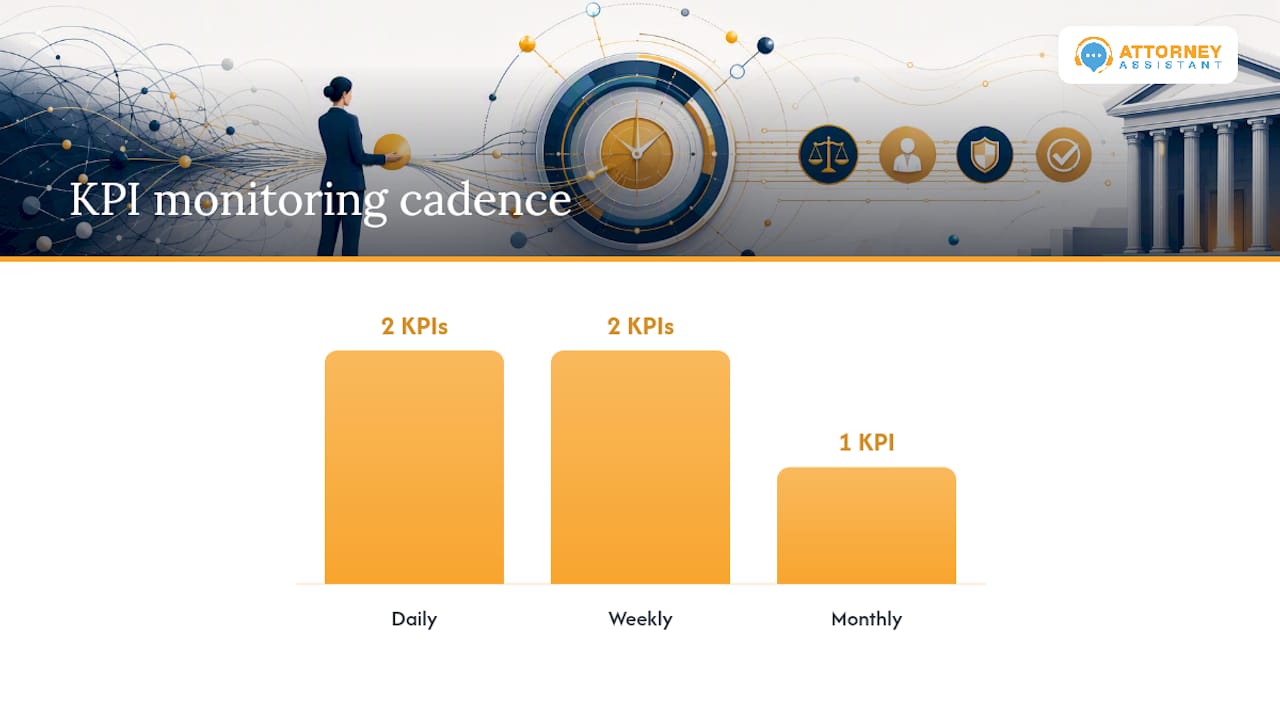
Five numbers tell you almost everything you need to know about whether a VLA is delivering value: speed-to-lead (time from inquiry to first meaningful contact), answer rate (percentage of inbound calls actually answered live), booked-consult rate, consult-to-sign conversion, and rework or error rate on delegated tasks.
| KPI | Formula | Monitoring Cadence |
|---|---|---|
| Speed-to-lead | Time from inquiry to first contact | Daily |
| Answer rate | Calls answered ÷ total calls received | Daily |
| Booked-consult rate | Consults booked ÷ qualified leads | Weekly |
| Consult-to-sign rate | Signed retainers ÷ consults held | Weekly |
| Rework rate | Errors caught ÷ tasks completed | Monthly |
The connection between speed and conversion is not theoretical. Hennessey Digital’s 2025 study found that only 25% of firms respond to online leads within five minutes, even though phone remains the dominant first-contact channel. Firms that close that gap are converting leads their competitors are still letting go cold. Structured intake scripts combined with disciplined CRM tracking measurably reduce lead leakage, which is exactly the workflow a well-run intake process is built to enforce.
Sample Job Description and 30/60/90 Rollout
A workable job posting for this role reads something like this: Virtual Legal Assistant, remote, supervised by managing attorney. Responsible for intake triage, calendar management, and client follow-up. Must have experience with case management software, CRM platforms, and e-signature tools. No legal advice given under any circumstance; all client-facing communication follows documented scripts and escalation procedures.
| Phase | Tasks Handed Off | Acceptance Criteria |
|---|---|---|
| Days 1 to 30 | Intake calls, calendar booking | Answer rate above 90%, no missed escalations |
| Days 30 to 90 | Follow-up sequences, CRM logging | Speed-to-lead under 15 minutes |
| Days 30 to 90 | Billing follow-up, document assembly | Zero critical filing errors |
During the trial, watch three things closely: how clearly the VLA communicates with clients on the phone and in writing, how quickly they become fluent in your specific tools, and how consistently they follow confidentiality protocols without needing repeated reminders. A productivity-focused approach to managing virtual staff treats these first 90 days as the real interview, not the resume screen that came before it.
An Operator’s View on Why Intake Fails
Most firms think their problem is lead volume. It rarely is. Firms come to us convinced they need more marketing spend, and then we pull their call logs and find leads sitting unanswered for hours, sometimes days. The marketing worked. The intake process didn’t.
This confusion happens because marketing is visible and intake is not. A partner can look at a Google Ads dashboard and see clicks and spend. Nobody is watching the call log at 7 p.m. on a Friday when a car accident lead calls and gets voicemail. That lead calls the next firm on the list within minutes.
We’ve seen this pattern repeat across firms of very different sizes: a personal injury firm running six figures a month in ad spend, missing roughly one in five inbound calls simply because there was no coverage after 5 p.m. Once evening and weekend coverage went in, their consult-booking rate on after-hours leads jumped within the first month. Nothing else about their marketing changed. The leads had been there the whole time.
A few lessons repeat across nearly every firm we’ve worked with:
- If you can’t answer your phone from 6 p.m. to 8 a.m., you’re paying for leads you’re throwing away.
- Speed-to-lead is a solvable operational problem, not a staffing shortage you have to accept.
- A missed call log is more useful than a marketing report for diagnosing lost revenue.
- Fixing intake is almost always cheaper than the next marketing campaign you were about to fund.
How Attorney Assistant Fixes the Intake Gap
Everything covered above points to the same conclusion: the fastest, lowest-risk win from a virtual legal assistant comes from putting one on intake and follow-up first. That is the exact problem Attorney Assistant was built to solve. We are not a staffing vendor filling a seat. We handle intake, follow-up, and administrative workflows so calls get answered, leads get contacted fast, and consults get booked before a prospect calls the next firm on their list.
A pilot engagement typically works like this: you give us visibility into your current call volume and lead sources, we provide phone and reception coverage plus structured follow-up sequences, and we report back on answer rate and speed-to-lead on a set cadence so you can see the numbers move. No long-term commitment required to find out if the gap is real.
If you suspect your firm is losing signed cases to missed calls or slow follow-up, the way to find out is to look at the data, not guess. Book a call to review your intake numbers and see whether a focused pilot on intake and reception coverage makes sense for your firm.
Sources
- Legal Virtual Assistants: A Practical Guide for Modern Law Firms
- Hennessey Digital — Lead Form Response Time Study (2025)
- Legal Intake Response Time Statistics 2026 | Stealth Agents
- The Benefits of Virtual Legal Assistants - MyCase
FAQ
What Qualifications Do You Need to Be a Virtual Legal Assistant?
Most firms look for prior legal or administrative experience, familiarity with case management and CRM software, and strong written and verbal communication skills; no bar license is required since the role excludes legal advice.
What Is a Virtual Legal Assistant?
A virtual legal assistant is a remote, nonlawyer professional who performs supervised, repeatable tasks such as intake, calendaring, document prep, and billing follow-up, always under an attorney’s oversight.
Can ChatGPT Act as a Lawyer?
No. AI tools can draft or summarize text, but they require attorney review for every output since they cannot exercise legal judgment or take responsibility for advice given to a client.
Can I Be a Virtual Assistant Without Experience?
Yes for general administrative roles, but law firms typically prefer candidates with prior legal, paralegal, or intake experience given the confidentiality and accuracy demands of the work.
Should a Firm Hire a Dedicated VLA or Use a Managed Service First?
A managed service is usually the lower-risk starting point since it provides built-in coverage and backup staff, while a dedicated VLA or freelancer works better once you know exactly which tasks you want handled long-term.
Recommended
Related Articles
Case Management Aide: A Law Firm Setup Guide
Learn the key roles, setup steps, and workflow tips for a case management aide in your law firm. Boost efficiency and organize cases in 2026.
Virtual Staffing Solutions for Law Firms
Discover how virtual staffing solutions build real operational capacity for law firms. Learn about co-managed models, dedicated legal support, and 24/7 intake.

Nice No Soliciting Sign: Wording, Design and Templates
Nice No Soliciting Sign ideas that work: ready-to-use wording, design rules, legal limits and printable templates for doors and apartments.