AttorneyGram.com Alternatives for Law Firms: 2026 Guide
TL;DR:
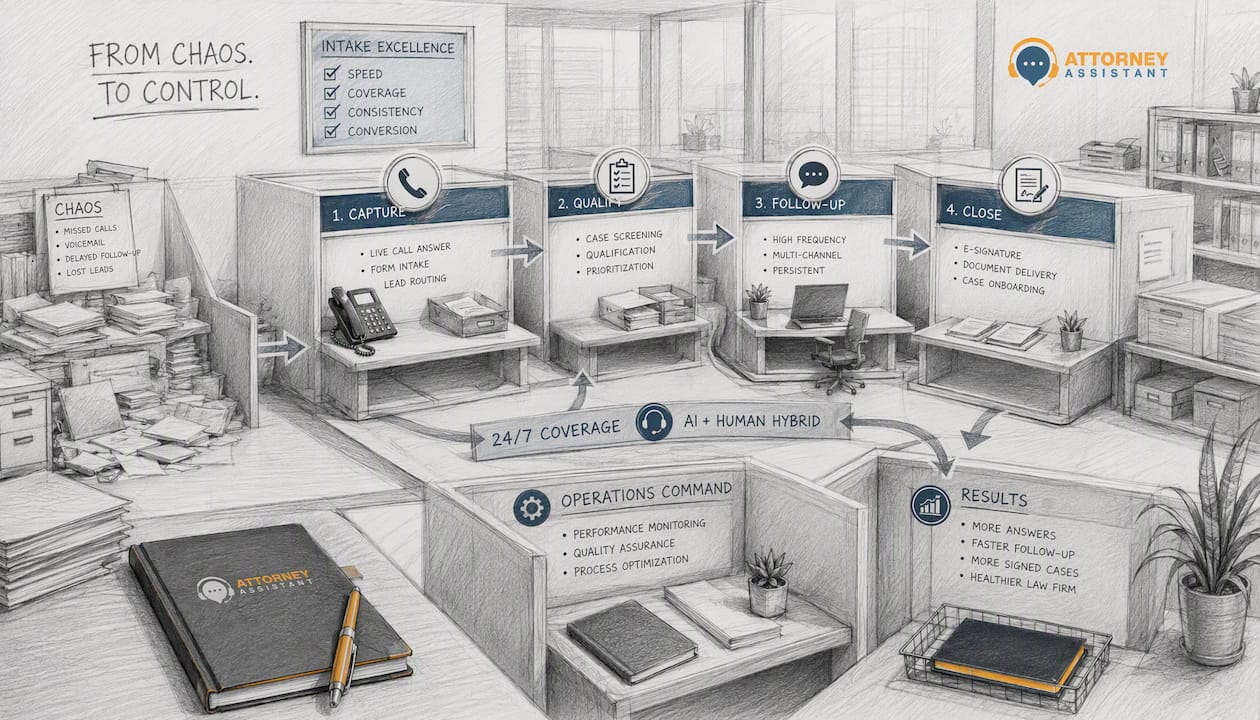
- Attorney Assistant offers a comprehensive, co-managed intake-to-retainer solution with fast response times and admin workflows. It outperform alternatives by combining AI automation with human accountability, reducing lead leakages for law firms. Proper selection and onboarding focus on response speed, retainer signing, and seamless system integration.
If you need a virtual intake and follow-up solution for your law firm, Attorney Assistant is the recommended pick among AttorneyGram.com alternatives. It covers the full intake-to-retainer workflow, not just call answering.
The short list for U.S. law firms evaluating these services:
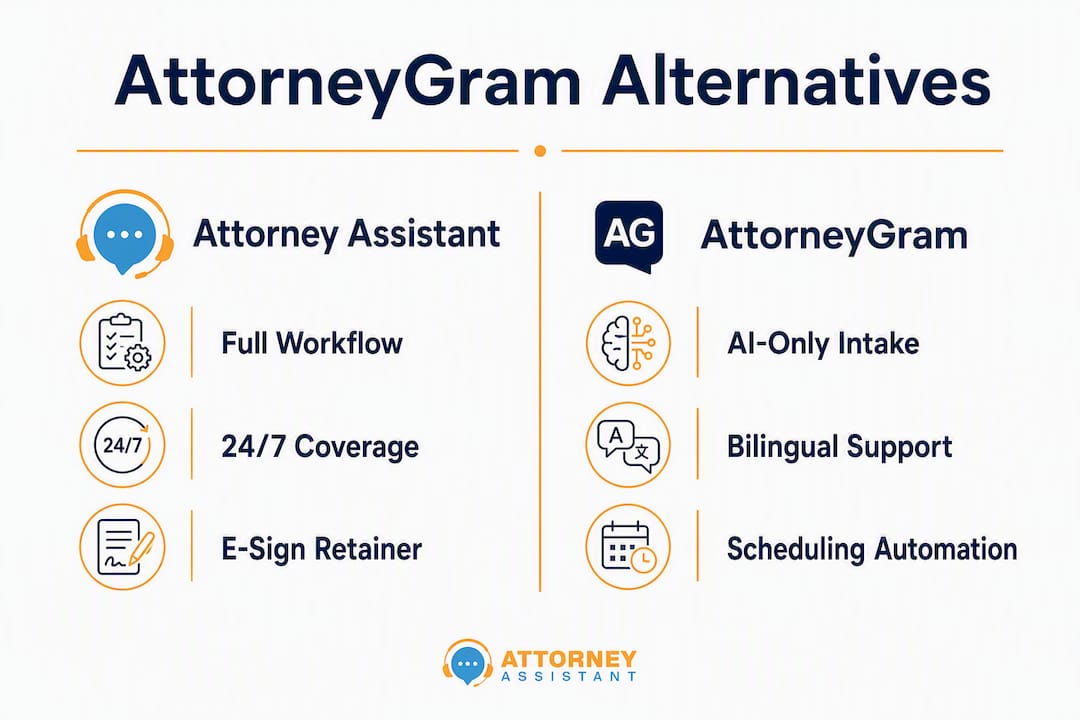
- Attorney Assistant — co-managed intake, 24/7 coverage, retainer signing, follow-up sequences, and admin workflows
- AttorneyGram — AI-first call answering via AVA AI, with bilingual support and scheduling automation
- Virtual staffing agencies — remote intake specialists hired on a cost-per-head basis
- Shared answering services — per-minute call coverage with limited action capability
- Hybrid AI-plus-human vendors — automated triage with human escalation, varying action depth
Law firms lose around 20% of incoming leads the moment they arrive, due to missed calls, slow follow-up, or inconsistent intake. That is a revenue leak, not a marketing problem. Any vendor you evaluate should have a clear answer for how they close it. HIPAA-compliant data handling is a baseline expectation, not a differentiator.
Table of Contents
- How do these AttorneyGram alternatives compare at a glance?
- What does each option actually deliver for your firm?
- How should you choose the right vendor?
- What should onboarding look like in the first 90 days?
- How does pricing work, and what does it actually cost?
- How was this shortlist evaluated?
- Key Takeaways
- What most firms get wrong when switching intake vendors
- Attorney Assistant fixes the intake problems that cost firms the most
- Useful sources
- FAQ
How do these AttorneyGram alternatives compare at a glance?
| Dimension | Attorney Assistant | AttorneyGram | Virtual Staffing | Shared Answering | Hybrid AI+Human |
|---|---|---|---|---|---|
| Best for | Small-mid PI firms needing full intake ops | Firms wanting AI-first 24/7 answering | Cost-focused firms building in-house | High call volume, low action need | Firms wanting automation with human backup |
| Core services | Intake, follow-up, admin, retainer signing | AI call answering, scheduling, lead summaries | Intake calls, basic admin | Call answering, message relay | Automated triage, live escalation |
| Action capability | E-sign, retainer signing, scheduling, CRM updates | Scheduling, intake capture | Varies by hire | Message only | Scheduling, limited e-sign |
| Coverage model | Dedicated assistant + AI hybrid | AI-first, 24/7 | Dedicated remote staff | Shared agent pool | AI + shared human team |
| Integrations | CRM, case management, phone systems | Scheduling tools | Varies | Basic CRM relay | CRM, calendar |
| Pricing model | Monthly subscription + action-based | Not publicly listed | Per hire / monthly | Per minute | Subscription |
| Onboarding time | 1–2 weeks | Not publicly listed | 2–4 weeks | Days | 1–2 weeks |
| Security & compliance | HIPAA-aware workflows | Not publicly detailed | Varies by vendor | Varies | Varies |
| Expected outcomes | >95% answer rate, speed-to-lead under 5 min | Reduced missed calls, faster lead capture | Cost savings, variable conversion | Fewer missed calls | Faster triage |
Firms with weekend intake needs should weight the coverage model and action capability columns hardest. If retainer signing is part of your intake workflow, shared answering services and most AI-only vendors will fall short immediately.
What does each option actually deliver for your firm?
Attorney Assistant
Attorney Assistant handles the full intake-to-retainer path: 24/7 phone coverage, follow-up automation, e-sign retainer handling, CRM hygiene, calendar management, and admin support that keeps the handoff from intake to case file clean. The co-management model means a human is always in the loop for escalation, not just an AI routing calls.

Strengths: Full workflow coverage from first call to signed retainer; dedicated assistant model; measurable speed-to-lead enforcement; case management remediation for firms with broken back-office processes.
Trade-offs: Higher monthly investment than a shared answering service; requires a short onboarding period to configure scripts and CRM connections.
AttorneyGram
AttorneyGram’s AVA AI handles 24/7 answering, lead qualification, bilingual conversations, scheduling automation, and real-time intake summaries. It is built for firms that want AI to handle the first touch without a human on standby.
Strengths: Always-on AI coverage; bilingual support; instant lead summaries; good for high call volume with straightforward intake.
Trade-offs: AI-only first touch means complex or distressed callers may disengage before a human connects; retainer signing and deep admin workflows are not part of the core offering.
Virtual staffing agencies
These vendors place remote intake specialists, often from the Philippines or Latin America, and market significant cost savings versus local hires. The trade-off is that you are managing a person, not a system.
- Pro: Lower per-head cost than domestic staff
- Con: Conversion consistency depends on individual performance, not a managed process
- Con: No built-in SLA enforcement or speed-to-lead guarantees
Shared answering services
Per-minute pricing, shared agent pools, and basic message relay. Useful for overflow coverage, weak for firms that need intake to move a caller toward a signed retainer.
- Pro: Fast to deploy, low upfront cost
- Con: Agents are not trained on your firm’s intake script or case criteria
- Con: No action capability beyond taking a message
Pro Tip: Ask any answering service vendor how they handle a caller who is ready to retain right now, at 9 PM on a Saturday. If the answer is “we take a message,” that is a conversion gap.
How should you choose the right vendor?
Selection criteria checklist
- Speed-to-lead SLA — Does the vendor commit to a response time under 5 minutes for inbound calls?
- Answer rate guarantee — Is there a contractual commitment to answer rate above 95%?
- Retainer signing capability — Can the vendor execute e-sign workflows, or do they hand off to your staff?
- CRM and case management integration — Does intake data flow directly into your system, or does someone retype it?
- Bilingual support — Is Spanish-language intake available without a separate add-on?
- HIPAA-compliant data handling — Are data storage and transmission practices documented?
Questions to ask on a discovery call
- What is your average speed-to-lead for inbound calls, and how do you measure it?
- Walk me through what happens when a caller is ready to sign a retainer at 11 PM.
- How do you handle escalation when AI cannot resolve a caller’s concern?
- What CRM and case management systems do you integrate with natively?
- What does your onboarding process look like, and what do you need from us?
- What are the exit terms if we need to cancel within the first 90 days?
Red flags to watch
- Vague SLA language (“we respond quickly”) with no defined metric
- Per-minute pricing that spikes unpredictably during high-volume periods
- No documented HIPAA policy or data handling agreement
- Onboarding that is entirely self-serve with no configuration support
- Vendors who describe their service as “staffing” with no process accountability
What should onboarding look like in the first 90 days?
- Week 1: Discovery and script setup — define intake criteria, call routing rules, and escalation paths
- Week 2: CRM and calendar integration, parallel monitoring alongside your existing process
- Days 30: Target answer rate above 95%, speed-to-lead under 5 minutes for all inbound calls
- Days 60: Follow-up cadence running at 3–5 attempts within the first 72 hours of each new lead
- Days 90: Signed retainer rate benchmarked against your pre-vendor baseline
Common friction points: data mapping between your intake form and CRM fields, call routing rules that conflict with existing phone systems, and calendar sync delays. Each has a straightforward fix if the vendor has done this before. Legal admin automation can resolve most of these within the first two weeks when the vendor takes an active configuration role.
The 30/60/90 metrics that matter are answer rate above 95%, speed-to-lead under 5 minutes, and 3–5 follow-up attempts within 72 hours.
How does pricing work, and what does it actually cost?
Pricing checklist — what to ask about:
- Monthly subscription base (flat fee for coverage)
- Per-action fees (e-sign, scheduling, CRM updates)
- Per-minute charges for answering services
- Setup and onboarding fees
- Contract length and early exit terms
| Pricing model | Best fit | Watch for |
|---|---|---|
| Monthly subscription | Predictable volume, full-service firms | Scope creep on actions not included |
| Per-action | Low volume, specific tasks only | Costs spike with retainer-heavy intake |
| Per-minute answering | Overflow coverage only | Unpredictable monthly totals |
ROI example: A firm averaging 40 inbound leads per month with a 25% sign rate closes 10 cases. Improving sign rate to 35% through faster intake and follow-up adds 4 cases per month. At a conservative average case value of $5,000, that is $20,000 in additional monthly revenue against a typical managed intake subscription cost.
Pro Tip: Calculate your current cost-per-signed-case before you price any vendor. A cheaper per-minute service that converts at half the rate costs more in lost revenue than a higher-subscription managed service.
How was this shortlist evaluated?
Vendors and categories were assessed on: 24/7 coverage capability, action depth (retainer signing, e-sign, scheduling), CRM and case management integrations, HIPAA and security posture, onboarding structure, pricing transparency, and documented outcome metrics.
Sources include vendor marketing pages, LinkedIn announcements, Attorney Assistant’s internal service documentation and client outcomes, and published intake automation guidance. Direct competitors beyond the required entities (Attorney Assistant and AttorneyGram) are described by category label rather than name to keep the comparison focused on capability, not brand preference.
Key Takeaways
Attorney Assistant is the strongest AttorneyGram alternative for firms that need the full intake-to-retainer workflow, not just call answering.
| Point | Details |
|---|---|
| The 20% lead leak | Law firms lose around 20% of leads on arrival; fixing intake is an operations fix, not a marketing fix. |
| Speed-to-lead target | Aim for a vendor who can deliver a response under 5 minutes and a follow-up cadence of 3–5 attempts in 72 hours. |
| Action capability matters | If your intake needs retainer signing or e-sign, eliminate any vendor that only takes messages. |
| Pricing total cost | Match pricing model to your call volume and action intensity before comparing monthly rates. |
| Attorney Assistant | Covers intake, follow-up, retainer signing, and admin workflows under one co-managed model. |
What most firms get wrong when switching intake vendors
The conventional wisdom says to pick the vendor with the highest answer rate. That number matters, but it is the wrong place to start. A 99% answer rate on a service that cannot move a caller toward a signed retainer is just a very efficient message-taking operation.
The firms that get the most out of switching vendors are the ones who treat it as a process change, not a vendor swap. They define what a successful intake call looks like before they sign a contract. They set 30-day metrics in writing. They ask the hard question on the discovery call: what happens when a caller is ready to sign at 11 PM on a Sunday?
The AI-versus-human debate is mostly a distraction. What matters is whether the escalation path is clear and fast when AI hits its limit. A co-managed model that keeps a human accountable for outcomes is more reliable than either pure AI or pure staffing.
Attorney Assistant fixes the intake problems that cost firms the most
Most firms evaluating AttorneyGram.com alternatives are not looking for a call center. They are looking for a way to stop losing cases they already paid to generate. Attorney Assistant is built for that specific problem.
The service covers 24/7 intake and phone coverage, automated follow-up sequences, e-sign retainer handling, CRM hygiene, calendar management, and back-office admin that keeps cases moving after the call ends. The co-management model means your firm gets both the speed of AI and the accountability of a human team tracking your metrics.
If your firm is ready to see what a 30-day intake pilot looks like in practice, book a call or attend the Attorney Assistant virtual webinar to walk through onboarding and ROI with the team directly.
Useful sources
- Attorney Assistant — Automate Legal Intake: Evidence-based guidance on intake automation outcomes and 30/60/90 metrics; use as a pilot checklist.
- Attorney Assistant — Why Automate Client Follow-Up: Follow-up cadence strategy and leak-point analysis; use when setting vendor SLA expectations.
- Attorney Assistant — Resource 2025: Compiled tools and templates for law firms; useful for onboarding planning.
- AttorneyGram LinkedIn — AVA AI announcement: Primary source for AttorneyGram’s AI feature set and positioning.
- Attorney Assistant — Admin Support: Service detail for post-intake admin workflows that preserve conversion gains.
FAQ
What is the main difference between Attorney Assistant and AttorneyGram?
Attorney Assistant covers the full intake-to-retainer workflow including e-sign, follow-up sequences, and admin support, while AttorneyGram focuses on AI-first call answering and lead capture via its AVA AI system.
Can an AI-only intake service handle retainer signing?
Most AI-only services, including AttorneyGram’s current offering, handle scheduling and intake capture but do not execute retainer signing workflows. Firms that need e-sign capability at the point of intake require a vendor with human action capability.
How quickly should a vendor respond to inbound leads?
Speed-to-lead under 5 minutes for inbound calls is the target benchmark, paired with 3–5 follow-up attempts within the first 72 hours for leads that do not convert on the first contact.
What hidden fees should I watch for in intake service contracts?
Per-action charges for scheduling and e-sign, setup and onboarding fees, and early exit penalties are the most common costs not reflected in a base subscription price. Always ask for a full fee schedule before signing.
Is HIPAA compliance standard across these vendors?
No. HIPAA-compliant data handling varies significantly across virtual staffing agencies, shared answering services, and AI vendors. Always request a documented data handling policy and confirm whether a Business Associate Agreement is available before sharing any client information.
Recommended
Related Articles
Business Telephone Answering Service for Law Firms
How a business telephone answering service works for law firms, including 24/7 intake, qualification, warm transfers, pricing models, and what

Call Flow Customer Service for Law Firms: A Practical Guide
Design a call flow customer service system for your law firm that captures leads, qualifies matters, and signs cases. Practical guide

Fear of Talking on Phone: 7 Practical Confidence Tips
Overcome fear of talking on phone with practical scripts, role-play, exposure exercises, and intake tools built for legal teams.