How to Streamline Administrative Tasks for Your Firm

TL;DR:
- Efficient administrative management involves documenting, optimizing, and automating workflows to reduce errors and save time. Successful implementation requires understanding current processes, phased AI adoption, and ongoing staff training and oversight. Focusing on process design before automation ensures sustainable, measurable improvements in productivity and compliance.
Efficient administrative management is defined as the systematic process of identifying, documenting, and optimizing workflows so that repetitive tasks consume less time, produce fewer errors, and free staff to focus on higher-value work. For law firms and business owners, knowing how to streamline administrative tasks is not a productivity exercise. It is a revenue decision. Missed intake calls, slow follow-up, and manual data entry do not just slow your team down. They cost you signed cases. This guide covers the tools, steps, and pitfalls that determine whether your admin processes work for you or against you.
How to streamline administrative tasks: prerequisites and tools
Before you automate anything, you need to know what you are automating. The most common mistake firms make is deploying software on top of broken processes. The result is faster chaos, not efficiency.
Start by identifying your single biggest process bottleneck. This could be client intake, invoice processing, appointment scheduling, or document drafting. Phased rollout of automation focused on one bottleneck at a time reduces disruption and improves staff adaptation. That means you pick one process, fix it completely, measure the results, and then move to the next.
The tools you need depend on the process, but several categories apply across most administrative environments:
- AI drafting and workflow tools: Microsoft Copilot and Microsoft Teach help create document templates and draft procedural content with human review built into the process.
- Transcription and voice capture: Otter.ai and Microsoft Teams transcription accelerate procedural documentation by converting spoken knowledge into written records.
- Workflow visualization: Lucidchart and Miro allow you to map current processes visually, identify redundant steps, and redesign flows before touching any software.
- Low-code automation platforms: Tools like Deel’s Akai allow operations teams to build automated workflows without IT support, enabling faster deployment and iteration.
Staff training is not optional. More than half of leaders say upskilling is critical for successful AI adoption. Critical thinking and adaptability matter more than technical skills. Your team needs to understand why the process is changing, not just how to use the new tool.
Pro Tip: Before deploying any automation tool, spend one week documenting how the process actually works today. Interview the people who do the task daily. Their undocumented knowledge is the foundation of every workflow you build.
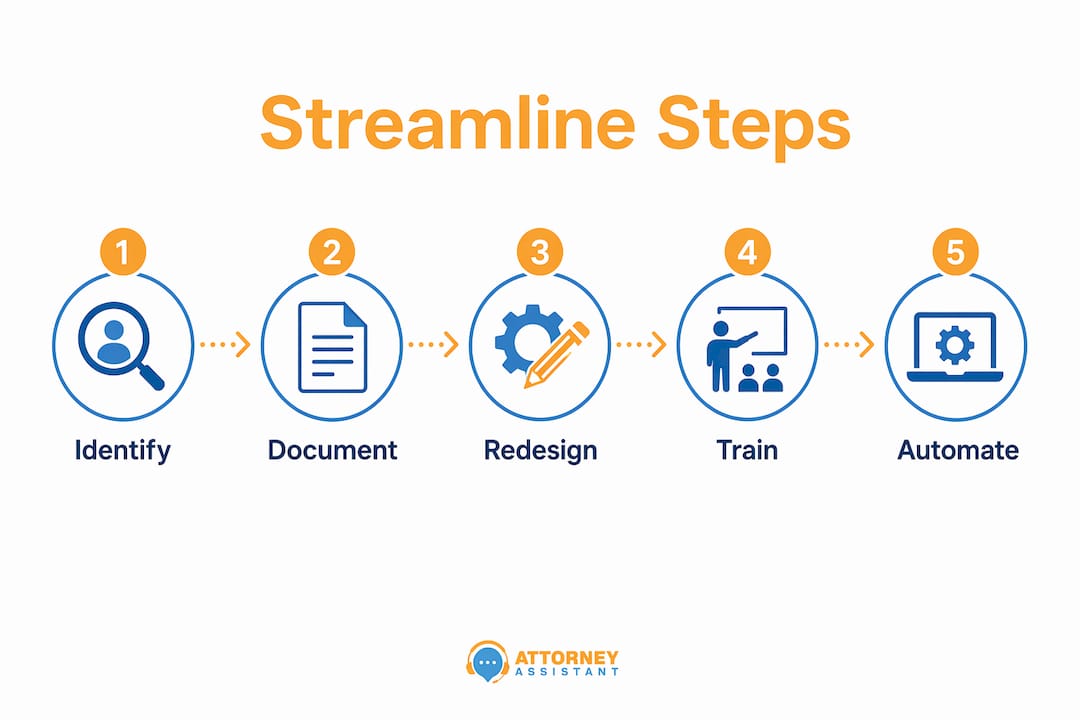
How to document and design workflows for administrative efficiency
Workflow documentation is where most efficiency projects succeed or fail. If you cannot describe a process in writing, you cannot automate it reliably.

The documentation process follows a clear sequence. First, identify every role involved in the process. Second, list every step in the order it happens. Third, mark every decision point where the process can branch. Tools like Lucidchart and Miro make this visual, which helps you spot bottlenecks and waste such as duplicate approvals, manual data re-entry, and unnecessary waiting periods.
The table below shows how two common administrative workflows look before and after documentation and redesign:
| Workflow | Before redesign | After redesign |
|---|---|---|
| Client intake | Phone call logged manually, follow-up by memory | Intake form triggers CRM entry, automated follow-up sequence |
| Invoice processing | Email chain, manual approval, spreadsheet tracking | Digital submission, single approval step, automated status updates |
| Staff onboarding | Verbal instructions, scattered documents | Documented checklist, templated welcome packet, assigned task owner |
Once you have mapped the current state, redesign the process with the people who actually do the work. They know where the friction is. Skipping this collaboration produces workflows that look clean on paper but fail in practice.
AI transcription tools like Otter.ai and Microsoft Teams transcription let you capture verbal walkthroughs of processes and convert them into draft procedures quickly. This is especially useful for capturing tribal knowledge, the undocumented expertise that lives in one person’s head and disappears when they leave.
The goal is a living procedures manual. Not a static document that gets filed and forgotten, but a reference that gets updated every time a process changes. Microsoft Copilot can assist with drafting and refining these documents, reducing the time it takes to produce a clean, usable SOP from hours to minutes.
Pro Tip: Assign one person as the process owner for each documented workflow. That person is responsible for keeping the documentation current. Without ownership, procedures manuals go stale within 90 days.
What does a step-by-step AI implementation actually look like?
Implementing AI in administrative workflows does not require a large IT project. The most effective approach is incremental and measurable. Here is a practical sequence that works for law firms and small business operations teams alike.
- Select one bottleneck process. Choose the task that consumes the most time or produces the most errors. Client intake follow-up and document drafting are common starting points for law firms.
- Document the current process completely. Use Lucidchart or Miro to map every step. Identify which steps are repetitive and rule-based. Those are your automation candidates.
- Apply AI to the draft-first steps. AI performs best in processes where it generates an initial draft or summary and a human provides final review. Use Microsoft Copilot to draft intake summaries, response templates, or procedure updates.
- Run automation in the background with human review on exceptions. Deel’s Akai demonstrates this model at scale. A benefits consolidation process that previously required 80 hours monthly dropped to 30 minutes after background automation was introduced with human review for sensitive exceptions. That is the target outcome.
- Define your KPIs before you launch. Measure cycle time, error rates, and the number of human touchpoints per transaction. Tracking these metrics validates whether the automation is working and tells you exactly where to improve next.
- Iterate and expand. Once the first process is stable and measurable, apply the same method to the next bottleneck. Do not attempt to automate everything at once. Firms that try a big-bang rollout consistently face higher error rates and lower staff adoption.
The law firm context adds one layer of complexity: compliance. Every automated workflow that touches client data, billing, or case records needs a human review checkpoint. Automation handles volume. Humans handle judgment.
For law firms specifically, legal admin automation examples show how document management and scheduling workflows can be restructured without disrupting client service.
Common pitfalls when improving administrative efficiency
Most administrative efficiency projects stall or fail for predictable reasons. Knowing them in advance is the difference between a successful rollout and a wasted quarter.
- Automating before documenting. Software cannot fix an undocumented process. If the steps are unclear, the automation will encode the confusion. Document first, automate second.
- Tech overload without training. Deploying Microsoft Copilot, Otter.ai, and a new CRM simultaneously overwhelms staff. Phased rollouts with focused training minimize disruption and increase adoption rates.
- No human oversight on automated outputs. AI solutions perform best when humans maintain responsibility for accuracy and compliance. Removing review steps entirely creates compliance risk, especially in legal environments.
- Treating procedures as finished documents. A procedures manual that does not get updated becomes a liability. Assign process owners and schedule quarterly reviews.
- Measuring the wrong outcomes. Tracking hours saved is useful, but tracking error rates and cycle times tells you whether quality improved alongside speed. Both matter.
Effective administrative management requires strategic planning and end-to-end process evaluation, not just software deployment. The technology is the tool. The discipline is the system.
For law offices, productivity improvements that actually hold come from fixing the process before adding the tool, not the other way around.
Which AI tools are best for administrative workflow automation?
Choosing the right tool depends on your process type, your team’s technical comfort, and whether you need IT support to deploy. The table below compares the most widely used options across key criteria.
| Tool | Primary use case | IT support needed | Human review built in |
|---|---|---|---|
| Microsoft Copilot | Document drafting, email summarization, SOP refinement | Minimal (Microsoft 365 integration) | Yes, draft-first model |
| Microsoft Teach | Workflow template creation, process design | Minimal | Yes |
| Otter.ai | Meeting transcription, procedure capture | No | User-controlled |
| Microsoft Teams transcription | Meeting notes, verbal process documentation | No (Teams users) | User-controlled |
| Deel Akai | Background workflow automation, high-volume case processing | Low-code, no IT required | Yes, exception handling |
| Lucidchart | Workflow mapping and visualization | No | N/A |
The most important factor is not features. It is fit. A tool your team will not use delivers zero efficiency gains. Start with the tool that solves your documented bottleneck and that your staff can learn in a single training session. Microsoft Copilot is the most accessible entry point for most firms already using Microsoft 365. Otter.ai works immediately for teams that need to capture verbal knowledge fast. Deel’s Akai suits operations teams running high-volume, repeatable back-office processes.
Removing duplicate approvals and simplifying decision points in legal workflows is often the fastest path to measurable time savings, regardless of which tool you choose.
Key takeaways
Efficient administrative management requires documented workflows, phased AI adoption, and human oversight to produce lasting, measurable results.
| Point | Details |
|---|---|
| Document before automating | Map every step and decision point in a process before deploying any tool. |
| Start with one bottleneck | Phased rollouts reduce disruption and produce measurable results faster than big-bang deployments. |
| Use draft-first AI tools | Microsoft Copilot and Teach generate initial drafts; humans provide final review and compliance checks. |
| Measure cycle time and error rates | KPIs validate whether automation improved speed and quality, not just headcount. |
| Assign process owners | Every documented workflow needs one person responsible for keeping it current and accurate. |
Why the people side matters as much as the technology
I have reviewed enough administrative efficiency projects to say this with confidence: the technology is rarely the problem. The problem is almost always the process underneath it, or the people who were never brought into the redesign.
The firms and operations teams that get lasting results from AI tools share one habit. They spend more time on documentation and training than on tool selection. They interview the people doing the work. They capture the tribal knowledge that lives in one person’s head and would disappear on their last day. They treat that knowledge as the raw material for every workflow they build.
The counter-intuitive truth about AI in administrative work is that its greatest value is not speed. It is consistency. A well-designed AI-assisted workflow produces the same output on a Monday morning and a Friday afternoon. That consistency is what reduces errors, shortens cycle times, and makes scaling possible.
I also think the compliance dimension is underestimated, particularly in legal environments. Background automation paired with human exception handling is not a compromise. It is the correct architecture. You want volume handled automatically and judgment handled by a person. The firms that remove human review entirely to save time are the ones that end up with compliance problems that cost far more than the hours they saved.
The practical advice I give every operations team is this: pick the one process that causes the most internal complaints, document it completely, fix the design before touching any software, and then automate the repetitive steps. Do that three times and you will have built the muscle memory to scale it across your entire operation.
— Nicole
How Attorneyassistant can help your firm reduce admin chaos
Law firms lose revenue not because they lack leads, but because their administrative processes fail to convert the leads they already have. Missed intake calls, slow follow-up, and inconsistent client communication are operational problems, not staffing problems.
Attorneyassistant handles intake, follow-up, and administrative workflows so your firm responds faster, converts more leads into signed cases, and reduces internal chaos. If you want to see how these processes work in practice, the Attorney Assistant virtual webinar walks through real workflow examples for law firms. You can also explore the free tools for law firms to get started immediately. If you are ready to talk through your specific situation, book a call with the team.
FAQ
What does it mean to streamline administrative tasks?
Streamlining administrative tasks means identifying repetitive, time-consuming workflows and redesigning them using documentation, process optimization, and AI tools to reduce errors and free staff for higher-value work. The goal is repeatable, measurable processes rather than ad hoc execution.
Which AI tools are most effective for admin workflow automation?
Microsoft Copilot and Microsoft Teach are the most accessible entry points for document drafting and workflow creation, particularly for teams already using Microsoft 365. Otter.ai handles transcription and knowledge capture, while Deel’s Akai suits high-volume background automation with human exception review.
How do you measure whether admin process improvements are working?
Track cycle time, error rates, and the number of human touchpoints per transaction before and after any process change. Monitoring these KPIs identifies what is working and where further optimization is needed.
Why should you document workflows before automating them?
Successful streamlining projects convert undocumented tribal knowledge into documented, repeatable procedures before automation. Automating an undocumented process encodes existing inefficiencies rather than eliminating them.
How long does it take to see results from admin process improvements?
A single, well-scoped bottleneck process can show measurable cycle time and error rate improvements within four to six weeks of a phased rollout. Firms that attempt to overhaul all processes simultaneously typically see slower adoption and higher error rates during the transition period.
Recommended
Related Articles
Macs for Lawyers: The Hardware and Compatibility Guide
A practical guide to Macs for lawyers covering hardware choices, software compatibility, security tradeoffs, and recommendations by firm size and workflow.
Business Telephone Answering Service for Law Firms
How a business telephone answering service works for law firms, including 24/7 intake, qualification, warm transfers, pricing models, and what
Call Flow Customer Service for Law Firms: A Practical Guide
Design a call flow customer service system for your law firm that captures leads, qualifies matters, and signs cases. Practical guide