How to Track Inbound Leads for Law Firms in 2026

TL;DR:
- Effective inbound lead tracking involves automating source capture and using tiered reporting to analyze performance. Most law firms fail because they rely on manual entry and overlook ongoing system audits, leading to inaccurate data. Focusing on accurate attribution and quick response times can significantly increase conversions and reduce wasted marketing spend.
Inbound lead tracking is the process of capturing where each prospect came from, how they engaged with your firm, and whether they converted into a signed case. Most law firms know they need more clients, but the real problem is that they cannot tell which marketing channels produce profitable cases and which ones drain budget. Knowing how to track inbound leads gives you the data to fix that. Tools like Google Analytics 4, Salesforce, and HubSpot, combined with UTM parameters and CRM automation, make it possible to attribute nearly every lead to its source. Responding to a lead within one minute can increase conversion rates by 391%. That number makes tracking not just a reporting exercise, but a direct revenue lever.
What are the key tools for tracking inbound leads?
Law firms need four categories of tools working together to capture lead source data accurately. No single platform covers everything on its own.
CRM platforms are the foundation. Salesforce, HubSpot, and Clio Grow each store lead records and can be configured to require a “Lead Source” field before saving a contact. That mandatory field is what prevents blank records from piling up. Without it, your intake team will skip the field under pressure, and you lose attribution data permanently.
UTM parameters are short tags appended to your URLs. When someone clicks a Google Ads link tagged with utm_source=google&utm_medium=cpc&utm_campaign=pi-injury, that data travels with them to your website. Google Analytics 4 reads those tags and records the session. The problem is that UTM data often disappears when a visitor navigates between pages or opens a chat widget. That is where hidden form fields come in.
Hidden form fields capture UTM values the moment a visitor lands on your site and store them invisibly inside your contact form. When the prospect submits the form, the source data submits with it. This technique, combined with tracked phone numbers from platforms like CallRail, gives you source attribution across both digital and phone channels.
| Tool | Primary function | Key integration |
|---|---|---|
| Google Analytics 4 | Session and traffic source tracking | CRM via GA Connector |
| Salesforce / HubSpot | Lead record storage and source fields | Forms, phone, chat |
| CallRail | Phone call source attribution | CRM, Google Ads |
| UTM parameters | URL-level campaign tagging | GA4, hidden form fields |
| Chat widget with UTM capture | Source persistence through live chat | CRM, hidden fields |
Pro Tip: Configure your CRM to block record creation unless the Lead Source field is populated. This single rule eliminates the most common cause of attribution gaps in law firm intake.
How to set up source attribution to capture 90% of leads
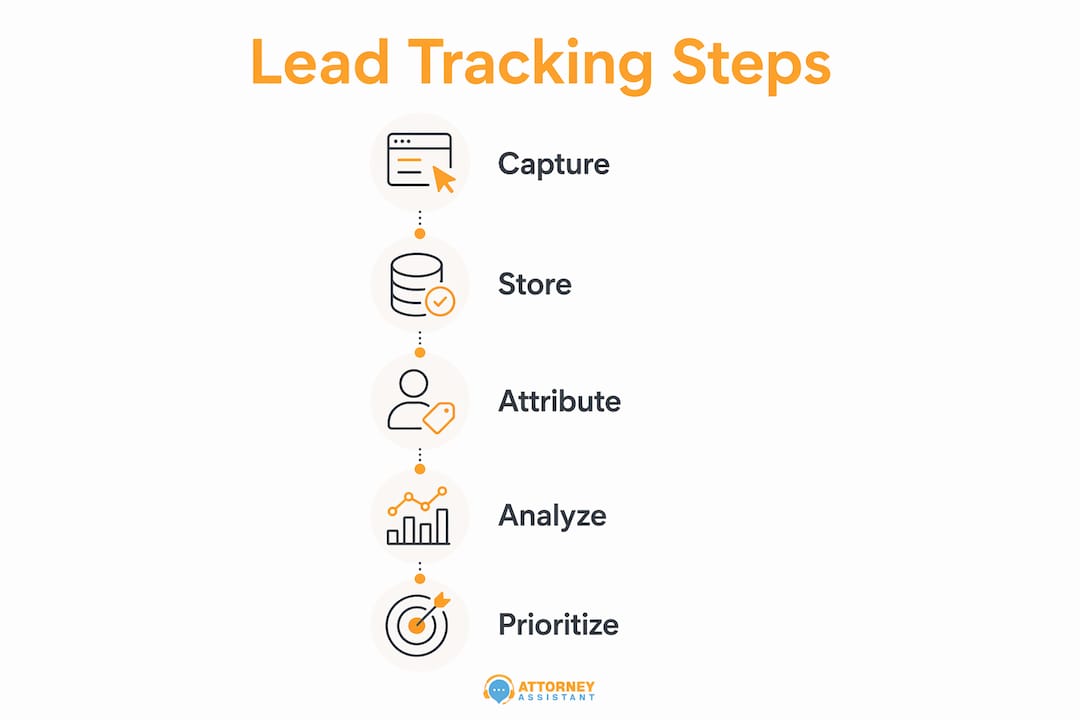
Achieving 90% or higher source attribution requires automating capture before any human touches the lead. Manual entry at intake is the single biggest cause of data blind spots. Here is how to build the system correctly.
-
Add UTM parameters to every ad and campaign URL. Use a consistent naming convention across Google Ads, Facebook Ads, and any directory listings like Avvo or FindLaw. Inconsistent naming creates fragmented data that is hard to analyze later.
-
Install a JavaScript snippet on your website. This script reads UTM values from the URL on page load and writes them into hidden fields on every form and chat widget. UTM parameters get stripped when visitors navigate between pages or when a chat session begins. The JavaScript fix ensures the data persists through the entire session.
-
Set Lead Source as a required CRM field. Configure Salesforce, HubSpot, or your chosen CRM to reject record saves without a source value. This applies to both web form submissions and manually entered phone leads.
-
Assign tracked phone numbers by channel. Use a different CallRail number for your Google Ads landing page, your organic homepage, and your Avvo profile. Each number routes to the same intake line but logs the source automatically.
-
Set up real-time routing rules. Route leads from high-intent sources like Google Ads directly to your fastest intake staff. 15 to 30 minute delays trigger automated re-routing protocols in high-performing firms. Build that logic into your CRM from day one.
The most common pitfall is a spike in “Direct” or “Web” traffic in your CRM. That spike almost always means UTM data is being lost before it reaches the record. The JavaScript hidden field approach is the fix.
Pro Tip: Audit your “Direct” lead bucket monthly. If it exceeds 10% of total inbound volume, your UTM capture is broken somewhere in the chain.
Which metrics reveal whether your lead tracking is working?
Tracking incoming leads is only useful if you review the right metrics on the right schedule. Effective lead monitoring uses a tiered reporting structure: real-time dashboards, weekly conversion reports, and monthly pipeline analysis.

Daily and real-time metrics tell you whether your intake operation is functioning right now. Watch queue depth (how many leads are waiting for first contact), average response time, and uncontacted leads older than four hours. Escalate any lead that has not been contacted within 30 to 60 minutes.
Weekly metrics reveal conversion patterns by source and stage. Track how many leads from each channel moved from inquiry to consultation, and from consultation to signed retainer. This is where you start to see which sources produce serious prospects versus tire-kickers.
Monthly metrics answer the bigger strategic questions:
- Pipeline velocity: how long does it take a lead to become a signed case, by source?
- Cost per opportunity: what did you spend to generate each qualified consultation?
- ROI by channel: which sources produce the highest revenue per dollar spent?
- MQL to SQL conversion rate: AI-assisted lead management improves MQL-to-SQL conversion by 10–25%.
Multi-touch attribution adds another layer of insight. First-click attribution tells you which channel introduced the prospect to your firm. Last-click attribution tells you which channel closed the deal. Both matter. A prospect might find you through an organic blog post, return via a Google Ad, and call after seeing a directory listing. Crediting only the last touch misrepresents the value of your content and SEO investment.
How to use lead data to prioritize leads and cut wasted spend
Leads with the highest volume are often the lowest quality. Tracking lead volume alone misleads you into funding channels that generate inquiries but not cases. The metric that actually matters is Cost Per Qualified Lead (CPQL).
CPQL is calculated by dividing total channel spend by the number of leads from that channel that met your firm’s definition of a qualified prospect. A channel that sends 100 leads at $20 each looks better than one that sends 10 leads at $150 each. But if the first channel produces zero signed cases and the second produces eight, the math reverses completely.
To use lead data well, your marketing team and intake team need to agree on one shared definition of a qualified lead. Silos between marketing and intake teams impair attribution data and create disagreements about which leads count. A mandatory follow-up field required within 36 hours closes the attribution gap and forces both teams to work from the same record.
Lead scoring helps prioritize who gets called first. Assign higher scores to leads from channels with strong historical conversion rates, to leads who visited multiple pages before submitting, and to leads who match your firm’s practice area focus. Your CRM can automate this scoring and surface the highest-priority leads at the top of your intake queue.
Pro Tip: Never reallocate marketing budget based on lead volume alone. Pull a CPQL report by source before any budget decision. One month of that data will change how you think about your Google Ads versus directory spend.
Key takeaways
Effective inbound lead tracking requires automated source capture, tiered reporting, and shared definitions between marketing and intake to produce reliable conversion data.
| Point | Details |
|---|---|
| Automate source capture | Use hidden form fields and tracked phone numbers to eliminate manual entry errors. |
| Target 90% attribution | Configure CRM to require Lead Source before saving any record. |
| Use tiered reporting | Review real-time queues daily, conversion rates weekly, and ROI by channel monthly. |
| Measure CPQL, not volume | Cost Per Qualified Lead reveals true channel efficiency and guides budget decisions. |
| Align marketing and intake | A shared definition of a qualified lead closes attribution gaps between teams. |
What most law firms get wrong about lead tracking
I have worked with enough law firms to say this plainly: the tracking problem is almost never a technology problem. Firms have Google Analytics. They have a CRM. They have forms. The problem is that none of it is connected, and nobody owns the data.
The most damaging mistake I see is relying on intake staff to manually type the lead source into the CRM during a busy call. That field gets skipped every time. The result is a “Direct” bucket that swells to 40 or 50 percent of all leads, which makes the data useless for any real decision. Fixing this requires removing the human from that step entirely. Automate the capture, make the field mandatory, and the problem disappears.
The second mistake is treating lead tracking as a one-time setup. Lead tracking must be a continuous process, not a project you complete and forget. UTM structures break when campaigns change. CRM fields get deleted during software updates. Tracked numbers get reassigned. Someone needs to audit the system monthly and own the outcome.
The third mistake is ignoring anonymous visitor identification. Most visitors never fill out a form. Anonymous visitor ID integrated with CRM gives you visibility into the full buyer journey, including the people who researched your firm for three weeks before calling. That data tells you which content and which channels warm up prospects before they ever convert.
Speed-to-lead is where I see the most immediate revenue impact. A firm that responds in five minutes will sign more cases than one that responds in two hours, regardless of how good the attorney is. The tracking system should surface uncontacted leads in real time so nobody falls through the cracks. If your intake team is not looking at a live queue, you are losing cases you already paid to generate.
— Nicole
How Attorneyassistant helps law firms stop losing inbound leads
Law firms that fix their tracking systems quickly discover a second problem: the leads are coming in, but the follow-up is inconsistent. Attorneyassistant handles the intake, follow-up, and administrative workflows that determine whether a tracked lead becomes a signed case.
Attorneyassistant’s lead follow-up service keeps response times tight and follow-up sequences running without depending on an overloaded intake team. The lead recovery service re-engages prospects who went cold before signing. For firms that want to build their own systems, the free tools library and virtual webinar cover lead tracking setup, CRM configuration, and intake process design. If you want to talk through what is leaking in your firm specifically, book a call and we will walk through it together.
FAQ
What does inbound lead tracking mean for a law firm?
Inbound lead tracking is the process of recording where each prospect came from, how they engaged with your firm, and whether they became a client. It uses tools like CRM systems, UTM parameters, and tracked phone numbers to capture that data automatically.
What tools do law firms use to track lead sources?
Law firms commonly use Google Analytics 4 for traffic attribution, Salesforce or HubSpot for CRM records, and CallRail for phone call tracking. Hidden form fields and UTM parameters connect campaign data to individual lead records.
Why do so many leads show up as “Direct” in my CRM?
“Direct” attribution spikes when UTM parameters are lost during page navigation or chat sessions. A JavaScript snippet that captures UTM values into hidden form fields on page load fixes this and restores accurate source data.
How quickly should a law firm respond to an inbound lead?
Responding within one minute increases conversion rates by 391%. High-performing firms escalate any lead that has not been contacted within 30 to 60 minutes using automated routing rules in their CRM.
What is Cost Per Qualified Lead and why does it matter?
Cost Per Qualified Lead (CPQL) divides total channel spend by the number of leads that met your firm’s qualification criteria. It reveals which channels produce profitable cases, not just high inquiry volume, and prevents budget waste on low-quality sources.
Recommended
Related Articles

Call Flow Customer Service for Law Firms: A Practical Guide
Design a call flow customer service system for your law firm that captures leads, qualifies matters, and signs cases. Practical guide

Fear of Talking on Phone: 7 Practical Confidence Tips
Overcome fear of talking on phone with practical scripts, role-play, exposure exercises, and intake tools built for legal teams.

Appointment Setting Online: A Law Firm Guide
Master appointment setting online for law firms with proven strategies that turn leads into booked consultations and grow your practice.