Law Firm Intake Response Time Improvement Guide

TL;DR:
- Improving intake response time significantly increases law firm conversion rates by reducing delays from inquiry to first contact.
- Automation, structured processes, and real-time tracking are essential to sustain sub-5-minute responses across channels.
Intake response time improvement is the practice of reducing the delay between a client inquiry and your firm’s first meaningful contact, and it is the single most measurable lever for increasing case conversion rates. Firms responding within 5 minutes see up to 300% higher conversion rates, yet the average legal industry response time sits at 17 hours. That gap is where revenue disappears. This guide covers how to audit your current process, apply proven response time strategies, select the right technology, and build the operational habits that sustain improvement over time. Tools like structured client portals, automated communication templates, and real-time tracking dashboards are central to every step.
What is an intake response time improvement guide for law firms?
An intake response time improvement guide is a structured framework for measuring, diagnosing, and fixing the delay between when a prospect contacts your firm and when your team responds with a meaningful first touch. The industry term for the core metric is “speed-to-lead,” and it directly predicts whether a prospect signs with you or calls the next firm on their list.
Most firms treat intake as an administrative function. It is a sales function. Every hour of delay is a compounding liability. A prospect who submits a form at 2 p.m. and hears nothing until 10 a.m. the next day has already spoken to two or three competitors. Improving intake is not about hiring faster staff. It is about building faster systems with automation and clear service level agreements (SLAs) that remove the human bottleneck from the first-touch process entirely.
How to audit and benchmark your current intake response time
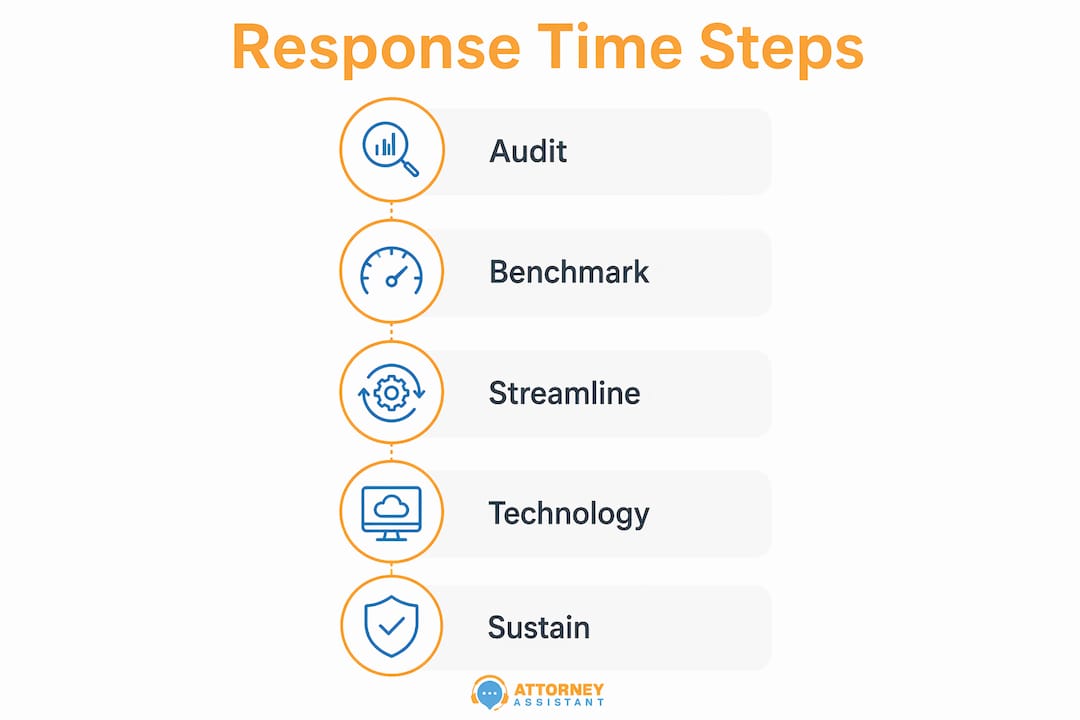
Before you change anything, you need a baseline. Pull the last 90 days of intake submissions from your CRM, intake software, or email inbox. For each submission, record the timestamp of the inquiry and the timestamp of your first outbound response. Calculate both the average and the median response time.

The average is useful for spotting overall trends. The median tells you what a typical prospect actually experiences. If your average is 4 hours but your median is 22 hours, you have a severe outlier problem where a handful of fast responses are masking widespread delays. The sub-48-hour response is the minimum industry standard, but your actual target should be under 5 minutes for high-intent web and phone inquiries.
If your systems do not timestamp responses automatically, run a manual log for two weeks. Assign one staff member to record inquiry time and first-response time for every new contact. This is also where mystery shopping adds value. Submit a test inquiry through your own website and measure how long it takes to receive a response, what that response says, and whether it moves the conversation forward.
Pro Tip: Segment your audit by inquiry channel. Phone, web form, email, and chat often have dramatically different response times. Fixing the slowest channel first produces the fastest measurable gain.
Set your KPIs before you build any new process. A reasonable 90-day target for most firms is a median first-response time under 30 minutes for web inquiries and under 2 minutes for phone calls. Sub-5-minute response for all channels is the goal at full maturity.
What are the top strategies to improve intake response time?
The most effective response time strategies combine automation, standardization, and clear accountability. No single tactic closes the gap alone. Here is what actually moves the number:
- Automate lead routing. Rules-based routing assigns new inquiries to the right intake staff member in seconds. Automated routing reduces average response time from over 13 hours to approximately 3.5 hours without adding headcount.
- Use structured client portals by practice area. Generic intake forms produce incomplete submissions that require follow-up before a case can even be evaluated. Practice-area-specific portals with required fields and document checklists cut matter-opening time by 60% and reduce new-file admin time by 80%.
- Standardize response templates. Draft four core templates: acknowledgment, information request, decline, and quote or fee agreement. Standardized templates compress response drafting time by 20 to 30 percent and eliminate the blank-page delay that causes staff to procrastinate on responses.
- Embed scheduling directly in intake forms. Requiring a prospect to wait for a callback to schedule a consultation adds 24 to 48 hours to the process. Tools like Calendly integrated into your intake form let prospects book immediately after submitting.
- Deploy after-hours automated responses. Over 40% of high-intent inquiries arrive outside business hours. An automated SMS or email response sent within 60 seconds of submission keeps the prospect engaged until a live person is available.
- Set and enforce SLAs with escalation alerts. Declaring a 5-minute response target means nothing without an alert system. Enforced SLA escalation nearly doubles the rate at which firms hit sub-15-minute response benchmarks.
Pro Tip: Add AI-powered qualification to your intake form so that by the time a staff member picks up the phone, they already know the case type, urgency level, and whether the prospect meets your firm’s criteria. This cuts call time and increases conversion on the calls that matter.
The fastest intake process efficiency gains come from removing steps, not speeding them up. Every approval, manual assignment, or copy-paste action that sits between inquiry and response is a target for elimination.
How to choose technology for fast law firm intake
The right technology stack for intake response optimization has four non-negotiable components: a structured intake portal with practice-area-specific forms, e-signature integration, a CRM with automated lead routing, and a scheduling tool that connects directly to your calendar.
| Feature | Why it matters |
|---|---|
| Practice-area intake forms | Reduces incomplete submissions and eliminates back-and-forth before case evaluation |
| Automated lead routing | Assigns inquiries to the right staff member in seconds, not hours |
| E-signature integration | Removes the print-sign-scan cycle from retainer agreements |
| Scheduling integration | Lets prospects book consultations immediately, cutting 24 to 48 hours from the process |
| Real-time SLA alerts | Flags overdue responses before leads go cold |
The most common mistake firms make when deploying intake technology is over-engineering the automation before mapping their actual requirements. Deployment time is typically spent on requirement mapping per practice area, not on building the software itself. A personal injury intake has different required fields, documents, and qualification criteria than an estate planning intake. Skipping this mapping phase produces a system that is technically functional but practically useless.
Start with the simplest version that works. A structured form connected to a CRM with automated email acknowledgment and a Calendly link is more effective than a complex multi-step automation that breaks under edge cases. Real-time SLA alerting and fallback systems are critical because automated routing will encounter failures. Build the fallback before you need it.
The ROI calculation is straightforward. Attorneys spend approximately 40% of their time on non-billable administrative tasks. Automating intake recovers 8 to 16 billable hours weekly for small firms. At $300 per hour, that is $2,400 to $4,800 in recovered capacity per week. For legal intake automation to pay for itself, it typically needs to recover fewer than two signed cases per month that would otherwise have been lost to slow response.
How to sustain intake response time improvements over time
Improving response time is a one-time project. Sustaining it is an operational discipline. The firms that maintain sub-5-minute response rates 12 months after implementation share three practices: real-time visibility, defined roles, and regular audits.
Build a speed-to-lead dashboard that every intake staff member can see in real time. This does not require expensive software. A shared Google Sheet updated automatically via Zapier from your CRM is sufficient for firms under 10 attorneys. The goal is to make response time visible so that slow responses are noticed immediately rather than discovered in a monthly report.
Define a rapid-response role for high-intent inquiries. Not every inquiry requires the same urgency. A prospect who fills out a form at 11 p.m. on a Sunday after a car accident is a different priority than a general inquiry about estate planning fees. Assign a specific staff member or rotation to monitor and respond to high-intent inquiries within your target window, and give that person the authority to schedule consultations without manager approval.
Maintain follow-up sequences after the first contact. Most firms treat intake as a single event. A prospect who does not respond to the first outreach is not a lost lead. A structured follow-up sequence of three to five touches over seven days recovers a significant portion of leads that went quiet after the initial contact.
Conduct a formal intake audit every 90 days. Pull the same data you collected in your baseline audit and compare it to your KPIs. Identify the channels, time windows, or staff members with the highest response times and address them specifically. Intake process efficiency degrades without active monitoring. Staff revert to old habits, forms get outdated, and automation breaks silently.
Train intake staff on three things: qualification criteria for your practice areas, the scripts for each response template, and how to use your CRM to log and track every interaction. Staff who understand why speed matters convert at higher rates than staff who are simply told to respond faster.
Key takeaways
Fast intake response time is the most direct operational lever law firms have for increasing case conversion without spending more on marketing.
| Point | Details |
|---|---|
| Speed-to-lead defines conversion | Firms responding within 5 minutes convert at up to 300% higher rates than those responding in hours. |
| Audit before you build | Pull 90 days of intake data and calculate median response time before changing any process or technology. |
| Automation beats effort | Automated lead routing cuts average response time from 13+ hours to 3.5 hours without adding staff. |
| Map requirements first | Deployment time is spent on practice-area requirement mapping, not software. Skip this and the system fails. |
| Sustain with visibility | Real-time dashboards and 90-day audits prevent response times from drifting back to baseline. |
What I’ve learned about intake that most guides won’t tell you
The firms that struggle most with intake response time are not the ones with bad technology. They are the ones with flexible processes. When intake is handled by whoever is available, using whatever format they prefer, the result is inconsistency that no automation can fix. I have seen firms spend significant money on CRM platforms and intake software only to watch staff route around the system because it was easier to respond by email.
The fix is not more technology. It is structure enforced at the process level. Structured checklists by practice area, required fields in intake forms, and mandatory CRM logging are more effective than any AI tool applied to a chaotic process. Over-engineered automation applied to an unstructured intake process produces faster chaos, not faster conversions.
Start with the simplest possible version of each improvement. A real-time Slack alert when a new web form submission goes unanswered for 10 minutes costs almost nothing to build and produces an immediate behavior change. Add complexity only after the simple version is working consistently. The firms that sustain sub-5-minute response rates are not the ones with the most sophisticated systems. They are the ones with the most disciplined processes.
One more thing: allocate more time to mapping your intake requirements than you think you need. Most firms underestimate this by a factor of three. Getting the requirements right for each practice area is the work. Everything else is execution.
— Nicole
How Attorneyassistant helps law firms respond faster and convert more
Slow intake response is a revenue problem, and it is one Attorneyassistant is built to solve. If your firm is losing leads to delayed follow-up, inconsistent intake, or after-hours gaps, the issue is operational, not a shortage of inquiries.
Attorneyassistant handles intake, follow-up, and administrative workflows so your team responds faster and converts more of the leads you are already generating. Explore the free tools for law firms to assess your current intake gaps, or join an upcoming virtual webinar focused on intake response optimization and lead conversion. If you want a direct assessment of where your firm is losing leads, book a call and we will walk through your intake process together.
FAQ
What is a good intake response time for law firms?
The minimum industry standard is a response within 48 hours, but the conversion benchmark is under 5 minutes for high-intent inquiries. Firms that respond within 5 minutes convert at up to 300% higher rates than those responding hours later.
How do I measure my firm’s current intake response time?
Pull the last 90 days of intake submissions and calculate the time between each inquiry timestamp and your first outbound response. Calculate both the average and the median to identify whether slow responses are widespread or concentrated in specific channels or time windows.
What is the fastest way to improve intake response time?
Automated lead routing combined with standardized acknowledgment templates produces the fastest measurable gain. Routing automation alone reduces average response time from over 13 hours to approximately 3.5 hours without requiring additional staff.
Do after-hours inquiries need an immediate response?
Yes. Over 40% of high-intent inquiries arrive outside business hours. An automated SMS or email response sent within 60 seconds of submission maintains prospect engagement until a live staff member is available the next business day.
How long does it take to implement intake automation?
Most of the time is spent mapping intake requirements by practice area, not building the technology. A firm with two to three practice areas should allocate four to six weeks for requirements mapping before configuring any software. The technology build itself is typically faster than the planning phase.
Recommended
Related Articles

Why Intake Response Time Matters for Law Firms
Discover why intake response time matters for law firms. Fast replies boost client conversion and secure more signed cases. Learn how now!

Preferred Method of Contact for Law Firm Intake
Discover how to capture and use the preferred method of contact in legal intake to improve conversions, ensure compliance, and streamline law firm operations.

1st Dollar Coverage in Law Firm Retainers: A Practical Guide
Understand 1st dollar coverage in legal and insurance contexts. Learn how it shapes intake, retainer strategy, firm revenue, and risk.