
It's 6:47 on a Friday. A woman whose car was rear-ended on the shoulder of the interstate is calling the number from your website. The phone rings four times. Voicemail picks up. She leaves forty seconds of detail, waits out the weekend, and on Monday morning she signs with a firm two blocks closer to her apartment.
The loss is an intake failure, and it is ordinary.
Legal intake software is the system that captures every new inquiry, qualifies it, routes it to the right person, and tracks follow-up until the matter is signed or closed. Without that trail, the call sits in a mailbox until someone remembers it, which is how a paid click becomes a file that never opens.
Firm owners often shop for a lead-capture gadget and end up with a subscription that stores names nobody calls. I would buy against a narrower job. Legal intake software is an accountability system for response time and follow-up. Software reminds, routes, and records. People decide, persuade, and sign.
Table of Contents
- Legal intake software, explained
- What legal intake software does stage by stage
- Key features to evaluate before you buy
- What this looks like in real firms
- Where software ends and live intake begins
- Choosing the right setup for your firm
Legal intake software, explained
A firm can buy every channel a prospect might use and still lose the matter between the first ring and a signed retainer. Collecting the lead is the simplest part. The harder work is qualification, routing, scheduling, and following up until a person either signs or closes the file.
That harder work is what the software is for. It timestamps the inquiry, assigns an owner, and keeps the next step visible after the receptionist goes to lunch or sits in a deposition for four hours. It does not run a conflict check, talk a hesitant caller through a fee, or decide the case is worth taking. Those steps still need a trained person who is paid to care about the outcome.
A 2024 Clio secret-shopper study of 500 U.S. law firms found that the share of firms answering a live call fell 16 percentage points from the 2019 version of the same test. Firms already spend real money on marketing, SEO, and referrals, then let the results leak at the front door. Intake in a lot of small and midsize firms runs on someone remembering, a habit that takes lunch, goes on vacation, and disappears into a four-hour deposition.
The uncomfortable part: most firms can't tell you their answer rate. A firm that can't name that number has an ownership problem, not a missing report.
I would not buy intake software to pile up more names. I would buy it so response time and follow-up have an owner, a clock, and a record someone can audit on Monday morning. Marketing can fill the queue. A person, prompted and measured by the system, is who calls the lead back.
What legal intake software does stage by stage
A web form lands at 6:14 p.m. By morning it either has a timestamp, a practice-area tag, and a task with a deadline, or it has none of those things and the person who would have signed is already on the phone with the firm that answered. Legal intake software, standing alone or sitting inside a practice management platform, is what makes the first outcome the default. It pulls calls, web forms, chat, texts, and referrals into one tracked pipeline and puts a clock on every record.
It works like air traffic control: it sequences, routes, and records every movement. It does not fly the plane. It is not a web form, an answering service, or a replacement for your CRM, though it should feed the CRM so nobody retypes a phone number twice. Functionally it is a queue with a clock on every item. The clock is the accountability. The queue only works if a person is assigned to beat it.
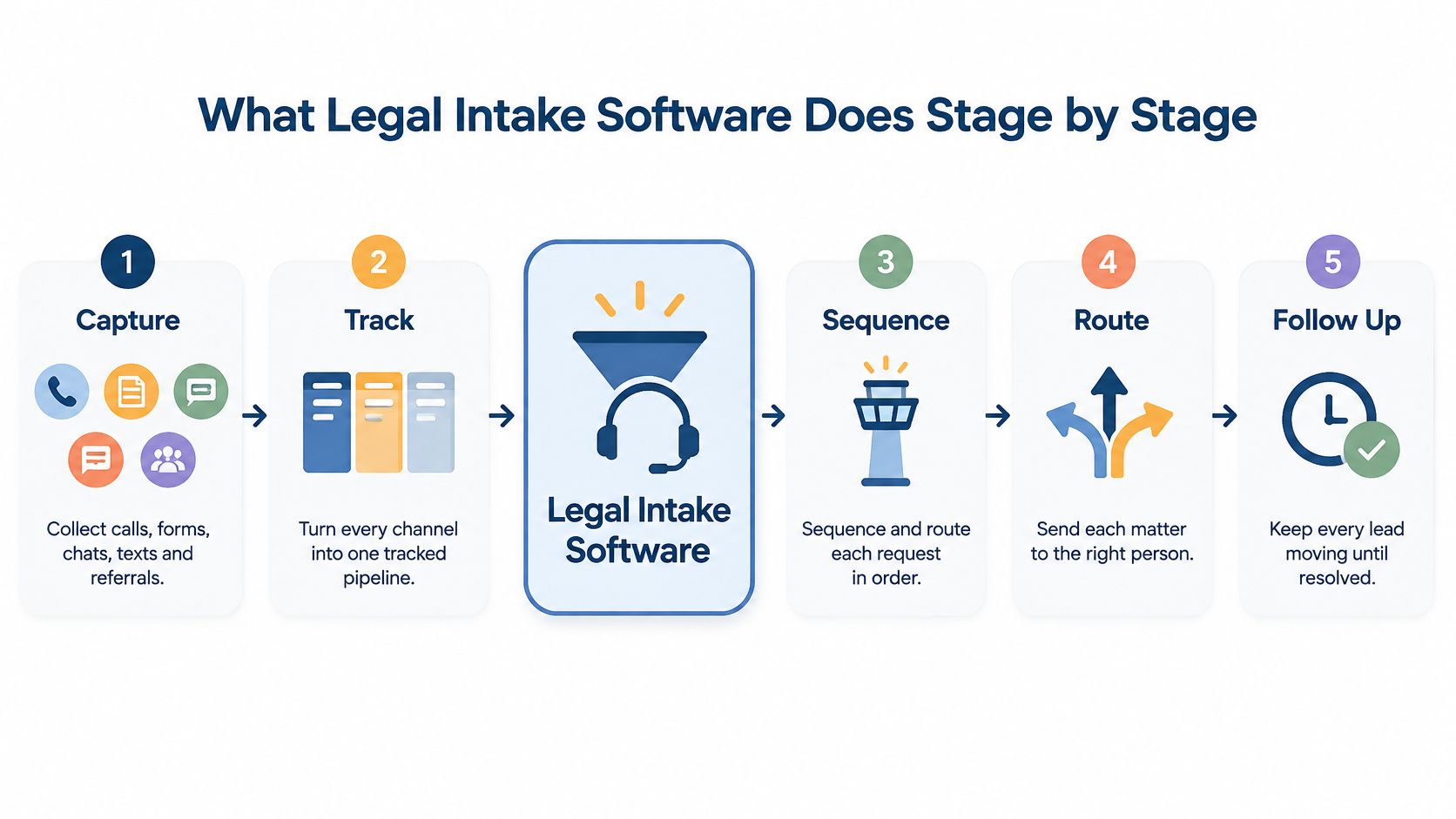
Eight stages, one chain. Walk them in order and the leak shows up as a missing owner, not a vague complaint about lead quality. Software can automate the handoff between stages. It cannot decide the case is worth taking.
- Capture. Every channel lands in a single timestamped queue. Skip that and inquiries live on voicemail, in three inboxes, and on a sticky note stuck to a monitor.
- Acknowledge. An instant confirmation tells the prospect the message arrived and when a human will respond. Without it, silence reads as rejection. The auto-reply is the software's job. The human reply is not.
- Qualify. Structured questions cover matter type, jurisdiction, deadlines, and funding. Without structure, the facts that decide whether you want the case live in one person's memory, if anyone asked them.
- Conflict check. Names and parties get flagged before an attorney spends an hour of goodwill on a matter the firm cannot take.
- Route. Practice area, language, and availability decide where the inquiry goes. A Spanish-speaking caller sent to a monolingual queue is a routed lead, not a served one. Routing rules are configuration. Language coverage is staffing.
- Schedule. Consultations book against real calendar availability, with reminders that cut the no-show rate you have been blaming on clients.
- Follow up. Multichannel attempts continue until the lead reaches a disposition: signed, declined, or unresponsive after a defined number of tries. One call and a hopeful feeling is not a sequence. The tool can fire the tasks. Someone has to work them.
- Sign and onboard. E-signature, payment setup, and a complete matter record open in the case management system with the story already in it. Software moves the file. A person still has to explain the retainer.
The cost of a broken stage shows up on the clock. In a dataset covering 356,229 U.S. law-firm first contacts, the median time to initial human contact was about 21 hours, according to Clio's Legal Trends data. Twenty-one hours is an obituary with a timestamp. Stalled matters, the ones where an intake form went out and never came back, rarely get a timely second attempt. Speed-to-lead automation can create the task. It cannot make the second call if nobody owns the list.
Prospects have been clear about the standard for years. In Clio's 2019 mystery-shopping study of 2,507 legal professionals, 79% of prospective clients expected a response within 24 hours, 82% said timeliness was important when choosing a lawyer, and 82% of the firms that answered email replied within a day, as reported in Clio's press release on the study. The divide is process, not capability. I would not keep a system that cannot show time-to-first-human-response by source. If you cannot see the miss, you will keep blaming the ads.
The intake workflow stage by stage
| Stage | What the software does | What breaks without it |
|---|---|---|
| Capture | Collects calls, forms, chats, texts, and referrals into one timestamped queue | Inquiries scattered across voicemail, inboxes, and sticky notes |
| Acknowledge | Sends instant confirmation and sets response expectations | Prospect wonders whether anyone received the inquiry |
| Qualify | Runs structured questions on matter type, jurisdiction, deadlines, and funding | Key facts live in one person's memory, if they were asked at all |
| Conflict check | Flags names and parties against existing matters before attorney time is spent | Conflicts surface late, after the firm has already invested effort |
| Route | Assigns the inquiry by practice area, language, and availability | Hot leads sit in a general inbox waiting for someone to notice |
| Schedule | Books consultations, syncs calendars, and sends reminders | Double bookings, no-shows, and manual rescheduling |
| Follow up | Triggers multichannel sequences until the lead reaches a disposition | One call, then silence; stalled matters quietly expire |
| Sign and onboard | Produces e-signature retainers, payment setup, and a complete matter record | Handoffs lose context and the client repeats their story from zero |
Intake is a decision about what happens next, made by someone who owns the outcome. A saved message is only a note until that decision exists.
The technical version is unglamorous: event-driven queues with service-level timers, automatic task creation, escalation rules for unanswered leads, and dashboards for time-to-first-human-response, contact rate, follow-up completion, and hire rate by source and matter type. The audit trail matters more than the interface. Timestamped inquiries, attempted contacts, dispositions, consent status, assigned staff member, and outcome let you separate a marketing problem from an operations problem. Without those fields, "lead quality is down" is a feeling, not a finding. Software can record every miss. A trained person still has to close, decline, or keep calling.
Key features to evaluate before you buy
Start with a benchmark you can hold a vendor to. A 2023 secret-shopper study that contacted 1,300 U.S. law firms through their own online lead forms using a fictional inquiry found a median first response of 20 minutes, down from 25 minutes in the comparable 2021 test. That's the number your intake process is competing against, not the marketing brochure's promise of speed. A response that waits until the end of the business day isn't slightly slow. It's outside the observed benchmark by an order of magnitude.
Note the qualification on that figure: it measures the first response, not the qualification, the booked consultation, or the signed retainer. Speed is the entry ticket, not the win.
Features worth evaluating before you buy
| Feature | Why it matters | What to ask the vendor |
|---|---|---|
| Omnichannel capture | Every call, form, chat, and text lands in one queue | Which channels are native and which need connectors? |
| Speed-to-lead automation | Instant acknowledgment, task creation, and escalation timers | What happens automatically when nobody answers? |
| Qualification and conflict checks | Structured scripts and party screening before attorney time is spent | Can we customize questions per practice area? |
| Scheduling and calendar sync | Books consultations and cuts no-shows with reminders | Does it sync two-way with our existing calendars? |
| E-signature and intake-to-case flow | Moves a qualified lead straight to retainer and matter opening | Where does signed data go next: CRM, billing, documents? |
| Integrations | Intake data should flow into the tools the firm already runs | Do you work with Clio, Filevine, Litify, MyCase, or SmartAdvocate? |
| Reporting | Response times, contact rates, and conversion by source | Can we see time-to-first-response and follow-up completion without exporting spreadsheets? |
| Security and confidentiality | Prospect data is sensitive from the first message | Do you offer role-based access, encryption, audit logs, and a promise not to train on our data? |
Three questions do most of the sorting. What happens automatically when nobody answers? If the answer is "it sits in the queue," you've bought a form with extra steps. What can we measure out of the box? If the answer requires a spreadsheet export and a patient analyst, the reporting isn't real. Who owns the data if we leave? Get that in writing, with export format and timeline named.
The security specifics worth insisting on
Intake data is names, contact details, injuries, medical facts, and sometimes a panicked description of a criminal charge. NIST's AI Risk Management Framework recommends documenting privacy risks, mapping third-party software and data risk, monitoring systems for privacy exposure, and treating confidentiality, integrity, and availability as core requirements across system and output data.
Translated to procurement: verify role-based access, least-privilege permissions, encryption in transit and at rest, monitored audit logs, retention and deletion controls, incident-response procedures, tenant isolation, and a contractual bar on using client or prospect data for model training. If the platform adds AI summaries or qualification, add human review before consequential decisions, prompt and output logging, redaction of unnecessary sensitive data, and periodic testing for leakage.
A vendor demo answers every question. A test lead at 9 p.m. on a Tuesday answers the only question that matters.
Don't build a second system of record
Most firms already own the back office. The ABA's 2024 Practice Management TechReport reported that 53% of surveyed lawyers had case or practice-management software available at their firms, and a 2025 ABA release reported that 73% of law firms were using cloud-based legal tools in 2024. Intake belongs at the front of that stack, not beside it.
Before you sign, ask whether a new inquiry can open or update a matter without anyone retyping a field. That's the practical test behind the reporting question, and it's also where the intake analytics you need comes from: a single record that starts at first contact and ends at signed. A Staffline hire works inside the firm's case management system, whether that's Filevine, Litify, Clio, MyCase, or SmartAdvocate, so the workflow doesn't stop at the edge of the tool.
What this looks like in real firms
Three firm shapes, one workflow. These aren't customer stories. They're operating pictures, recognizable from the symptoms, and the correction looks the same in each.
The solo personal-injury attorney who is in court all day
Calls roll to voicemail by 9:30. Consultations get booked from memory, in a car, between hearings. After the fix, live coverage answers and qualifies while the attorney is standing at a podium, the software conflict-checks and books the consultation, and the attorney opens a complete file instead of a stack of missed-call slips. Nothing about the attorney's day changed. The front door started working.
A two-partner family firm buried in web forms
One person tries to remember who still needs a call, which is the world's least reliable CRM. The correction isn't more software. It's sequences that put every inquiry on a schedule, plus one named owner for intake and phone coverage. A lean firm that hired a single Staffline assistant for intake and phone coverage trusted that same assistant with review generation and follow-up within weeks, which is what happens when a competent person owns a queue instead of renting space in it.
Worth remembering why capacity is the binding constraint. A 2025 attorney workload report found attorneys spent 2 of every 8 hours in a typical workweek on administrative tasks such as tracking hours and managing projects, according to the Attorney Workload report. In an eight-hour day, that's roughly two hours not spent on legal work. Sending intake to the attorney is how you get a $400 hourly rate applied to a $0 task.
A high-volume screening practice counting form fills
The dashboard says 400 leads came in. Nobody can say which source produced signings, so marketing gets judged on volume and intake gets judged on nothing. After the rebuild: identical scripts across sources, recorded calls with quality review, disposition tracking, and a conversion report sorted by source. Somebody finally knows that the $18,000 a month producing 180 leads produced four signed matters.
The four numbers to track before and after
- Answer rate. The share of inbound calls a human picks up.
- Time to first contact. Minutes, not business days.
- Consult show rate. Booked versus attended.
- Sign rate. By source, by matter type, by intake person.
If those four are unknown at your firm, the software hasn't made intake accountable. It has made it prettier. Set the numbers against the outside benchmark, where most tested firms failed to reach the caller at all, and the gap tends to be uncomfortable reading.
Where software ends and live intake begins
A chatbot answers at 2:17 a.m., collects a name, and sends a confirmation. By morning the lead is a row in a spreadsheet and nobody has decided whether it is a case. That is the line software does not cross.
Attorney use of AI tools rose sharply in the ABA's 2024 technology survey, and the jump was larger inside firms of 100 or more attorneys. Clients are not uniformly hostile to that. In Scorpion's 2025 Legal Consumer Insights Report, 61% of surveyed consumers said they were open to lawyers using AI to improve speed or communication as long as the human relationship stayed intact.
Speed without a person on the other end is not the advantage. The working model is transparent escalation: software moves volume, and a trained person takes the step that needs judgment.
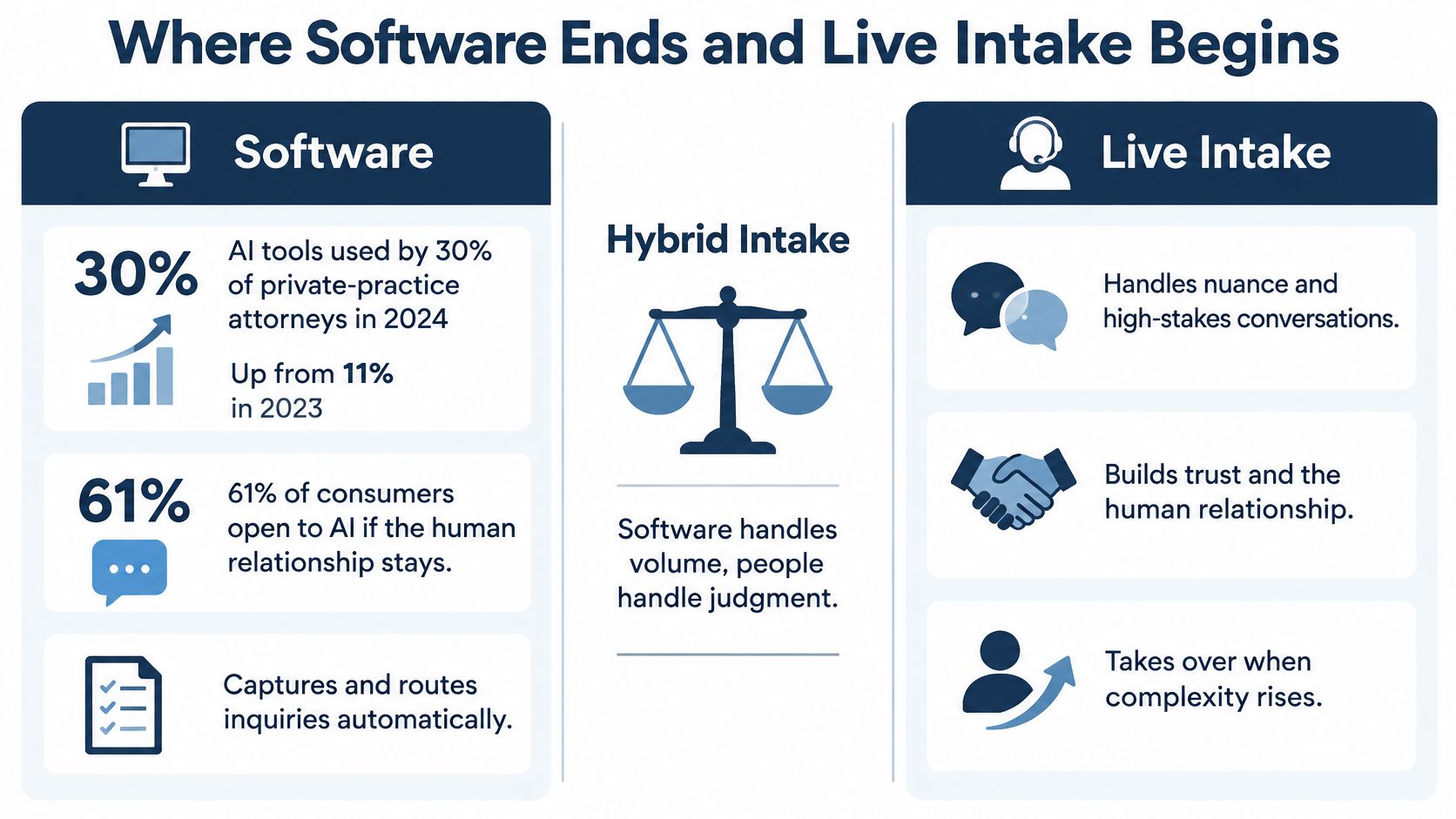
Who does what in a hybrid intake operation
| Intake task | Software handles | A trained person handles |
|---|---|---|
| First response at 2 a.m. | Instant acknowledgment and data capture | Judgment, empathy, and an actual conversation |
| Qualification | Consistent scripts and complete records | Hearing what the caller is not saying |
| Emergency triage | Routing rules and escalation alerts | Deciding whether this is a case and how urgent it is |
| Conflict screening | Flagging matching names and parties | Reviewing flags and making the call |
| Follow-up sequences | Timed reminders and task creation | Persistent, human outreach that adapts to the answer |
| Fee discussion and signing | E-signature, payment links, document assembly | Explaining fees, handling objections, closing the matter |
| Records and administration | Reminders, checklists, and status tracking | Chasing providers, drafting, and managing deadlines |
Over-automation fails in a specific way. The bot stores the name, the confirmation email goes out, and nothing creates a monitored callback, a conflict review, or a documented disposition. The leak is still there. The dashboard just describes it more neatly.
Automate volume. Staff judgment. If the step is whether this caller is a client, whether the matter is urgent, or whether the fee structure is fair, a person does it. Software's job is to put that call in front of them with the facts already captured.
The deliberate version of hybrid
Attorney Assistant's Frontline is 24/7 live intake that answers, qualifies, and signs cases. Specialists work in English and Español, with quality assurance on every call, and they sign CFA, flat-fee, and retainer matters instead of leaving a message for someone else to interpret.
Traditional law firm receptionists handle routing and courtesy. That work is real, and it is a different job. Live intake has to qualify, handle objections, and get a signature. If the difference between live answering services and live intake is fuzzy at purchase, the quarter-end conversion report will make it plain.
After the signature, Staffline is a dedicated full-time professional inside the firm's own systems. That person carries records, liens, deadlines, and client communication. Frontline signs the case. Staffline carries it. Together they cover the path from first call to resolution, and the mix is scoped on a discovery call rather than guessed at in a proposal.
Choosing the right setup for your firm
Four rules cover most of the decision.
If leads leak after hours, the gap is coverage, not another login. A tool that captures a form at 11 p.m. and waits until 9 a.m. for a human hasn't solved nights and weekends.
If follow-up is inconsistent, the fix is a named owner. Software can schedule attempts. Only a person can decide that attempt four needs a different tone than attempt one.
If staff are buried, add capacity rather than more attorney hours. Delegation reserves judgment for the work that requires it.
If nobody can state the answer rate, buy reporting before features. You can't manage a number you don't collect.
The measurement gap is well documented. Only 35% of surveyed firms report measuring response time, and just 25% track total case-resolution time, according to the ABA's Legal Industry Report 2025 coverage. Consumer research in the same body of work found that 72% of prospective clients move on when they don't hear back within 24 hours. A firm that knows its baseline is already ahead of two thirds of the market.
Then take five steps, in this order.
- Map the current path from first ring to signed retainer, including the after-hours detour.
- Measure four things for a month: answer rate, time to first contact, follow-up attempts, and sign rate.
- Choose software that runs capture through signature and connects to the case system you already run, rather than creating a parallel record.
- Decide which hours require a live person, and be honest about nights, weekends, and holiday overflow.
- Assign an owner to every stage, including conflict review and failed-contact recovery, because unowned stages are where matters go to die.
If the diagnosis points to coverage, Attorney Assistant's free intake audit shows where operational gaps are leaking revenue. Every engagement starts with mapping the firm's intake process, follow-up gaps, and admin workflows before recommending anything, whether that turns out to be software, Frontline live intake that qualifies and signs, or a dedicated Staffline professional embedded in the firm's systems. If you're pairing this with wider legal staff solutions, that's the same conversation. And if search visibility is part of the plan, this 2026 schema implementation checklist is a useful companion for making sure the pages feeding your intake are described accurately to search engines and AI assistants.
Start where the losses are measurable. The rest is configuration.
Attorney Assistant provides the two halves of a working front door: Frontline for 24/7 live intake that answers, qualifies, follows up, and signs cases in English and Español, and Staffline for a dedicated full-time professional who works inside your case management system and carries the matter forward. If your answer rate is a mystery and your follow-up depends on memory, Attorney Assistant can map where the inquiries stop and what it takes to fix it.
Related Articles

Missed Call Text Back for Law Firm Intake
A missed call text back tells the caller you saw them, then hands the lead to live intake. See the timing, the first message, and the TCPA line.

Speed to Lead for Law Firms: How Fast Is Fast Enough
Speed to lead is how fast your firm answers new inquiries. Learn what to measure, how to cut response times, and where intake breaks down.

After Hours Service for Law Firms: Models, Costs and KPIs
Learn how after hours service works for law firms: three operating models, what unanswered calls cost, and the metrics that prove coverage works.