mx.linkedin.com Alternatives: Best Networks by Use Case

TL;DR:
- Several platforms serve as effective alternatives to LinkedIn for specific professional needs, such as Meetup and Eventbrite for events, Slack and Discord for communities, and GitHub or Behance for portfolios. Choosing the right platform depends on your goal, audience, and required outcome, with emphasis on verification and privacy for high-trust exchanges. Migrating away from LinkedIn involves exporting contacts, selecting suitable channels, and updating workflows to capture and convert referrals efficiently.
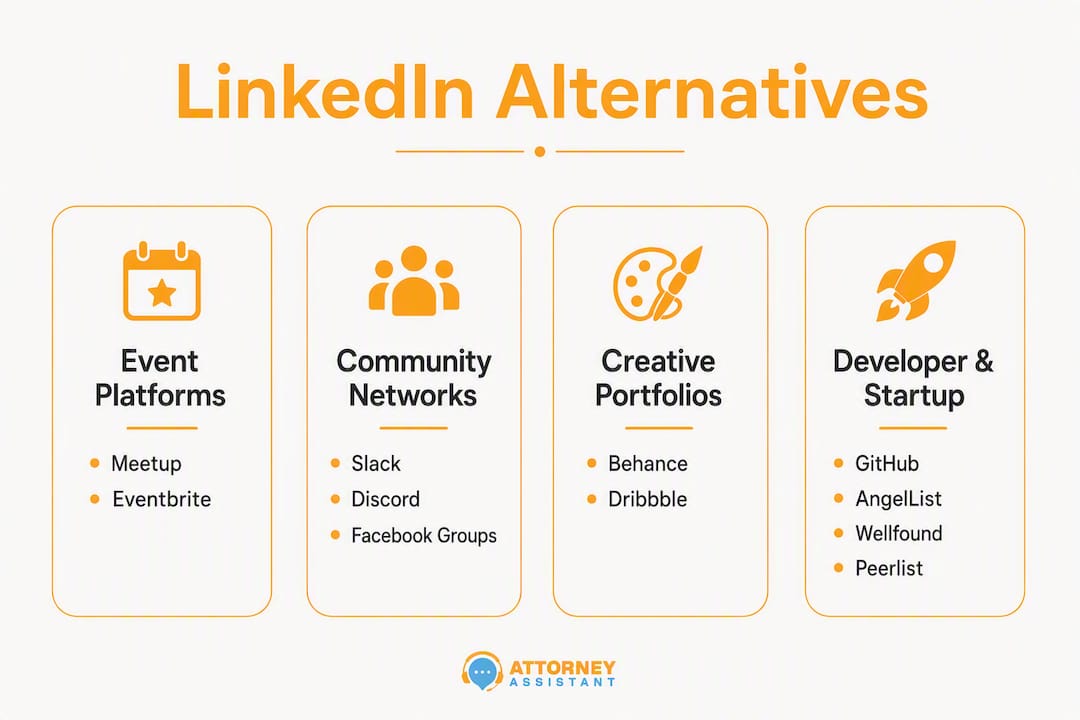
The best alternatives to mx.linkedin.com, organized by what you actually need to accomplish: Meetup and Eventbrite for live events, Slack and Discord for communities, Behance and Dribbble for creative portfolios, GitHub, AngelList, Peerlist, and Wellfound for developers and startups, ResearchGate for academics, Indeed, ZipRecruiter, Glassdoor, and Jobcase for job searching, Upwork and Fiverr for freelance work, and Overture Law and Referify for attorney referral networks.
Here is the quick case for each category:
- Events: Meetup and Eventbrite surface local and virtual gatherings that LinkedIn’s feed buries under sponsored posts.
- Communities: Slack and Discord host niche, invite-based groups where conversations actually happen.
- Creative portfolios: Behance and Dribbble let your work speak louder than a job title.
- Developer/startup: GitHub, AngelList, Peerlist, and Wellfound connect you with people who judge you by what you ship.
- Academic: ResearchGate is where researchers find collaborators, not recruiters.
- Job boards: Indeed, ZipRecruiter, Glassdoor, and Jobcase reach active job seekers directly.
- Freelance/gig: Upwork and Fiverr match you with clients who have a budget, not just a connection request.
- Attorney referrals: Overture Law and Referify offer gated, verified networks built for ethical fee-sharing.
LinkedIn still has a massive user base, but senior professionals increasingly find the feed noisy and less useful for high-trust introductions. The alternatives above exist because attention-economy mechanics and LinkedIn’s shift toward AI-prioritized, commercialized content opened real space for platforms built around outcomes, not engagement scores.
Table of Contents
- How do you choose the right LinkedIn alternative for your goal?
- The best LinkedIn alternatives organized by use case
- Why do attorneys need gated, verified referral networks?
- How do you migrate your network away from LinkedIn?
- Key Takeaways
- Why this switch matters for law firms
- Useful sources and further reading
- FAQ
How do you choose the right LinkedIn alternative for your goal?
Start with one question: what outcome do you need? Meeting people in person, showing your work, hiring, getting hired, finding gigs, or exchanging verified referrals each points to a different platform. Picking by audience size alone is how professionals end up on the wrong platform for six months.
Five criteria worth checking before you commit:
- Audience match. Does the platform attract the specific people you need — recruiters, founders, creatives, academics, or attorneys? A platform with millions of users is useless if none of them are your buyers or collaborators.
- Discovery model. Events-based platforms (Meetup, Eventbrite) work differently from feed-based ones (Facebook Groups) or matchmaking ones (Shapr). Choose the model that fits how you naturally build relationships.
- Privacy, gating, and verification. Open platforms generate noise. Gated or verified platforms (Overture Law, Referify, private Slack workspaces) produce higher-trust introductions. For attorneys, verification is not optional.
- CRM and workflow integration. Can you export contacts? Does the platform connect to tools like HubSpot, Clio, or Salesforce? A platform that traps your network is a liability.
- Cost-to-outcome. Free tiers on job boards and community platforms are often enough to test fit. Pay-to-play visibility models (where your profile disappears unless you upgrade) are a red flag until you have confirmed the audience is there.
Red flags to watch for: platforms that require premium upgrades just to send a message, no member verification, no data export, and engagement models that reward volume over quality.
Pro Tip: Before committing to a new platform, spend 20 minutes as a lurker. Check whether real conversations are happening in the last 30 days, whether members respond to cold outreach, and whether the community moderators are active. A ghost town with a polished homepage is a common trap.
Quick evaluation checklist:
- Search for three people in your target role or industry. Are their profiles current?
- Post or reply once and measure response quality within 48 hours.
- Ask a community moderator one specific question. Response time and depth tell you everything about community health.
- Confirm data export options before building a presence.
The best LinkedIn alternatives organized by use case

Alternative professional networks built around verifiable work artifacts — code contributions, design portfolios, published research — convert connections into real collaboration faster than profile-based feeds. Here is the full catalog.
Events: Meetup and Eventbrite

Meetup connects professionals through recurring local and virtual groups organized around shared interests. You find your people by showing up, not by optimizing a headline. Free to join; organizers pay a subscription fee. Discovery is event-based, which means relationships start with shared context rather than a cold connection request. Strong for community builders, consultants, and anyone who converts better in person.
Eventbrite is better for one-off professional events, conferences, and workshops. It is less of a network and more of a discovery engine for where your industry gathers. No ongoing community features, but the attendee lists and post-event follow-up tools make it useful for outreach. Free to list free events; paid events carry a ticketing fee.
Pros for both: Real-world context accelerates trust. Con: Neither replaces a persistent professional profile.
Community and groups: Slack, Discord, and Facebook Groups
Slack hosts thousands of invite-only professional communities across industries, from legal tech to growth marketing. The signal-to-noise ratio is higher than any public feed because membership is usually curated. Many communities are free; some charge a monthly fee for premium access. CRM integration is possible via Zapier. Mobile app is strong.
Discord started in gaming but now runs serious professional communities in tech, crypto, design, and creative fields. Free, with optional paid server boosts. Discovery happens through community directories like Disboard. Less formal than Slack, which works in its favor for younger professional audiences.
Facebook Groups remain one of the largest community platforms in the United States, with active groups for nearly every profession and niche. Privacy settings range from public to secret. No native CRM integration, but contact export workarounds exist. The algorithm can suppress posts, which is the main friction point.
Shapr deserves a mention here as a matchmaking app that surfaces one-to-one introductions based on your professional profile. Think of it as a networking app that removes the feed entirely and focuses on matched conversations. Free tier available; premium unlocks more daily matches.
Creative portfolios: Behance and Dribbble
Behance (owned by Adobe) is the standard portfolio platform for designers, photographers, illustrators, and motion artists. Your work is the profile. Recruiters and creative directors actively browse it. Free to use; Adobe Creative Cloud subscribers get additional features. No job-board noise.
Dribbble skews toward UI/UX designers and digital illustrators. It has a job board built in, which makes it one of the few portfolio platforms where you can convert visibility directly into work. Pro accounts start at a monthly fee. The community is smaller than Behance but more focused.
Con for both: Neither works for non-visual professionals.
Developer and startup networks: GitHub, AngelList, Peerlist, and Wellfound
GitHub is where developers build reputation through code. Your contribution history, open-source projects, and pull requests are public by default. Recruiters use it to verify skills that a resume cannot. Free for public repositories.
AngelList (now split into Wellfound for talent and AngelList for investing) connects startup founders with investors and early-stage talent. If you are raising or hiring at a startup, this is where the relevant audience lives.
Wellfound is the talent side of that split. Job listings are startup-focused, equity is often listed alongside salary, and the audience skews toward engineers, designers, and operators who want equity upside. Free to apply; employers pay to post.
Peerlist is a newer professional network built around verified work artifacts: projects, contributions, and skills backed by evidence rather than endorsements. It is gaining traction among developers and product people who want a portfolio-meets-network experience. Free to use.
Mobile apps: GitHub, Wellfound, and Peerlist all have solid mobile apps. AngelList’s mobile experience is functional but secondary to the web version.
Academic and research: ResearchGate
ResearchGate is the default professional network for researchers, academics, and scientists. Members share papers, ask technical questions, and find collaborators. Reputation is built on publication record and citation count, not connection volume. Free. Not useful outside academic or research contexts, but within them, it is the most relevant platform available.
Job boards and hiring: Indeed, ZipRecruiter, Glassdoor, and Jobcase
These platforms are not social networks in the traditional sense, but they are where active job seekers and recruiters actually spend time.
Indeed is the largest job search platform in the United States by traffic. Employers post jobs; candidates apply. Resume hosting is free. Sponsored listings cost per click. For recruiters, the candidate pool is enormous. For job seekers, the volume of listings is the main advantage.
ZipRecruiter uses matching algorithms to surface candidates to employers and jobs to candidates. Employers pay a subscription; job seekers use it free. The one-click apply feature increases application volume, which is good or bad depending on which side of the table you are on.
Glassdoor adds company reviews and salary data to job listings, which makes it uniquely useful for candidates evaluating employers. Employers can respond to reviews and post jobs. Free to browse; employers pay for enhanced profiles.
Jobcase targets hourly and blue-collar workers specifically, which makes it one of the few job platforms with a distinct audience that LinkedIn does not serve well. Free for job seekers; employers pay to post.
CRM integration: Indeed and ZipRecruiter both offer ATS integrations. Glassdoor integrates with most major recruiting platforms.
Freelance and gig marketplaces: Upwork and Fiverr
Upwork connects freelancers with clients for project-based and ongoing contract work. The platform handles contracts, payments, and dispute resolution. Upwork charges a service fee on earnings. Strong for writers, developers, designers, and consultants. The built-in review system creates verifiable reputation over time.
Fiverr is better for defined, packaged services at a fixed price. Sellers create “gigs” that buyers purchase directly. Lower barrier to entry than Upwork; the audience skews toward buyers who want speed and a clear deliverable. Fiverr charges a service fee on each transaction.
Con for both: Platform dependency is real. Export your client relationships to email or CRM as early as possible.
A note on two additional platforms worth knowing: Alignable focuses on local small-business networking and referrals, making it a strong fit for service businesses that rely on community relationships. BNI (Business Network International) runs structured, in-person referral groups with formal accountability systems. Neither replaces a digital presence, but both produce higher-trust referrals than most online platforms for the right business type.
Why do attorneys need gated, verified referral networks?
Public feeds produce low-trust introductions. For attorneys, a referral from an unverified source creates intake friction, ethical risk, and conversion problems that a high-volume LinkedIn connection never solves. Gated, verified referral channels produce higher conversion and cleaner intake workflows precisely because referral provenance is established before the first call.
| Platform | Member verification | Referral tracking | Fee-split support | Scale signal | US availability |
|---|---|---|---|---|---|
| Overture Law | Pre-vetted attorneys | Yes | Ethical fee splits supported | 6,000+ pre-vetted attorneys | Yes |
| Referify | Lawyer-only verified membership | Yes | Yes | Verified membership model | Yes |
| Self-reported credentials | No | No | Very large, unverified | Yes | |
| BNI | In-person, chapter-based | Informal tracking | No | Local chapters nationwide | Yes |
Overture Law operates as an attorney-to-attorney referral network with over 6,000 pre-vetted members. The platform tracks referrals and facilitates ethical fee splits, which addresses the two biggest operational gaps in informal referral arrangements: accountability and compliance. Solo and small-firm attorneys are the primary users.
Referify runs a lawyer-only verified network focused on referral quality and conversion. The verification model means every introduction comes with a baseline of professional credibility. For firms that rely on referrals as a primary intake channel, the difference between a verified and an unverified source shows up directly in conversion rate.
Vetting questions for attorneys before joining any referral network:
- Does the platform verify bar admission and standing?
- How are referral fees tracked and documented for ethics compliance?
- Can you export referral records for your own file?
- Does the platform support written fee-sharing agreements that meet your state bar’s requirements?
Pro Tip: When a referral comes in from a new network, treat it like any other lead: assign a referral source field in your CRM, trigger your intake script within the first hour, and log the fee-split agreement before the matter opens. High-trust networks still leak revenue when intake does not capture the referral correctly. Attorney Assistant’s streamlined intake framework covers exactly this workflow.
For firms that handle cross-border referrals or work with multilingual clients, confidentiality practices in legal translation become relevant the moment a referred matter involves documents in another language.
How do you migrate your network away from LinkedIn?
Use a two-track approach: diversify your active presence onto one or two high-value alternatives, and migrate critical contacts to channels you own — primarily your email list and CRM. A platform you do not control can change its algorithm, raise prices, or shut down. Your owned channels cannot.
Step-by-step migration checklist:
-
Identify your primary goal. Hiring, being hired, finding clients, building community, or exchanging referrals each maps to a different platform. Pick one goal first.
-
Export your LinkedIn connections. Go to LinkedIn Settings > Data Privacy > Get a copy of your data. Download your connections CSV. This file includes names, emails (where shared), and company data.
-
Tag contacts by intent. Sort exported contacts into categories: active clients, referral sources, potential collaborators, passive connections. Only the first two categories need immediate outreach.
-
Seed your presence on one new platform. Complete your profile, post once, and engage with three existing community members before sending any outreach. Cold messages from empty profiles convert poorly.
-
Run initial outreach using a short, specific template. Three examples to adapt:
Event community intro: “Hi [Name], I saw you at [Event/Group]. I work with [brief description]. Would a 15-minute call make sense to explore whether there’s overlap?”
Portfolio pitch: “Hi [Name], I noticed your work on [Platform]. I’m [role] — here’s a recent project: [link]. Open to connecting if you’re working on anything in [area].”
Attorney referral intro (for Overture Law or Referify): “Hi [Name], I’m [Name], [practice area] in [state]. I handle [case types] and refer out [case types]. Would you be open to a brief call about a referral arrangement?”
-
Schedule follow-up. One follow-up at 5 days if no response. Two touches total, then move on. Log every outreach in your CRM with the referral source field populated.
-
Track conversion by source. Speed-to-first-contact, conversion rate by platform, and average time-to-signed retainer are the three metrics that tell you whether the new platform is working. Small improvements in speed-to-lead recover significant revenue.
For law firms, updating your intake management workflow to include referral source fields and platform-specific intake scripts is the step most firms skip. That is where referred leads go cold.
Key Takeaways
The most effective approach to replacing LinkedIn is to pick platforms by the outcome you need, migrate critical contacts to owned channels, and update intake workflows before referrals start arriving.
| Point | Details |
|---|---|
| Choose by outcome, not size | Match each platform to a specific goal: events, portfolios, jobs, gigs, or verified referrals. |
| Diversify across two modalities | Maintain presence on at least one community platform and one owned channel (email or CRM). |
| Export contacts immediately | Download your LinkedIn connections CSV and tag contacts by intent before switching platforms. |
| Attorneys need gated networks | Overture Law and Referify offer verified membership and referral tracking that public feeds cannot match. |
| Update intake before you migrate | Add referral source fields, enforce speed-to-lead, and trigger intake scripts within the first hour of a new referral. |
Why this switch matters for law firms
Law firms lose referred cases the same way they lose cold leads: slow response, no intake script for the new channel, and no referral source field in the CRM. When a firm migrates from LinkedIn to Overture Law or Referify, the quality of introductions goes up. But if intake does not change, the revenue leak continues.
Attorney Assistant fixes exactly that gap. We handle intake, follow-up, and administrative workflows so firms respond faster, convert more referred leads into signed cases, and stop losing matters to voicemail. When a firm starts receiving referrals from a new verified network, we make sure those referrals hit an intake script within the first hour, get logged with the correct source field, and move through the signing process without falling through the cracks.
If your firm is expanding its referral network and you want to make sure intake keeps up, audit your current intake process with our free tools or book a call to walk through where referrals are leaking.
Useful sources and further reading
These are the primary sources used for facts, platform descriptions, and attorney-network details in this article.
- Redefining career capital: alternative networks beyond LinkedIn — Analysis of artifact-based reputation systems and niche platform value.
- Alignable — Platform homepage for local small-business networking and referral model.
- BNI: Business Network International — Platform homepage for structured, in-person referral groups.
- Attorney Assistant free intake tools — Free tools for auditing intake and tracking referral sources by channel.
FAQ
Is there a better alternative to LinkedIn for professionals?
It depends on your goal. For verified referrals, Overture Law and Referify outperform LinkedIn. For events, Meetup and Eventbrite deliver more focused introductions. For creative work, Behance and Dribbble let your portfolio do the work a profile cannot.
Why are professionals leaving LinkedIn?
LinkedIn’s feed increasingly prioritizes promoted content and AI-generated engagement over organic professional content, which reduces the quality of introductions for senior professionals and founders who need high-trust connections, not reach.
Who are LinkedIn’s biggest competitors in the United States?
For job searching, Indeed and ZipRecruiter are the largest by traffic. For professional communities, Slack and Discord host the most active niche groups. For startup and developer networking, Wellfound and GitHub are the primary alternatives. For attorney referrals specifically, Overture Law and Referify are the most relevant gated options.
What do professionals in other markets use instead of LinkedIn?
This varies by region. In Japan, for example, Wantedly is a common professional networking platform. In the United States, the alternatives above cover the full range of professional networking needs across industries.
How do I network professionally without relying on LinkedIn?
Build presence on one platform matched to your goal, export your existing contacts to an owned channel like email or CRM, and run short, specific outreach rather than broad connection campaigns. For attorneys, joining a verified referral network like Overture Law and updating your intake workflow to capture those referrals is the highest-ROI move.
Recommended
Related Articles

Macs for Lawyers: The Hardware and Compatibility Guide
A practical guide to Macs for lawyers covering hardware choices, software compatibility, security tradeoffs, and recommendations by firm size and workflow.

Business Telephone Answering Service for Law Firms
How a business telephone answering service works for law firms, including 24/7 intake, qualification, warm transfers, pricing models, and what

Call Flow Customer Service for Law Firms: A Practical Guide
Design a call flow customer service system for your law firm that captures leads, qualifies matters, and signs cases. Practical guide