Best Nexa.com Alternatives for Law Firms in 2026

TL;DR:
- Nexa is a Phoenix-based virtual receptionist company that offers live, AI-assisted call handling for multiple industries. Many firms seek alternatives that provide better legal compliance, faster response times, and more reliable CRM integration. The best options include Attorney Assistant for full intake ownership, Smith.ai for hybrid support, and AnswerConnect for high-volume ecommerce coverage.
For law firms and small businesses that need faster intake and tighter coverage, the strongest alternatives to Nexa are Attorney Assistant (legal intake operations), Smith.ai (hybrid AI-plus-human answering), Ruby Receptionists (live human coverage), AnswerConnect (24/7 volume), Abby Connect (boutique legal focus), Dialpad (AI-first communications), and NextPhone AI (conversational AI answering).
Quick verdict by use case:
- Best for legal intake and signed-case conversion: Attorney Assistant — fixes the full intake-to-retainer workflow, not just call answering
- Best for ecommerce and price-sensitive SMBs: AnswerConnect or NextPhone AI, both of which offer flexible per-minute or per-call pricing with Shopify-compatible integrations
- Best AI-plus-human hybrid for 24/7 coverage: Smith.ai, which combines conversational AI triage with live agents and CRM sync
Top-3 shortlist:
- Attorney Assistant — purpose-built for law firms; enforces speed-to-lead, owns follow-up, and handles intake through retainer signing
- Smith.ai — strong hybrid model with solid CRM integrations and a documented SLA for response time
- AnswerConnect — genuinely 24/7, per-minute pricing, and Shopify integration support for ecommerce merchants
72% of legal consumers move on if they don’t hear back within 24 hours. That single figure explains why the answering service you pick matters more than how many leads your marketing generates.
Table of Contents
- What do Nexa alternatives look like side by side?
- What is Nexa, and why do firms look for something else?
- How do you choose the right Nexa alternative?
- Profiles of the best alternatives to Nexa
- How to switch from Nexa: migration checklist and timeline
- Why intake speed and follow-up directly drive your revenue
- What do users actually say about these services?
- How do these services compare on customer support?
- Security, compliance, and data handling across alternatives
- Key Takeaways
- The intake problem most firms are still ignoring
- Attorney Assistant fixes what answering services leave unfinished
- Useful sources and links
- FAQ
What do Nexa alternatives look like side by side?
| Provider | Best for | Answering model | Starting price (approx.) | 24/7 | Key integrations | Legal/data suitability | Setup time | Reporting/SLA |
|---|---|---|---|---|---|---|---|---|
| Attorney Assistant | Legal intake, PI firms | Hybrid (AI + human) | Custom subscription | Yes | Clio, Filevine, CRMs | HIPAA-aware; legal-specific | 1–2 weeks | Weekly KPI reviews, SLA enforced |
| Smith.ai | SMB + legal hybrid | Hybrid (AI + human) | ~$285/mo | Yes | HubSpot, Clio, Salesforce | HIPAA BAA available | 1–3 days | Call summaries, dashboard |
| Ruby Receptionists | Relationship-focused SMBs | Live human | ~$235/mo | Business hours + overflow | Clio, Zapier | Basic privacy; no HIPAA BAA listed | 1–2 days | Call logs, basic reporting |
| AnswerConnect | High-volume, ecommerce | Live human | ~$149/mo | Yes | Shopify, Salesforce, Zapier | Standard data handling | 1–2 days | Basic call reporting |
| Abby Connect | Boutique legal/professional | Live human | ~$299/mo | Partial (extended hours) | Clio, Zapier | Privacy-focused; legal familiarity | 1–3 days | Call summaries, SLA notes |
| Dialpad | Tech-forward SMBs | AI-first + live escalation | ~$15/user/mo | Yes | Google Workspace, Salesforce | SOC 2; no legal-specific BAA | Same day | AI transcripts, analytics |
| NextPhone AI | Ecommerce, high call volume | AI-first | Custom/per-call | Yes | Shopify, WooCommerce | Standard; no legal-specific BAA | Hours | AI call logs, basic SLA |
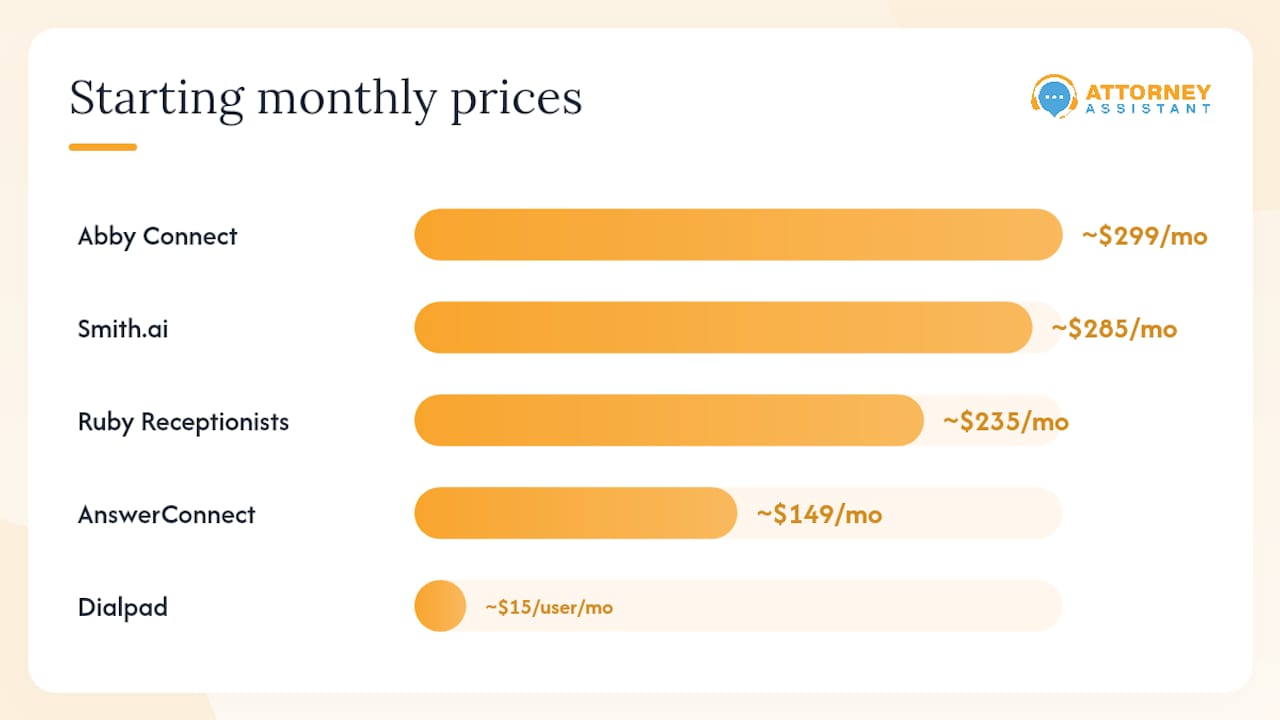
For law firms, the columns that matter most are legal/data suitability and reporting/SLA. A service that answers calls but cannot produce a HIPAA Business Associate Agreement or show you weekly intake metrics is not solving your conversion problem — it is just answering the phone.
What is Nexa, and why do firms look for something else?
Nexa is a Phoenix-based virtual receptionist and answering service that offers live agents, AI-assisted call handling, and outbound follow-up for businesses across industries. It markets to legal, medical, and home-services verticals and positions itself as a hybrid intake provider.
Three reasons firms start searching for Nexa alternatives:
Cost and pricing predictability. Nexa’s pricing is usage-based, which works fine at low volume but becomes unpredictable as call volume grows. Firms on tight budgets often find that per-minute billing creates month-to-month swings they cannot plan around.
Integration and workflow fit. Nexa connects to some CRMs, but firms running Clio, Filevine, or a custom intake stack sometimes find the sync shallow. When a call summary lands in the wrong field or a lead never reaches the CRM at all, the intake leak starts there.
Legal-specific compliance. HIPAA readiness, data handling policies, and intake form customization are non-negotiable for personal injury and medical-legal practices. Firms that need a signed BAA and documented data protocols often find that general-purpose answering services fall short.
How do you choose the right Nexa alternative?
The decision comes down to five things: speed-to-lead SLA, coverage hours, intake quality, integration depth, and compliance. Everything else is secondary.
Evaluation criteria in priority order
- Speed-to-lead SLA — Does the vendor commit to a first-response time in writing? Under 5 minutes for inbound calls is the benchmark for legal intake.
- Integration with your stack — Does it sync to Clio, Filevine, HubSpot, or your CRM in real time? A CRM-integrated follow-up sequence produces measurably better conversion than manual callbacks.
Vendor demo checklist
Run these tests before you sign anything:
- Place a live inbound call and time the answer
- Ask the agent to complete a sample intake form for your practice area
- Request a sample call summary and check field accuracy in your CRM
- Ask for a written SLA with response-time commitments
- Confirm HIPAA BAA availability in writing
- Test data export: can you pull your call logs and intake records?
- Ask how intake form fields are customized and how long it takes
Red flags to walk away from
- Vague SLAs (“we answer quickly”) with no written commitment
- No HIPAA BAA or documented data handling policy for legal clients
- CRM sync that requires manual export/import
- Opaque per-minute pricing with no monthly cap option
- No dedicated point of contact for your account
Quick-scoring method for finalists
Score each finalist 1–5 on these five axes, then total the scores:
- SLA specificity and enforceability
- Coverage hours and after-hours quality
- Intake screening depth (qualification, not just message-taking)
- Integration reliability with your CRM or practice-management tool
- Compliance readiness (HIPAA BAA, data policy, call recording consent)
A vendor scoring 20 or above on 25 is worth a pilot. Below 15, keep looking.
Profiles of the best alternatives to Nexa
Attorney Assistant
Best for: Small to mid-sized law firms, especially personal injury practices, that are losing leads to slow follow-up and inconsistent intake.
Answering model: Hybrid (AI triage plus dedicated human intake specialists)
Pricing: Custom subscription; contact for a quote based on call volume and service scope
24/7: Yes
Key integrations: Clio, Filevine, major CRMs; custom workflow mapping available
Legal/data handling: HIPAA-aware processes; legal-specific intake protocols; retainer signing included
Setup time: 1–2 weeks for full workflow mapping and CRM integration
What sets it apart: Attorney Assistant does not just answer calls. It owns the intake process from first contact through signed retainer, including follow-up sequences, CRM hygiene, medical record retrieval, and calendar management. Firms that improve their intake process with a dedicated operational partner see the gap between marketing spend and signed cases close quickly.
Pros: Full intake-to-retainer ownership; dedicated legal assistant staffing; 24/7 hybrid coverage; weekly KPI reporting; no dropped follow-up
Cons: Designed specifically for law firms; not a fit for general ecommerce or non-legal SMBs
Smith.ai
Best for: SMBs and law firms that want a proven hybrid model with strong CRM integrations and a documented SLA.
Answering model: Hybrid (AI screening plus live agents)
Pricing: Starts around $285/month for a base call plan; scales by call volume
24/7: Yes
Key integrations: HubSpot, Clio, Salesforce, Zapier
Legal/data handling: HIPAA BAA available on request; call summaries delivered to CRM
Setup time: 1–3 days
Pros: Reliable hybrid model; strong integration library; HIPAA BAA available; good call summaries
Cons: Per-call pricing can escalate at higher volumes; less depth on intake-to-retainer workflow than a legal-specific provider
Ruby Receptionists
Best for: Relationship-focused professional services firms that prioritize a warm, human caller experience over AI speed.
Answering model: Live human
Pricing: Starts around $235/month
24/7: Extended business hours with overflow; not fully 24/7
Key integrations: Clio, Zapier, basic CRM connections
Legal/data handling: Standard privacy practices; no HIPAA BAA publicly listed
Setup time: 1–2 days
Pros: Consistently warm caller experience; strong brand reputation; easy setup
Cons: Not 24/7; no HIPAA BAA listed; limited intake depth beyond message-taking and call routing
AnswerConnect
Best for: High-volume businesses and ecommerce merchants that need genuine 24/7 coverage at a predictable per-minute rate.
Answering model: Live human
Pricing: Starts around $149/month; per-minute billing above the base
24/7: Yes
Key integrations: Shopify, Salesforce, Zapier, WooCommerce
Legal/data handling: Standard data handling; not legal-specific
Setup time: 1–2 days
Pros: Genuinely 24/7; competitive entry price; solid ecommerce integrations
Cons: Per-minute billing adds up at volume; agents are generalists, not legal intake specialists
Abby Connect
Best for: Boutique law firms and professional services practices that want a curated, legal-familiar live-agent experience.
Answering model: Live human (dedicated small team per client)
Pricing: Starts around $299/month
24/7: Extended hours; not fully 24/7
Key integrations: Clio, Zapier
Legal/data handling: Privacy-focused; legal familiarity; check BAA availability directly
Setup time: 1–3 days
Pros: Dedicated agent team builds familiarity with your firm; strong legal focus; good call summaries
Cons: Higher starting price; not fully 24/7; smaller integration library than enterprise options
Dialpad
Best for: Tech-forward SMBs that want AI-first communications with live escalation and deep analytics.
Answering model: AI-first with live agent escalation
Pricing: Starts around $15/user/month
24/7: Yes
Key integrations: Google Workspace, Salesforce, HubSpot, Microsoft 365
Legal/data handling: SOC 2 certified; no legal-specific HIPAA BAA listed
Setup time: Same day to a few hours
Pros: Low per-user cost; strong AI transcription and analytics; fast setup
Cons: AI-first model is not a fit for complex legal intake; no HIPAA BAA for legal/medical use cases
NextPhone AI
Best for: Ecommerce businesses and high-call-volume SMBs that want AI-first answering with Shopify and WooCommerce integration.
Answering model: AI-first (conversational AI)
Pricing: Custom per-call pricing; contact for quote
24/7: Yes
Key integrations: Shopify, WooCommerce
Legal/data handling: Standard; not designed for legal or HIPAA use cases
Setup time: Hours
Pros: Fast deployment; ecommerce-native integrations; handles high call volume without per-agent cost
Cons: AI-only model lacks the human reassurance that legal intake requires; no HIPAA BAA
Pro Tip: Before signing any answering service contract, run a blind test call during off-hours. How long does it take to answer? Does the agent know your practice area? That single test tells you more than any sales demo.
How to switch from Nexa: migration checklist and timeline
Switching answering services is less painful than most firms expect, provided you run a parallel period before cutting over.
Step-by-step migration checklist
- Export your data — Pull all call logs, intake records, and contact data from Nexa before you give notice. Confirm the export format is compatible with your CRM.
- Run a parallel period. For 1–3 weeks, route a portion of calls through the new service while Nexa handles the rest. This catches dropped calls and CRM sync errors before they cost you a lead. Parallel-run testing is the most reliable way to avoid a hard cutover failure.
Cost considerations
Plan for overlap billing during the parallel period — you will pay both providers simultaneously for 1–3 weeks. Factor in number porting fees (typically $20–$50 per number), any setup fees from the new provider, and internal time for script writing and agent training. For most small firms, the total transition cost is recoverable within the first month of improved intake conversion.
Tests to run during the parallel period
- Place 10 test calls at different hours (including after-hours and weekends) and log answer time and agent quality
- Submit a test intake form and verify every field appears correctly in your CRM within 5 minutes
- Trigger a follow-up sequence and confirm the timing and content match your script
- Check SLA tracking: does the new provider’s dashboard show time-to-first-response for each call?
Why intake speed and follow-up directly drive your revenue
The math on intake is straightforward. 72% of legal consumers will move on to another firm if they don’t hear back within 24 hours — up from 66% the year before. That is not a slow trend. It is a fast-moving threshold that most firms are failing.
Stat: 72% of legal consumers move on if they don’t hear back within 24 hours of first inquiry.
The features that actually move the needle on conversion are not complicated:
- Live answer plus AI triage — AI handles initial qualification and routes urgent matters; a human closes the intake and builds rapport
- Dedicated intake ownership — Assigning a single owner for intake and reviewing key metrics weekly materially improves conversion and reduces leaked leads
Consider what fixing intake actually means for a firm spending $10,000 a month on marketing. If that spend generates 80 inbound leads and the firm converts 14% (the industry average), it signs roughly 11 cases. Push conversion to 25% through faster response and structured follow-up, and the same marketing budget produces 20 cases. No additional ad spend required.
Modern AI intake tools automate reminders, organize intake data, and keep follow-up moving without replacing the human judgment that legal intake requires. The firms closing more leads are using this hybrid approach, not choosing between AI and human coverage.
What do users actually say about these services?
Reputation signals across G2, Trustpilot, and legal-community forums show consistent patterns for each category.
Attorney Assistant earns strong marks from personal injury firms specifically for intake ownership and follow-up consistency. Firms cite the reduction in missed follow-ups and the ability to track signed-case rates as the most tangible outcomes.
Smith.ai holds a strong G2 rating with reviewers frequently citing CRM integration reliability and the quality of call summaries. Negative reviews cluster around pricing escalation at higher call volumes.
Ruby Receptionists is consistently praised for caller experience and agent warmth. The most common complaint is limited after-hours coverage and the absence of a HIPAA BAA for legal clients who need one.
AnswerConnect reviews highlight 24/7 reliability and competitive pricing. Firms with complex intake needs note that agents are generalists and do not qualify leads at the depth a legal-specific service provides.
Abby Connect receives high marks for the dedicated-team model, where a small group of agents becomes familiar with a firm’s practice and clients. The trade-off is a higher starting price and limited 24/7 availability.
Dialpad is rated well for analytics and AI transcription quality. Legal users note the absence of a HIPAA BAA as a limiting factor for regulated use cases.
NextPhone AI has a smaller public review footprint, with early users in ecommerce reporting fast deployment and solid Shopify integration. Legal reviewers are sparse, which reflects the product’s positioning as an ecommerce-first tool.
How do these services compare on customer support?
Support quality separates services that feel like vendors from those that function like operational partners.
Attorney Assistant operates on a co-management model: your firm has a dedicated point of contact who reviews intake metrics weekly and flags problems before they compound. That is a different relationship than a ticket queue.
Smith.ai offers live chat and email support with documented response times. Most users report same-day resolution for configuration issues. Escalations to account managers are available on higher-tier plans.
Ruby Receptionists is known for responsive onboarding support. Ongoing account management is lighter, and firms with complex needs sometimes find the self-service configuration limiting.
AnswerConnect provides 24/7 support access, which aligns with its 24/7 service model. Response quality is generally rated as adequate for standard issues; complex integration problems take longer.
Abby Connect assigns a dedicated account manager, which reviewers consistently cite as a differentiator. For boutique firms, having a named contact who knows your practice is worth the premium.
Dialpad offers strong technical support documentation and a responsive support team for its SMB tier. Legal-specific configuration guidance is limited because the product is not purpose-built for legal intake.
NextPhone AI support is primarily self-service and chat-based, which works for fast-moving ecommerce teams but may feel thin for firms with complex intake workflows.
Security, compliance, and data handling across alternatives
For law firms, this section is not optional reading. Attorney-client privilege, HIPAA obligations (for medical-legal matters), and state bar data-handling rules all touch your answering service.
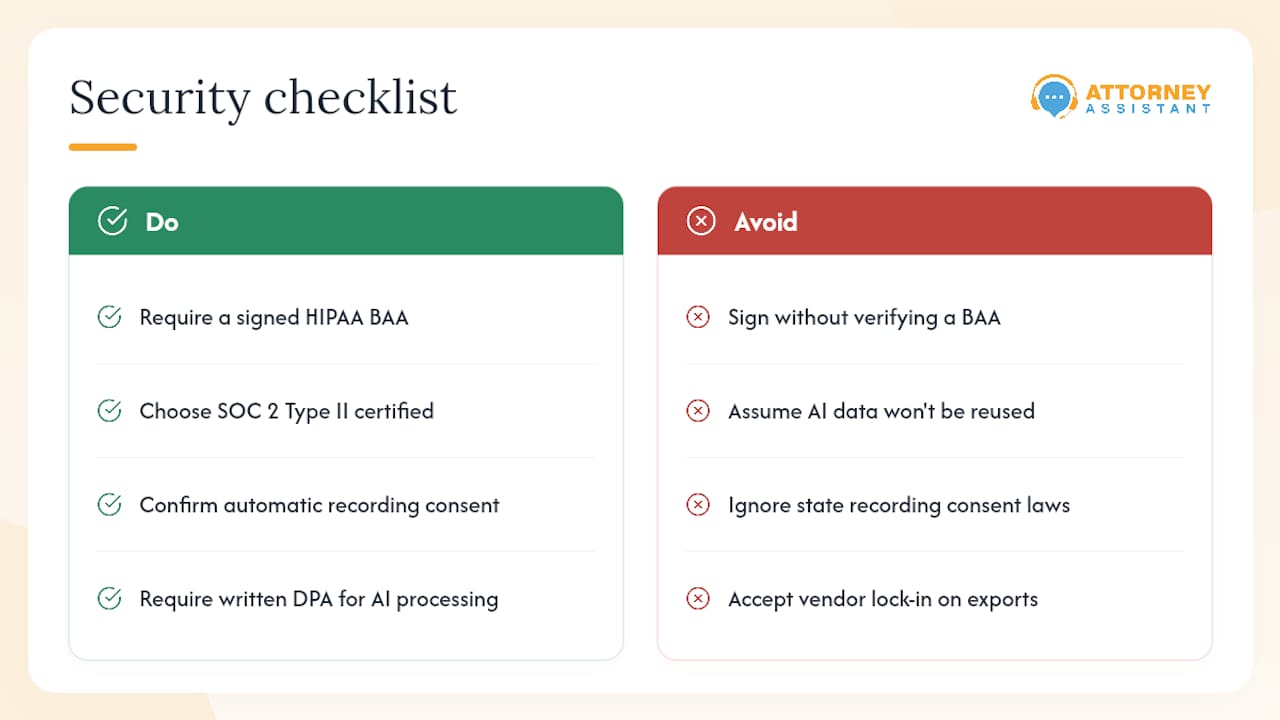
HIPAA BAA availability is the first filter. Smith.ai and Attorney Assistant both offer HIPAA-compliant configurations with a signed BAA. Ruby Receptionists does not publicly list a HIPAA BAA. AnswerConnect’s HIPAA posture should be confirmed directly for legal use cases. Abby Connect is privacy-focused but BAA availability should be verified before signing.
SOC 2 certification is the baseline for cloud-based communications tools. Dialpad holds SOC 2 Type II certification. For AI-first providers like NextPhone AI, ask specifically about data retention, call recording storage, and third-party subprocessor agreements.
Call recording consent is a state-law issue. In two-party consent states (California, Florida, Illinois, and others), your answering service must notify callers that calls are recorded. Confirm that your provider handles consent disclosures automatically, not as an optional script add-on.
Data portability matters at contract end. Before you sign, confirm you can export all call records, intake data, and contact information in a standard format. Some services make data export difficult, which creates leverage at renewal time.
Conversational AI in customer service introduces additional data considerations: where AI-processed call data is stored, how long it is retained, and whether it is used to train third-party models. Ask every AI-first provider for a written data processing addendum before you go live.
Key Takeaways
Choosing the right Nexa alternative comes down to one question: does this service own your intake process, or does it just answer your phone?
| Point | Details |
|---|---|
| Speed-to-lead is the core metric | 72% of legal consumers move on without a response within 24 hours — your SLA must be written and enforced. |
| Legal compliance is non-negotiable | Confirm HIPAA BAA availability and call recording consent protocols before signing any contract. |
| Run a parallel period before cutover | A 1–3 week parallel run catches dropped calls and CRM sync errors before they cost you a signed case. |
| Intake ownership beats call answering | Designating a single owner for intake and reviewing weekly KPIs materially improves conversion rates. |
| Attorney Assistant for law firms | Attorney Assistant owns the full intake-to-retainer workflow for PI and contingency-fee firms — book a call to see where your leads are leaking. |
The intake problem most firms are still ignoring
Most law firms evaluate answering services the wrong way. They compare price per minute, caller experience ratings, and integration checklists. Those things matter, but they are downstream of the real question: what happens to a lead between the moment they call and the moment they sign?
The conventional wisdom is that more calls answered equals more cases. That is only true if the intake process behind the phone line is actually working. A firm that answers 95% of calls but follows up inconsistently, routes leads to a voicemail for the attorney, or never confirms a consultation appointment is still leaking revenue at every step after the call.
What actually works is treating intake as an operational system with a single owner, documented SLAs, and weekly performance reviews. The research on intake ownership is clear: firms that assign accountability and measure the right metrics convert more leads without spending more on marketing. The answering service is one piece of that system. It is not the whole system.
When you evaluate alternatives to Nexa, the right question is not “which service answers calls best?” It is “which service will own the outcome?”
Attorney Assistant fixes what answering services leave unfinished
Most answering services stop at the call. Attorney Assistant starts there and keeps going: intake qualification, follow-up sequences, retainer signing, CRM hygiene, and 24/7 hybrid coverage through a dedicated legal operations model. For personal injury and contingency-fee firms, that means leads stop leaking between the first call and the signed case.
If your firm is spending on marketing but not seeing the signed cases to match, the problem is almost certainly in your intake workflow, not your ad spend. Attorney Assistant’s lead follow-up and intake service is built specifically to close that gap. Book a diagnostic call and find out exactly where your leads are going.
Useful sources and links
- Slow Intake Hinders Growth, But Not If Firms Use AI
- The Intake Gap Costing Law Firms Cases They Should Have Retained
- Law Firm Lead Conversion: 14% Average, 40% Possible | LEXGRO
- Top 10 Nexa Alternatives & Competitors in 2026
- shopify.com
- hubspot.com
FAQ
What does a Nexa receptionist typically cost?
Nexa’s pricing is usage-based, typically structured around per-minute billing above a monthly base plan. Costs vary by call volume and service tier; firms with high inbound volume often find costs less predictable than flat-rate alternatives.
Is there a company called Nexa?
Yes. Nexa is a real virtual receptionist and answering service company headquartered in Phoenix, Arizona, serving legal, medical, and home-services businesses across the United States.
How is a legal-specific intake service different from a general answering service?
A legal-specific service qualifies leads by case type, collects case details during the call, routes urgent matters appropriately, and follows up through retainer signing. A general answering service takes messages and transfers calls. Attorney Assistant handles the full intake-to-retainer workflow, which is the difference between answering a call and converting a lead.
What are the main benefits of switching from Nexa to a legal intake specialist?
The primary gains are faster speed-to-lead, deeper intake screening, HIPAA-compliant data handling, and structured follow-up that continues past the first call. Firms that optimize their intake process with a dedicated operational partner typically see conversion improve without increasing marketing spend.
How long does it take to switch from Nexa to a new provider?
Most small firms complete the transition in 2–3 weeks. Mid-sized firms with complex CRM integrations should plan for 4–6 weeks, including a 1–3 week parallel run to catch dropped calls and sync errors before full cutover.
Recommended
Related Articles
Call Answering Service for Law Firms: What Actually Works
A call answering service for law firms should sign cases, not take messages. Learn pricing models, vendor criteria, and 24/7 intake that converts.
Case Management Notes: A Law Firm's How-To Guide
Learn how to write case management notes that hold up, with a defensible structure, privilege safeguards, handoff tips, and a smarter way to staff the work.
Medical Records Coordinator: What the Role Actually Does
A medical records coordinator manages records retrieval, summaries, billing, and liens for law firms. Learn duties, KPIs, and when to outsource vs hire.