The Best Ruby.com Alternatives for Law Firms

For U.S. law firms, Attorney Assistant is the most practical alternative to ruby.com because it fixes intake failures at the operational level, not just the answering level. Ruby charges per minute, and those minutes add up fast when callers are screened, placed on hold, or transferred. The real cost isn’t the bill; it’s the leads that leak out while the meter runs.
The shortlist below covers 11 ruby.com alternatives across three categories: operations-first legal intake (Attorney Assistant), hybrid human-and-AI services (Smith.ai, Goodcall, Moneypenny, Posh, Ambs Call Center, AnswerConnect), and AI-first or app-based options (Rosie AI, Ringly.io, Upfirst, NextPhone). Ruby’s Trustpilot reviews show a recurring pattern of pricing surprises and overage complaints, which is the single biggest reason firms start looking for alternatives.
Per-minute billing is where Ruby’s pricing traps live. A busy intake week can double your expected bill. Every provider below either eliminates that risk or makes the overage math transparent upfront.
Key Takeaways
Attorney Assistant is the strongest choice for law firms that need intake fixed at the operational level, not just calls answered.
| Point | Details |
|---|---|
| Per-minute billing is the main pricing trap | Ruby and similar services bill per minute; moderate call volumes can double expected monthly costs. |
| Intake depth separates the options | AI-first services (Rosie AI, Upfirst) cost less but handle structured legal intake poorly; hybrid and legal-ops models handle it better. |
| Speed-to-lead drives conversion | Missed or delayed callbacks burn paid search spend; firms that answer and follow up faster convert more leads into signed cases. |
| Pilot before committing | A 7–14 day pilot measuring answer time, intake completeness, and CRM accuracy reveals more than any vendor demo. |
| Attorney Assistant for law firms | Operations co-management with 24/7 hybrid coverage, legal scripting, and follow-up sequences built for contingency-fee firms. |
Table of Contents
- How we evaluated these ruby.com alternatives
- Ruby.com alternatives compared: provider profiles
- How to choose the right ruby.com alternative for your firm
- Pricing models explained: what they actually cost law firms
- Why Attorney Assistant fits law firms better than the alternatives
- Which alternative should you actually pick?
- What law firms keep getting wrong about intake
- Attorney Assistant: a different approach to the intake problem
- Sources
- FAQ
How we evaluated these ruby.com alternatives
The shortlist is based on eight criteria applied consistently across all providers.
- Cost transparency: Is starting price publicly listed? Are overage rates clear before you sign?
- Pricing model: Per-minute, flat monthly, per-call, or hybrid? Each has a different risk profile at different call volumes.
- Answer time and SLA: Does the vendor publish an average answer time or a contractual SLA?
- Intake quality: Can agents or AI complete a structured intake form, not just take a message?
- CRM and calendar integration: Does the service push data to tools like Clio, Salesforce, or Google Calendar without manual re-entry?
- 24/7 coverage: Is after-hours and weekend coverage included, or does it cost extra?
- Demo or trial availability: Can you test the service before committing to a contract?
- Legal or industry scripting: Does the vendor have experience with legal intake scripts, not just generic call scripts?
Data sources include public pricing pages, Forbes’ answering-service roundup, Trustpilot and G2 reviews, vendor product pages, and practitioner discussion on r/Lawyertalk. Where pricing is not publicly listed, this article notes “custom quote” rather than guessing. Some vendors use custom contracts with pricing that varies by call volume, geography, or industry, so the figures here reflect publicly available starting points only.
Ruby.com alternatives compared: provider profiles
Attorney Assistant
Attorney Assistant is built for one problem: law firms that are losing signed cases because intake is broken. The model is operations co-management, not just call answering. That means intake workflows, CRM hygiene, follow-up sequences, and 24/7 hybrid coverage are all part of the same service. When a lead calls at 9 PM on a Friday, it gets answered, logged, and followed up, not just noted in a voicemail.
For personal injury and contingency-fee firms specifically, the speed-to-lead gap is where revenue leaks. Attorney Assistant’s hybrid AI-plus-human approach targets that gap directly, with near-100% answer rates and intake data pushed to your CRM rather than sitting in a call log. Setup is typically faster than building an in-house intake process from scratch, and the subscription model means no per-minute billing surprises.
Pros for law firms: Legal-specific intake scripting, CRM integration, follow-up sequences included, 24/7 coverage. Cons: Designed for law firms; not the right fit for non-legal businesses.
Learn more about how legal answering services keep firms responsive without burning out staff.
Smith.ai
Smith.ai pairs live agents with AI-generated summaries and CRM pushes, targeting small businesses and law firms. Plans start around $285/month for 30 calls, with per-call overage rates above the plan limit. The hybrid model means a human handles the conversation while AI handles the data entry, which reduces transcription errors. Integrations include Clio, HubSpot, and Salesforce. Setup typically takes a few days. No long-term contract is required on standard plans.
Pros: Strong CRM integrations, legal intake experience, no long-term lock-in. Cons: Per-call overages can climb quickly for high-volume firms; pricing is mid-range, not budget.
AnswerConnect
AnswerConnect runs a large network of US-based agents with 24/7 coverage and published SLA options. It’s a per-minute service, so the cost scales directly with call volume. Base plans start around $149/month, but a firm with moderate inbound volume will spend considerably more once minutes are counted. The service handles overflow well and integrates with common CRMs. Legal scripting is available but not the core focus.
Pros: Scale, US-based agents, bilingual support available, established SLA options. Cons: Per-minute billing creates unpredictable costs; intake depth is less specialized than legal-first services.
Rosie AI
Rosie AI is an AI-first answering app positioned primarily for merchants and small businesses. It handles basic intake and call routing without a human agent, which keeps the per-call cost low. The flat monthly pricing is its main draw. For law firms, the limitation is intake depth: AI-only handling works for simple screening but struggles with complex legal intake questions or sensitive caller situations that need human judgment.
Pros: Low cost, 24/7 AI coverage, flat monthly pricing. Cons: No human fallback; limited legal intake scripting capability.
Goodcall
Goodcall focuses on appointment booking and call transfers with a human-first receptionist experience. It suits service businesses that need reliable booking without complex intake workflows. For law firms, it covers the basics but lacks the intake depth and CRM integration that high-volume personal injury firms need.
Pros: Human receptionists, appointment booking, straightforward pricing. Cons: Limited legal intake specialization; CRM integrations less extensive than legal-focused competitors.
Moneypenny
Moneypenny is a UK-based provider with US operations, offering concierge-style live reception. It targets firms that want high-touch, brand-consistent call handling and global-language support. Pricing is custom-quoted. The service quality is consistently rated well, but the cost structure is opaque until you speak to sales, and the intake depth for US legal workflows is not its primary strength.
Pros: High-touch human reception, multilingual support, strong brand consistency. Cons: Custom pricing only; not built around US legal intake workflows.
Ringly.io
Ringly.io is an AI-powered receptionist app distributed through app marketplaces, built primarily for ecommerce and app-stack businesses. It automates call handling and integrates with ecommerce tools. For law firms, it’s a poor fit: the intake logic is designed for product and order queries, not legal screening.
Pros: App-store distribution, AI automation, ecommerce integrations. Cons: Not designed for legal intake; no human fallback.
Upfirst
Upfirst positions itself as a low-cost AI answering solution with simple flat monthly pricing. It suits cost-sensitive small teams that need basic 24/7 coverage and don’t require complex intake workflows. For law firms evaluating it as a Ruby substitute, the gap is intake quality: Upfirst handles message-taking and basic routing, but structured legal intake is outside its scope.
Pros: Low cost, flat pricing, easy setup. Cons: AI-only; intake depth insufficient for legal use cases.
NextPhone
NextPhone offers both per-minute and flat-fee options, with AI routing to reduce cost on lower-volume calls. It suits firms that want to model out their call volume before committing to a pricing structure. The flexibility is useful during a pilot phase, but legal intake specialization is limited and intake depth varies by plan.
Ambs Call Center
Ambs Call Center is a traditional call-center operation with human agents, custom scripting, and managed teams. It handles high-volume answering and strict scripted intake well. The pricing is custom-quoted and typically per-minute or monthly block. For firms that need volume and scripting control, it’s a solid option, though the per-minute model carries the same overage risk as Ruby.
Pros: Custom scripting, human agents, high-volume capacity. Cons: Per-minute pricing risk; not AI-assisted; setup takes longer than app-based alternatives.
Posh
Posh is a boutique receptionist service focused on brand experience and premium call handling. It suits firms where the caller experience is a differentiator, such as estate planning or high-net-worth practices. For high-volume personal injury intake, the boutique model doesn’t scale cost-effectively.
Pros: Premium human reception, strong brand consistency, high-touch handling. Cons: Not built for high-volume legal intake; pricing not publicly listed.
Pro Tip: Before signing any contract, ask the vendor to show you a sample intake record from a legal call. If it looks like a message slip rather than a structured intake form with case type, injury date, and contact details, the service isn’t built for law firm intake.
How to choose the right ruby.com alternative for your firm
The decision comes down to five questions. Work through them before you book a demo.
- What is your primary goal? If it’s fixing intake leaks and protecting marketing ROI, you need a service with legal scripting and CRM integration, not just call answering. If it’s pure cost reduction on overflow calls, a per-minute human service or AI-first option may be enough.
- What is your call volume? Per-minute pricing is cheaper at very low volumes (under 50 calls/month). Flat-rate or subscription pricing wins above that threshold. Run the math with your actual call log before comparing sticker prices.
- Do you need 24/7 coverage? After-hours calls are where most law firms lose leads. Confirm whether 24/7 is included in the base price or billed as an add-on.
- What CRM or practice management software do you use? A service that can’t push intake data to Clio, Filevine, or your CRM creates manual re-entry work that defeats the purpose.
- How long is the minimum contract? Month-to-month terms let you pilot and exit. Multi-month minimums increase switching costs if the service underperforms.
Questions to ask vendors during a demo:
- What is your average answer time, and is it contractually guaranteed?
- How are overages billed, and what triggers them?
- Can I export my intake data at any time, and in what format?
- How is caller PII handled and stored?
- What happens when a call transfers fail?
- Do you have experience with [your practice area] intake scripts?
Red flags to watch for:
- No published answer-time SLA
- Overage rates buried in the contract rather than quoted upfront
- Minimum terms longer than three months for a new client
- No legal intake experience or sample scripts available
Pilot checklist (7–14 days): Track answer time on every call, review five intake records for completeness, check that CRM data is accurate and complete, test one after-hours call yourself, and calculate cost per captured lead against your marketing spend for the same period.
Pricing models explained: what they actually cost law firms
There are four pricing shapes in this market.
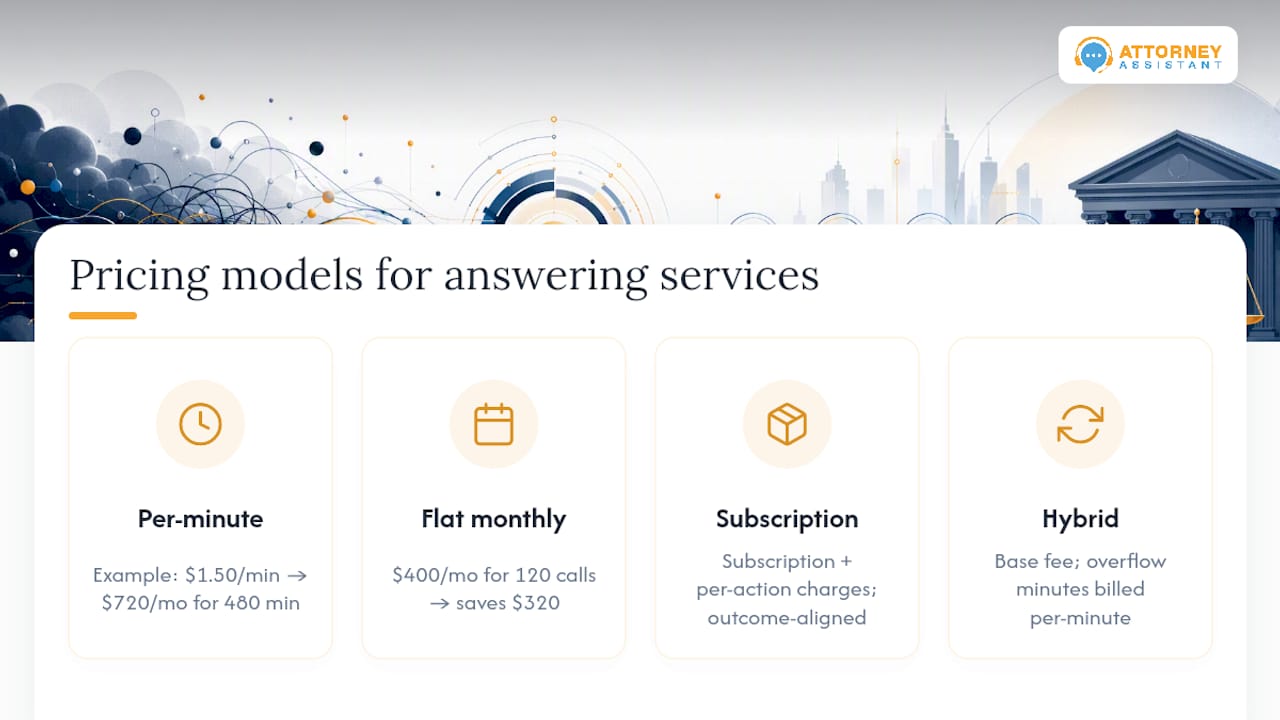
Per-minute: You pay for every minute a live agent spends on your calls. Ruby uses this model. It’s predictable at low volume but punishing at moderate or high volume. A 10-minute intake call costs 10x a 1-minute screening call, and you have no control over call length.
Flat monthly: A fixed fee covers a defined number of calls or minutes. Overages kick in above the cap. The risk is lower than pure per-minute, but the cap matters: a plan that covers 100 calls/month is useless if you receive 180.
Subscription with action-based billing: A base subscription covers infrastructure and staffing, with additional charges per completed action (intake form submitted, appointment booked, follow-up sent). This is the model Attorney Assistant uses. It aligns cost with outcomes rather than time spent on the phone.
Hybrid base + per-minute overflow: A flat base covers normal volume; overflow minutes are billed per minute. Useful for firms with predictable volume and occasional spikes.
Simple cost comparison:
A firm receiving 120 calls/month at an average of 4 minutes per call generates 480 minutes of call time. At a typical per-minute rate of $1.50, that’s $720/month before any overages. A flat-rate plan covering 120 calls at $400/month saves $320 on the same volume, assuming no overages. The math shifts if your average call runs longer or your volume spikes.
Wage and occupational data confirm that human-based live answering services carry a wage-driven cost floor that AI-first services don’t. That’s why AI-first options like Rosie AI and Upfirst can price significantly lower, though the trade-off is intake depth. A Gartner survey found that 85% of customer-service leaders planned to explore or pilot customer-facing conversational AI by 2025, which explains why the AI-first tier of this market is expanding fast.
The missed-call cost is the number that makes pricing decisions concrete. CallRail’s analysis of law firm missed calls shows that missed calls directly erode marketing ROI, and Invoca’s research on service businesses demonstrates that missed sales calls produce measurable, sometimes large revenue losses. For a personal injury firm spending $5,000/month on paid search, a 20% missed-call rate isn’t a minor inefficiency. It’s $1,000 in wasted ad spend per month, minimum.
Pro Tip: Ask every vendor to show you their overage billing clause in writing before you sign. The clause should state the per-minute or per-call rate, the billing trigger, and the maximum monthly overage cap. If there’s no cap, negotiate one or walk away.
Why Attorney Assistant fits law firms better than the alternatives
Most answering services solve the phone problem. Attorney Assistant solves the intake problem, which is a different thing. Answering the phone is step one. Completing a structured intake, logging it to your CRM, triggering a follow-up sequence, and tracking whether that lead converted to a signed case: that’s the operational chain that determines whether your marketing spend produces revenue.
Key proof points:
- Near-100% answer rates through 24/7 hybrid AI-plus-human coverage, including nights and weekends
- Intake forms completed and pushed to your CRM on every call, not just messages taken
- Follow-up sequences that contact leads multiple times within the first 24 hours, protecting the speed-to-lead window
- Legal-specific scripting for personal injury, family law, and other contingency-fee practice areas
- Operations co-management model: Attorney Assistant works inside your daily workflows, not as a disconnected answering vendor
For firms that have tried Ruby or similar per-minute services and found the bills unpredictable and the intake quality inconsistent, the subscription model removes the billing anxiety and the legal-operations focus closes the intake gap.
Book a call to see how Attorney Assistant handles intake for firms like yours: virtual webinar and demo.
Which alternative should you actually pick?
The right answer depends on what’s broken.
If intake is the problem (missed calls, incomplete records, slow follow-up, leads not converting): Attorney Assistant. It’s the only option on this list built around fixing the intake chain end-to-end for law firms.
If you need human answering at scale with scripting control: Ambs Call Center or AnswerConnect. Both handle volume and custom scripts, though per-minute billing requires close monitoring.
If budget is the primary constraint and intake depth is secondary: Rosie AI or Upfirst. AI-first flat pricing keeps costs low, but expect to handle complex intake manually.
If brand experience and high-touch reception matter most: Posh or Moneypenny. Both deliver premium call handling, though neither is optimized for high-volume legal intake.
If you want a hybrid with strong CRM integration: Smith.ai is the closest competitor to Attorney Assistant for small law firms, with solid integrations and no long-term contract requirement.
Whatever you choose, run a 7–14 day pilot before committing. Measure answer time, intake record completeness, CRM data accuracy, and cost per captured lead. Those four metrics tell you more than any vendor demo. And before signing, confirm the overage billing clause in writing: that single contract detail is where most per-minute services create unexpected costs.
What law firms keep getting wrong about intake
The vendors aren’t usually the problem. The intake process is.
Firms switch from Ruby to Smith.ai, or from Smith.ai to AnswerConnect, and the conversion numbers don’t move. The calls get answered, but the leads still don’t sign. That’s because the answering service is downstream of the real failure: no consistent script, no follow-up sequence, no one accountable for whether a lead that called on Tuesday actually heard back by Wednesday.
The pattern repeats across firms of every size. A lead calls after hours, gets a message taken, and waits 18 hours for a callback. By then, they’ve called two other firms. The answering service did its job. The intake process failed.
The first fix isn’t switching vendors. It’s defining what a complete intake looks like, who owns the follow-up, and what the SLA is for first contact. Once that’s in place, the right answering service amplifies it. Without it, every vendor looks the same because the bottleneck is internal.
Attorney Assistant: a different approach to the intake problem
The services compared above all answer calls. Attorney Assistant fixes what happens after the call, and that’s where most firms are actually losing revenue.
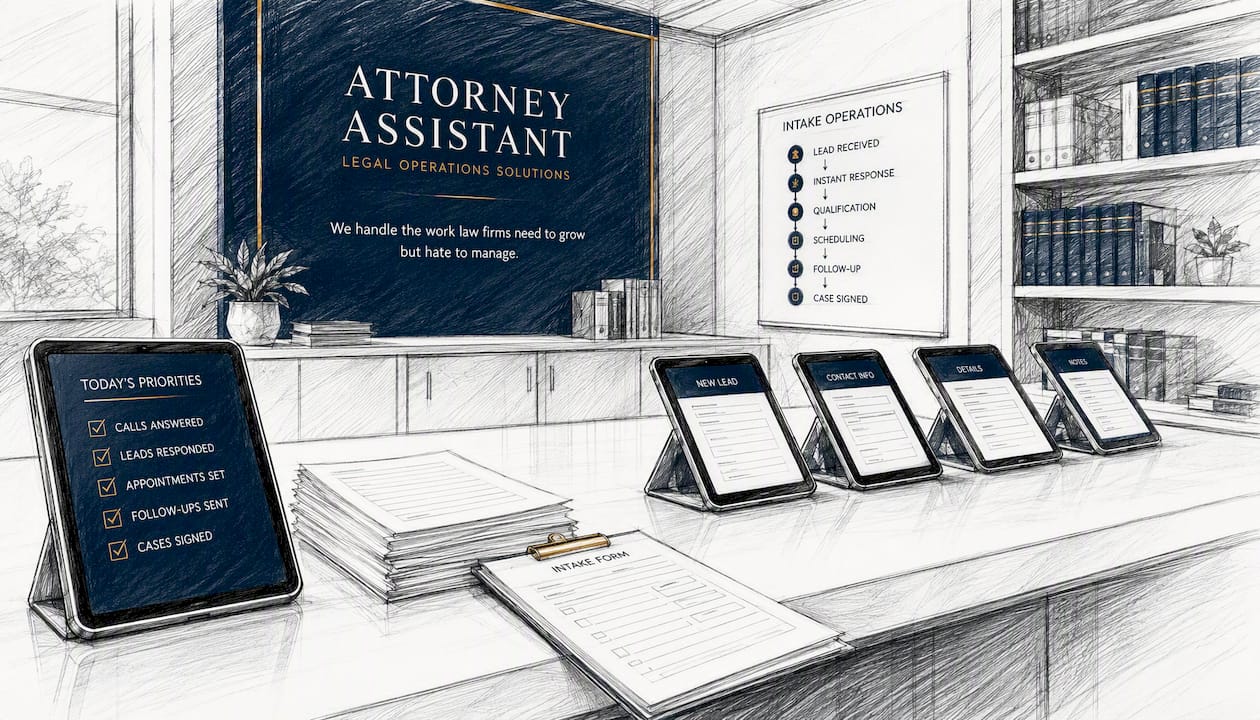
If your firm is spending on paid search, running referral programs, or investing in any form of lead generation, the return on that spend depends entirely on what happens when a lead calls. A missed call, a slow callback, or an incomplete intake form doesn’t just lose one case. It wastes the marketing dollars that generated that call in the first place.
Attorney Assistant handles lead follow-up, intake workflows, CRM hygiene, and 24/7 coverage as a single co-managed operation built around your firm’s practice area. No per-minute billing. No disconnected answering vendor. One operational model designed to convert the leads you already have.
If you want to see how it works for a firm like yours, book a spot at the next virtual webinar.
Sources
FAQ
What are the best alternatives to ruby.com for law firms?
Attorney Assistant, Smith.ai, and AnswerConnect are the most commonly cited alternatives for law firms. Attorney Assistant is the strongest fit for firms focused on intake quality and follow-up; Smith.ai suits firms that want hybrid human-and-AI handling with CRM integration; AnswerConnect handles high-volume overflow with US-based agents.
How much does Ruby virtual receptionist cost?
Ruby uses per-minute billing, and Trustpilot reviews frequently cite pricing surprises and overage charges as recurring complaints. Published plans vary by call volume, and actual monthly costs often exceed the base plan price for firms with moderate inbound volume.
Is Ruby virtual receptionist legitimate?
Ruby is a real, established service. The concerns raised in reviews relate to pricing transparency and overage billing rather than service legitimacy. Firms that experience cost surprises typically find the per-minute model harder to predict than flat-rate or subscription alternatives.
What is the best virtual receptionist for a small law firm?
For intake-focused law firms, Attorney Assistant’s hybrid model with legal-specific scripting and CRM integration addresses the full intake chain. For firms that need a lighter-touch human answering service, Smith.ai or Goodcall are practical starting points. The right choice depends on whether the primary need is call answering or intake conversion.
How do per-minute and flat-rate pricing compare for law firm answering services?
Per-minute pricing is cheaper at very low call volumes but becomes expensive as volume grows. A firm with 120 calls/month averaging 4 minutes per call pays for 480 minutes, which at typical per-minute rates exceeds most flat-rate plans covering the same volume. Flat-rate and subscription models offer more predictable costs for firms with consistent inbound volume.
Recommended
Related Articles

Free Google Phone Number for Business: What Actually Works
Free Google phone number for business covers one user. Here is how to set one up, where it breaks for intake, and when to upgrade.

How Do I Stop Being Socially Awkward: A Plan
How do I stop being socially awkward with a graded ladder, one conversation skill at a time, and a clear line for when to get help.

How to Find Clients for Cleaning Business in 2026
How to find clients for cleaning business with local search, referrals, partnerships, and a five-minute follow-up that books paid work.