Call Screening Service for Law Firms: A Practical Guide

The popular advice is simple: answer every call live and your intake problem goes away. It doesn't. A live voice that takes a name, promises a callback, and leaves no usable record has only moved the leak from voicemail to a notepad.
A call screening service for a law firm should do more than pick up. It should confirm who's calling, decide whether the matter fits, capture the facts an attorney needs, route the caller to a named owner, and log what happens next. If it can't do that, you've bought a friendlier way to lose cases.
Table of Contents
- Why Answering the Phone Is Not Screening
- Which Calls Need Which Rules
- How to Build the Screening Call Flow
- Routing Urgent, Existing and Out-of-Scope Calls
- Training Screeners and Auditing Their Calls
- Metrics That Show Screening Works
- Decide Who Owns Screening Before You Hire Help
Why Answering the Phone Is Not Screening
Start with reachability, because most firms aren't as reachable as they think. In a 2024 secret-shopper study commissioned by Clio of 500 U.S. law firms, only 40% answered the telephone call, while 48% remained unreachable by phone even after shoppers were given an opportunity to leave a message and receive a return call.
That gap matters, but answering alone doesn't close it. Taking a message is not intake. Screening is the decision process after pickup: who's calling, what do they need, does it fit your practice, how urgent is it, and who owns the next step?
One Call, Two Very Different Records
Say a caller says a truck hit her on the highway last Tuesday and she now has a letter from an insurer. Voicemail gives an attorney a name, a number, and a vague sense of dread. A screened call gives the date of loss, injuries, treatment so far, insurer, whether she's spoken to another lawyer, any deadline in that letter, and a consultation already on the calendar.
One record requires detective work. The other lets an attorney make a decision.
Answering takes the call. Screening decides what happens next.
This also isn't consumer call blocking. Your phone app tries to keep strangers away. Your firm is trying to keep good prospects from drifting to the next firm on Google while still filtering out robocalls, vendors, and matters you'll never take.
Try a quick test this week. Pull your last ten missed or unreturned calls and check one thing for each: is there a documented next action with a named owner? If half the records say "left message" or nothing at all, you don't have a screening problem in theory. You have one in your CRM, assuming the calls made it there.
Which Calls Need Which Rules
A call script is a routing control, not a universal greeting. Set different rules for prospective clients, existing clients, outbound follow-ups, automated messages, and court or opposing counsel calls. A wrong classification can send a live matter into a marketing workflow or expose case details to an unverified caller.
| Call type | Example | Legal point to check | Screener action |
|---|---|---|---|
| Inbound prospective client | Caller asks about a car accident | Recording disclosure based on the caller's and firm's jurisdictions | Answer, disclose as required, capture intake fields |
| Existing client | Client asks for a case update | Confidentiality and identity verification before sharing matter details | Verify identity, then route to the case team |
| Outbound follow-up | Callback to a missed lead | Prior express consent for autodialed or prerecorded calls to mobile phones | Check the consent record before dialing |
| Advertising or prerecorded message | Automated reminder that includes a promotion | Written consent when an autodialed or prerecorded call contains advertising | Send only with documented written consent |
| Opposing counsel or court | Clerk returns a call | This is not a prospect inquiry | Route to the assigned attorney |
Classify Before You Script
First classify each interaction as inbound service, outbound follow-up, advertising, or automated messaging. The legal treatment depends on the category. The FCC guidance on unwanted communications says autodialed or prerecorded non-emergency calls to mobile phones generally require prior express consent. Written consent is required when an autodialed or prerecorded call contains advertising.
Recording consent is a separate question. Some states require consent from all parties to a recorded call. State rules vary, so have counsel verify the current requirements and set the disclosure for the caller's and firm's jurisdictions. A single national greeting can miss a state-specific requirement.
Build controls around the rules:
- Consent prompts: Make disclosures configurable by jurisdiction rather than hard-coding one greeting.
- Suppression and timing controls: Apply suppression lists and time-zone controls to outbound follow-up, and retain consent timestamps.
- Recording access: Limit access by role, set retention limits, and keep sensitive facts out of voicemail.
- Escalation triggers: Route callers reporting an imminent deadline, criminal exposure, active litigation, or a conflict out of the standard script.
Put qualification questions inside this framework. A written set of intake qualification questions by practice area can help screeners apply the same criteria to each relevant call type.
Build a call-type table for your firm, identify which interactions your team handles, and ask counsel to review the consent rules. The practical test is whether each classification leads to an appropriate owner and next action.
How to Build the Screening Call Flow
A good flow feels boring in the best way. Every screener asks in the same order, stops at the same decline points, and produces the same kind of record. Callers get a consistent experience. Attorneys get information they can use.
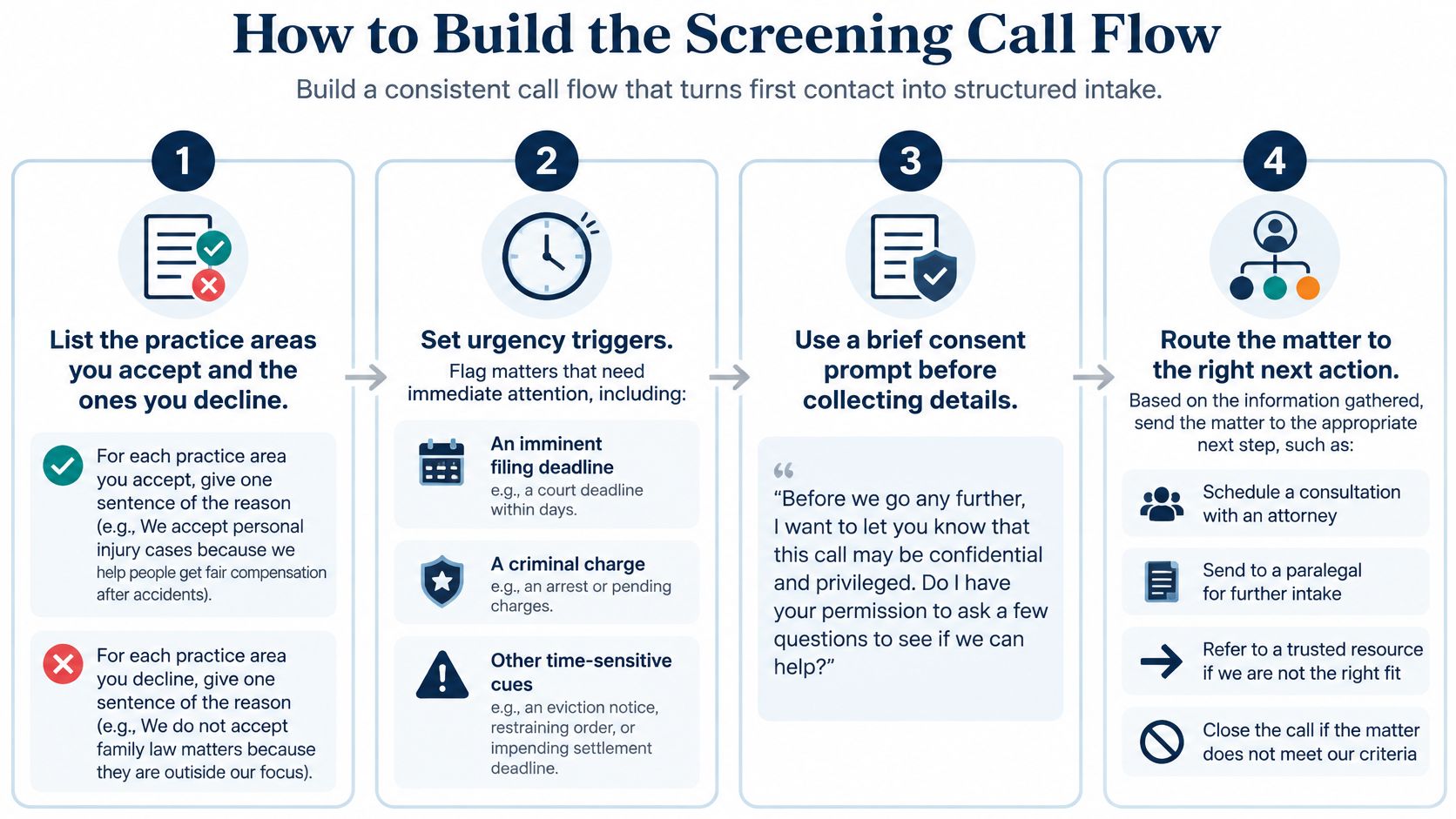
Build It in Seven Steps
List what you accept and decline. Write each practice area you take and each you turn away, with one sentence explaining why. "We don't do that" isn't a screening rule. "We decline workers' comp because we refer those matters out" is. The common slip is leaving borderline areas to screener judgment, which guarantees inconsistent judgment.
Set urgency triggers. Name the facts that break the normal queue: an imminent filing deadline, a criminal charge, active litigation, a protective order, or a recent injury. When a trigger appears, the screener stops collecting routine details and escalates. Without written triggers, urgent callers wait politely behind routine ones.
Define conflict fields early. Capture the opposing party, other involved parties, and related company names before deep fact-gathering. There's no value in a beautiful intake you have to delete after a conflict check. Put these fields near the top, not as an afterthought at minute nine.
Write required fields by practice area. A personal injury call needs date of incident, injuries, treatment, insurer or defendant, and whether the caller already has a lawyer. Another practice area needs different fields. In lead recovery, our specialists screen each lead against the customer's criteria and gather the information attorneys need to move forward. That's the standard: if an attorney still has to call back for basics, the field list failed.
Script the opening properly. State who answered, give the recording disclosure chosen for the caller's jurisdiction, and confirm the caller's name and callback number before anything substantive. The classic slip is asking eleven questions before recording a name, then losing the call and having a fascinating record belonging to nobody.
Ask qualification questions in a fixed order. Move from fit to facts, stop when a decline criterion is met, and never let a non-lawyer give a legal opinion. Screeners can explain next steps and timelines for your process. They can't tell a caller whether they have a good case, no matter how confidently the caller asks.
Close with a disposition and next action. Every call ends as transfer, book, callback, decline, or conflict hold, with an owner and due time. A decline should include a referral where appropriate, not a verbal shrug. "Not a fit" with no reason code teaches you nothing next month.
Some firms evaluate AI-powered call answering solutions to handle parts of this flow, and that's worth comparing carefully. Technology can answer, transcribe, and prompt consistently. It still needs your accept and decline rules, escalation triggers, and disposition codes, or it will automate a vague process at impressive speed.
Finished record test: A name, a callback number, a matter type, a fit decision, and a timed next step. If one is missing, the call isn't finished.
Judge your current records against that standard. Most firms don't need a longer script. They need fewer optional fields, clearer stopping rules, and a closing step that forces an owner onto every outcome.
Routing Urgent, Existing and Out-of-Scope Calls
Routing is where screening either protects attorney time or buries real clients. The screener's job isn't to decide the case. It's to put the call in front of the right person, quickly, with enough context to act.
| Call situation | Route to | Response target |
|---|---|---|
| Imminent deadline or criminal charge | On-call attorney now | Under 5 minutes during business hours |
| Existing client about an open matter | Assigned case manager | Same business day |
| Opposing counsel, court or medical provider | Named case team | Logged and routed the same day |
| New prospect, in practice area | Consultation calendar or attorney callback | Faster than the 13-minute median among responding firms |
| New prospect, out of practice area | Referral list and decline script | Logged the same day |
| Possible conflict | Hold and flag for conflict check | Before any substantive intake |
Those targets need context. Authentication alone won't route a call correctly. The FCC overview of call authentication explains that STIR/SHAKEN authenticates caller-ID information and supports blocking or labeling decisions, but authentication doesn't prove a caller is legitimate or relevant to your firm. Independent reporting also cites a 2025 test of 1,200 small and midsize firms in which 35% of business-hours calls went unanswered. A genuine caller can still look like noise.
Do Not Let the Filter Eat Real Clients
An existing client on a new phone, a prospect calling from an unknown mobile number, or a spoofed number belonging to a real person should reach a human under escalation rules. Use callback verification before sharing sensitive facts, keep an audit log, and review blocked or declined calls weekly for false positives, meaning legitimate calls incorrectly blocked.
Separate existing clients from new leads at the first question. If active clients fill the new-lead queue, your response times look busy and productive while actual prospects wait. That's not a routing system. That's a traffic jam with reporting.
For overnight and weekend gaps, firms sometimes keep calls covered overnight with Mercateer or use another after-hours option. Whoever covers it, the routing table still has to say who gets woken up, who gets a morning callback, and who owns the record at 8 a.m.
Warm Transfers That Actually Help
Our Frontline inbound handling includes live call answering, intake if criteria are met, warm transfers or appointment scheduling, and "Flag for Review" where applicable. A useful warm transfer follows the logic in this comparison of warm transfer vs cold transfer for law firm calls:
- Confirm basics: Verify the caller's name and matter type.
- Write the handoff: Give the receiver one short paragraph covering caller, matter, deadline, conflict status, and consent given.
- Prepare the caller: Tell them who is joining and why.
- Stay until connected: Connect while the screener is still present, or book a timed callback with a named owner if nobody's free.
Write your own routing table this week and put a person's name on every row. A queue is not an owner. "The team" is not an owner either, despite its long history of accepting blame.
Training Screeners and Auditing Their Calls
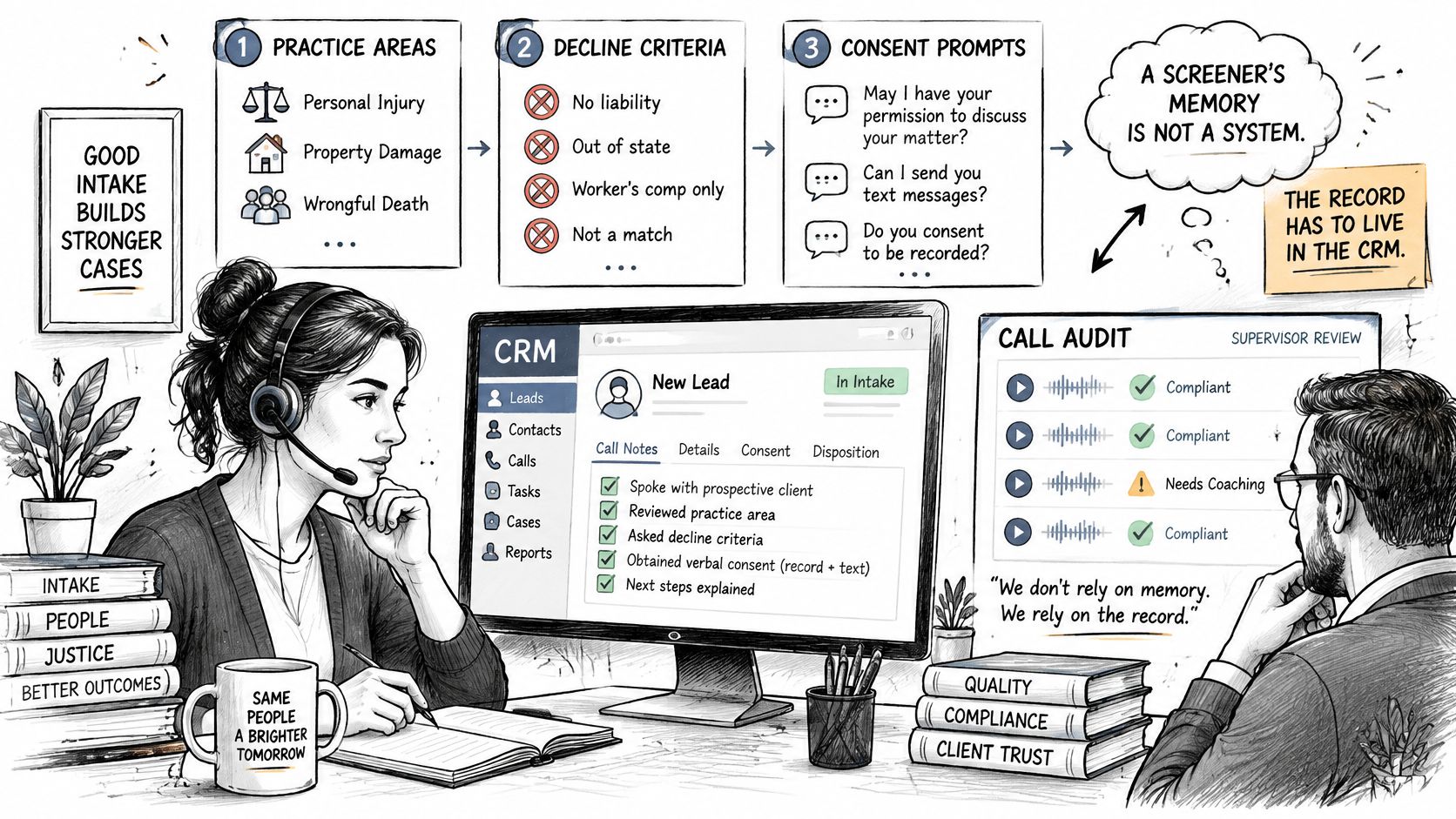
A screener's memory is not a system. If the record doesn't live in the CRM, it doesn't reliably exist, no matter how good the conversation sounded.
Train in a deliberate sequence. Teach your practice areas, decline criteria, consent prompts, and escalation rules first. Then role-play your three most common call types until each screener passes a short scored sample. Don't start with rare edge cases while routine injury, family, or criminal calls are still handled three different ways.
Mystery Calls and the Audit Trail
Run mystery calls on a fixed schedule, not only after someone complains. Script them to test the failure modes that create real risk:
- Recording before disclosure: Does the screener disclose at the right moment for that jurisdiction?
- Prerecorded follow-up: Is documented permission checked before it's used?
- Sensitive voicemail: Does the screener avoid leaving matter details where anyone can hear them?
- Legal advice request: Does the screener decline to opine and route appropriately?
Inspect both the conversation and the CRM audit trail. A warm, confident call that produces no timestamp, no disposition, and no owner is still a failed intake. It just fails pleasantly.
Every call should create one record with a timestamp, caller type, disposition code, next-action owner, and due time. Once a matter is signed, that record should sync into case management so intake facts don't get retyped, abbreviated, or lost. Your CRM cannot follow up with a lead if nobody puts the lead in the CRM.
If an outside team handles calls, you should see every recorded call and every script change. Every lead call at Attorney Assistant is recorded and reviewed for quality, and scripts are refined based on these reviews. That's how a script improves: actual caller language replaces what everyone assumed callers would say.
Run This Checklist This Month
- Written rules: Every practice area has an accept or decline rule.
- Matching prompts: Consent prompts match the caller's and firm's jurisdictions.
- One record per call: Each record has an owner and due time.
- Mystery calls completed: Results are logged, not discussed and forgotten.
- Approved changes: Every script change is dated and approved by a named attorney.
Metrics That Show Screening Works
Measure screening as a funnel, not as phone activity. The six stages are answer or return the call, verify identity and jurisdiction, classify the matter, capture structured facts, route to a lawyer or calendar, then log disposition and trigger follow-up. A breakdown can occur at any stage, and total call volume won't tell you where.
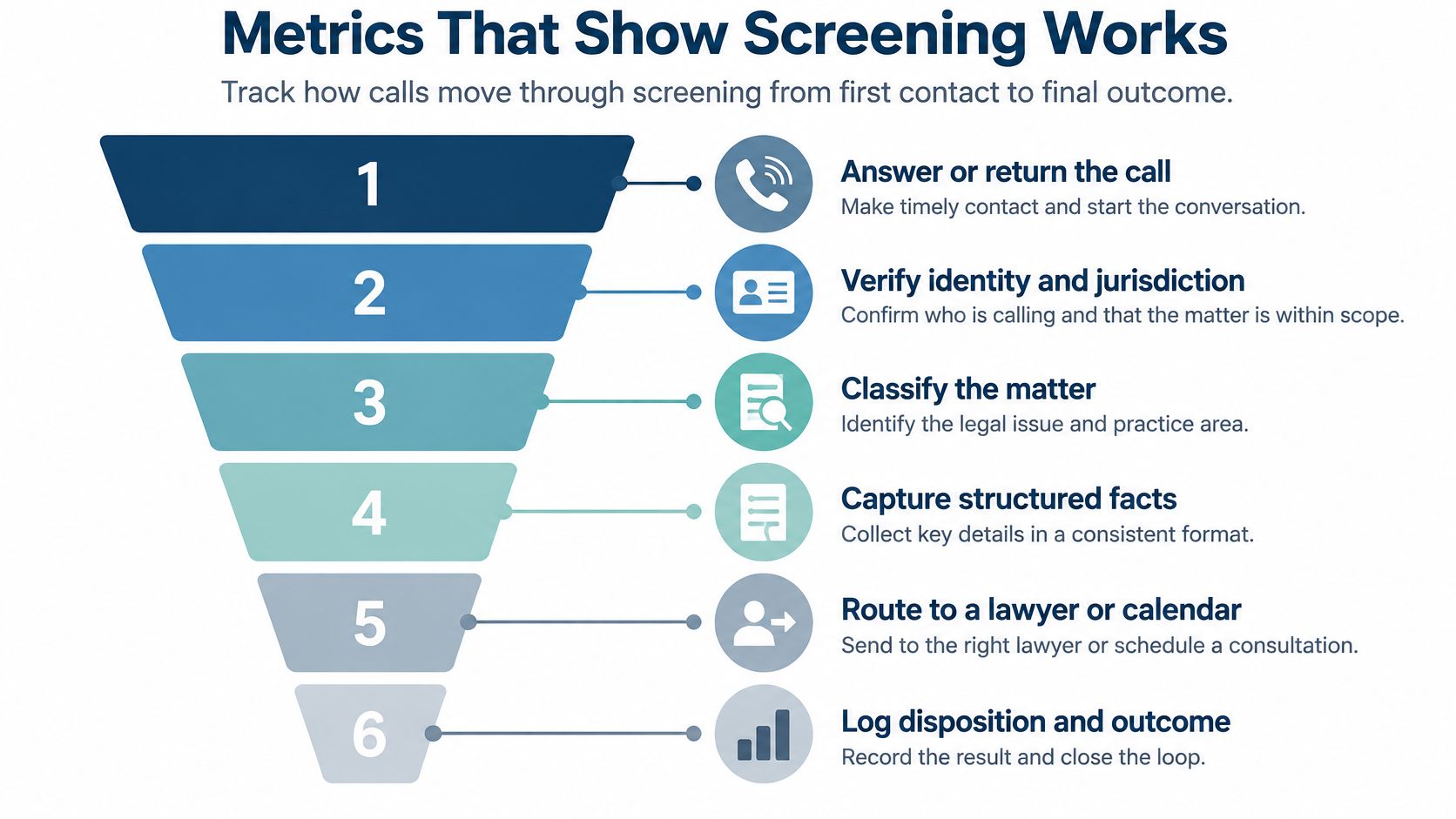
| Metric | How to calculate | Decision it informs |
|---|---|---|
| Answer rate | Calls answered by a person divided by total calls, by hour | Whether after-hours coverage is needed |
| Speed to first human contact | Minutes from call or form to a person | Whether urgent calls meet the 5-minute target |
| Qualification rate | Qualified leads divided by completed intakes | Whether the script screens out too much or too little |
| Warm-transfer rate | Transfers with a case summary divided by all transfers | Whether routing hands over usable information |
| Appointment rate | Consultations booked divided by qualified leads | Whether screening reaches the calendar |
| Retained-matter rate | Signed matters divided by consultations | Whether screening produces revenue, not just volume |
| False-negative rate | Rejected leads later found legitimate, from an audit sample | Whether scripts are too narrow |
Speed deserves its own number because delay is where prospects disappear. The legal intake automation overview from Amalga Group reports that in a 2025 response-time study, only 25% of firms replied within five minutes, the median response among firms that did respond was 13 minutes, and 26% still failed to respond at all. General contact-center references place first-call resolution around 70–75% and abandonment around 5–8%, but those are cross-industry indicators, not legal-intake guarantees.
Read the Numbers by Segment
Report answer rate by hour so after-hours gaps can't hide inside a decent monthly average. Keep new leads apart from existing clients for the same reason. A firm can answer 300 calls a month and retain none of them, then congratulate itself on call volume while marketing gets blamed for lead quality.
This is also where a disciplined view of intake analytics for law firms helps you connect first contact to signed matters instead of treating each report as a separate hobby.
Run a monthly review with the seven numbers in front of you. Flag the metric that moved most, find the funnel stage that caused it, and review a weekly QA sample for required fields, routing accuracy, and rejected leads that should have passed.
A high qualification rate with a low retained-matter rate usually means the script screens out too much, or the transfer summary is too weak for an attorney to act on.
That's a useful diagnosis. "We answered more calls" is not.
Decide Who Owns Screening Before You Hire Help
Before you compare any call screening service, name the owner. Someone has to own the call flow, routing table, metrics, and QA review, whether that's in-house staff, an outside team, or a mix. Without an owner, every provider will look disappointing for reasons that started inside the firm.
Give any prospective owner three tests. Can they change a script within a week when attorneys adjust criteria? Can they see every call disposition without asking three people? Can they show the first-contact time for a specific new lead? If the answer is no, fix visibility before you add headcount.
Scale changes the right model. A firm with heavy nights-and-weekends demand may need 24/7 live coverage, while a smaller firm may need a dedicated assistant focused on business hours and follow-up. Pairing 24/7 live intake with a dedicated full-time staff member covers a firm from first call to case resolution, and our team scopes the right mix on a discovery call. Prospects can start by using the Book a Call button on the website.
Prepare for that conversation properly. Bring your practice-area list, decline criteria, routing table, and last month's metrics. Those four items turn a sales call into an operations review, which is considerably more useful for everyone.
You have two sensible options. Book a call to review your screening workflow with those documents in hand, or keep the routing table in-house and run the metrics review for one month first. Either way, you'll know whether your problem is coverage, qualification, routing, follow-up, or nobody owning the system.
If your phones are answered but qualified callers still aren't reaching consultations, Attorney Assistant can help you build screening that captures, routes, and follows up instead of merely taking messages. Our Frontline team provides 24/7 live intake, and Staffline adds dedicated full-time legal support inside your systems, because Frontline signs the case and Staffline carries it. Visit Attorney Assistant to review your intake gaps and scope the right mix for your firm.
Related Articles

Client Service Questionnaire Templates for Law Firms
Build a client service questionnaire for your firm: sample questions by stage, send timing, response metrics, and how to route results into intake.
Virtual Front Desk for Law Firms: What It Really Does
Learn what a virtual front desk does for law firms, how it compares to in-house reception, and how to roll one out without risking client confidentiality.
Case Management App for Law Firms in 2026: How to Choose
Compare case management app options for law firms on intake, documents, calendaring, security and pricing, with a checklist to pick the right fit.