Case Management App for Law Firms in 2026: How to Choose

The sticky note is still on the monitor. It has a first name, half a phone number, and "car accident, call back." The receptionist left at five. Someone saw the note the next morning, called, and got voicemail. By lunch the prospect had signed with a firm that picked up on the first ring. Your case management app never heard about the call.
That scene is more common than any demo suggests. The software can hold matters, contacts, documents, deadlines, and tasks. It cannot remember to call anyone back. If intake lives in someone's memory, you have built the world's least reliable system of record.
Shopping in 2026 should start with the full path from lead to open matter, and with what the system costs to run, migrate, and leave over three years. Feature pages are a sorting tool. They are not a decision.
Table of Contents
- Case Management Apps Compared at a Glance
- Which Case Management App Fits Your Firm Size
- Document and Calendar Features Worth Testing
- Where Intake Leaks Even With Good Software
- Security and Ethical Duties That Shape Your Shortlist
- Pricing Models and the Real Cost Behind Them
- Migration, Exit and Three-Year Operating Risk
- Run a Two-Week Trial Before You Sign
Case Management Apps Compared at a Glance
A case management app keeps matters, contacts, documents, deadlines, and tasks in one system. The category you choose decides whether it stops at storage or also runs intake, permissions, and reporting. A lightweight tracker and an enterprise platform are not rivals. They fix different messes.
| Category | Best fit | Document depth | Intake depth | Typical pricing |
|---|---|---|---|---|
| Lightweight cloud case tracker | Solo and 2 to 5 attorney firms with simple matters | Uploads, tags, and basic search | Manual entry and simple forms | Per user, monthly |
| Mid-market practice suite | 5 to 50 attorney firms across several practice areas | Templates, version history, and e-signature add-ons | Web forms, lead pipeline, and conflict-check hooks | Per user, tiered by feature set |
| Practice-specific platform | Firms concentrated in one practice with heavy records volume | Practice templates, records requests, and court forms | Practice-specific intake questions | Per user or per matter |
| Enterprise legal platform | Firms with 50 or more attorneys and multiple offices | Granular permissions and audit reporting | Custom intake workflows and routing rules | Quote-based annual contract |
| Generic work or CRM tool with legal templates | Firms already running the tool company-wide | Attachments without matter-level permissions | Pipeline stages with no legal intake logic | Per seat, monthly |
Sort the category before the logo
Pick a row before you pick a brand. Clio and MyCase show up in the mid-market conversation for many general practices. Filevine tends to appear when a personal-injury docket needs records and liens inside the matter. A company-wide CRM or project tool with legal templates looks cheap until one client's medical records need to stay walled off from everyone else's.
The usual surprise in that last row is not a missing feature. It is a missing wall.
Firms often learn there are no matter-level permissions only after intake notes are already in the tool. Pulling that data back out, then rebuilding who can see what, costs more than the seats you saved.
Three questions that finish the shortlist
- Features: Which document, calendar, and intake behaviors work in your setup, not on a slide.
- Security: Which access and audit controls you will demand before client data moves.
- Three-year cost: What license, migration, training, add-ons, and cleanup cost after the monthly price stops looking small.
Drop any category that cannot hold documents at the depth you use, or that cannot tell a lead from a client. Comparing twelve logos inside the wrong category is how firms buy software they abandon.
Which Case Management App Fits Your Firm Size
A solo attorney can outgrow a basic tracker if court deadlines drive the docket. A larger firm can still struggle with a full-featured platform if intake and matter handoffs vary by lawyer. Start with headcount, then test the workflow from first inquiry through active matter. The right fit depends on how the firm works, not just how many people have logins.
| Firm size | Best-fit category | Verify before shortlisting | Override to watch |
|---|---|---|---|
| Solo practitioner | Lightweight cloud case tracker | Mobile access, intake forms, phone-synced calendar | Litigation deadlines that follow court rules |
| 2 to 9 attorneys | Lightweight tracker or mid-market suite | One shared calendar, one intake path, configuration help | Single high-volume practice |
| 10 to 49 attorneys | Mid-market practice suite | Matter permissions, integrations, named internal owner | High-volume single practice may need a practice-specific platform |
| 50 or more attorneys | Enterprise legal platform | Audit reporting, multi-office permissions, administrator without a full caseload | Multi-office firms with separate matter rules |
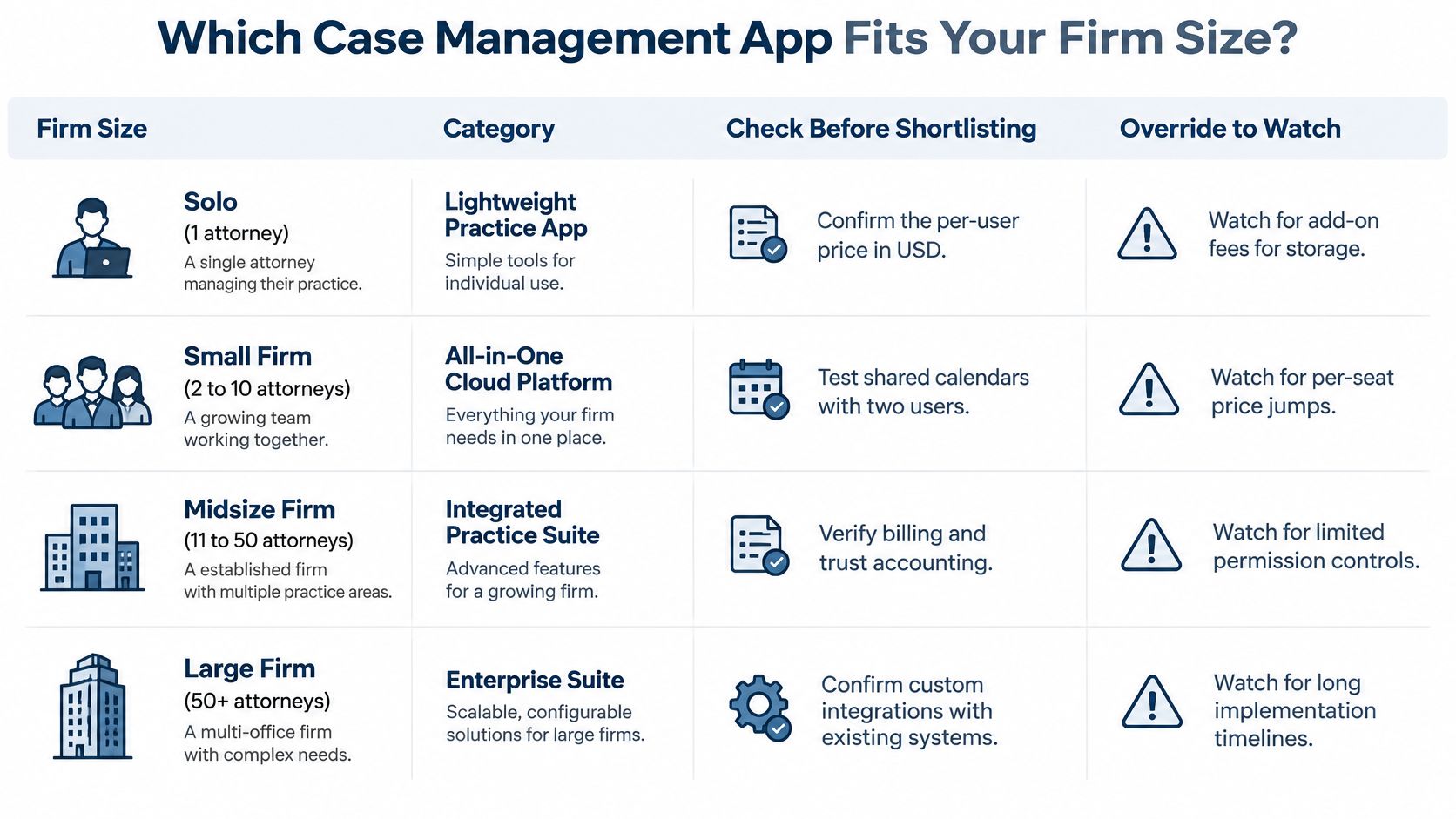
What changes as the firm grows
A solo practice often benefits from a lightweight tracker, mobile access, a basic intake form, and a calendar that syncs to a phone. Enterprise reporting adds setup and administration without much value if one person handles the matters. For rules-based litigation, confirm court deadlines can be built or imported before choosing based on the mobile app.
Firms with 2 to 9 attorneys need a shared path from intake to matter work, plus a vendor that will configure it with them. If each lawyer keeps a private method, information gets stranded and follow-up depends on memory. A shared case management model works only when staff and attorneys use the same process.
At 10 to 49 attorneys, handoffs multiply, and matter permissions, working integrations, and a named internal owner become more important than another dashboard. Larger firms also need to decide who will administer the system. An administrator carrying a full caseload may leave configuration and access reviews undone.
Adoption varies across firm sizes
The American Bar Association's 2022 Practice Management TechReport illustrates that case management software adoption is uneven across firm sizes. The practical takeaway is about fit and use: software being available at a firm does not mean it supports the daily workflow. Evaluate whether inquiries move reliably into matters and whether responsibilities are clear. A system cannot make someone call a prospective client back if the firm has no dependable follow-up process.
When the practice overrides the headcount
A high-volume practice may need specialized workflows even when the firm is small. Compare the work that must stay attached to each matter:
- Personal injury: Records requests and lien tracking need to stay with the matter, or staff will maintain a separate spreadsheet.
- Family: Court deadlines and document templates may matter more than a complex pipeline.
- Immigration: Form tracking and a client document portal may serve the team better than a generic task list.
If a practice-specific platform handles those workflows better, include it on the shortlist regardless of the firm-size row. Test the whole lead-to-matter path before committing, and consider who will own setup and administration over the next three years.
Document and Calendar Features Worth Testing
A new matter can start clean and still end up with three versions of the same letter, a deadline copied to the wrong calendar, and a retainer waiting in someone's inbox. Test the whole document and calendar workflow in your own matters before paying. Feature names are cheap; staff time spent fixing handoffs is not.
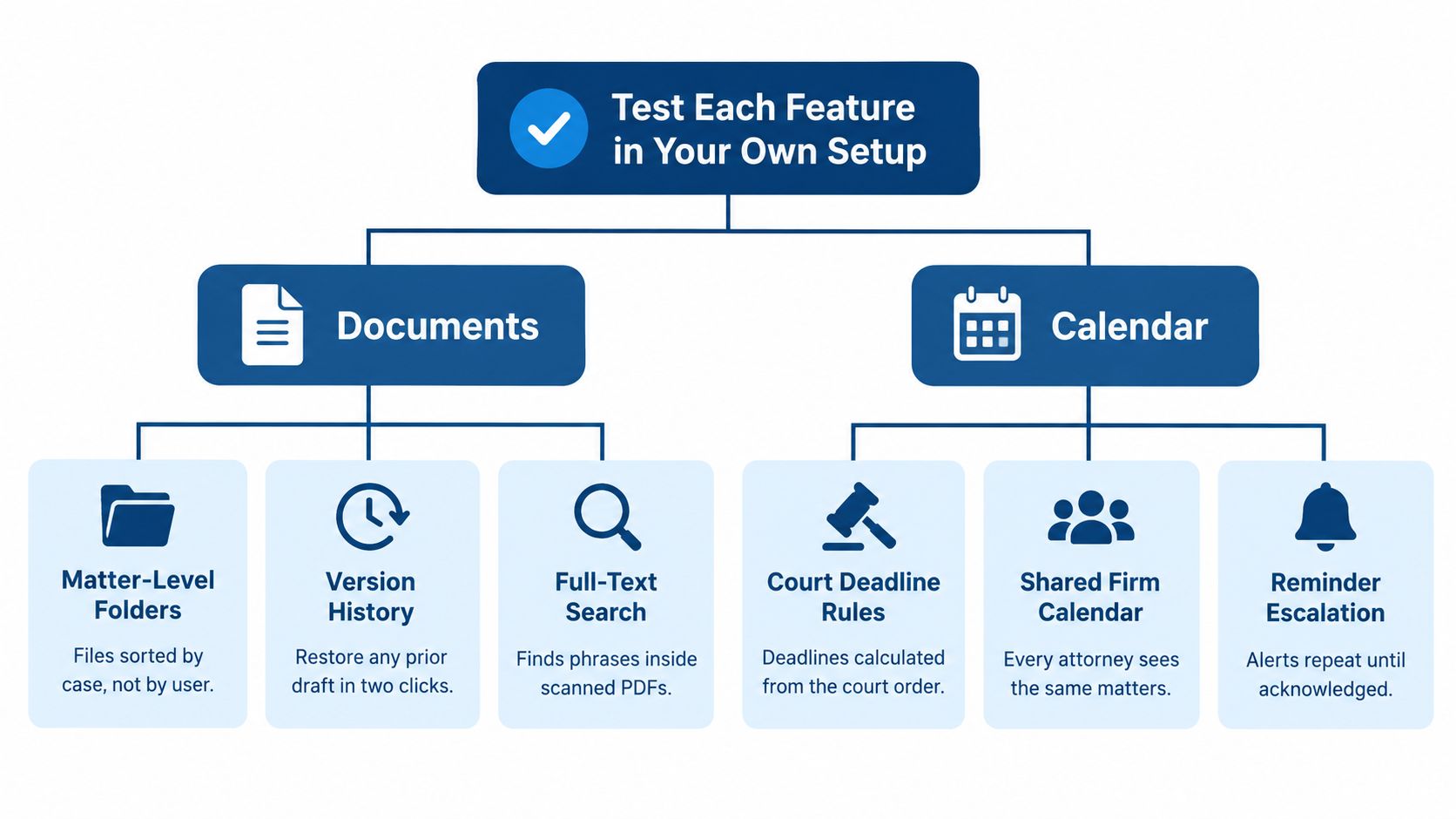
Documents worth failing a demo over
Open a real matter and test these five tasks. A deeper look at document management for law firms can help you define what staff need from filing and search.
- Matter-level folders: Files sort by case, not by who last saved them on a desktop.
- Version history: Restore yesterday's draft without emailing it to yourself.
- Full-text search: Search for a phrase inside a scanned PDF, not only the file name.
- Template merge: Names, dates, and captions pull from matter records instead of a letter copied from last month.
- Signed retainer filing: The executed PDF lands in the right matter without a manual filing step.
If a person must drag each file into place, count that work across every new case. A demo can make the process look tidy; test it with the file types and naming habits your staff use day to day.
Calendars and the difference between sync and a copy
Court-rule deadlines should be built or imported, not calculated from memory or a wheel chart. Check that calendar sync works both ways and that reminders go to the matter owner. An office-wide alert for every deadline trains people to ignore alerts.
Practical rule: If the calendar updates overnight, you don't have an integration. You have a copy job.
Create an event in the case system and watch the firm calendar. It should update promptly. Then sign a test retainer. The matter status should change, related tasks should appear, and the assigned person should receive an alert. That is a connected workflow. A connector that copies records overnight may carry the same label, but it leaves a gap between the action and the handoff.
For smaller firms, compare APIs, webhooks, role-based permissions, and bulk import and export against the administration a larger suite requires. Ask who resolves mismatched records and how much staff time that takes. Then test document search, filing, and deadline changes together. A system that works only when someone remembers every manual step will not fix intake or matter handoffs; it will give the office another place to forget. The ABA's 2023 Legal Technology Survey is useful background, but your own workflow test should decide whether the product fits.
Where Intake Leaks Even With Good Software
A case management app does not capture a lead. Someone has to answer, log the contact, and own the next step. Vendors rarely put that on the slide with the pipeline graphic.
The familiar sequence is dull and expensive. The call comes in after five. Nobody owns the callback. By evening the prospect has called another firm. Technically, returning the call four days later is follow-up. It is not particularly useful follow-up.
A 2019 Legal Trends Report secret-shopper study found that only 43% of law firms responded to voicemail inquiries. Among those that did, 86% called back within 24 hours, and 14% took longer or left no message. Prospects were less patient. 10% expected a response within one hour, 24% within a few hours, and 45% within 24 hours. A reply after one day misses the stated expectation of 79% of people who reached out.
An owner for every stage
Treat intake as a chain, not a form.
- First response. Who calls back, and how fast is "fast" on your matters?
- Contact attempts. How many tries happen before a lead is closed, and where is each try logged?
- Qualification. What counts as a case you want, in writing, not in a senior associate's head?
- Consultation booked. Who hears about an urgent matter the same hour?
- Retainer signed. Who chases the signature when the form sits untouched?
- Matter opened. When does a prospect become a matter, and who is forbidden from retyping it?
Taking a message is not intake.
The signs of ineffective client intake usually show up in that chain, not in the software brochure. Firms also experimenting with AI for law firms still need a person who owns the unanswered call. A model can draft a summary. It cannot decide your case is worth taking at 9 p.m. on a Saturday.
What the app can do, and where it stops
Pair each software check with the ownership question it supports.
- Web forms that write to the matter record support the handoff into a file. They don't staff the phone.
- Phone capture logged against the lead supports the attempt count. It doesn't place the second call.
- Qualification fields matched to your practice areas support a consistent yes or no. They don't train the person asking.
- Duplicate-contact detection stops a returning prospect from becoming a second record. It doesn't reconcile two memories.
- A conversion path from signed lead to matter removes the retype. It doesn't chase the retainer.
After-hours calls, repeated follow-up, and warm transfers need people on a documented sequence. Frontline from Attorney Assistant is built for that work: live coverage nights and weekends, qualification, and follow-up until the lead is signed or closed. Built-in intake is enough when volume is low and someone is clearly on the hook. It is not enough when "open 24 hours" describes the Google listing more accurately than the firm.
Security and Ethical Duties That Shape Your Shortlist
The duty shows up before the feature list. Under ABA Model Rule 1.6(c), lawyers must make reasonable efforts to prevent unauthorized disclosure of client information. Model Rule 5.3 requires supervision of nonlawyer assistants. Many states have adopted the technology-competence language in Model Rule 1.1, Comment 8. A case management app is where those duties get tested on an ordinary Tuesday, when someone shares a medical record with the wrong matter team.
Controls to require, not admire
NIST cloud guidance points at role-based access, least privilege, encrypted communications, monitored audit trails, and standardized APIs. Turn that into a vendor checklist.
- Unique identities and MFA: No shared "front desk" login. Strong authentication, or an equivalent, on every account.
- Least privilege: Matter-level and document-level permissions, plus time-bounded admin access.
- Audit events: Access, creation, modification, deletion, download, sharing, permission changes, failed logins, and exports. Each line needs a timestamp and a user.
- Contract access to logs: You should be able to get audit records without a support ticket that closes next quarter.
- Retention and export: Written procedures for how long data stays and how a full copy leaves.
Ask for evidence, not a security page. A current SOC 2 Type II report or an equivalent independent assessment, a penetration-test summary, incident-notification terms, and a sample redacted audit log. If the vendor will not show a log, assume you will not have one when you need to investigate a mishandled lead.
Outside staff and the limit of a secure platform
Any virtual assistant or intake team needs a named account, scoped permissions, and an offboarding step that runs the day they stop. A shared password "for the service" is how you lose the audit trail the day something goes wrong.
For firms with overnight intake or distributed staff, test the system under real concurrency. Measure login and dashboard speed, search across a large matter set, upload success, webhook delay, and the recovery point and recovery time the vendor will commit to in writing after an outage.
A locked-down platform still cannot stop a missed deadline or a careless share. Process has to sit next to the controls, or the log will only tell you, very precisely, who forgot.
Pricing Models and the Real Cost Behind Them
A low monthly quote can turn into an expensive three-year commitment once setup, add-ons, and staff time are included. Compare the full lead-to-matter workflow, not just the license line.
Three-year cost equals license price times users times 36 months, plus migration, data export, training hours, add-on modules, integration upkeep, and staff time spent cleaning duplicates and broken records. Include the cost of handling leads, too: software will not make someone call a prospective client back if your intake process relies on memory.
| Pricing model | How it bills | Hidden cost to check | Best fit |
|---|---|---|---|
| Per user, monthly | Fixed fee for each seat | Higher tiers may be needed for permissions and audit logs | Small firms with stable headcount |
| Tiered feature plans | Price rises with each feature set | Required features may sit in a higher tier | Firms with clear must-have features |
| Per matter or per case | Charge for each open matter | Volume growth raises the bill | Low-volume, high-value practices |
| Add-on modules | Base license plus e-signature, texting, or intake forms | Add-ons can substantially increase the total | Firms needing one specific extra |
| Usage-based | Charges per message, call, or document processed | Intake spikes raise charges | Firms with predictable volume and tight budgets |
| Enterprise contract | Quoted annual agreement, often with a minimum term | Implementation fees and administrator staffing | Multi-office firms with 50 or more attorneys |
Where each model bites
Per-user pricing rises with headcount. A low-priced tier may omit permissions and audit logs a growing firm needs. Per-matter charges can weigh heavily on practices where files open quickly, such as personal injury or immigration. E-signature, texting, and intake forms sold separately can roughly double a basic subscription. Enterprise contracts may add implementation fees and keep billing through a poor fit.
Check the whole workflow before accepting the quote. Test whether an inquiry can be captured, assigned, followed up, and converted into a matter without duplicate entry. Then price the staff time required when a lead sits in an inbox or a record needs cleaning. The software may reduce manual work, but only a clear ownership process ensures someone makes the callback.
Get renewal caps in writing, and confirm that a full data export is included at no charge. If export requires paid professional services, ask for the price before signing. Add these costs and expected staff hours to the three-year total; a smaller license fee may not mean lower operating cost.
Clio's 2024 Legal Trends research is a useful reminder to judge software spending by what it supports in practice, not by the size of the subscription alone. For a pricing comparison, ask which parts of the lead-to-matter process the product covers and what your team must still do by hand. Count the related setup, maintenance, and staff time in the same three-year formula. A feature that looks inexpensive on a proposal can cost more to operate if the firm has to build workarounds around it.
Migration, Exit and Three-Year Operating Risk
A case-management app can carry a firm from first enquiry to closed matter and still become an expensive liability if the data cannot leave cleanly. Compare the full operating risk over three years, including migration, training, administration and the cost of a poor fit. A lower subscription does not guarantee a lower cost.
Five answers before anyone signs
Write down the answers and name who owns each one.
- Full export. Confirm the format and whether it includes attachments, contact history and audit logs. “We can discuss export later” leaves the largest exit risk unresolved.
- Cutover. Set a switch date and agree how long the old and new systems will run side by side.
- Permissions owner. Assign an administrator and schedule quarterly access reviews. “The office manager, when she has time” is not an operating process.
- Restore test. Require evidence that backups have been restored successfully, not just a checkbox on a security document.
- Exit. Record the data-return format, deletion timing and written confirmation that production data has been removed.
Include staff hours for migration and training in the three-year cost. They can outweigh the difference between two monthly subscription prices.
UK research involving about 150 solicitors found 72% were concerned about investing in technology that could become outdated. Respondents cited cost, product fit and future-proofing as barriers. Cloud access alone does not make an operation resilient. Ask vendors for written security policies and clear incident-response commitments, then check how those commitments apply during migration and after termination.
Even a secure platform cannot stop a deadline being missed when intake or handoffs rely on someone remembering to call back. Software supports the workflow; the firm still needs clear ownership from first enquiry through matter closure.
Run a Two-Week Trial Before You Sign
No demo replaces a few weeks on your own matters. Run these eight checks in order. Each one is a single action with a pass and a reason to walk away.
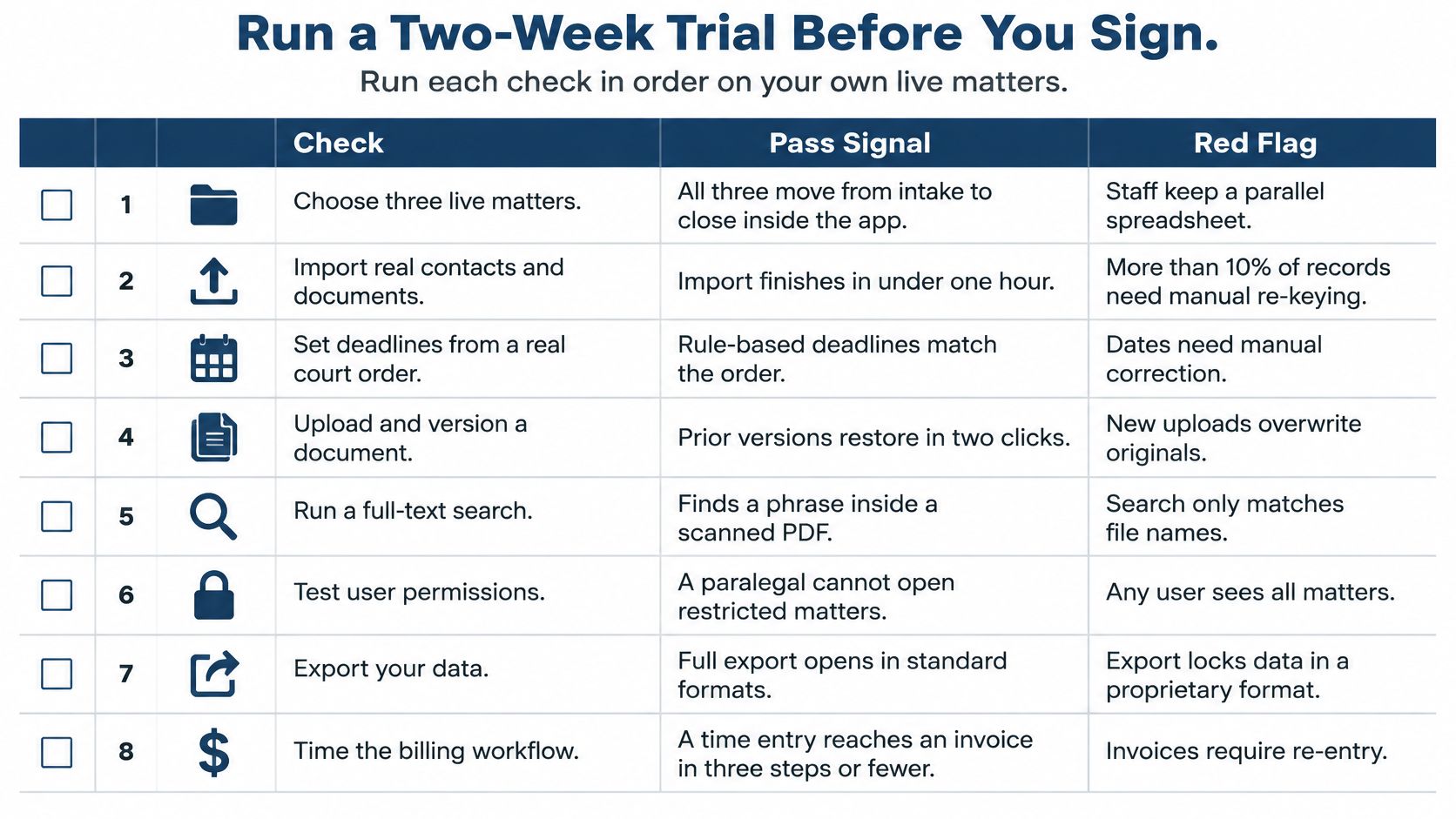
| Step | Action | Pass signal | Red flag |
|---|---|---|---|
| 1 | Run three live matters of different types and one open lead | All four visible with correct owners | Matters missing or ownership unclear |
| 2 | Import about 200 contacts and count the duplicates created | Duplicates flagged and mergeable | Duplicates created silently |
| 3 | Push the open lead through intake and time first response | Owner alerted at once with timestamp logged | Alert goes to the whole office or to no one |
| 4 | Enter a court deadline | Calendar updates in both directions | One-way copy that runs overnight |
| 5 | Sign a test retainer | Status changes, tasks created, assignee alerted | Manual status change required |
| 6 | Log in as a restricted assistant account | Sees only assigned matters | Sees firm-wide records |
| 7 | Export all matter data | Complete export with the export logged in the audit trail | Partial export or no log entry |
| 8 | Request restore test, offboarding steps, breach-notice clause, and written security policy | Documents provided within the trial window | Vendor declines or delays |
Steps 4 and 5 are the same automation test from the feature review. If they fail on your data, they will fail after you pay. Step 6 is where shared logins and "everyone can see everything" usually surface. Step 8 is the exit plan in miniature. A vendor that cannot produce those documents during a trial will not become more generous after the contract is signed.
The decision the checklist is for
If the app passes and work still stalls, the bottleneck is people. Software will not call the lead back, chase the records, or keep the CRM from filling up with half-finished contacts. Map which of those tasks a dedicated team would own inside the system you just tested. Attorneys went to law school to practice law. Ideally, they should occasionally get to do that.
Attorney Assistant helps law firms staff the work around a case management app, not just buy another one. Frontline covers 24/7 live intake, qualification, and follow-up, and Staffline places a dedicated full-time legal support professional inside your systems for case administration, records, and the rest of the operational load. If the trial showed that the file is fine and the follow-up is not, visit Attorney Assistant and map which of those tasks should leave the attorneys' desks.
Related Articles

Business Telephone Answering Service for Law Firms
How a business telephone answering service works for law firms, including 24/7 intake, qualification, warm transfers, pricing models, and what

Call Flow Customer Service for Law Firms: A Practical Guide
Design a call flow customer service system for your law firm that captures leads, qualifies matters, and signs cases. Practical guide

Appointment Setting Online: A Law Firm Guide
Master appointment setting online for law firms with proven strategies that turn leads into booked consultations and grow your practice.