
It's 4:40 on a Tuesday. A voicemail from Monday is still sitting in the general mailbox, a web form about a rear-end collision came in overnight and nobody has claimed it, and an attorney walks past your desk asking who called about that crash. Everyone assumes someone else handled it. Nobody did.
That's not a software failure. A CRM for law firms is supposed to be the system that carries a prospect from first contact to signed engagement, with a named owner and a dated next step at every stage. Most firms buy one, fill it with contacts, and then keep running intake out of memory and goodwill. If your intake process lives primarily inside someone's head, you've built the world's least reliable CRM.
Table of Contents
- What a Law Firm CRM Tracks From First Call to Signed Client
- Where Law Firm Leads Leak and How Fast Firms Respond
- Features That Keep Intake From Falling Through the Cracks
- How to Build a Follow-Up Sequence Step by Step
- Choosing a CRM That Fits How the Firm Actually Works
- Access, Confidentiality and Ethics Controls to Set First
- Who Keeps the CRM Accurate Every Day
- Decide Whether the Gap Is Software, Staffing or Process
What a Law Firm CRM Tracks From First Call to Signed Client
The value of a legal CRM sits in the lifecycle states, not the contact card. A phone number and an email address tell you nothing about whether anyone called back. Five states carry the whole journey, and each one needs fields, an owner, and a visible failure mode when it's skipped.
| Lifecycle state | What the record must show | Owner | Typical failure |
|---|---|---|---|
| Inquiry | Source, practice area, received time, contact details | Intake staff | Sits unassigned in a shared inbox |
| Qualified lead | Jurisdiction, matter type, conflict-check status | Intake lead | Qualified on paper but never checked for conflicts |
| Consultation booked | Date, attorney, confirmation and show status | Scheduler | No-shows disappear from the record |
| Retained matter | Signed engagement, matter number, case team | Case manager | Contact and matter live in separate systems |
| Declined or lost | Reason code and follow-up date | Intake lead | The reason lives in someone's memory |
Why the states matter more than the contact card
Collapse "inquiry" and "qualified lead" into one bucket and you can't see where prospects drop out. Collapse "declined" and "lost" and you'll never know whether you're losing cases to conflicts, geography, fee expectations, or your own silence. The states are how a firm converts a vague sense that intake is "fine" into something you can manage.
Adoption is thinner than the vendor emails suggest. The American Bar Association's 2022 Legal Technology Survey, reproduced in the Clio Legal Trends Report hosted by the Wyoming State Bar, found 39% of lawyers in firms with 2 to 9 attorneys reported using some form of CRM software, compared with 22% in firms of 10 to 49 and 17% of solo practitioners. The survey's definition was broad enough to include Microsoft Outlook alongside Clio Grow and InterAction, so that number measures any structured tracking, not mature intake systems.
Your CRM cannot follow up with a lead if nobody actually puts the lead in the CRM.
Run one test today. Pick a single open inquiry, ideally the oldest one, and see whether the system shows its state, its owner, and its next action without you asking a human being. If you have to walk down the hall, that's your answer. The same discipline applies after signing, which is why responsive client communication belongs in the same workflow rather than in a separate habit.
Where Law Firm Leads Leak and How Fast Firms Respond
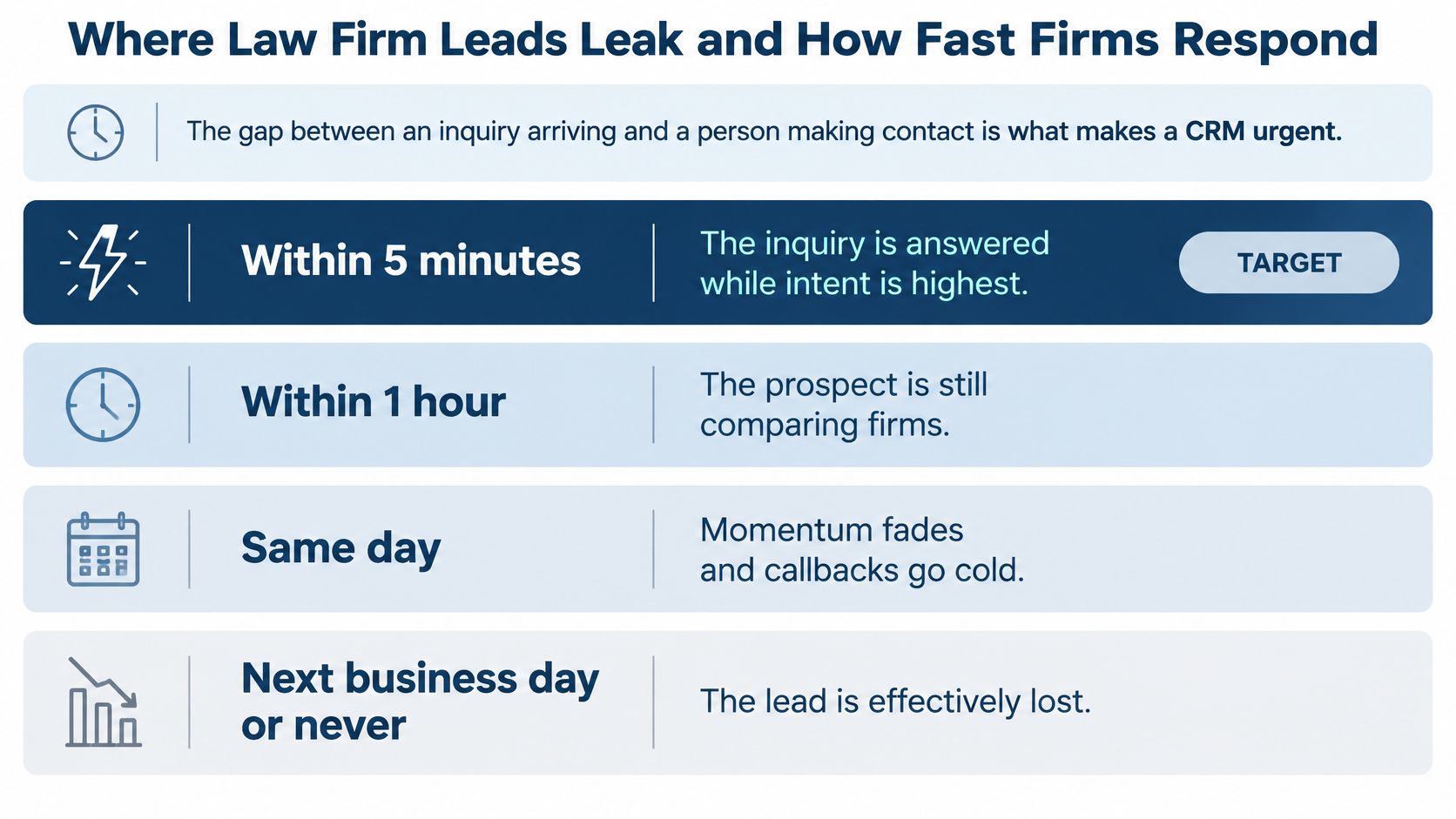
The uncomfortable number is 13 minutes. In a 2025 study of online lead response at 1,333 U.S. law firms, the Hennessey lead form response time study found that among firms that responded, the median time to first contact was 13 minutes, only 25% responded within five minutes, and 74% responded within seven days. Read that last figure again. A substantial minority of firms couldn't manage a reply inside a week.
The trend is improving, which isn't the same as good
A separate lead-response program contacted 1,377 U.S. firms through online forms and measured submission to first personal outreach. As compiled in Pareto Legal's legal client intake statistics, 28% responded in under five minutes in 2024, up from 19% in 2023 and 12% in 2022, and the median fell to 13 minutes from 21 minutes in 2023.
| Study year | Firms reaching a person within 5 minutes | Median first response |
|---|---|---|
| 2022 | 12% | Not reported |
| 2023 | 19% | 21 minutes |
| 2024 | 28% | 13 minutes |
| 2025 (1,333 firms) | 25% | 13 minutes |
The methods differ across those studies, so treat them as a direction of travel rather than a precise year-over-year comparison. The direction is clear enough: the fastest cohort more than doubled, and the median still leaves plenty of time for a prospect to call the next firm on the list.
What the gap looks like inside a firm
A lead sitting in a shared inbox isn't in your CRM. It's in a room where everyone assumes someone else is watching. Three mechanics close the gap, and none of them are exotic:
- Immediate assignment: every inbound inquiry gets a named owner and a timestamp the moment it arrives, including the ones that land at 9:40 on a Saturday.
- Logged outreach: each call, text, and email lands on one timeline, so "I tried them" becomes a record instead of a claim.
- An escalation rule: if no human contact happens inside your chosen window, a supervisor gets an alert, not a shrug.
Pull your last 20 inquiries and time the first human contact on each. Not the auto-reply. The person. Most firms that run this exercise discover their real median is nothing like the one they'd have guessed, and the worst outliers all arrived outside business hours.
Features That Keep Intake From Falling Through the Cracks
Feature lists are marketing. Consequences are useful. Here's the same checklist written as what breaks when the capability is missing, in the order an inquiry moves through your firm.
| Capability | What it should do | What breaks without it |
|---|---|---|
| Source tagging | Records channel, campaign, and referral partner | Marketing spend cannot be tied to signed matters |
| Conflict-check status | Holds clearance state before a consultation is booked | Consultations get booked on matters the firm cannot take |
| Next-action deadline | Assigns an owner and due time to every open inquiry | Unanswered inquiries have no owner |
| Multi-channel follow-up log | Stores calls, texts, and emails on one timeline | Attempts happen but leave no record |
| Escalation rule | Alerts a supervisor when no human contact occurs in a set window | Stalled leads sit silently |
| Disposition codes | Standard reasons for declining or losing a matter | Losses stay unexplained |
| Case management sync | Moves contact data into the matter once retained | Staff re-key the same information by hand |
Disposition codes are the cheapest analytics you'll ever build
A firm with one "closed lost" status knows it lost cases and nothing else. A firm with a picklist knows whether the losses came from conflicts, out-of-state incidents, fee objections, practice-area mismatch, or a prospect who never heard back. Those are five different problems with five different fixes, and only one of them involves marketing.
Make the codes a required field, keep the list short enough for staff to use, and ban free text in that field. Free text is where reporting goes to die.
Ask less at the front door
Clio's 2024 secret-shopper study of 500 U.S. firms, summarized by the Illinois Supreme Court Commission on Professionalism, points to online schedulers, intake forms, and text messaging as the mechanisms that streamline engagement. Use all three, but keep the form to the minimum necessary: name, contact, incident date, state, and a short description. Personal-injury prospects will volunteer health details before any retainer exists, and every extra field you require is another record you're responsible for protecting.
Two practical notes on configuration. First, put the conflict-check field ahead of the scheduler, not after it, so nobody books a consultation on a matter you can't accept. Second, a feature only counts if a human reviews its output weekly. An escalation rule that fires into an unmonitored mailbox is decoration.
Score your current system against the table with a yes, partial, or no on each row. Any "no" in the first three rows is your first project, ahead of any new subscription.
How to Build a Follow-Up Sequence Step by Step
Consumer expectations set the clock. In the 2019 Legal Trends Report published by the Institute for the Advancement of the American Legal System, 82% of consumers said timely responses were important and 79% expected a law firm to respond within 24 hours. Your sequence should beat that expectation comfortably, not meet it on a technicality.
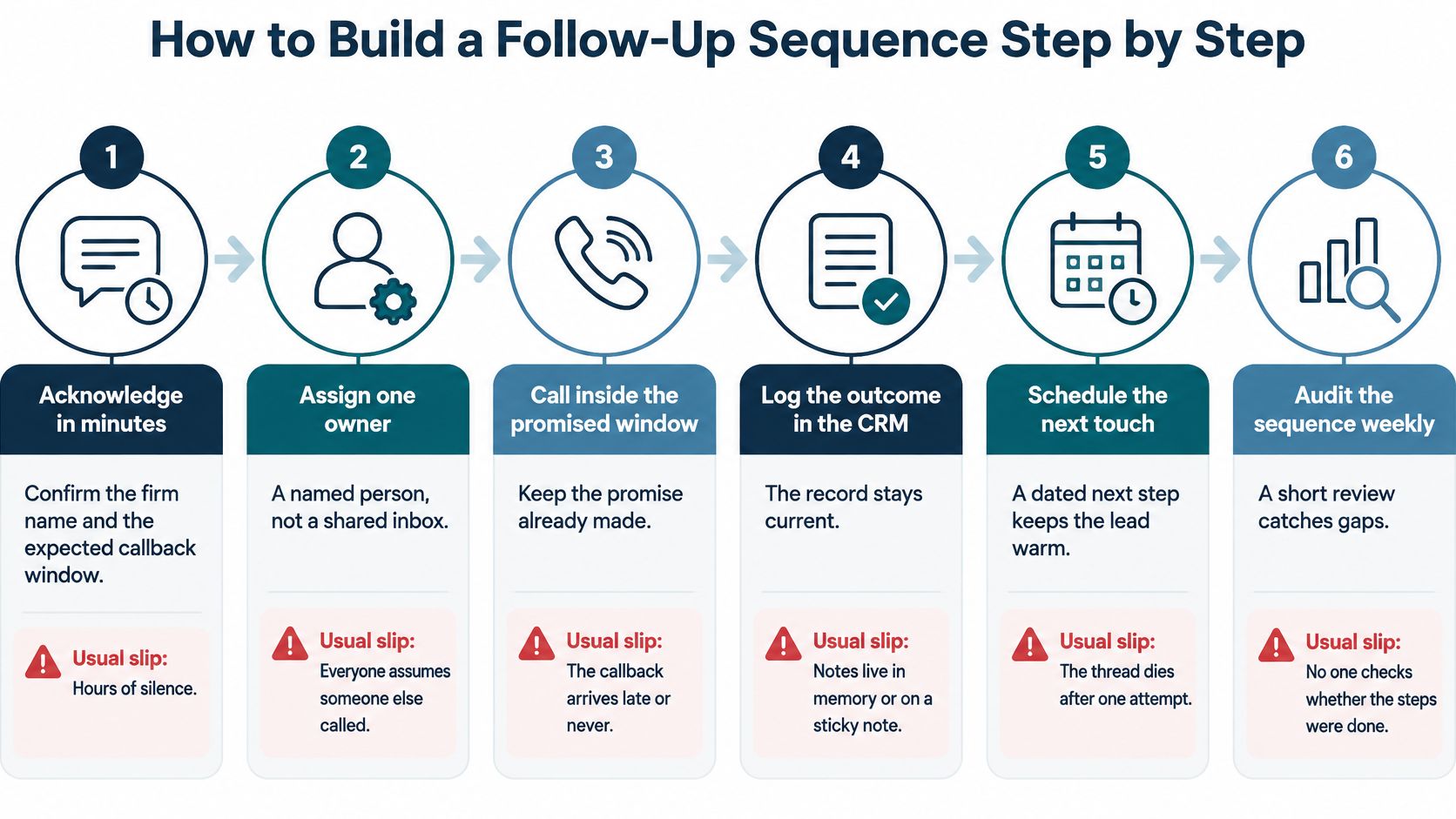
- Acknowledge within minutes. Send the firm name, the window in which a person will call, and one clear next step. The usual slip is an auto-reply promising a callback that nobody has scheduled, which is worse than silence because it sets a deadline you then miss.
- Create a task with an owner and a due time. Every unanswered inquiry gets both. Assigning it to "the team" is assigning it to nobody, and the record will politely agree with you.
- Attempt across two channels. Call, then text, then email, all logged on the same timeline. The slip here isn't laziness, it's unrecorded work: the call happened, the note didn't, and the next person starts from zero.
- Space attempts over days and set a stop rule. A sequence needs an end date as much as a start date. Without one you get either endless reminders that annoy people or a single call followed by permanent silence.
- Escalate on a clock, not on a feeling. If no human contact has occurred by your chosen cutoff, the record moves to a supervisor automatically. Feelings are not a queue.
- Record a disposition on every exit. Qualified, consulted, retained, or declined, with a reason code from the list. No record leaves the pipeline without one.
Practical rule: if a step in your sequence doesn't create a timestamped record, it didn't happen, no matter how confidently someone remembers it.
A cadence you can copy
Day zero: text acknowledgment plus a call attempt inside the promised window. Day one: call. Day three: email with a scheduling link. Day seven: final call and a closing text, then a disposition. Adjust the spacing to your practice area, but keep the shape and keep the stop rule. A deeper build-out sits in our client follow-up strategy guide for law firms.
Frontline, our 24/7 live intake team, runs this structure after signing up and integrating with the firm's case management system, then activating coverage, capturing leads, reviewing activity, and signing cases. Technically, calling someone back four days later is follow-up. It isn't particularly useful follow-up. Taking a message is not intake.
Choosing a CRM That Fits How the Firm Actually Works
Choose a category before you choose a logo. Most buyer's remorse comes from a firm buying an enterprise relationship tool to solve a speed-to-lead problem, or expecting a marketing CRM to carry a matter record it was never designed to hold.
| System type | Examples | What it does well | Where it breaks |
|---|---|---|---|
| Intake and marketing CRM | Clio Grow, Lawmatics | Speed-to-lead, source tracking, drip follow-up | Thin matter record once the case is signed |
| Case management with built-in CRM | Filevine, Litify, MyCase, SmartAdvocate | One record from inquiry through matter | Intake features lighter than dedicated tools |
| Enterprise relationship tool | InterAction | Contact history and referral tracking across a large firm | Not built for high-volume consumer intake |
| Shared inbox and spreadsheet | Outlook, Google Workspace, Excel | Cheap, familiar, works today | No owner, no deadline, no audit trail |
Match the category to your constraint. One practice area with dedicated intake staff points somewhere different than five practice areas with a rotating front desk. If conflict clearance has to live inside the record before a consultation is booked, that requirement alone eliminates several options.
Five questions for every vendor demo
- Can it timestamp first human contact and report median response by source?
- Does every new inquiry create an owner and a deadline without manual setup?
- Can source and campaign fields map to what marketing purchases?
- Do calls, texts, and emails land on one timeline?
- Who can export, and what leaves the firm when they do?
Ask for a worked field mapping into your case management system, not a logo on an integrations page. "We integrate with Filevine" can mean a full two-way sync or a CSV someone uploads on Fridays. Our law firm tool matrix is a useful starting point for comparing what your stack already covers.
It also helps to see the purchase from the client's side. Reading articles on selecting legal representation from Fiscella Law LLC shows what prospects are weighing while your intake queue ticks along, and responsiveness features prominently.
Then run a 30-day pilot on one practice area: one record per person, dispositions picked from a list, a weekly stale-record review. Ask every vendor for total first-year cost including implementation, migration, and the admin time nobody quotes.
Access, Confidentiality and Ethics Controls to Set First
A CRM concentrates privileged communications, personal identifiers, medical records, and financial details into one place. It also gives more people a login. That makes the first question not “Which dashboard looks better?” but “Who can touch what, and what happens when they do?”
The maturity gap is real. The 2024 ABA practice management technology report found 60% of firms had formal cybersecurity policies, while phishing and ransomware remained significant threats. A policy in a drawer and permissions in the system are different artifacts. The second one decides whether a receptionist can view medical attachments, a marketing vendor can export the prospect database, or a former contractor still has access three months after leaving.
Least-privilege roles, written down
- Reception: creates and updates intake records, nothing more.
- Intake supervisors: assign leads, audit activity, and reassign stalled records.
- Case teams: access matter-specific documents only, not the whole prospect database.
- Exports and bulk downloads: restricted to named roles, logged every time.
Write the role map before configuring the CRM. Otherwise permissions get copied from whoever set up the account, and the firm inherits a permission structure nobody can explain. Each role should match the work: intake, supervision, case handling, administration, or reporting. If a person changes jobs, the access should change the same day.
The technical baseline to hand your IT lead
Multifactor authentication on every account. Encryption in transit and at rest. Immutable audit logs for edits and access. Automatic session expiry. Backups you have restored once. Vendor incident-notification terms in writing. Scoped API tokens for integrations instead of a shared login passed around the office. Medical attachments stored separately from general marketing data, which matters most in personal-injury and mass-tort intake where health information arrives before representation is established.
The policy layer sits on top: call-recording consent language, minimum-necessary intake questions, a retention and deletion schedule, and documented supervision of any subcontractor who touches intake. For non-lawyer and contract staff, define what they may enter, update, export, or send, then require attorneys to review anything that involves legal judgment, client advice, or conflict decisions. The overview of remote paralegal duties and boundaries can help frame those file boundaries, but your own supervision rules still need to match the firm's workflow and ethical obligations.
Quarterly test: print the user list, remove anyone who's left, and check every remaining permission against that person's current job duties.
Treat the CRM as an accountability system. Software can enforce a permission. It can't decide a conflict, supervise a non-lawyer, or judge whether an automated message says something you shouldn't have said. Those stay with the firm, and outsourcing the work never transfers the accountability.
Who Keeps the CRM Accurate Every Day
A CRM is only as current as the person feeding it, and that person is usually doing four other jobs. In a 2026 survey of 400 attorneys, paralegals, and legal-operations staff cited by OnceHub's legal answering service analysis, nearly 40% estimated losing at least four hours of billable work each week to administrative tasks. Four hours per affected professional is not a rounding error. It's a staffing decision you made by accident.
Buying the platform doesn't fix ownership. Harbor Global's 2025 Marketing Technology Survey, in its findings on data integration and law firm growth, reported that 97% of surveyed law firms used CRM platforms while only 18.2% of lawyers actively engaged with those tools. A system everyone has and nobody updates is an expensive address book.
Four lanes, four names
- Intake lead: owns dispositions and the reason codes, and closes every record that exits the pipeline.
- Admin support: uploads correspondence, client documents, and case updates into the CRM as they arrive, not in a Friday batch.
- Case managers: keep the case management system current, with documents filed, notes logged, and tasks updated.
- Attorneys: own conflict decisions and retention approvals, which are the two things nobody else can sign off.
The firm chooses the system. Our staff work inside whatever the firm uses, whether that's Filevine, Litify, Clio, MyCase, or SmartAdvocate, and a dedicated full-time hire learns your matters, your checklists, and your communication standards rather than splitting attention across other clients. Software doesn't acquire medical records, chase liens, or keep a calendar honest. People do. Your attorneys went to law school to practice law. Ideally, they should occasionally get to do that.
Weekly check: one named person reviews stale records and open tasks, every week, on the calendar.
Name one person for each lane. If you can't, that gap is your first problem, and it's cheaper to fix than any subscription on your shortlist.
Decide Whether the Gap Is Software, Staffing or Process
A new CRM will not answer phones, write a disposition, or chase a stalled prospect. Most firms that think they have a CRM problem have a coverage, ownership, or process problem. Diagnose before you buy.
- Software: inquiries arrive, get recorded, and the record still cannot show state, owner, or next action. That is a genuine platform limitation.
- Process: the record shows state and owner, but no escalation rule fires and dispositions are free text. That is configuration and discipline, and it is cheap to fix.
- Staffing: the rules exist and nothing happens after 6 p.m., on weekends, or during a two-week trial. That is coverage, and no automation writes a retainer at 11 on a Sunday.
Do the work in that order. Process and ownership first, software second, capacity third. A well-configured system still leaves a hole when nobody is answering. Clear communication after signing matters just as much, and Lawyer in Martin County offers practical guidance to improve lawyer-client dialogue after accidents.
The firm chooses the system. Attorney Assistant integrates with the CRM the firm already uses, and a Staffline hire works inside the firm's case management system, including Filevine, Litify, Clio, MyCase, and SmartAdvocate. Frontline covers intake 24/7, built for nights, weekends, and fast speed-to-lead with persistent, structured follow-up rather than one call and silence. Staffline staff are sourced and vetted by Attorney Assistant, embedded and directed by the firm, and co-managed by both. Scoping happens on a discovery call, not off a shelf.
Start with a free intake audit. A team member reaches out after the form is submitted, then maps where operational gaps are leaking revenue. Bring your last 20 inquiries, your real first-response times, and your list of open records with no owner. Compare them against published benchmarks before spending another dollar on leads. Attorney Assistant handles intake, follow-up, admin, and operations so follow-up happens in the system instead of living in someone's memory.
Related Articles

Monitoring Phone Calls Without Breaking the Law
Learn how monitoring phone calls works, which methods need consent, how all-party states differ, and how to use call data without legal trouble.

Client Experience Coordinator for Law Firms
See what a client experience coordinator owns in a law firm, from intake and status updates to the skills that keep matters moving.

Answering Service for Business: A Practical Guide for 2026
Learn how an answering service for business works, which options exist, and how fast, consistent call handling protects leads, intake and client trust.