Free Google Phone Number for Business: What Actually Works

Google's free Voice plan covers one user at $0 and cannot serve as a shared business line. Business use needs a paid Google Voice plan starting at $10 per user per month, plus Google Workspace starting at $6 per user per month.
The popular advice sounds tidy. Grab a free Google phone number for business, forward it to your cell, print it on the website, done. That works until a second person needs to answer, a prospect calls at 8:40 p.m., or the one person holding the login takes a vacation. Then your phone system turns out to be one human's availability, which is a creative definition of infrastructure.
A number isn't intake. It doesn't qualify anyone, follow up on day two, or put a lead in your CRM. Treat the free line as a test channel, then decide based on who has to answer it.
Table of Contents
- Free and Paid Google Voice Plans Compared
- What a Free Number Really Costs a Firm
- Where a Free Number Breaks Down for Intake
- How to Set Up a Google Number for a Firm
- Moving an Existing Number Without Losing Calls
- Alternatives When a Free Number Is Not Enough
- Choosing a Number Setup Your Intake Can Support
Free and Paid Google Voice Plans Compared
Start with the headcount, not the feature list. The Google Voice subscription comparison lists the no-cost Google Voice subscription at $0 and limits it to one user, while Starter costs $10 per user per month for up to 10 users, Standard costs $20 per user per month for unlimited users, and Premier costs $30 per user per month for larger or multinational organizations.
That one-user limit settles most firm decisions before pricing enters the picture. A solo attorney testing a second public line can use the free plan and learn something cheaply. The moment a paralegal, receptionist, or second attorney needs to answer the same number, you're shopping in the paid tiers whether you planned to or not.
What Each Tier Actually Unlocks
Starter is the entry point for a small team sharing one number. It's built for small businesses and entrepreneurs who need more than one person on the line but don't need elaborate routing yet.
Standard removes the user cap and adds the tools that matter once intake splits across people, including multi-level auto attendants, ring groups, and desk-phone support. A ring group means a call can reach whoever is free instead of dying on one person's phone during a deposition.
Premier targets larger or multinational organizations. Most small and mid-sized firms won't need it, and buying it to feel thorough is just expensive reassurance.
Google's own billing examples show the scaling clearly. Six Starter users cost $60 per month, 25 Standard users cost $500 per month, and 150 Premier users cost $4,500 per month. The math is simple because it's per seat, which also means every extra answerer adds a recurring line item.
| Plan | Users Covered | Monthly Price | Fits a Firm When |
|---|---|---|---|
| Free Google Voice | 1 user | $0 | Testing a single personal line |
| Voice Starter add-on | Up to 10 users | $10 per user per month | Small teams sharing one business number |
| Voice Standard add-on | Unlimited users | $20 per user per month | Firms needing ring groups and multi-level auto attendants |
| Voice Premier | Larger or multinational organizations | $30 per user per month | Multi-office firms with enterprise call needs |
| Google Workspace (required for business use) | Per account | From $6 per user per month | Email, accounts and admin controls behind the phone line |
Count the people who must answer the same line. If the answer is two or more, the free plan is already out.
What a Free Number Really Costs a Firm
The word free does a lot of unpaid work in most articles on this topic. The Google Workspace Voice product page states current official Google documentation says business use requires a paid Google Voice subscription, starting at $10 per user per month, in addition to Google Workspace, which starts at $6 per user per month.

So budget for the whole stack, not the headline. The recurring costs that arrive after sign-up are predictable once you list them.
- Voice license per answerer: Every staff member who needs to pick up, call back, or text from the number needs a seat.
- Workspace account behind each seat: The phone line sits on top of accounts, email, and admin controls you also pay for.
- Recording or transcription needs: If your firm needs a record of intake calls for quality checks or file notes, confirm your tier covers it.
- Manual handoff time: When a call lives on one person's phone, someone else spends time chasing messages, screenshots, and callbacks.
That's the invoice side. The larger cost never gets invoiced at all.
Price the Calls Nobody Answered
Run your own worksheet before you decide. Take your weekly inbound calls, estimate how many go unanswered, multiply by the share that normally become consultations, then multiply by the value of a signed matter. Compare that monthly figure against your license and staffing costs, and the free option often stops looking thrifty.
Say a firm misses a handful of calls each week because the line rings to one busy person. Technically, calling someone back four days later is follow-up. It's just follow-up performed for the benefit of the competitor who answered first.
The same pattern shows up with other free office tools, which is why it's worth reading up on free fax numbers and their limits before building client communication on any no-cost tier. The cheapest number can carry the highest operating cost when every call depends on one person's phone, memory, and mood.
Where a Free Number Breaks Down for Intake
Judge the line against your actual intake tasks, not against a feature checklist. A free Google number handles one-to-one conversations well. It falls apart when intake needs volume, repetition, or a human at odd hours.
What It Handles Fine
Callbacks to a prospect who already called you work. So does replying to someone who texted the firm first, or reading a voicemail transcription and returning the call promptly. These are personal, individualized conversations, which is exactly what the service was built for.
The Google Voice support guidance on texting limits describes consumer calling and texting as intended for one-to-one personal conversations and warns that spam-like behavior, including many short outbound calls, repeated identical texts, URLs, image attachments, or large message volumes, can trigger blocking. It also notes Google Workspace Voice currently supports SMS only in the United States, and SMS/MMS are not supported for SIP Link numbers.
Where It Fails
Bulk appointment reminders and scripted lead-recovery sequences look like spam to the system because, structurally, they are identical messages sent at volume. The Google Voice acceptable use policy prohibits sending or facilitating spam, large volumes of commercial messages, or automated messages through Voice, and it also warns that emergency calling may be unavailable during an internet outage, power outage, or Voice service outage.
Nights and weekends are the other gap, and no setting fixes it. A free line has no staff behind it, so after-hours callers get voicemail. If your firm is weighing what real coverage looks like, our breakdown of a 24/7 phone answering service for law firms is a useful comparison point.
Practical rule: Taking a message is not intake. A voicemail nobody owns until Monday is a lead aging in public.
| Intake Task | Free Google Number Fit | Why |
|---|---|---|
| One-to-one callbacks to a prospect | Good fit | Consumer calling and texting are built for personal conversations |
| Replies to a person who texted the firm | Good fit | Individualized replies to a contact are the intended use |
| Bulk reminders or scripted campaigns | Poor fit | Spam-like volume can trigger blocking and breaks acceptable use rules |
| Identical retainer prompts with links | Poor fit | Repeated identical texts and URLs can get the line blocked |
| SMS outside the United States | Not supported | Workspace Voice supports SMS only in the United States |
| SMS on SIP Link numbers | Not supported | SMS and MMS are not supported on SIP Link numbers |
| Live answering at night and weekends | Poor fit | No staffed overflow or live coverage; voicemail is not intake |
| Emergency calls during an outage | Unreliable | Emergency calling may fail during power, internet or service outages |
Before trusting the line with real leads, run a controlled 30-day pilot. Track delivery rate, reply rate, blocked-message incidents, missed-call rate, and qualified-intake conversion. Those five numbers will tell you more than any product page.
How to Set Up a Google Number for a Firm
If you still want to pilot a free Google phone number for business inquiries, set it up like firm infrastructure, not like a side project on someone's phone. The steps in Google's own deployment guidance are straightforward, and each one exists because firms skip it.
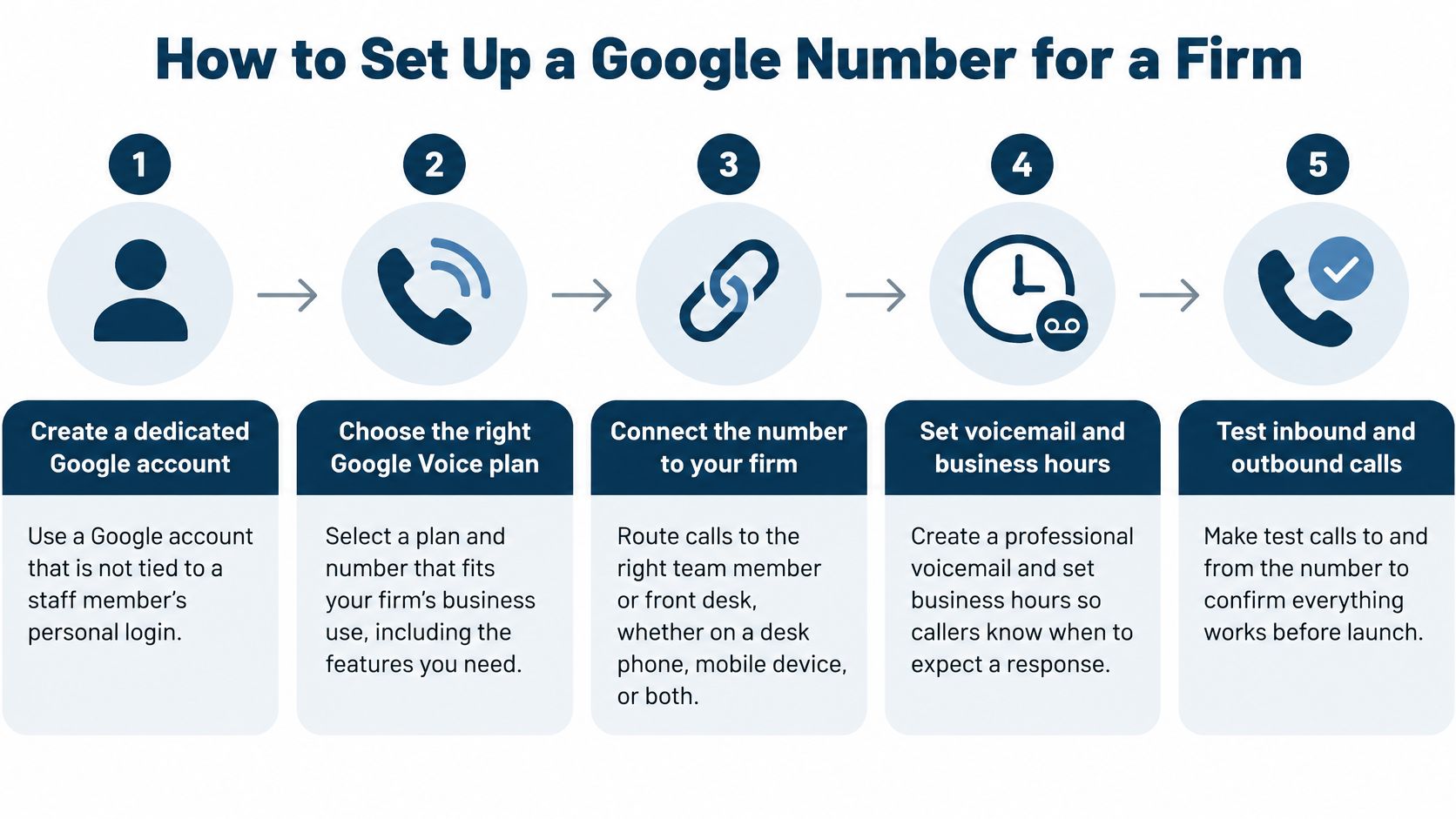
- Create a dedicated Google account for the line rather than tying it to an employee's personal login. Personal accounts leave with the people who hold them, and recovering your own intake number from a former employee is nobody's idea of a smooth Tuesday.
- Assign at least two authorized staff members who can answer through the web and mobile apps. One sick day shouldn't silence the firm.
- Write a call-routing and voicemail escalation procedure that names who calls back and how fast. Your CRM cannot follow up with a lead if nobody puts the lead in the CRM.
- Enter each user's physical service address and update it when remote staff move. The Google Voice emergency calling guidance states Google Workspace administrators need to enter a user's physical service address so emergency calls can transmit that address.
- Test everything before publishing the number, including inbound calls, outbound caller ID, voicemail transcription, SMS replies, and after-hours handling from multiple carriers. Test on every device type your staff will use, not just the office desktop.
- Keep a second, monitored line for urgent or continuity-critical calls. An internet-based number is only as reliable as the connection under it.
If you're also sorting out desk phones and network hardware during setup, this walkthrough of VoIP setup with We Fix PC Laptop covers the physical side of getting a small office system running.
Your Pre-Launch Checklist
- Dedicated owner account: Firm-controlled, with credentials documented somewhere secure.
- Two named answerers: Both tested on web and mobile.
- Written escalation: Callback owner and response window spelled out.
- Address on file: Current for every user, including remote staff.
- Backup line: Monitored and separate from the pilot number.
Moving an Existing Number Without Losing Calls
Porting is where optimistic timelines go to die. The Google Voice administrator FAQ says U.S. porting generally takes at least 10 business days and no more than 30 unless technical issues arise. Plan around that window instead of discovering it mid-campaign.
Before you start, confirm your account type supports porting. A free personal number isn't interchangeable with an administratively managed business number, and assuming otherwise is how firms end up rebuilding a setup they thought they'd finished.
The Safe Sequence
- Schedule the port away from busy periods. Don't move your main advertising or referral number the same week a campaign launches or during your heaviest intake stretch.
- Keep the old carrier active until you've verified inbound routing, outbound caller ID, and voicemail on the new line. Test with real calls from outside numbers, not just internal checks.
- Document ownership in your own records. Note the account holder, admin credentials, and carrier details in a place your operations lead controls.
There's genuine good news on the ownership side. Employee numbers remain with the organization when employees leave, and numbers can later be ported out if you change providers. That's a real protection compared with a number living on a staffer's personal account.
Also keep physical locations current during and after the move, since emergency calls transmit the user's service address to emergency services. That's easy to overlook with remote intake staff, and it's the kind of detail that only matters on the worst possible day.
A moved referral number that goes quiet during the switch isn't a technical hiccup. It's a lead source switched off with your own hands. Keep the old service on until the new one demonstrably works.
Alternatives When a Free Number Is Not Enough
Once the free plan stops fitting, you're choosing among real alternatives, not between free and nothing. Compare them on who answers after hours, how calls get recorded, and how much routing control your firm needs.
Paid Google Voice with Workspace is the closest like-for-like step if your firm already runs on Google email. You keep one ecosystem and gain shared answering, though the after-hours gap remains yours to staff.
A dedicated business VoIP system suits firms that want desk phones, call analytics, or finer routing control. The FinancesOnline 2024 business phone system statistics put VoIP phone systems at approximately $20 to $30 per user per month, with businesses switching to VoIP reducing monthly costs by as much as 45%. Treat that as vendor-compiled research and check it against your own quotes. If you're evaluating apps specifically, our guide to finding a good VoIP app for your firm walks through the selection criteria.
A mobile carrier business line works for a solo practitioner who needs a second number and doesn't want a new system. It's simple, it rings, and it still depends entirely on you answering it.
A staffed intake team covers the gap no phone platform fills by itself. Software routes calls, but people answer them, qualify the caller, and follow up when the first attempt fails. That's the difference between a number and a system for capturing work.
| Option | Typical Cost | Best Fit | Main Limit |
|---|---|---|---|
| Google Voice Starter with Workspace | $10 plus $6 per user per month | Small teams already on Google email | Covers up to 10 users and SMS only in the United States |
| Google Voice Standard with Workspace | $20 plus $6 per user per month | Firms needing ring groups and multi-level auto attendants | No live overflow coverage after hours |
| Business VoIP phone system | About $20 to $30 per user per month (FinancesOnline, 2024) | Firms needing desk phones and routing control | Live coverage still depends on staffing |
| Frontline 24/7 live intake | Action-based credits, priced per completed action | Firms missing nights, weekends or follow-up | Requires a scoped intake process to hand off |
Choosing a Number Setup Your Intake Can Support
Here's the decision rule in plain terms. A free line can carry one person's inbound calls and callbacks, and a Starter or Standard line can carry a small team sharing one number. Once intake is shared across people or calls arrive at night and on weekends, the number becomes one layer of an intake stack rather than the whole stack.
A number doesn't answer live, qualify prospects, follow up on day two, or set appointments by itself. A written escalation procedure only works if someone's on the other end of it, and a follow-up email only works if it reaches the inbox. Test the email path too with an email tester before you assume your confirmations and reminders are landing.
It also helps to measure which marketing numbers produce signed work, which is why our guide on call tracking for law firms pairs well with any number change you're planning.
For firms that find the gap is staffing rather than software, we offer a free intake audit where a team member reaches out after you fill out the form. You can also start with the Book a Call button on the website if you'd rather talk through your setup directly.
Bring three questions to that conversation. Who answers at 9 p.m.? Who follows up on day two? And who owns the record when the call ends?
If your free Google phone number for business is really one person's phone wearing a business costume, Attorney Assistant can help you build the staffing layer behind it, from 24/7 live intake with Frontline to dedicated, full-time legal support through Staffline. Visit the site to request a free intake audit or book a call, and let's find out where your calls are going when nobody answers.
Related Articles

How Do I Stop Being Socially Awkward: A Plan
How do I stop being socially awkward with a graded ladder, one conversation skill at a time, and a clear line for when to get help.

How to Find Clients for Cleaning Business in 2026
How to find clients for cleaning business with local search, referrals, partnerships, and a five-minute follow-up that books paid work.

Sentence for Counsel: 7 Examples Law Firms Can Use
Sentence for counsel examples for law firms: seven ready-to-adapt lines for intake replies, status updates, document requests, and engagement confirmations.