How to Enhance Intake Efficiency at Your Law Firm

TL;DR:
- Law firms improve intake efficiency by mapping workflows, automating routine steps, and ensuring rapid, clear communication. Designing user-friendly forms, responding within five minutes, and documenting interactions help convert inquiries into signed clients while reducing disputes. Addressing handoff issues and reserving attorney review for judgment tasks are key to maximizing operational effectiveness.
Intake efficiency is the measure of how quickly, accurately, and consistently a law firm converts an initial inquiry into a signed client. Most firms losing revenue are not short on leads. They are losing the leads they already have to slow responses, inconsistent follow-up, and intake processes that were never designed to scale. Knowing how to enhance intake efficiency means fixing the operational gaps between first contact and signed engagement, and that requires standardized workflows, smarter form design, targeted automation, and clear client communication from the first interaction.
How to enhance intake efficiency: the core components
The industry term for what most firms call “intake” is client intake and screening, and the ABA defines it as a standardized process using checklists, trained staff, and candid client communications to prevent disputes and ethical conflicts. That definition matters because it frames intake as a risk management function, not just an administrative one. Firms that treat intake as a checkbox miss the operational and legal exposure that comes with doing it poorly.
The core components of an efficient intake process are:
- Standardized workflows. Every inquiry follows the same documented steps, from initial contact to conflict check to engagement letter. Variation is where errors and delays hide.
- Trained intake staff. Staff must recognize red flags, handle sensitive conversations about fees and retainers, and know when to escalate to an attorney.
- Clear fee conversations. Setting billing and retainer expectations at the first contact reduces disputes and client dissatisfaction downstream.
- Short, staged intake forms. Weavely recommends 8 to 12 questions grouped into roughly three steps with progress indicators and conditional logic to reduce abandonment and keep forms relevant.
- Documented communication boundaries. Clients need to know how and when they will hear from the firm. Ambiguity creates follow-up calls that consume staff time.
Pro Tip: Build a one-page intake script for your front-line staff that covers the five most common practice areas. A script does not make conversations robotic. It makes them consistent, which is what protects the firm.
How can law firms redesign intake workflows to remove bottlenecks?
The first step is documentation. Before you automate anything, map every manual step in your current intake process. Firms that document manual intake steps recover 35% more time savings from automation than those that skip this step. That gap exists because automation applied to a flawed process accelerates the flaw. Mapping first reveals where delays and rework actually occur.
Once documented, the steps eligible for automation become obvious. Here is a practical sequence:
- Immediate web form acknowledgment. An automated reply within seconds confirms receipt and sets expectations. This is not a substitute for human follow-up. It is a holding action that keeps the lead warm.
- Questionnaire delivery. Send the intake questionnaire 1 to 4 hours after the initial inquiry, once basic interest is confirmed.
- Conflict check notification. Trigger an automated alert to the responsible attorney the moment a new intake is submitted.
- Reminders at 48 and 96 hours. Time-triggered follow-ups for incomplete questionnaires reduce the manual workload on coordinators.
- Engagement letter and retainer invoice delivery. Once the attorney clears the conflict check, automate document delivery rather than waiting for a coordinator to send it manually.
The results of this approach are measurable. Automated intake processes reduce average questionnaire return time from 3.2 days to 1.1 days and cut time to signed engagement letter from 4.1 days to 1.3 days. That is not a marginal improvement. It is a structural change in how fast a firm converts inquiries into paying clients.
| Step | Manual timeline | Automated timeline |
|---|---|---|
| Questionnaire return | 3.2 days | 1.1 days |
| Signed engagement letter | 4.1 days | 1.3 days |
| Initial acknowledgment | Hours to days | Under 60 seconds |

Pro Tip: Preserve attorney review gates for conflict analysis and engagement letter drafting. Automation handles volume. Attorneys handle judgment. Mixing those roles is where firms create liability.
What are the best practices for intake forms that improve completion rates?
Form design is where most firms lose leads they should convert. A prospect who abandons a 25-question intake form is not a lost lead. They are a lead your form design pushed away.
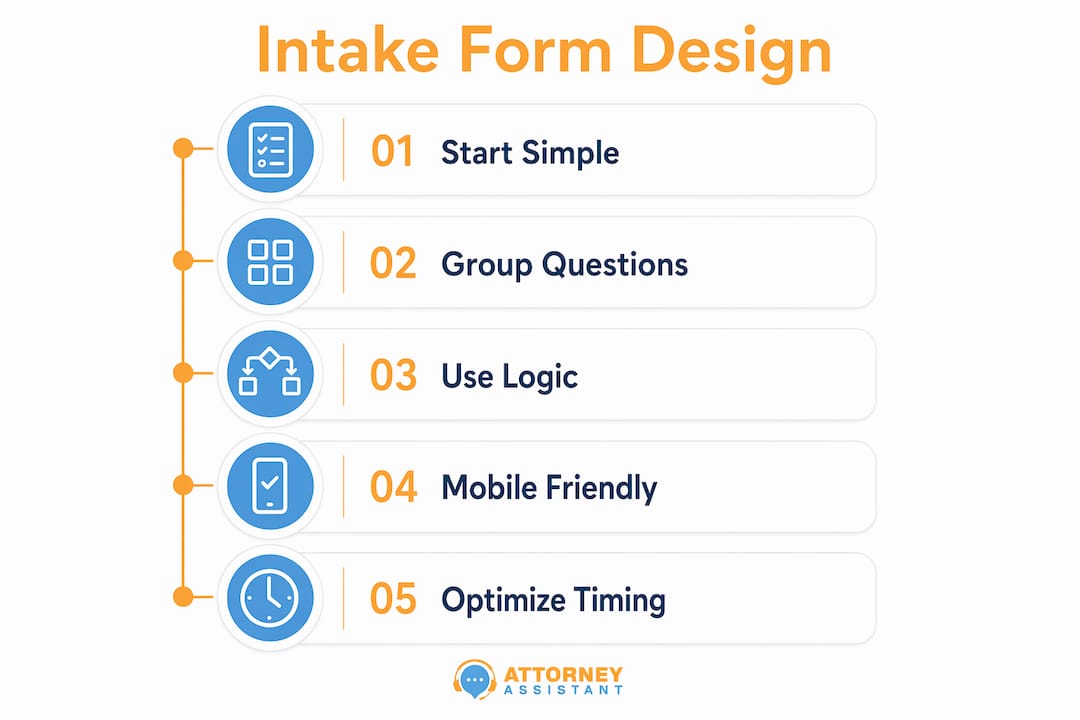
The best practices for intake form design follow a clear pattern. Start with simple, non-sensitive questions to build momentum. Ask for name, contact information, and the general nature of the matter before asking about income, prior legal history, or sensitive facts. Conditional logic hides questions that do not apply to the specific matter type, which reduces cognitive load and keeps the form feeling short even when it collects detailed information.
Delivery timing matters as much as design. Send the form immediately after the initial inquiry or directly after a brief screening call that confirms the prospect is a viable lead. Delivery via a contextual email link, a booking confirmation email, or a QR code for in-person consultations all outperform forms embedded on a generic contact page.
| Form approach | Completion rate impact | Best use case |
|---|---|---|
| Single long form, no logic | Low | None recommended |
| Multi-step with progress bar | High | All practice areas |
| Conditional logic enabled | Highest | Complex matters |
| Mobile-optimized design | Critical baseline | All delivery methods |
Mobile-friendly design is not optional. A significant share of legal inquiries come from mobile devices, and a form that requires pinching and zooming loses completions before the first question is answered. AI-powered form builders like those offered through platforms integrated with legal practice management software can customize and deploy these forms faster than building them from scratch.
How does rapid response impact intake efficiency and conversion rates?
Speed-to-lead is defined as the time between a prospect submitting a form and receiving a personal outreach from the firm. Hennessey Digital’s 2025 study found that 25% of law firms now respond to online leads in under five minutes, up from 13% four years earlier. That improvement reflects how competitive the response window has become. A firm that responds in 30 minutes is not slow by historical standards. It is slow by current market standards.
The consequence of delay is direct. Prospects who submit inquiries to multiple firms sign with whoever calls first. There is no loyalty at the inquiry stage. Speed is the differentiator.
Practical steps to improve speed-to-lead:
- Use automation for immediate acknowledgment so no inquiry goes unconfirmed, even outside business hours.
- Route new inquiries to a dedicated intake coordinator or answering service rather than a general inbox.
- Set a firm-wide KPI for speed-to-lead and review it weekly, not monthly.
- Use sequenced follow-up automation with escalation triggers so a lead that does not respond to the first outreach gets a second and third contact without requiring manual intervention.
Monitoring speed-to-lead as a tracked KPI, rather than an assumed behavior, is what separates firms that improve from those that assume they are already fast enough. Benchmarking against the 25% threshold gives operators a concrete target.
Pro Tip: Avoid legal jargon in your first outreach message. A prospect who just submitted a personal injury inquiry does not want to read about “retainer agreements” in the first text they receive. Plain language builds rapport faster and reduces the friction that kills conversions.
Which communication and documentation strategies protect firms while improving intake?
Clear communication and thorough documentation serve two functions simultaneously. They improve the client experience and they protect the firm from disputes, unpaid invoices, and ethical complaints. ABA guidance is direct on this point: document everything, and set fee and retainer expectations early.
The practical application looks like this:
- Written fee summaries at intake. A one-page summary of billing structure, retainer amount, and payment schedule sent during intake eliminates the “I didn’t know it would cost that much” dispute.
- Intake forms as legal records. The information a client provides during intake is a written record of their stated facts and scope. Treat it accordingly and store it in the client file.
- Checklists for intake staff. A documented checklist reduces omissions. When a staff member skips the conflict check because they were busy, the firm carries the liability. A checklist makes the skip visible.
- Automated reminders for missing information. Higher-performing intake workflows route complete submissions forward automatically and escalate incomplete files with context-specific reminders, so staff focus on problem cases rather than chasing every file manually.
“Document everything” is not a compliance slogan. It is the operational habit that prevents a billing dispute from becoming a bar complaint.
The law firm onboarding checklist approach, which structures conflict checks, document collection, and engagement letter generation into sequential steps, is the most reliable way to build this documentation discipline into daily operations.
Key takeaways
Intake efficiency in law firms depends on documenting workflows before automating them, designing forms that reduce abandonment, responding to leads within minutes, and protecting the firm through clear communication and consistent documentation.
| Point | Details |
|---|---|
| Document before automating | Map every manual intake step first to recover 35% more time savings from automation. |
| Design forms for completion | Use 8 to 12 questions in 3 stages with conditional logic to reduce abandonment. |
| Respond within 5 minutes | 25% of firms now meet this benchmark; slower responses lose leads to faster competitors. |
| Automate routine steps | Reduce questionnaire return time from 3.2 days to 1.1 days with targeted automation. |
| Document every intake interaction | Written records of fees, scope, and client facts protect against disputes and ethical conflicts. |
The part most firms skip when fixing intake
I have worked with enough law firm operators to know where the real friction lives, and it is almost never where they think it is. Firms assume their intake problem is a technology problem. They buy a new CRM, set up a few automated emails, and wonder why conversion rates barely move.
The actual problem is handoffs. When intake moves from the receptionist to the coordinator to the attorney and back, nobody owns the file completely. Each handoff is a moment where the case can stall, get re-routed, or get re-checked by someone who does not have full context. The greatest gains in intake efficiency come from redesigning those handoffs, assigning clear ownership at each stage, and defining explicit exit criteria so a file does not move forward until it is actually complete.
Automation is only as good as the process it runs on. I have seen firms automate a broken intake sequence and end up with faster broken intake. The firms that get real results map the process first, fix the handoffs, then automate the steps that do not require human judgment. That sequence matters more than any specific tool.
The other thing I would push back on is the assumption that more automation means less human contact. The best intake operations I have seen use automation to handle volume and timing, while reserving human calls for the moments that actually convert leads. A warm call from a trained intake coordinator, made within five minutes of a form submission, converts at a rate no automated sequence can match. Technology creates the conditions for that call to happen consistently. It does not replace the call.
— Nicole
How Attorneyassistant helps firms fix intake at the source
Most firms that contact Attorneyassistant are not looking for more leads. They are losing the leads they already have to slow responses, missed calls, and intake processes that break down under volume.
Attorneyassistant handles intake reception services so your firm responds to every inquiry rapidly and professionally, regardless of time of day. The lead follow-up solutions reduce missed calls and convert more inquiries into signed cases without adding headcount. These services integrate with your existing workflows rather than replacing them. If you want to see where your firm is losing revenue in the intake process, book a call and we will walk through it with you.
FAQ
What does intake efficiency mean for a law firm?
Intake efficiency measures how quickly and consistently a firm moves a prospect from initial inquiry to signed engagement. It covers response speed, form completion rates, conflict check timing, and engagement letter delivery.
How do I improve intake processes without hiring more staff?
Automation handles the high-volume, time-sensitive steps like acknowledgments, questionnaire delivery, and reminders. Documenting your workflows before automating them recovers the most time savings and prevents accelerating existing errors.
What is a good speed-to-lead benchmark for law firms?
Hennessey Digital’s 2025 data shows 25% of law firms now respond to online leads in under five minutes. That is the current competitive benchmark for firms that want to convert inquiries before a prospect contacts a faster competitor.
How long should a client intake form be?
Weavely’s 2026 guidance recommends 8 to 12 questions grouped into approximately three steps with a progress indicator. Conditional logic keeps the form short by hiding questions that do not apply to the specific matter type.
What intake steps should always involve an attorney?
Conflict analysis and engagement letter drafting require attorney review regardless of how automated the surrounding workflow is. These are the steps where legal judgment, not process speed, determines firm liability.
Recommended
Related Articles

Common Intake Challenges That Cost Law Firms Clients
Discover common intake challenges law firms face that cost them clients. Learn how to improve your process and boost client conversion rates.

How to Reduce Intake Errors at Your Law Firm
Learn how to reduce intake errors at your law firm. Discover steps and tools to enhance client data accuracy and streamline your processes.

Tips for Improving Case Intake at Your Law Firm
Discover essential tips for improving case intake at your law firm. Boost conversion rates and secure more clients with effective strategies.