LegalSoft.com Alternatives for Law Firm Intake

TL;DR:
- Managed intake services like Attorney Assistant ensure 24/7 call answering, swift qualification, and CRM data flow, reducing revenue leaks for small to mid-sized firms. Software-only platforms offer control but depend on internal staff to answer calls and operate workflows, making internal capacity crucial. Successful adoption relies on effective integration, prompt response times, and disciplined process enforcement rather than feature comparisons.
If your firm needs to fix intake leaks, not just add software, Attorney Assistant is the recommended first option: a fully managed service that handles 24/7 coverage, follow-up enforcement, and retainer signing without requiring your staff to operate new tools. For firms that prefer software control, legal CRM platforms like Clio Grow, Lawmatics, Law Ruler, and Lead Docket are the main legalsoft.com alternatives worth evaluating.
Here is the short version of who fits where:
- Attorney Assistant: Best for small to mid-sized firms, especially personal injury, that want intake fixed operationally without building an internal team.
- Software-only legal CRMs (Clio Grow, Lawmatics): Best for firms with in-house ops staff who want to own their workflow configuration.
- Hybrid managed + platform vendors (Law Ruler, Lead Docket): Best for firms that want automation tools with some vendor support, and have staff to manage the gaps.
- Specialized intake agencies: Best for high-volume practices that need dedicated phone coverage but already have a CRM in place.
The deciding factor is not features. It is whether your firm has the internal capacity to run a software tool correctly. Most small firms lose leads not because they lack software, but because no one is enforcing the process.
Table of Contents
- How do these alternatives compare on intake and pricing?
- How does each model actually work day to day?
- What should you check before choosing an alternative?
- What does onboarding look like, and what should you measure?
- Why Attorney Assistant works for intake-first firms
- What do comparable law firms say?
- Key Takeaways
- The feature checklist is the wrong starting point
- Attorney Assistant fixes the intake problem directly
- Useful sources
- FAQ
How do these alternatives compare on intake and pricing?
| Dimension | Managed intake service | Software-only legal CRM | Hybrid managed + platform | Specialized intake agency |
|---|---|---|---|---|
| Best for | Small/mid firms, PI, no in-house ops | Firms with ops staff, any size | Mid-sized firms, mixed practice | High-volume firms with existing CRM |
| Pricing model | Monthly subscription + per-action | Monthly subscription | Subscription + setup fee | Per-lead or monthly retainer |
| Core features | 24/7 phone, scripted qualification, follow-up, retainer signing, CRM hygiene | Intake forms, pipeline tracking, automated follow-up, e-sign | Automated forms, phone routing, some live agent coverage | Live phone answering, basic qualification |
| Managed vs. software | Fully managed | Software only | Hybrid | Managed phone, software separate |
| Integrations | Clio, PracticePanther, MyCase, major CRMs | Clio, MyCase, PracticePanther | Clio, Salesforce, custom API | Varies |
| Onboarding time | 1–3 weeks | 2–6 weeks | 3–6 weeks | 1–2 weeks |
| Support/SLAs | Dedicated team, defined answer-time SLAs | Ticket/email support | Ticket + account manager | Phone coverage SLA only |
| Security/compliance | Data encryption, access controls, TCPA-safe scripts | SOC 2 or equivalent, user access controls | Varies by vendor | TCPA compliance varies |
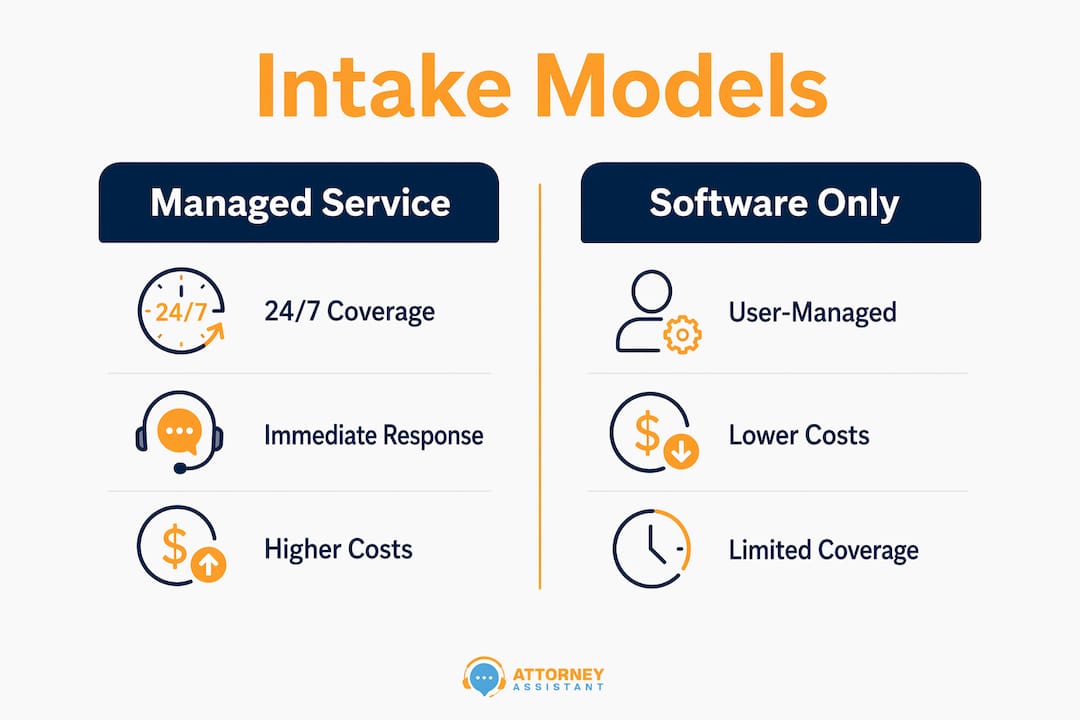
On pricing shape: Managed services typically run on a monthly subscription with additional per-action fees for tasks like retainer signing or medical record retrieval. Software-only platforms charge flat monthly subscriptions, often tiered by user count or contact volume. Hybrid vendors add setup fees. Specialized agencies often bill per lead or per call handled.
Tradeoffs that actually matter:
- Managed services deliver 24/7 coverage immediately. Software tools require your staff to answer the phone.
- After-hours intake matters: a significant share of potential clients make contact outside regular business hours. A software tool does not answer the phone at 9 PM on a Saturday.
- Software gives you full control over messaging and scripts. Managed services enforce a process but require trust in the vendor’s execution.
- Self-scheduled consultations tend to have higher show rates than staff-scheduled ones, which makes calendar integration an important feature regardless of which model you choose.
How does each model actually work day to day?
Managed intake service (Attorney Assistant model):
- A live agent or AI-plus-human hybrid answers every call, including nights and weekends.
- Qualification runs from a scripted flow your firm approves. Conflict checks happen in real time.
- Qualified leads get scheduled directly into your calendar. Attorneys receive a structured summary, not a raw voicemail.
- Follow-up sequences run automatically until the lead responds or is disqualified.
Software-only legal CRM:
- Your staff configures intake forms, pipeline stages, and automated email/SMS sequences.
- Someone at your firm still needs to answer the phone or set up a chatbot.
- Reporting lives inside the platform, but only if your team enters data consistently.
Hybrid managed + platform:
- The vendor provides automation tools and some live coverage, but coverage hours and script quality vary.
- Your staff handles escalations and edge cases. Attorney notification depends on how well the integration is configured.
Pro Tip: Design automated acknowledgment messages to confirm receipt and set expectations only. Do not include legal advice, case assessment, or outcome predictions in automated responses. This keeps your first-touch automation UPL-safe and still captures consent for follow-up contact.
The most common failure mode across all models: intake data sitting in a separate system from your case management software. When a new lead’s information never makes it into your CRM, your attorneys work blind and your marketing spend produces no measurable return.
What should you check before choosing an alternative?
Deal-breaker capabilities to confirm:
- Sub-5-minute automated acknowledgment after a lead submits a form or calls after hours.
- Conflict check integration with your case management system.
- Two-way calendar sync for consultation scheduling.
- TCPA-compliant consent capture at first contact.
- CRM syncing so intake data flows into your existing pipeline without manual entry.
- Documented SLA for live agent answer times.
Questions to ask in demos:
- Operations: What is your average answer time for inbound calls? How do you handle overflow or after-hours volume spikes?
- Compliance: How do you store consent records? Are your scripts reviewed for UPL risk? Who owns the intake data if we cancel?
- Technical: Which conflict check systems do you integrate with natively? How long does CRM sync take after a lead qualifies?
Red flags:
- No documented onboarding timeline. If a vendor cannot tell you when you will go live, they are guessing.
- Pricing that changes based on “usage” with no defined ceiling.
- Vague answers about data ownership after contract termination.
- No evidence of SLA performance. Ask for a sample report, not a promise.
Industry analysts consistently find that improvised intake costs firms more than they realize, precisely because the losses are invisible until someone measures them. Vendors who cannot show you their own performance data are unlikely to help you measure yours.
What does onboarding look like, and what should you measure?
| Milestone | Typical timeline | Required firm input |
|---|---|---|
| Discovery and scoping | Days 1–3 | Intake scripts, conflict check access, CRM credentials |
| Integration setup | Days 4–7 | IT contact, API keys or login access |
| Script review and approval | Days 5–10 | Attorney review of qualification criteria |
| Staff training | Days 8–— | Ops lead availability for 2–3 sessions |
| Soft launch | Days 10–— | Monitor live calls, flag edge cases |
| Full launch | Days 14–— | Hand off daily oversight to vendor or internal ops lead |
KPIs to track from day one:
- First response time (target: under 5 minutes for any inbound contact)
- Call answer rate (target: as close to 100% as operationally feasible)
- Qualified leads per week (baseline first, then trend upward)
- Consultation show rate (benchmark: self-scheduled appointments run roughly 23% higher)
- Consultation-to-retainer conversion rate
Responding to a lead within five minutes produces dramatically higher qualification and conversion rates compared to standard office response times. For a firm spending on paid search or referral networks, that gap translates directly into wasted marketing budget. Firms that treat intake as infrastructure rather than an ad-hoc task convert more leads without spending more on marketing.

Why Attorney Assistant works for intake-first firms
Attorney Assistant is built around the operational gaps that cost firms the most: missed calls, slow follow-up, and inconsistent qualification. Here is what that looks like in practice:
- 24/7 live coverage: Every inbound call gets answered, including evenings and weekends when roughly 46% of prospects reach out.
- Scripted qualification: Intake flows are built to your firm’s criteria, reviewed for UPL compliance, and enforced consistently across every call.
- Follow-up enforcement: Leads that do not convert on first contact enter a structured follow-up sequence. Nothing falls through because someone forgot to call back.
- Retainer signing support: Qualified leads can be moved to e-sign without attorney involvement in the scheduling or paperwork logistics.
- CRM hygiene: Intake data flows into your existing system. Attorneys see a clean, complete record, not a pile of sticky notes.
- Calendar and deadline management: Consultations are scheduled directly, reducing no-shows and eliminating back-and-forth.
Firms that fix intake operationally, rather than adding another software subscription, stop the revenue leak at the source. The highest ROI comes from enforcing immediate acknowledgment and consistent qualification scripts tied to CRM reporting.
When a software-only or hybrid approach makes more sense: if your firm has a dedicated ops manager, an existing CRM your team uses well, and the internal bandwidth to configure and maintain intake workflows, a software platform gives you more direct control. Attorney Assistant is the stronger fit when that internal capacity does not exist or when the firm has already tried software and the process still breaks down.
For firms evaluating a range of legal service alternatives, this comparison of legal practice options offers additional perspective on how managed and software models differ in practice.
What do comparable law firms say?
Small and mid-sized law firms consistently report the same pattern: strong client satisfaction scores alongside real operational strain. The LexisNexis Bellwether 2026 report found that 84% of firms rate their client experience as good or excellent, yet more than half identified routine administrative work as their biggest operational challenge. Billing, document management, and client communications were flagged as blockers by 52% of respondents.
The gap between client-facing performance and back-office reality is where intake failures hide. Firms that look good to clients are still losing leads after hours, missing follow-ups, and failing to convert consultations because the operational infrastructure was never built. That is not a marketing problem. It is an intake problem.
Research from the same report found that around 30% of firms are actively investing in standardizing workflows, and more than 40% are exploring AI for research and drafting. The firms moving fastest are the ones pairing that technology investment with a disciplined intake process, not just adding tools.
Key Takeaways
The most effective alternative to LegalSoft for intake-first outcomes is a managed service that enforces speed-to-lead, 24/7 coverage, and consistent qualification scripts tied to CRM reporting.
| Point | Details |
|---|---|
| Managed vs. software tradeoff | Managed services cover after-hours calls immediately; software tools require your staff to operate them. |
| After-hours coverage gap | Roughly 46% of prospects contact firms outside business hours, making 24/7 coverage a baseline requirement. |
| Speed-to-lead benchmark | A sub-5-minute first response produces dramatically higher conversion rates than standard office response times. |
| Onboarding timeline | Most alternatives go live within 1–3 weeks for managed services and 2–6 weeks for software platforms. |
| Attorney Assistant | Recommended for small to mid-sized firms that need intake fixed operationally without building an internal team. |
The feature checklist is the wrong starting point
Most firms shopping for legal software alternatives spend their evaluation time comparing feature lists. That is understandable, but it is usually the wrong frame. The question that actually predicts outcomes is simpler: who answers the phone when a lead calls at 8 PM on a Friday, and what happens next?
Software does not answer that question. Process does. The firms that recover the most revenue from their existing lead flow are not the ones with the most integrations. They are the ones that enforced a consistent response within five minutes, ran a scripted qualification call, and moved qualified leads to a scheduled consultation before the prospect had time to call someone else.
Feature parity across legal CRM platforms is real. The execution gap between firms that use them well and firms that do not is also real, and it is much wider. Before you evaluate any alternative to LegalSoft, map your current first-response time and your consultation-to-retainer conversion rate. Those two numbers will tell you more about what you actually need than any demo.
Attorney Assistant fixes the intake problem directly
Most firms evaluating legalsoft.com alternatives are looking for better software. Attorney Assistant offers something different: a managed operations layer that handles intake, follow-up, and administrative workflows so your firm stops losing revenue from leads it already paid to acquire.
The concrete difference: your phones get answered 24/7, qualified leads move to signed retainers faster, and your attorneys spend time on billable work instead of chasing callbacks. Attorney Assistant’s lead follow-up service enforces the follow-up sequences most firms intend to run but never do consistently.
If you want to see how the intake process works before committing, join a free virtual webinar where Attorney Assistant walks through real intake scenarios and shows how firms measure the improvement. Or book a discovery call to talk through your firm’s specific intake gaps.
Useful sources
- Your intake process is costing you more than you think — Miami-Dade Bar; supports the case for standardized, scripted intake as a baseline requirement.
- Law firm intake conversion — LexGro; source for the 5-minute response advantage and after-hours lead dropout figures.
- Law firm lead conversion benchmarks — LexGro; supports CRM integration and single-source reporting arguments.
- Legal lead response time — Let’s Ask Claire; source for self-scheduled consultation show rate data and UPL-safe automation guidance.
- Speed-to-lead benchmarks for law firm attorneys — YMM Digital; context for live chat as an intake channel.
- Small law firms confident on client service but face growing pressure — LexisNexis Bellwether 2026; source for operational drag statistics and workflow standardization investment data.
- Warning signs mid-market firms ignore — Law.com; supports the operations-first argument and intake-as-infrastructure framing.
FAQ
What is the main difference between LegalSoft and Attorney Assistant?
LegalSoft is a software platform; Attorney Assistant is a managed operations service. Attorney Assistant handles intake, follow-up, and administrative workflows directly, so your firm does not need internal staff to run the process.
Which legalsoft.com alternatives work best for personal injury firms?
Attorney Assistant is built specifically for small to mid-sized personal injury and contingency-fee firms. It covers 24/7 intake, scripted qualification, retainer signing, and CRM hygiene without requiring in-house ops capacity.
How long does it take to go live with a new intake alternative?
Managed services like Attorney Assistant typically go live within 1–3 weeks. Software-only platforms such as Clio Grow or Lawmatics generally take 2–6 weeks depending on integration complexity and staff training requirements.
Why does first response time matter so much for law firm intake?
Responding within five minutes produces dramatically higher qualification and conversion rates compared to standard office response times. Most firms lose leads not because they lack software, but because no one responds fast enough when a prospect first makes contact.
What should I measure after switching to a new intake solution?
Track first response time, call answer rate, qualified leads per week, consultation show rate, and consultation-to-retainer conversion. First response time is the highest-impact metric to fix first.
Recommended
Related Articles

Call Flow Customer Service for Law Firms: A Practical Guide
Design a call flow customer service system for your law firm that captures leads, qualifies matters, and signs cases. Practical guide

Fear of Talking on Phone: 7 Practical Confidence Tips
Overcome fear of talking on phone with practical scripts, role-play, exposure exercises, and intake tools built for legal teams.

Appointment Setting Online: A Law Firm Guide
Master appointment setting online for law firms with proven strategies that turn leads into booked consultations and grow your practice.