The usual advice about the preferred method of contact is too neat for how law firms work. Clients don't wake up with one permanent channel preference carved into stone. They use the channel that fits the moment, then change their minds the minute the conversation gets complicated, sensitive, or annoying.
That's why firms keep building intake around a single “best” channel and then act surprised when it breaks. Taking a message is not intake. A phone number is not a follow-up strategy. And a CRM field that nobody updates is just an expensive place to hide chaos.
Table of Contents
- Why Clients Do Not Have One Universal Preference
- Mapping Channels to the Legal Client Journey
- Capturing and Storing Preferences in Your CRM
- Navigating Consent and Compliance for Texting
- Balancing Speed to Lead with Client Wishes
- Building a Reliable Intake and Follow-Up Workflow
Why Clients Do Not Have One Universal Preference
A client's preferred method of contact is usually a decision about context, not personality. Simple updates feel different from explaining an injury, asking about money, or deciding whether to retain a firm. Historical customer-service research showed that for simple requests, 60% preferred email and 24% preferred text, but for complicated requests, 76% preferred speaking by telephone. That shift matters because legal intake is rarely one-note, it moves from quick coordination to judgment-heavy conversation fast. Zendesk's customer-service research makes that point plainly.
Stage changes matter more than firm assumptions
A prospect may happily submit name, phone, and accident date through a form, then want a human voice when they're asked about treatment, fault, deadlines, or urgency. That isn't inconsistency. It's how people behave when the stakes rise. A “text-first” mindset works fine until the issue gets messy, which is, admittedly, when most legal matters become interesting.
A useful way to think about contact preference is as a moving target. The first touch might be digital because it's convenient. The qualification call might be live because trust and clarification matter. The document exchange might return to email or portal because nobody wants a confidential file floating around in a random text thread.
For firms that want more perspective on channel behavior outside legal, the live chat statistics resource is a useful comparison point because it reinforces the same operational truth, channel preference depends on task and timing, not just habit.
Practical rule: don't ask, “What channel does this person prefer?” and stop there. Ask, “Which channel fits this step of the matter?”
A firm that understands this stops chasing one magical channel and starts routing work intelligently. That's the difference between a process and a superstition.
Mapping Channels to the Legal Client Journey
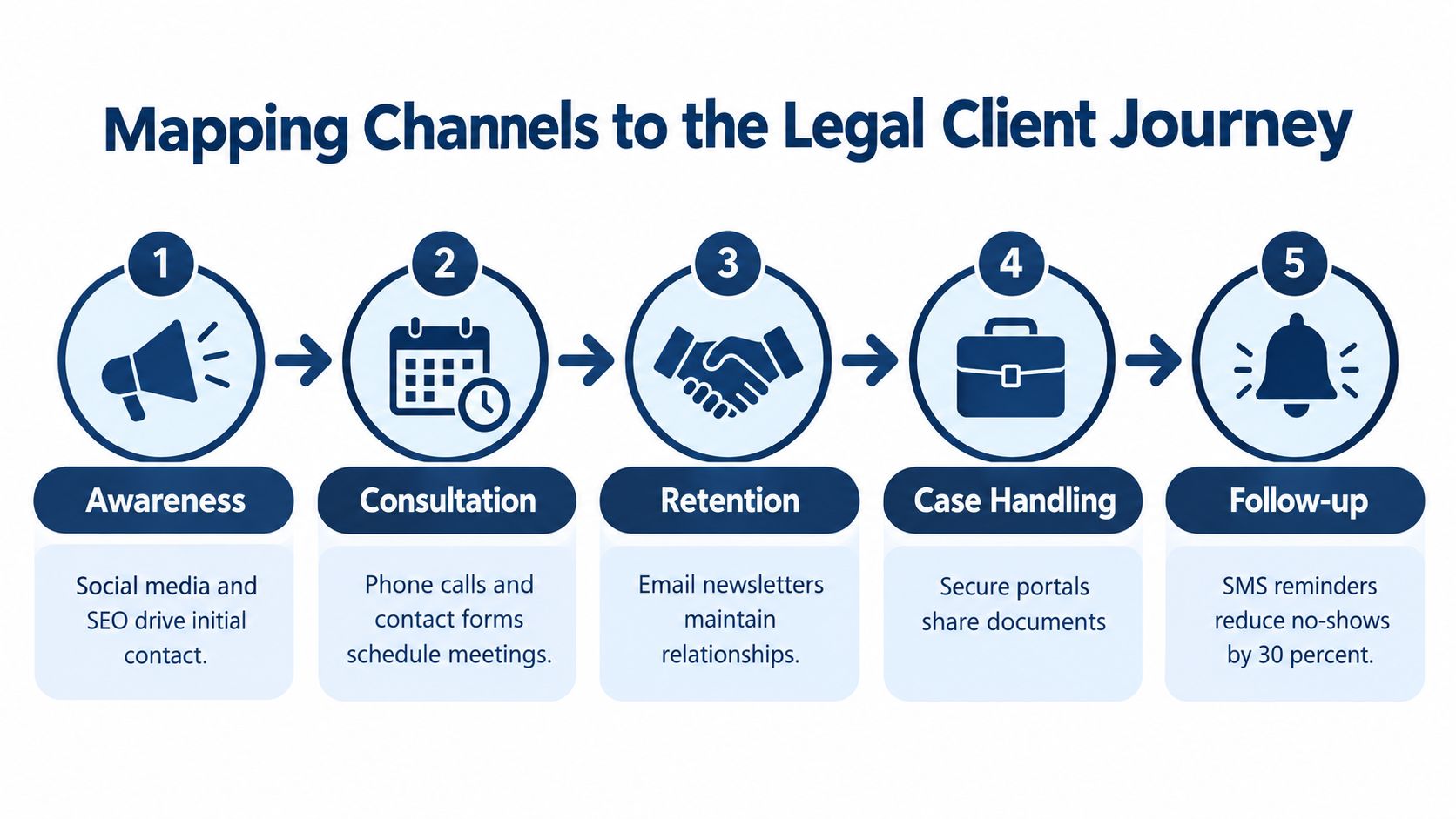
Different stages of the client journey need different channels, and firms that ignore that end up sending the right message the wrong way. The ABA's 2022 technology survey reported that only 33% of respondents used a client portal to communicate with clients, which tells you something basic, portals are valuable, but reach matters too. Email and phone still have wider practical coverage, while portals are stronger for access control and sensitive material. The ABA survey supports that operational tradeoff.
Use the channel that matches the job
At awareness and first contact, speed wins. Phone coverage, web forms, and fast email acknowledgment keep the lead from cooling while someone on your team decides who should own it. At consultation and qualification, live conversation is usually the better tool because questions get answered in real time and confusion doesn't linger in someone's inbox like a bad haircut.
At case handling, the job changes again. Durable written records matter, so email is useful for confirmations, requests, summaries, and handoffs. When the material is sensitive, such as medical records, liens, pleadings, or billing information, a secure portal is the better destination. Notification can happen by phone or email. The substantive content should move somewhere more controlled.
That separation, notification versus content, keeps firms from doing the legal equivalent of shouting confidential information across a crowded room because everyone was in a hurry. It also creates a more defensible workflow if a client later says they never saw the document, never got the update, or never understood next steps.
For firms trying to tighten domain reputation before sending more email, this blacklist checker is a practical diagnostic to review before blaming the intake team for every missed message.
Email can reach people. Portals can protect information. Those are not the same job, and pretending they are is how firms create avoidable friction.
Capturing and Storing Preferences in Your CRM
A CRM can't route contact correctly if the preferred method of contact field is blank, and it can't help if someone entered the right answer and then ignored it. The field has to function as a workflow rule, not a decorative note. That means the intake team has to capture it at the first touchpoint, and the automation has to respect it after that. A useful place to connect this with your own intake setup is Attorney Assistant's client intake and case conversion guidance.
Ask for the preference the moment the lead arrives
Train intake staff, reception, and 24/7 coverage to ask the channel question early and plainly. Not “Do you prefer text?” as if they're choosing dessert, but “What's the best way for us to reach you about this matter?” Then record the answer in the exact field your CRM uses for routing, not in a comment box nobody checks after lunch.
The 2025 legal-services user survey showed that 51% preferred face-to-face communication for the initial meeting and 43% preferred email for progress updates. That tells you preference changes by stage, so the CRM needs to store more than one note. The survey data supports a workflow rule, not a one-time label.
Make the preference trigger action
If the lead chooses email, the system should send the follow-up sequence by email first. If the lead chooses phone, a human should own the callback and the queue should show that deadline plainly. If the lead opts into text, use it for reminders, brief acknowledgments, or scheduling prompts, not as a dumping ground for case details.
The failure isn't missing a preference. It's receiving one and doing the opposite anyway. That's how firms end up with a prospect asking for an emailed checklist and getting three texts from three different numbers because the software was “helping.”
For firms using automation with follow-up workflows, the ChatGPT and GoHighLevel integration resource is worth a look because the technical issue isn't creating messages, it's making sure the right channel fires at the right time.
Operational rule: if your intake team can't explain where the preference lives, who updates it, and which automation listens to it, the CRM doesn't really have the field.
Navigating Consent and Compliance for Texting
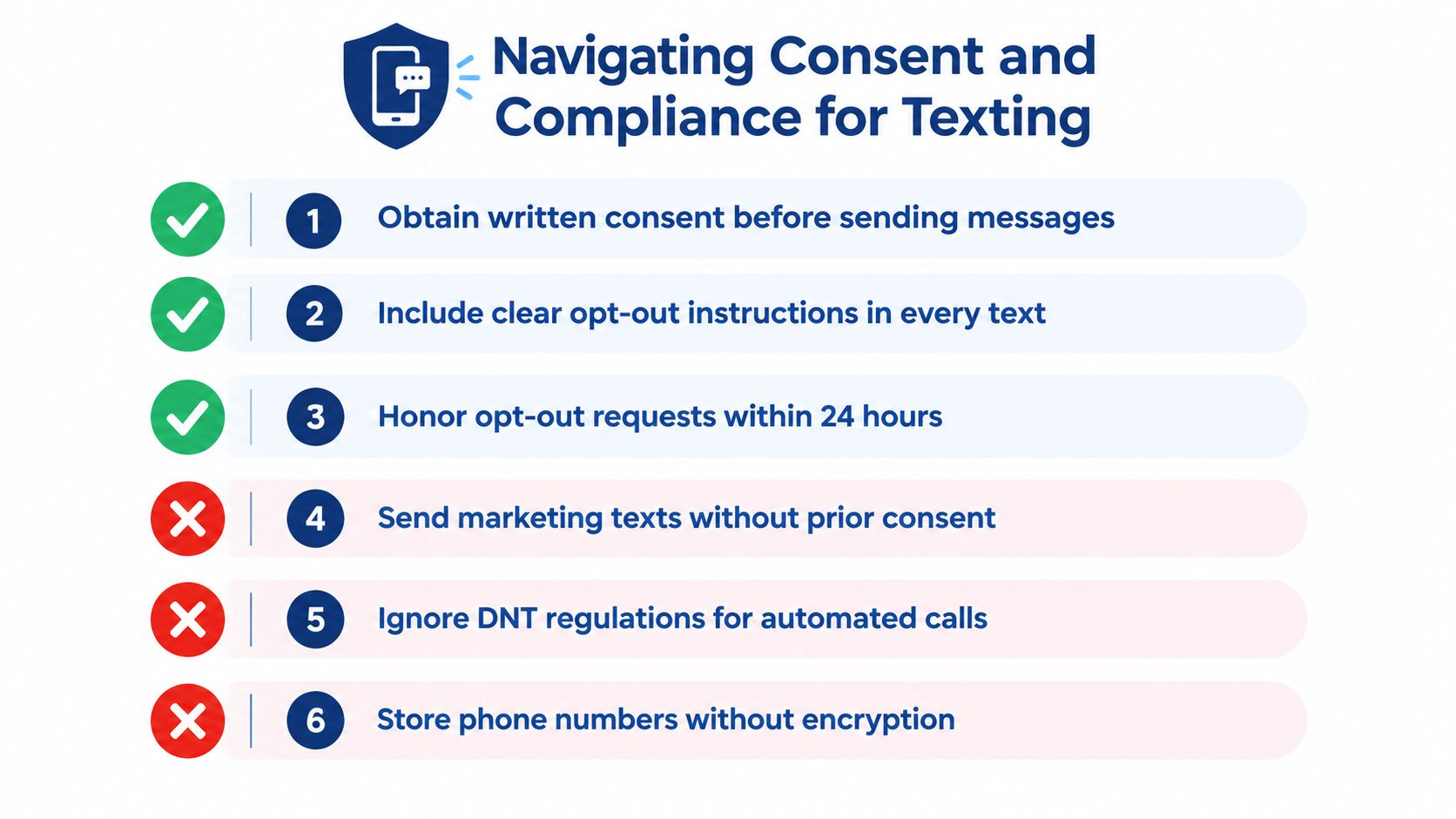
Texting is useful, but it is not permission-free. The FCC states that the Telephone Consumer Protection Act generally prohibits non-emergency autodialed or prerecorded calls and texts to mobile phones without the called party's prior express consent, and firms need to store consent and opt-out status separately from the preferred channel. FCC guidance on unwanted communications makes the compliance boundary clear.
Preference is not consent
A client saying “text me” is not the same thing as authorizing every kind of automated outreach forever. A human reply, an appointment reminder, and a promotional sequence are not identical from a compliance standpoint, even if they all arrive on the same screen. If your intake form treats them as the same thing, your compliance record will eventually disagree with you in a very inconvenient way.
The practical fix is simple enough to describe and annoying enough to do well. Record the exact disclosure shown, the consent scope, the timestamp, and the opt-out language. Keep a clean distinction between informational messaging and promotional messaging. If the client revokes consent, the process should stop, not enter a philosophical debate with the inbox.
Keep sensitive facts off ordinary SMS
SMS is fine for some operational tasks. It is not the place to drop medical details, fee disputes, or anything else you'd be unhappy seeing forwarded at a family dinner. Use text to confirm, remind, or nudge. Move substantive legal content to email, phone, or a secure portal when appropriate.
A simple checkbox is not a compliance system. It's a checkbox. If the firm can't prove what was consented to, when it was consented to, and what kind of message followed, that checkbox won't help much when someone asks harder questions.
For a practical reminder on how messaging terms should be documented, the SMS terms page is a useful internal reference point for keeping text workflows aligned with consent and opt-out rules.
Balancing Speed to Lead with Client Wishes
Clio's research indicates that firms have about five minutes to respond for the greatest chance of connecting with an inquiry, which means speed and preference are separate operational requirements, not competing slogans. Clio's speed-to-lead research makes that hard to ignore. If you wait for a perfect moment, the lead often finds a less perfect firm that answered first.
Build escalation around the first contact attempt
If the lead requested email, email first. If there's no response inside the critical window, escalate through a secondary channel that still respects the context of the relationship. That might mean a call, a voicemail, or a brief text acknowledging the inquiry and asking the person to confirm the best time to talk.
The key is to measure contactability, not just preference. Answer rate, reply rate, appointment completion, and retained-case rate by channel tell a more useful story than “we prefer phone here.” A channel that produces the most conversations isn't automatically the channel that creates the best experience. Sometimes it just creates the loudest pile of unanswered voicemails.
Don't confuse fast with noisy
Fast response doesn't mean blasting the prospect from every direction because the calendar looks empty. That only trains people to ignore you. It also creates avoidable friction when the original request was clearly for written contact or a later call.
Speed should shorten the distance to a real conversation, not broaden the number of people bothering the lead.
For firms that need a tighter operating model around lead response, Attorney Assistant's fast lead response guidance is a useful companion to this problem because the fix is usually process, not optimism.
A workable system respects the first choice, tracks the first failure, and then escalates with discipline. That's better than waiting, and it's a lot better than pretending the lead will “circle back.”
Building a Reliable Intake and Follow-Up Workflow
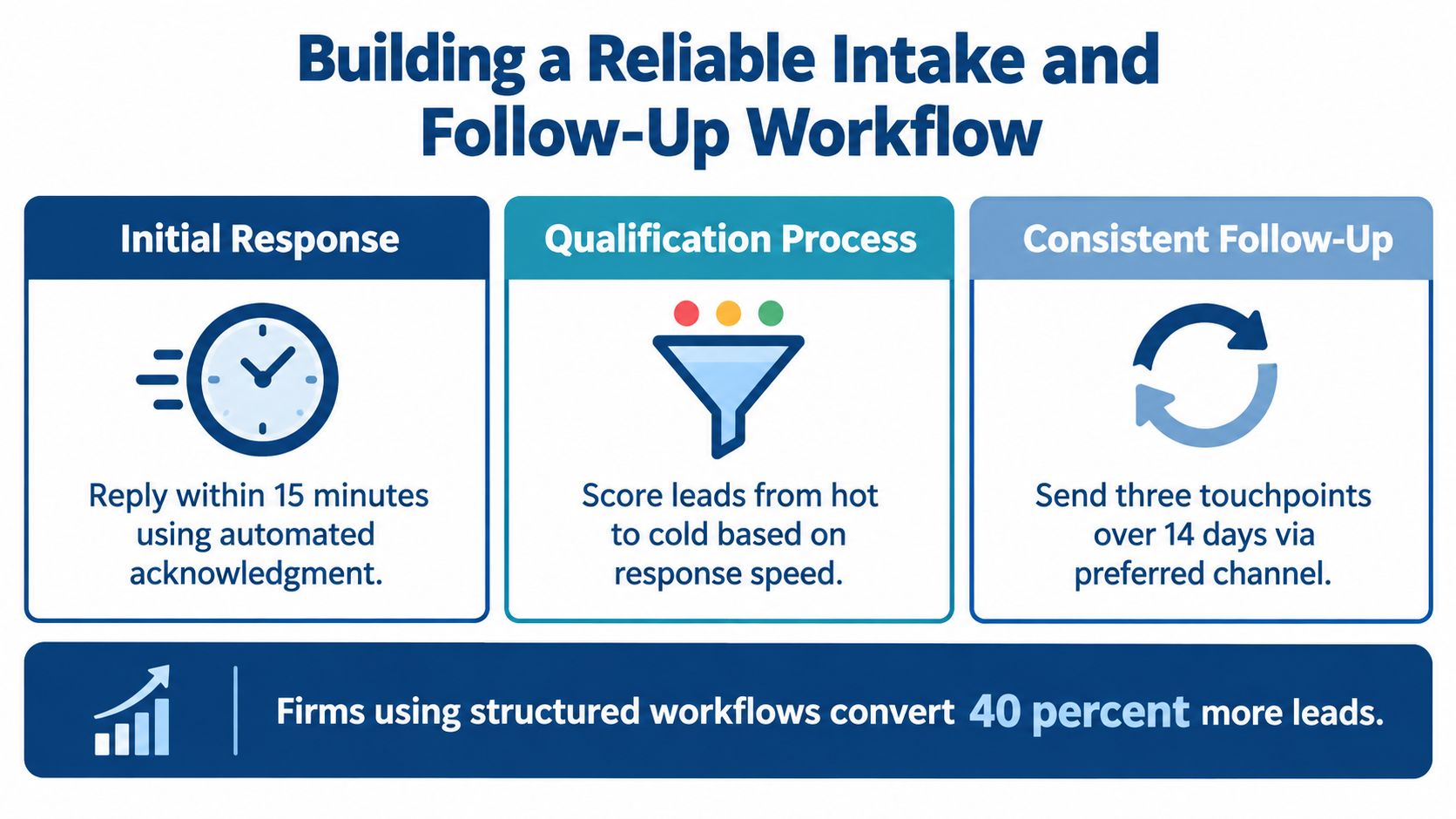
A reliable workflow starts with a simple fact. Taking a message is not intake. If no one owns the lead, no one documents the preference, and no one checks whether the message got a response, then the firm doesn't have a process. It has a hope.
Audit the path from first contact to signed retainer
Start at the first touchpoint. Ask where the lead came from, how they want to be reached, who owns the follow-up, and what the deadline is for the first response. Then track what happens when the primary channel fails, because that's where lost matters usually hide.
Use this checklist:
- Capture the channel immediately. Ask for the preferred method of contact during the first conversation, not after the lead has already gone cold.
- Store it where automation can use it. If the preference lives only in a note, it won't reliably drive follow-up.
- Separate preference from consent. Especially for texting, document opt-in, opt-out, and message type.
- Use phone for urgency. A live conversation still matters when qualification is complex or time-sensitive.
- Use email for records. Confirmations, summaries, and document requests belong somewhere traceable.
- Use a portal for sensitive material. Confidential case information shouldn't bounce around casual channels.
- Set an escalation timer. If no contact happens, the workflow should move, not pause politely.
- Review results by channel. The question is not just who replied, but who signed.
Staff the work so the process survives real life
A firm can have a good workflow and still fail it at 4:45 p.m. on a Friday because everyone is busy doing attorney work that an attorney probably shouldn't be doing. That's where dedicated support matters. Attorney Assistant provides legal intake and operational support through Frontline for 24/7 live intake and Staffline for dedicated, full-time support inside a firm's systems. Used properly, that kind of coverage helps firms honor preferences, respond quickly, and keep the follow-up sequence from becoming folklore.
When the intake process is staffed, documented, and consistently followed, the preferred method of contact stops being a box on a form and becomes part of how the firm signs cases. That is a much better use of everyone's time, including the attorneys who went to law school to practice law, not to babysit a broken queue.
If your firm's preferred method of contact is still being handled by memory, scattered notes, or whatever happens after lunch, it's time to fix the workflow. Visit Attorney Assistant to see how co-managed intake and 24/7 live coverage can help your team capture more leads, route them correctly, and stop losing good cases to slow or inconsistent follow-up.
Related Articles
Call Answering Service for Law Firms: What Actually Works
A call answering service for law firms should sign cases, not take messages. Learn pricing models, vendor criteria, and 24/7 intake that converts.
Case Management Notes: A Law Firm's How-To Guide
Learn how to write case management notes that hold up, with a defensible structure, privilege safeguards, handoff tips, and a smarter way to staff the work.

Medical Records Coordinator: What the Role Actually Does
A medical records coordinator manages records retrieval, summaries, billing, and liens for law firms. Learn duties, KPIs, and when to outsource vs hire.