It's 6:40 on a Friday. Your best paralegal left at five, the phones rolled to voicemail, and a web form from someone with a real problem is sitting in a shared inbox nobody checks until Monday. By Monday, that person has usually signed somewhere else.
That's the gap a virtual front desk is supposed to close. Not by taking prettier messages, but by answering, qualifying, booking, and documenting what happens next. If it doesn't change who owns the follow-up, you haven't bought intake. You've bought a more expensive voicemail box.
Table of Contents
- What a Virtual Front Desk Actually Does
- Virtual Front Desk vs In-House Reception and Call Centers
- Why Missed Calls Cost Law Firms Cases
- Speed-to-Lead Targets and the Numbers to Track
- How a Virtual Front Desk Plugs Into Firm Workflows
- Confidentiality and Conflicts Before You Go Live
- How to Roll Out a Virtual Front Desk in Six Steps
- Decide Whether a Virtual Front Desk Fits Your Firm
What a Virtual Front Desk Actually Does
Say a prospective client calls at 8:15 p.m. after a crash. She doesn't know if she has a case, she's worried about medical bills, and she'll call the next name on her phone if nobody picks up. A virtual front desk is the remote team that answers that call, plus the chat, form, and text that arrive after it.
Think of it as the receptionist who never goes home, reads the intake sheet before picking up, and knows which calls need an attorney tonight. That team works through phone, web chat, forms, and text, connected to your case systems, not operating from a legal pad in another state.
Three Jobs Firms Lump Together
Answering means a person picks up. Intake means that person decides whether the matter fits your criteria, your jurisdiction, and your calendar. Hand-off means the right information reaches the right person with a named owner for the next step.
Taking a message is not intake.
An answering service stops at job one. A complete front desk covers live answering for missed and overflow calls, after-hours and weekend coverage, lead qualification, appointment setting, warm transfers, conflict-check requests, and structured follow-up when someone doesn't book.
Checklist for Comparing Providers
- Live coverage around the clock: Nights and weekends included, not treated as an add-on.
- English and Español: Callers shouldn't have to qualify in a second language.
- Call quality assurance: Recordings reviewed against your criteria, not just stored.
- Persistent structured follow-up: Several planned attempts when a lead doesn't book, with dates attached.
- Warm transfer: A qualified caller reaches an attorney or senior intake person while still on the line.
Apply one test to any provider. Once the call ends, who owns the next step, and where is that step recorded? If the answer is vague, the workflow will be too.
Virtual Front Desk vs In-House Reception and Call Centers
Judge all three models against the same output: signed matters, not calls answered. A receptionist who picks up every call between nine and five can still lose the inquiry that comes in at 7 p.m., and a call center that logs thousands of minutes can still hand back a spreadsheet of names nobody qualified.
The three models on the same criteria
| Criteria | In-house receptionist | Outsourced call center | Virtual front desk |
|---|---|---|---|
| Hours covered | Office hours, with gaps for lunch, sick days and vacation | Extended hours, often scripted | Live coverage around the clock where contracted |
| Who qualifies the matter | Receptionist, usually without legal screening | Agents follow a generic script | Trained intake staff using firm-specific criteria |
| Follow-up after first call | Manual, when staff notice and have time | Often a single attempt | Structured, multi-attempt follow-up with owners and dates |
| Systems and records | Manual entry by staff | Often through exported notes or email | Written into the firm's case management system or CRM |
| Conflicts and confidentiality | Sits inside the firm's perimeter by default | Scripts rarely capture conflicts data | Conflict-check requests and intake data run inside firm systems |
| Cost model | Salary, benefits and overhead | Per-call or per-minute fees | Set by provider; compare the fee per completed action |
| Ramp-up time | Hiring and onboarding before solo coverage | Script and routing setup before launch | System integration and criteria training before launch |
| Best fit | Firms whose main problem is walk-in traffic | Firms needing high-volume, low-complexity screening | Firms losing after-hours, overflow and web inquiries |
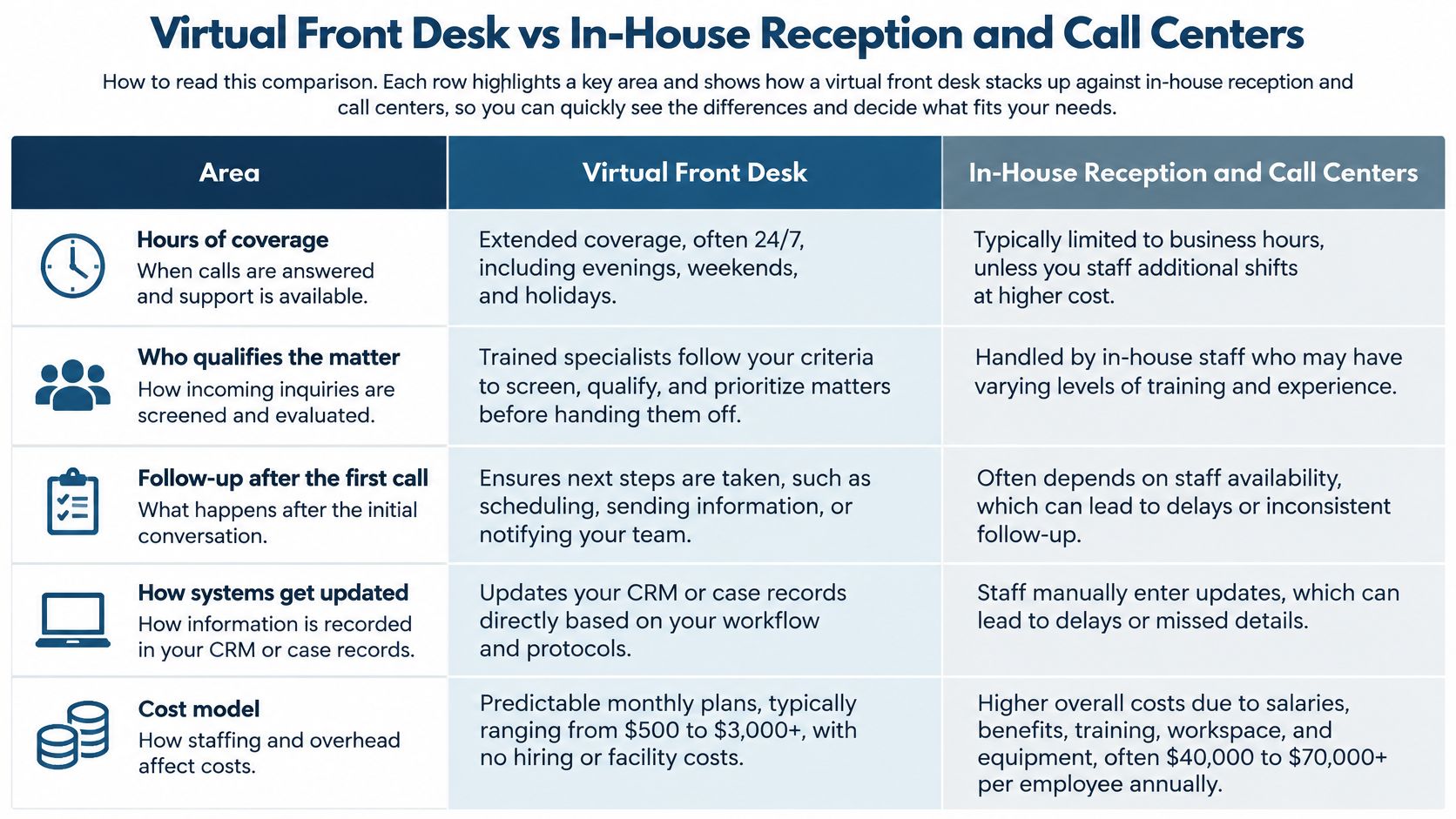
I read this table by failure mode, not by price. An in-house receptionist knows your clients, handles walk-ins, and absorbs the small office tasks nobody lists in a job description. That person also eats lunch, gets sick, and goes home, which is reasonable for a human and inconvenient for a caller in the evening. One quiet advantage sits in the conflicts row: she already knows who your clients are, so confidentiality comes free with the desk chair.
A call center solves volume. It usually doesn't solve judgment. Agents working from a generic script can capture a name and number, but they can't tell a viable matter in your county from a polite dead end three states away, so your attorneys end up doing the screening work you thought you'd outsourced. When the vendor bills per minute, you also pay for the length of the call whether or not it produced anything usable.
The virtual front desk fails differently. It inherits whatever criteria you hand it, so vague intake standards get applied faithfully, at scale, around the clock. Its pricing at least points the right direction: Attorney Assistant's Frontline bills in credits per action, with a reception call answered at 0.5 credits, an unsuccessful outbound attempt at 1 credit, and an appointment setting at 2 credits. That structure forces the better question of what a signed matter costs rather than what a minute costs.
Where Firms Combine the Models
The models overlap, and plenty of firms run two of them sensibly. Keep the in-house receptionist if your real problem is walk-ins and daytime client traffic. Add a virtual front desk if the losses are calls, forms, and leads arriving outside office hours. The hybrid works because each model covers the other's gap, provided both write into the same records so coverage doesn't create two versions of who called and what happened next.
Why Missed Calls Cost Law Firms Cases
Responsiveness has been sliding for years, and the missed call is usually invisible in the firm's own records. In 2024, 64% of prospective legal clients received no follow-up by phone or email, according to Clio's 2024 Legal Trends Report as summarized by the Oklahoma Bar Association.
A missed call rarely looks like a lost matter in your logs. It looks like nothing. The caller, meanwhile, is looking at a search results page full of other firms, including firms buying search ads that drive service bookings to reach the same people at that moment. Paying to generate a call you do not answer is an expensive way to fund a competitor's intake.
Treat that silence as a control failure, not a phone problem. No conflict check starts, no confidentiality screen runs, no audit trail exists, and the file never gets far enough to be measured. The useful unit is signed matters from inbound inquiries, not calls answered.
Three Places Inquiries Die
Peak-hour abandonment is the first. Two lines ring, your receptionist is checking in a client, and the second caller decides hold music is not a legal strategy. After-hours and weekend inquiries are the second, and they are predictable, since accidents and arrests keep poor office hours.
Slow callbacks are the third. Calling someone back four days later technically counts as follow-up. It is not useful follow-up. By then you are conducting an archaeology project, and the prospective client reads the delay as a preview of your communication. That perception is how poor client service at intake becomes a reputation problem later.
Read Your Own Log Before Buying Coverage
Pull four weeks of inbound contacts and sort each one three ways. Did a person answer live? Could that person qualify the matter? Did anyone make a second attempt?
If losses cluster after hours, at lunch, or during overflow, you have a coverage problem. If losses cluster after a live conversation, you have a qualification or attorney follow-through problem, and more coverage will deliver more leads into the same hole. Buy for the problem your counts show.
Speed-to-Lead Targets and the Numbers to Track
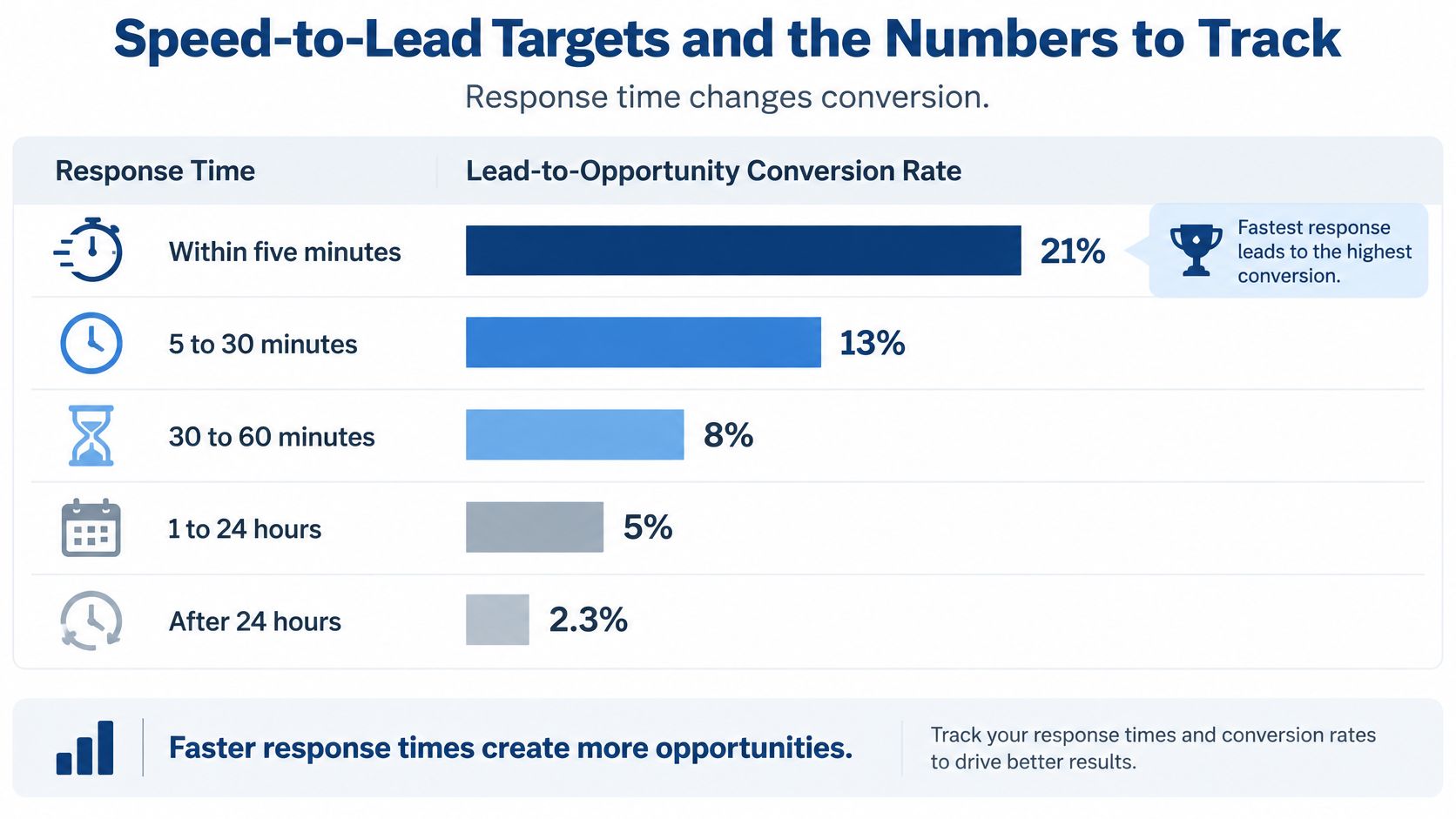
Lead-to-opportunity conversion by response time
| Response time | Lead-to-opportunity conversion |
|---|---|
| Within 5 minutes | 21% |
| 5 to 30 minutes | 13% |
| 30 to 60 minutes | 8% |
| 1 to 24 hours | 5% |
| After 24 hours | 2.3% |
Those figures come from a 2026 benchmark covering 253,817 inbound lead responses across 1,247 companies, which found lead-to-opportunity conversion at 21% within five minutes, falling to 2.3% after 24 hours. It isn't law-firm specific, so use it to set a target, not to promise your partners a result.
The law-specific picture is less flattering. Hennessey Digital's 2025 study of 1,333 law firms, summarized in Amalga Group's legal intake automation overview, found that 26% did not respond to inquiries at all and only 25% responded within five minutes. The median response among firms that did respond was 13 minutes, although 74% responded within seven days, which tells you how low the bar for eventually sits.
Metrics Worth a Dashboard
Track median and 90th-percentile first-response time, contact rate, qualified-lead rate, conflict-screen completion, consultation-booked rate, consultation show rate, and signed-matter rate. If you're defining terms for your team, start with a clear explanation of what lead response time means so nobody games the clock with an auto-reply.
The 90th percentile matters because the median hides your worst service. Half your leads can get a fast response while the slowest tenth wait a day, and the dashboard still looks reassuring. That slowest tenth contains the people who called during your busiest, most valuable hours.
Practical rule: Measure signed matters, not conversations. A front desk that books unqualified consultations quickly has made your calendar worse, faster.
Record a disposition for every interaction: abandoned, voicemail, failed transfer, disqualified, consultation scheduled, retainer signed. Then segment by channel, hour, and practice area. My recommended target is simple: web leads acknowledged within five minutes, calls answered live, and an automatic follow-up task created whenever a transfer fails.
How a Virtual Front Desk Plugs Into Firm Workflows
The handoff path should read like a chain, with no link left to memory. Capture caller identity and source, classify practice area and urgency, request a conflict check, warm-transfer or book the consultation, log the disposition, and create a timed follow-up task for anything unresolved.
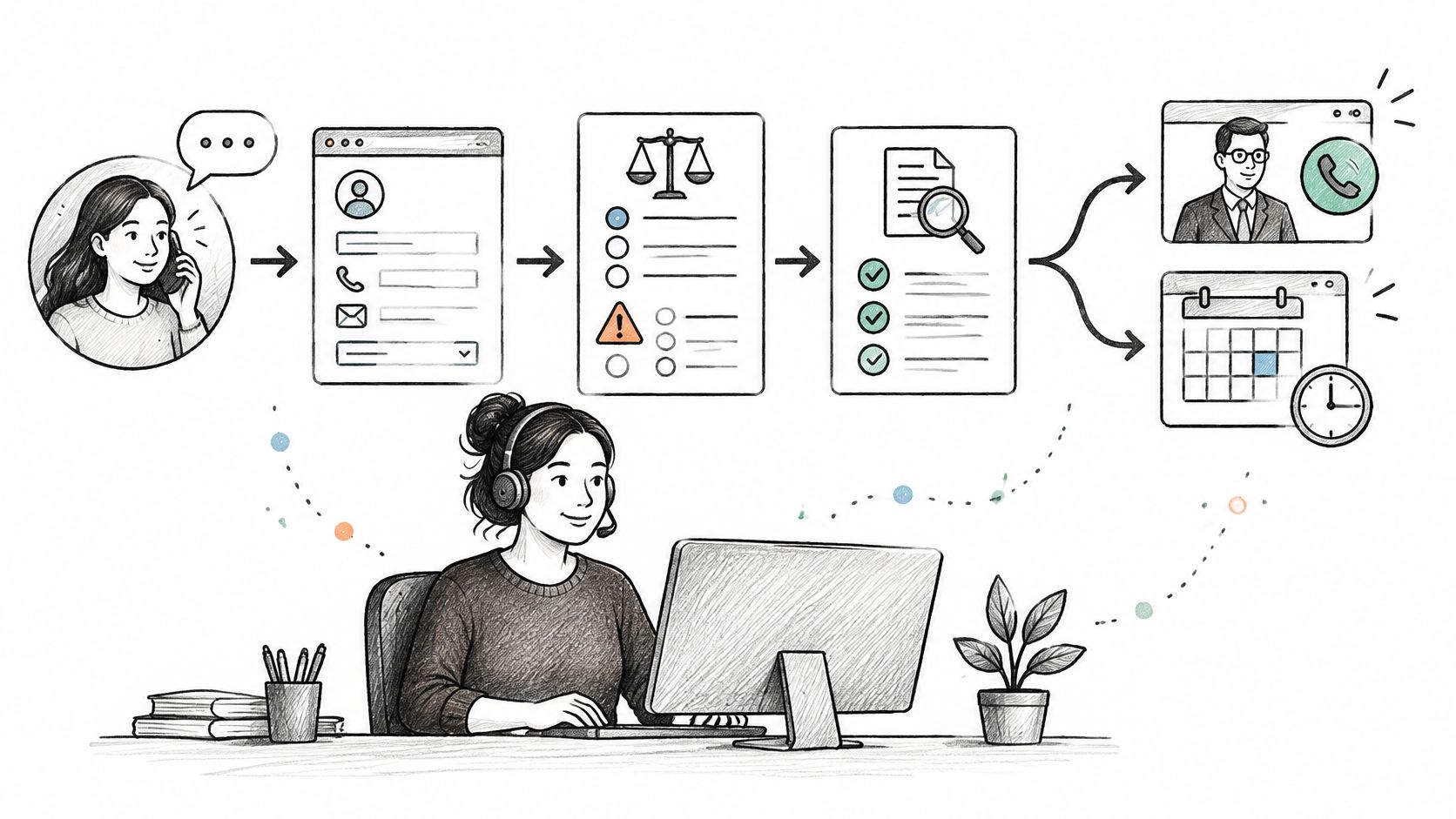
Integration means the front desk writes to the same fields your attorney reads, in your CRM or case management system. If intake notes live in a separate spreadsheet someone opens on Monday, you don't have integration. You have a second filing system with worse handwriting. Your CRM cannot follow up with a lead if nobody puts the lead in the CRM.
Why the Handoff Determines the Time Saving
Bloomberg Law's Attorney Workload and Hours Survey, based on responses from 1,054 legal professionals about 2024 workloads, found that attorneys spent roughly two of every eight hours in a typical workweek on administrative tasks such as time tracking and project management. That's about a quarter of the week spent not practicing law.
Delegating intake returns that time only when the handoff is clean. If the summary is thin, your attorney re-asks every question on the consultation call, the prospective client repeats a painful story twice, and the saving evaporates. Your attorneys went to law school to practice law. Ideally, they should occasionally get to do that.
Three Breakdowns to Hunt Down
- Duplicate entry: The same lead typed into two systems, so neither record is complete and both get followed up, or neither does.
- Dead transfers: A warm transfer lands in voicemail and no task is created, so a qualified caller becomes an unreturned call.
- Unreviewed summaries: Intake notes go straight to the file unchecked, and an error in dates or parties survives into the conflict check.
Adopt one rule and enforce it in the system, not in a meeting. Every lead has one owner and one next-action date. If your intake process lives primarily inside someone's memory, you have built the world's least reliable CRM.
Confidentiality and Conflicts Before You Go Live
A caller reaches your front desk at 9 p.m. and, inside ninety seconds, gives the name of the driver who hit her, the hospital where she was treated, and the date of the accident. Nobody at your firm has run a conflicts check. Nobody has signed anything. That call already sits inside your confidentiality obligations, which makes the front desk part of your conflicts-control system. Measure it that way: by signed matters that clear screening, rather than by calls answered.
Adding around-the-clock availability multiplies exactly those conversations, most of them outside business hours when no attorney is watching. Governance has to grow with the access and volume you add, or your responsiveness improvement becomes a risk expansion.
Vendor Checklist to Work Through in Writing
- Collection limits: What may staff collect before conflicts screening, and what must they never ask for?
- Storage and retention: Where do recordings, texts, form entries, and ID data live, and for how long?
- Role-based access: Can staff see matters outside their queue, and how is access revoked when someone leaves?
- Confidentiality obligations: Has every staff member signed written commitments your firm has reviewed?
- Deletion: How are recordings and medical details destroyed, and who confirms it happened?
- Breach notification: How quickly must the vendor tell you? Get it in the contract, not in a sales call.
- Conflict-check inputs: Who verifies names, dates, and adverse parties before the summary feeds your conflicts search?
- Human escalation and disclosure: How does a caller reach a person at your firm, and how do prospective clients learn who they're speaking with?
- No legal advice: Is the prohibition on intake staff giving legal advice written into scripts and training?
Collection limits hold only when they're built into the fields. A consistent case management form structure decides what gets captured on every call, so a midnight intake doesn't turn into improvisational data collection by whoever picked up the phone.
Ask separately whether any AI tool touches intake, what it records, and whether prospective clients are told. The ABA's 2025 Legal Industry Report found that 31% of legal professionals personally used generative AI, while adoption among firms with 50 or fewer lawyers was only about 20%. Smaller firms are experimenting faster than their governance is catching up, which is a polite way of saying a recording or transcript may already live somewhere nobody has reviewed.
Attorneys remain responsible for protecting client information when they use outside tools and vendors, whatever the current bar phrasing happens to be. Get the vendor's answers documented before go-live, not reconstructed after an incident.
How to Roll Out a Virtual Front Desk in Six Steps
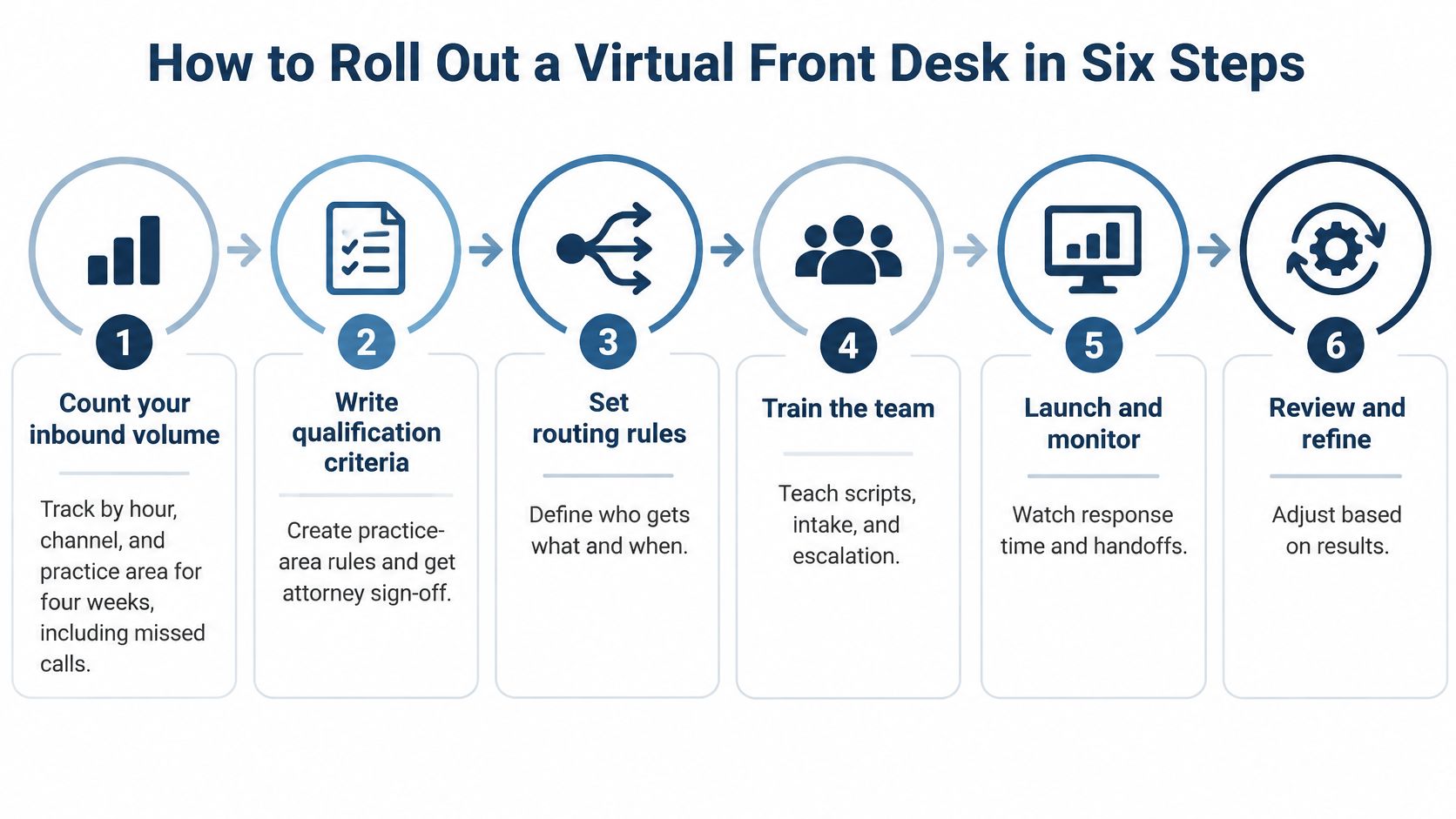
- Count inbound volume for four weeks by hour, channel, and practice area, including missed calls. For each inquiry, record whether a person answered live, whether that person could qualify the matter, and whether a second attempt was made. Skip this and coverage gets set by guesswork and whoever complains loudest.
- Write qualification criteria per practice area and get attorney sign-off on what gets booked, transferred, or declined. Turning those criteria into documented sops keeps a new intake hire from improvising your case selection policy. Vague criteria produce confidently wrong bookings.
- Connect the team to your case management system and CRM and agree on disposition fields before the first call. Skip this and the data lives in someone's inbox, which is where follow-up goes to retire.
- Set coverage windows, transfer rules, and an escalation path for urgent matters. Define who gets woken up, for what, and what happens when that person doesn't answer.
- Run a two-week pilot on after-hours and overflow only. Audit a sample of recordings and follow-ups weekly. Skip the pilot and the first bad call becomes your firm's reputation with the partners, fairly or not.
- Widen coverage after the audit passes and speed and conversion numbers hold steady. Expanding before quality stabilizes just scales the problem you were trying to fix.
By week six, success looks unglamorous. Most inquiries reach a person within minutes, every unresolved contact has an owner and a date, and attorneys get a short summary they can act on without calling back to ask what happened. Unglamorous is the point. Intake should be boringly reliable.
Decide Whether a Virtual Front Desk Fits Your Firm
Run a three-question self-check. Do calls or web forms go unanswered outside office hours? Do new leads wait more than an hour for a human response? Do attorneys lose billable time to intake administration that could be delegated? Two yeses mean a coverage gap is already costing you matters.
Bring evidence, not impressions. Pull your four-week inbound log, record the first-response time for each lead, and count how many of those leads became signed matters. Signed matters are the metric that decides this; a service that answers every call and signs nothing is an expensive answering service. If your matters run on contingency, flat fee, or retainer agreements, the bar is higher still: the front desk has to qualify and close on your fee type, and run a conflict check before anything reaches your calendar. A team that can't run your conflict check sits outside your confidentiality controls and adds a step instead of removing one.
Some firms scope the whole staffing question in a single review, weighing dedicated intake coverage against broader virtual-assistant support like the setup described under legal efficiency with Approved Lux. The comparison is fair as long as both options get measured against signed retainers and conflict-checked intake rather than calls answered.
Two services cover the two halves of the problem. Frontline, our 24/7 live intake team, answers every call, qualifies, follows up, and signs cases on your firm's behalf, in English and Español. Staffline is a dedicated full-time virtual staff member who works 40 hours a week in your systems, for your firm only, and is never shared.
Frontline signs the case. Staffline carries it.
Pairing 24/7 live intake with a dedicated full-time staff member covers a firm from first call to case resolution, and we scope the right mix on a discovery call. Decide after you've seen your own numbers, not before.
If your log shows after-hours losses, slow first responses, or attorneys buried in intake administration, Attorney Assistant can help you fix the specific gap, with Frontline for 24/7 live intake that qualifies and signs cases and Staffline for dedicated full-time legal support inside your systems. Bring your four-week numbers, and we'll scope coverage against what they're costing you.
Related Articles
Case Management App for Law Firms in 2026: How to Choose
Compare case management app options for law firms on intake, documents, calendaring, security and pricing, with a checklist to pick the right fit.

Case Management Notes: A Law Firm's How-To Guide
Learn how to write case management notes that hold up, with a defensible structure, privilege safeguards, handoff tips, and a smarter way to staff the work.

Medical Records Coordinator: What the Role Actually Does
A medical records coordinator manages records retrieval, summaries, billing, and liens for law firms. Learn duties, KPIs, and when to outsource vs hire.