
Most major providers publish live-service plans from roughly $165 to more than $2,000 per month, but the cost depends on usage, coverage windows, and overage charges. AI-only options can sit around $25 to $300 monthly, while higher-touch human coverage can reach $3,000 per month or more depending on service depth.
The invoice usually arrives after the problem has already happened. An attorney is in court, the office manager is handling a client emergency, and a prospective client calls at the precise moment nobody can answer. The caller leaves a message, calls another firm, and becomes someone else's intake success story.
That's why virtual receptionist pricing shouldn't be evaluated as a simple phone expense. A low monthly rate may buy little more than voicemail with better branding. A higher rate may be justified if the service answers, qualifies, follows up, schedules, and routes matters consistently.
Table of Contents
- Understanding Virtual Receptionist Pricing for Law Firms
- Comparing Pricing Models and Service Types
- The Math Behind Capacity and Minute-Based Plans
- Identifying Hidden Costs and True All-In Pricing
- Evaluating ROI Through Speed to Lead and Conversion
- Making the Final Decision on Your Intake Solution
Understanding Virtual Receptionist Pricing for Law Firms
A firm can lose a valuable inquiry without seeing a line item labeled “lost case.” The cost hides in missed opportunities, delayed callbacks, incomplete intake forms, and attorneys interrupting legal work to perform receptionist duties between hearings.
Published pricing reflects how different these services are. One 2026 pricing review found live-service plans from major providers ranging from $165 to $2,100 per month, with effective costs of about $1.30 to $5.00 per human minute and per-call pricing around $7 to $11.50 (pricing review of receptionist services). Another overview places virtual receptionist services more broadly between $200 and $1,500 per month, while human-operated live answering can range from $25 to $3,000 monthly, depending on coverage and features (virtual receptionist pricing overview).
Those ranges aren't contradictory. They describe different operating models. AI reception tends to occupy the lower end, while live human service costs more because people handle ambiguity, emotion, qualification, and scheduling. Premium plans may include more coverage, more included usage, stronger integrations, or more detailed intake processes.
A firm comparing phone vendors should also separate receptionist services from the broader communications stack. A resource that helps you compare business phone systems can clarify whether the actual gap is call routing, overflow coverage, lead qualification, or all three.
Practical rule: Price the missed opportunity before pricing the phone service.
A useful overview of why your law firm should consider a virtual legal receptionist should lead to a sharper question: what must happen after someone answers? If the service only records a name and number, the firm still owns the difficult part.
Comparing Pricing Models and Service Types
A firm can pay for phone coverage, or it can pay for completed intake work. Those are different purchasing decisions, and the invoice looks different under each model.
AI-only reception generally uses a flat-fee bundle, commonly around $25 to $300 per month, with no after-hours surcharge in many quoted models (legal virtual receptionist pricing architecture). AI can route calls, answer basic questions, and follow scripted paths. That suits predictable routing and straightforward requests. It becomes less useful when a caller needs nuanced qualification, reassurance, conflict-screening questions, or a conversation outside the script.
Live human coverage is usually priced around $200 to $1,200 per month, often with per-minute charges of approximately $0.75 to $1.50 and after-hours premiums of 25% to 50%. Human teams handle more variation, but usage and coverage complexity raise the bill.
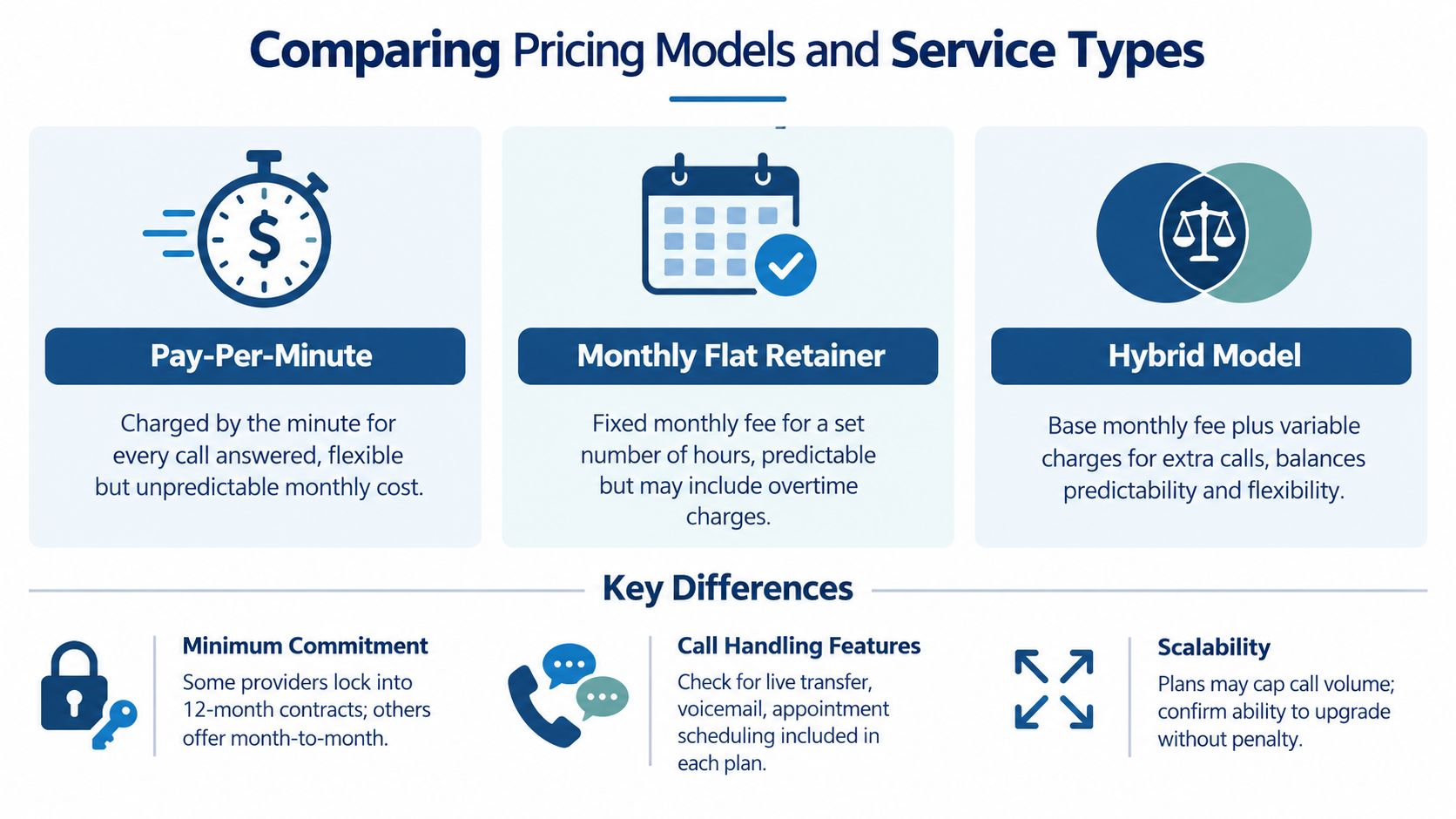
Flat bundles versus usage-based billing
A flat-fee bundle gives the firm budget predictability. The package may cover a defined number of calls, minutes, or features. Unused capacity may expire, while demand above the allowance can create overage charges.
Per-minute billing connects the invoice to actual usage, but campaign periods, seasonal demand, and long calls cost more. Per-call pricing is easier to audit, yet it can penalize a firm handling many short interactions when every completed call carries the same charge.
A hybrid model combines a base subscription with variable usage. It can work well when the firm understands the included capacity, overage rate, billing increment, and coverage rules before signing.
What action-based pricing changes
An action-based credit model prices completed outcomes rather than idle availability. That distinction matters in legal intake. The firm needs defined actions, such as answering, qualifying, transferring, scheduling, following up, or moving a matter toward signing. Paying for availability alone does not show whether those actions occurred.
Ask providers these questions before comparing headline rates:
- Minimum commitment: Is the agreement month to month, or does it require a long-term contract?
- Call handling: Are live transfers, appointment scheduling, qualification, and CRM updates included?
- Scalability: Can the plan absorb a campaign spike without punitive pricing?
- After-hours coverage: Are nights and weekends included, or billed as a premium service?
- Workflow ownership: Does the provider complete the next step, or only send the firm a message?
A plan comparison such as compare Magnitude Marketing plans can help frame the wider budgeting exercise. Compare each option by cost per handled action and captured opportunity, not phone coverage alone. The suitable model is the one that matches how the firm receives, qualifies, and processes inquiries.
The Math Behind Capacity and Minute-Based Plans
Minute-based pricing becomes less intimidating when you calculate the effective unit cost instead of staring at the headline fee.
A legal answering-service roundup lists plans around $425 per month for 150 minutes, $450 for 300 minutes, and $775 for 500 minutes (law firm answering service pricing). Those plans imply an effective rate of about $2.83 per minute at 150 minutes, falling to roughly $1.55 per minute at 500 minutes.
The arithmetic shows a familiar utility-pricing pattern. Larger capacity can reduce the effective rate, even though the monthly invoice rises. A firm that consistently uses more minutes may spend less per handled minute by selecting a larger package than by buying a small plan and absorbing expensive overages.
| Included capacity | Monthly price | Effective rate |
|---|---|---|
| 150 minutes | $425 | About $2.83 per minute |
| 300 minutes | $450 | About $1.50 per minute |
| 500 minutes | $775 | About $1.55 per minute |
The middle package has the lowest effective rate in this particular example, which is precisely why firms shouldn't assume the largest plan is automatically the most efficient. The right comparison uses your actual call history, average duration, after-hours pattern, and expected campaign volume.
Billing discipline: Calculate both normal-month cost and spike-month cost before choosing a tier.
Also check how the provider counts time. Does a transfer count as a separate action? Does a voicemail consume usage? Does follow-up carry its own charge? Guidance on billing increments for attorneys is useful because small counting rules can change the economics of a plan without changing the advertised rate.
Identifying Hidden Costs and True All-In Pricing
A firm can choose a low monthly rate and still receive an expensive invoice once call volume, after-hours coverage, and intake actions are counted.
A detailed comparison of true virtual receptionist costs for law firms identifies variables that often change total spend, including included minutes or calls, overage charges, setup fees, trial terms, and whether 24/7 coverage is part of the plan. Comparing only the entry tier matches a brochure against a workload, not a service against actual demand.
Begin with a capacity test. If a plan includes 150 minutes and the firm uses 300, the advertised monthly rate no longer represents the cost of handled calls. The same problem occurs when a provider moves callers into a higher tier, applies a separate overage rate, or bills independently for scheduling, transfers, and follow-up. Those actions may determine whether a lead becomes a consultation, so evaluate cost per completed intake action, not just cost per minute.
The invoice questions that matter
Get written answers before signing:
- What counts as usage? Confirm whether billing uses minutes, calls, actions, credits, or a combination.
- What happens after the limit? Request the exact overage rate and ask whether the account moves automatically into another tier.
- What does setup include? Clarify configuration, scripts, integrations, training, and any one-time onboarding fee.
- What does 24/7 mean? Verify whether nights, weekends, holidays, and overflow are included in the quoted price.
- What happens to missed calls? Determine whether the team calls back, sends a message, schedules an appointment, or stops after the first attempt.
- What happens during a spike? Ask how a campaign or unusual case event affects capacity and pricing.
After-hours pricing needs its own line in the comparison. Human coverage commonly carries an after-hours premium of 25% to 50%, while AI-only plans are often quoted without that surcharge. A cheaper plan may therefore cost less only during hours when the office already answers. Check whether the service covers the periods when callers are most likely to reach voicemail, and whether overflow is billed separately.
The more useful comparison is not monthly fee versus monthly fee. It is expected total cost under normal demand, overflow demand, and after-hours demand.
Use three columns in the buyer worksheet: published cost, likely all-in cost, and operational result. Include the number of qualified matters advanced, appointments scheduled, and follow-ups completed. A service with a higher invoice may cost less per captured matter than a low-cost provider that produces message lists no one contacts.
Evaluating ROI Through Speed to Lead and Conversion
Virtual receptionist pricing is a conversion question wearing a headset.
A 2026 intake benchmark reports that the median law firm responds to an online lead in 13 minutes, only 25% respond within five minutes, 56% respond within an hour, and 26% still fail to respond within seven days (legal intake response-time benchmark). Those figures give firms a practical standard for evaluating intake speed. “We usually call back the same day” sounds responsible until the caller has already moved on.
A separate summary of Clio's 2024 research reports that only 40% of 500 firms answered the phone, down from 56% in 2019, and that 48% were effectively unreachable when failed follow-up attempts were included. It also reports that only about one in five firms that missed a call called back (legal phone responsiveness research summary). The operational lesson is uncomfortable but useful: an answering service that only takes messages may preserve the appearance of coverage while leaving the conversion problem untouched.
A practical ROI calculation
Use this sequence with your own call and intake records:
- Count missed opportunities. Review missed calls, abandoned forms, delayed callbacks, and inquiries with no documented disposition.
- Separate qualified matters from noise. A receptionist who answers every robocall may look busy without creating meaningful value.
- Track completed actions. Record qualification, warm transfer, appointment setting, follow-up attempt, and signed-retainer progress separately.
- Calculate cost per qualified lead. Divide total service cost by qualified leads captured, not total minutes consumed.
- Calculate cost per booked consult or signed matter. Use the action closest to revenue and compare it with your current baseline.
- Model the failure scenario. Include after-hours demand, campaign spikes, staff absence, and attorney interruptions.
The model should also include internal labor. If attorneys review messages, return calls, correct incomplete intake, and update the CRM, those tasks belong in the total cost of the current process. Your CRM cannot follow up with a lead if nobody puts the lead in the CRM.
A useful resource on the advantages of fast lead response can help teams frame speed as an operating requirement rather than a vague service aspiration.
Measure the handoff, not the greeting. The valuable event is a qualified caller moving to the next defined step.
Making the Final Decision on Your Intake Solution
The right service earns its price by controlling a workflow, not by keeping a phone line technically occupied.
Law firms are among the weakest-performing industries for phone responsiveness in a CallRail benchmark cited by Pareto Legal. 28% of calls to law firms went unanswered, compared with 32% in healthcare, across 1.1 million tracked leads, and only about 20% of firms that missed a call returned it (legal client-intake statistics). That makes the buying decision fairly direct. If a provider answers but doesn't qualify, follow up, route, or document the matter, the firm has purchased coverage without process control.
Evaluate finalists against five operational questions:
- Coverage: Does the team answer when attorneys and staff can't, including nights and weekends?
- Qualification: Can agents follow the firm's intake criteria instead of collecting a name and phone number?
- Continuity: Does follow-up continue after the first missed connection?
- Integration: Do outcomes reach the CRM, calendar, and responsible team member?
- Accountability: Can the firm review call quality and see whether agreed actions happened?
The best fit may be AI for basic routing, live humans for nuanced intake, or a combination of both. Capacity-based pricing can work for predictable demand. Action-based pricing can work when the firm wants to tie spend to completed workflow steps. Neither model fixes unclear scripts, weak qualification rules, or an office that treats follow-up as an optional favor.
For firms evaluating a broader operating model, remember that intake isn't the only place capacity disappears. Dedicated legal support can also handle case management, records and bill retrieval, lien reduction, file opening, calendar and inbox management, CRM hygiene, and administrative work. Frontline signs the case. Staffline carries it. The decision should reflect the entire path from first inquiry through ongoing case support, not just the first ring.
Choose the provider that can show what happens next.
Attorney Assistant combines 24/7 live intake through Frontline with dedicated legal support staff through Staffline, so firms can evaluate receptionist pricing against completed actions, qualified opportunities, and broader operating capacity. Visit Attorney Assistant to examine where missed calls, weak follow-up, or administrative overload are costing your firm more than the invoice suggests.
Related Articles

Call Answering Service for Law Firms: What Actually Works
A call answering service for law firms should sign cases, not take messages. Learn pricing models, vendor criteria, and 24/7 intake that converts.

Business Telephone Answering Service for Law Firms
How a business telephone answering service works for law firms, including 24/7 intake, qualification, warm transfers, pricing models, and what

Fear of Talking on Phone: 7 Practical Confidence Tips
Overcome fear of talking on phone with practical scripts, role-play, exposure exercises, and intake tools built for legal teams.