Client Follow-Up Workflow for Law Firms: 2026 Guide

TL;DR:
- Most law firms lose leads silently due to delays in follow-up rather than competition. Implementing a structured, automated workflow with clear ownership and timely responses can significantly improve conversion rates. Regular review, personalized communication, and precise goal setting are essential for an effective client follow-up process.
Most law firms losing leads are not losing them to competitors. They are losing them to silence. A prospect submits a contact form, calls the office, or sends an email, and then waits. The firm means to follow up. Someone gets busy. A note gets lost. Two days pass. By the time anyone circles back, the lead has hired someone else. A well-built client follow-up workflow solves this problem without adding headcount or chaos. This guide walks you through exactly how to build one that converts.
Table of Contents
- Key takeaways
- Building the foundation for your client follow-up workflow
- How to design a structured follow-up sequence
- Common pitfalls that break follow-up workflows
- Measuring whether your workflow is actually working
- My honest take on where most firms go wrong
- How Attorneyassistant helps you fix follow-up gaps
- FAQ
Key takeaways
| Point | Details |
|---|---|
| Speed to first contact matters most | Clients expect acknowledgment within 24 hours; anxiety rises sharply after 48 hours of silence. |
| Assign a single owner per lead | Every prospect must have one accountable person, not a team, to prevent follow-up from falling through the cracks. |
| Automate triggers, not just timers | Build workflows around case milestones and client actions rather than calendar dates alone. |
| Force next-task creation after every contact | Missed follow-ups happen when no next action is scheduled immediately after each interaction. |
| Measure and review weekly | Track response time averages, task completion rates, and conversion rates to catch workflow gaps before they cost you clients. |
Building the foundation for your client follow-up workflow
Before you map out touchpoints or write templates, you need the right structure in place. Skipping this step is why most workflows collapse within a few weeks of launch.
Define your goals first
Be specific. “Better follow-up” is not a goal. “Respond to every new lead within 30 minutes during business hours” is. Pick two or three metrics you will track from day one: average first response time, percentage of follow-up tasks completed on schedule, and lead-to-consultation conversion rate. These give you a baseline so you can measure real improvement.
Choose tools that fit a law firm’s reality
Your CRM needs to do more than store contact names. It needs to create tasks automatically, send reminders, log communication history, and trigger sequences based on events. Options built for legal practices handle conflict checks, matter numbers, and intake stages natively. Generic sales CRMs can work too, but require more configuration. The table below compares what your setup should cover.
| Capability | Why it matters |
|---|---|
| Automatic task creation on new lead | Prevents manual entry gaps and missed first contact |
| Multi-channel messaging (email, SMS, call logging) | Supports the multi-touch follow-up cadence proven to increase conversion |
| Overdue task alerts | Flags stalled follow-ups before they become lost clients |
| Pipeline and conversion reporting | Gives you the data to refine the workflow over time |
| Escalation rules | Routes unresolved contacts to a supervisor when thresholds are missed |
Assign ownership clearly
Every lead that enters your firm must have one named owner. Not “the intake team.” One person. When ownership is shared, no one acts. When one person is accountable, tasks get done. Build this into your intake process from the first contact record. If that person is out, your escalation rules should reassign automatically.

Pro Tip: Start by mapping your current process end-to-end before you add automation. You cannot automate a process you have not defined.
Set your expected response windows in writing. Consistent response timing builds more trust than occasional fast replies. Clients do not expect instant answers. They expect to know someone received their message and is working on it.
How to design a structured follow-up sequence
Once your foundation is in place, you build the sequence itself. Think of it in three phases: early, mid, and late.
Phase 1: First 72 hours
Speed matters more here than anywhere else. Automate an acknowledgment email the moment a new lead enters your system. Within the first 24 hours, follow up with a personal call or message from the assigned owner. Do not use a vague opener like “just checking in.” Make every message actionable. Tell the prospect the next step, what you need from them, and when to expect contact again.
A working sequence for the first 72 hours looks like this:
- Automated acknowledgment email sent within 15 to 30 minutes of intake submission.
- Personal call from the assigned owner on day 1.
- Follow-up text message on day 2 if no call response.
- Second email on day 4 with a specific ask or deadline, not a generic nudge.
- Final check-in on day 7 with a clear close if no response is received.
This is a baseline follow-up cadence you can adapt to practice area and urgency. Personal injury intake may compress this timeline. Estate planning may expand it. The structure stays the same.
Phase 2: Mid-cycle engagement
For leads who engage but have not yet signed, shift to value-add communication. Share relevant information about their case type, answer anticipated questions, or confirm next steps tied to what they told you at intake. This phase runs from days 4 through 10 in most practice areas. Use multiple channels here. Email builds a paper trail. Text gets read. A quick call shows effort. Automated client status updates tied to case milestones, not just calendar dates, keep prospects informed without requiring manual effort on your team’s part.
Phase 3: Long-interval persistence
Some leads take time. A prospect dealing with a divorce, a business dispute, or a serious injury may not be ready to sign for weeks. Drop to lower-frequency contact every 10 to 14 days. The goal here is to stay present without becoming a nuisance. Reference something specific to their situation each time. A generic “following up again” message at this stage does real damage to your credibility.
Pro Tip: Build your templates around what the client needs to know right now, not around what is convenient for your calendar. Case-stage triggers outperform time-based sequences every time.
Common pitfalls that break follow-up workflows
Knowing what goes wrong is as useful as knowing what to do. Most workflow failures share the same handful of causes.
The single biggest killer is failing to create the next task immediately after every client interaction. Follow-up failures are almost never about what you said. They happen because no one scheduled what comes next. The moment a call ends or an email is sent, the next task must exist in the system with a due date and an owner.
A close second is ignoring overdue tasks. Stale follow-ups pile up silently. Without a weekly triage review, you will not notice a lead that has been sitting untouched for 11 days until it is too late to recover.
Watch for these warning signs in your firm:
- Follow-up tasks assigned to a group inbox rather than a named person
- No written standard for how long a lead can go without contact before escalation
- Templates that start with “I just wanted to follow up on my previous message”
- Staff relying on memory or sticky notes instead of CRM task queues
- No regular review of the pipeline for contacts that have gone cold
Each of these points to a system gap, not a people problem. Fix the system.
Over-reliance on manual effort is also common in firms that grew quickly without building intake infrastructure. When your client communication workflow depends on someone remembering to do something, it will eventually fail.
Pro Tip: Schedule a 15-minute stale-matter review every Monday. Pull every contact with no activity in five or more days and assign immediate actions. This one habit prevents most conversion losses before they happen.
Lack of personalization is worth calling out separately. Sending the same message to a car accident victim and a business owner pursuing a contract dispute signals that you are not paying attention. Segment your leads by matter type from the start. Your templates should reflect the client’s specific situation, not a generic legal intake.
Measuring whether your workflow is actually working
A workflow you cannot measure is a workflow you cannot improve. These are the numbers worth tracking.
Average first response time tells you how quickly your team contacts a new lead after intake. The target should be under 30 minutes for warm inbound leads during business hours. Consistent, timely acknowledgment reduces client anxiety and increases the chance they stay in your pipeline.
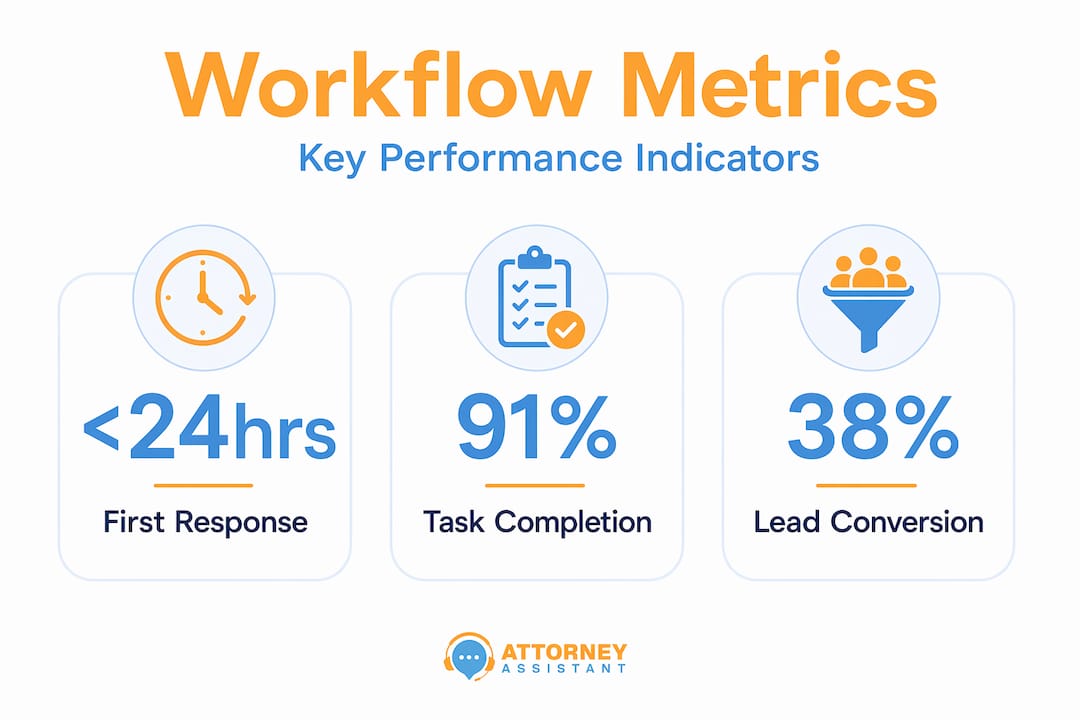
Follow-up task completion rate shows what percentage of scheduled follow-up tasks are completed on time. Anything below 85 percent signals a workload or accountability problem.
Lead-to-consultation conversion rate is the most direct measure of workflow health. If your rate improves after building a structured sequence, the process is working. If it stays flat, review the touchpoint content and the speed of first contact.
The table below shows a typical before-and-after comparison firms see after implementing a structured follow-up workflow.
| Metric | Before structured workflow | After structured workflow |
|---|---|---|
| Average first response time | 4 to 8 hours | Under 30 minutes |
| Follow-up task completion rate | 55 to 65% | 85 to 95% |
| Lead-to-consultation conversion rate | 20 to 30% | 40 to 55% |
| Client-reported communication satisfaction | Low, frequent complaints | High, reduced repeat inquiries |
A well-run client engagement process also reduces the volume of inbound “what’s happening with my case?” calls. Proactive milestone-based updates answer questions before clients have to ask them. Fewer interruptions for your staff. More trust from your clients.
Review your pipeline weekly. Look at every matter sitting in a follow-up stage. Look at every overdue task. These reviews are not administrative housekeeping. They are revenue protection.
My honest take on where most firms go wrong
I have worked with firms ranging from two-attorney boutiques to regional practices with multiple offices, and the pattern is almost always the same. When follow-up breaks down, the firm blames the tools, the staff, or the market. The real problem is almost always that no one defined what “following up” actually means inside that firm.
What I have seen work, consistently, is starting simple. Pick the 20 percent of intake scenarios that cause 80 percent of your pain. Build a clean, template-driven intake sequence for those first. Get it working. Then expand.
Automation gets oversold. It handles volume and consistency well. But a well-timed personal call from the right person still closes cases that automated emails cannot. The goal is to use automation to handle the mechanical parts so your people have time for the moments that actually require a human.
The other thing I keep coming back to is ownership. The firms that convert the most leads have one thing in common. Every lead has a name attached to it and a next task with a due date. That is not a technology problem. It is a discipline problem. Once you solve that, everything else gets easier.
Start building. Refine as you go. Do not wait until you have the perfect system.
— Nicole
How Attorneyassistant helps you fix follow-up gaps
If your firm is losing leads between intake and signature, the problem is almost always operational. Attorneyassistant works with law firms to fix exactly that.
Our lead follow-up services handle the outreach discipline your team does not always have time for. Our intake and reception support makes sure every inbound call and contact gets captured, logged, and acted on. We also offer free tools for law firms designed to close the gaps in your current process without a long implementation project. If you want to see exactly where your firm is leaking revenue and what a better workflow looks like in practice, book a call with our team. We will show you what is fixable and how fast.
FAQ
What is a client follow-up workflow for law firms?
A client follow-up workflow is a structured sequence of communication steps a law firm uses to stay in contact with leads and clients from first inquiry through signed engagement. It includes task assignments, message templates, timing rules, and escalation paths to prevent leads from going cold.
How quickly should a law firm follow up with a new lead?
Firms should send an automated acknowledgment within 15 to 30 minutes and make personal contact within 24 hours. Clients expect timely acknowledgment, and waiting longer than 48 hours significantly reduces conversion odds.
What should a follow-up email strategy include for law firms?
Each follow-up message should state a clear next step, reference the client’s specific situation, and include a deadline or call to action. Avoid generic openers. Every message in your follow-up email strategy should move the engagement forward.
How do you track whether a follow-up workflow is working?
Track first response time, follow-up task completion rate, and lead-to-consultation conversion rate in your CRM. Review overdue tasks weekly and compare pipeline conversion data month over month.
What is the most common reason law firm follow-up workflows fail?
The most common cause is failing to create the next task immediately after each client interaction. Without forced next-action rules and regular overdue task reviews, follow-up gaps accumulate until leads are already lost.
Recommended
- Streamline your law firm follow-up process: convert more leads | Attorney Assistant
- Law firm lead management: convert more clients in 2026 | Attorney Assistant
- Boost client intake: top communication strategies for law firms | Attorney Assistant
- Productivity Tips for Law Offices That Actually Work | Attorney Assistant
Related Articles
Workflow for Follow Up Strategies at Law Firms
Discover an effective workflow for follow up strategies at law firms. Enhance client retention and streamline your legal intake process today!

Client Follow-Up Strategy for Law Firms: 2026 Guide
Learn what is client follow-up strategy for law firms in 2026. Improve conversions and retention with effective communication techniques. Discover more!

10 Business Finance Course Options for Law Firms
Compare 10 business finance course options by level, format, workload, and law-firm relevance, then choose the right fit for your role and goals.