How to Reduce Intake Errors at Your Law Firm

TL;DR:
- Reducing intake errors involves implementing structured processes with validation gates and early data capture. A two-stage intake process and system-enforced steps significantly lower mistakes and professional liability risks. Regular error reviews help firms identify and address underlying issues effectively.
Intake errors in law firms are defined as missing, incorrect, or unverified client data collected during the onboarding process that causes downstream failures in conflict checks, docketing, and case management. The most effective way to reduce intake errors is to replace ad hoc form filling with a staged, gated workflow that validates data before any next step begins. Platforms like Clio, Lawmatics, and DocuSign give firms the infrastructure to enforce these gates automatically. The firms that fix intake mistakes earliest spend less time correcting records and more time working cases. This guide covers the specific structures, tools, and process designs that eliminate the most common intake failures.
How to reduce intake errors with a standardized checklist
A standardized intake checklist is the single most reliable way to prevent missing or incorrect information during client onboarding. Checklists ensure consistent capture of critical data fields and reduce the rushed, incomplete entries that happen when staff rely on memory. Without a checklist, different coordinators collect different fields, and the gaps only surface when a conflict check fails or a deadline gets missed.
The highest-value checklist fields are those with a direct downstream use. Fields tied to identity, timeline, and parties form the critical data backbone of any legal intake. Every field that has no downstream purpose adds noise and increases the chance of error. A field that feeds nothing should not be on the form.
A complete intake checklist for a law firm should include:
- Client identifiers: Full legal name, date of birth, Social Security number or tax ID, and contact details
- Conflict check parties: All opposing parties, related entities, and prior counsel names
- Issue timeline: Date of incident or triggering event, statute of limitations deadline, and any court dates already scheduled
- Document inventory: List of documents the client has, documents still needed, and who is responsible for obtaining them
- Engagement status: Retainer signed, fee agreement sent, and payment method confirmed
Each of these fields connects directly to a process that runs after intake closes. The conflict check cannot run without the opposing party names. Docketing cannot begin without the deadline. The document inventory prevents staff from chasing the same records twice.
Pro Tip: Build your checklist inside your case management system, not in a separate spreadsheet. When the checklist lives in Clio or Lawmatics, completion is tracked automatically and nothing gets lost in email.
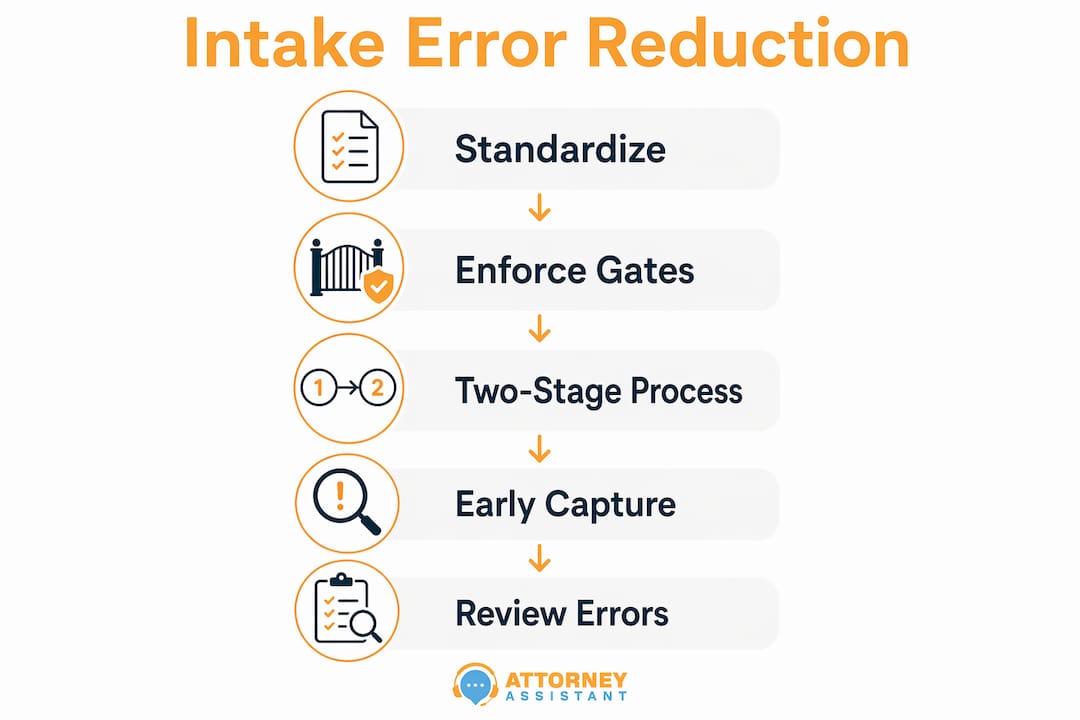
Does enforcing mandatory completion gates actually reduce intake errors?
System-enforced gates are the most direct way to prevent skipped steps in legal intake. Mandatory conflict checks before proceeding must be required fields with system confirmation before the next step continues. Without a hard stop, coordinators under time pressure skip the conflict check and move straight to scheduling. That shortcut creates professional liability risk that no checklist can fix after the fact.
The logic behind gates is simple: a system that allows skipping a step will eventually have that step skipped. The fix is to make skipping structurally impossible. Here is how to build that structure into your intake workflow:
- Set required fields in your intake form. Fields for opposing party names, date of birth, and matter type should be mandatory. The form cannot submit without them.
- Trigger a conflict check automatically. When the intake form submits, your case management platform should run or prompt a conflict check before generating any engagement letter.
- Gate the engagement letter on conflict clearance. Platforms like Clio and Lawmatics can connect to document generation tools so the engagement letter only generates after the conflict check is confirmed.
- Route for attorney review before signing. Automated routing sends the completed intake record to the supervising attorney for approval before DocuSign delivers the engagement letter to the client.
- Log every gate completion with a timestamp. Timestamped records show exactly who cleared each step and when, which matters in a malpractice dispute.
This sequence removes the human decision to skip from the equation entirely. The system enforces the process, not the coordinator’s memory.
Pro Tip: Add a second-layer review for high-risk matter types such as medical malpractice or multi-party litigation. A second-review layer on sensitive categories reduces errors that a single reviewer misses under pressure.
What role does a two-stage intake process play in minimizing intake mistakes?
Intake errors persist because firms treat intake as mere form filling instead of a staged, gated workflow with real-time routing and validation. A two-stage intake process fixes this directly. Stage one is a short pre-screen that qualifies the lead. Stage two is the full intake, completed only for leads that pass the screen.
This design reduces errors in two ways. First, it limits the volume of full intakes to qualified prospects, so coordinators spend less time on incomplete records from unqualified leads. Second, it allows the second stage to ask deeper, adaptive questions based on what the first stage revealed.
| Feature | Single-stage intake | Two-stage intake |
|---|---|---|
| Form length | Long, one-size-fits-all | Short pre-screen, then targeted deep intake |
| Error rate | Higher due to fatigue and skipped fields | Lower because questions match the matter type |
| Drop-off risk | High for complex forms | Low at pre-screen; qualified leads complete stage two |
| Data quality | Inconsistent | Consistent, validated progressively |
Conversational AI intake tools improve this further by probing insufficient answers in real time and validating identifiers like dates of birth before saving the record. A coordinator reviewing a record that an AI system already validated spends far less time correcting entries.
Adaptive questioning also helps with vague answers. When a client types “a few months ago” as an incident date, a static form accepts it. An adaptive system flags it and asks for a specific date before moving forward. That single correction prevents a missed statute of limitations deadline.
- Use conditional logic so personal injury intakes ask about medical treatment and employment intakes ask about documentation
- Build mobile-friendly forms because a large share of prospective clients complete intake on a phone
- Include a read-back confirmation step where the client reviews their key answers before submitting
How does early data capture prevent rework and data entry errors?
Moving data capture earlier and validating it inside systems before downstream steps rely on it is the most effective way to reduce rework. The standard law firm model collects information at the first appointment. The better model collects demographics, identity verification, consent, and supporting documents before the appointment begins.

Early capture means the coordinator arrives at the first call with a complete record, not a blank form. The appointment becomes a review and confirmation rather than a data collection session. That shift cuts the time spent per intake and reduces the errors that come from typing under pressure during a live conversation.
Automated triggers handle the gaps. When a pre-intake form is sent but not completed within 24 hours, the system sends a reminder automatically. When a document is missing from the intake packet, the system flags it before the appointment rather than after. These triggers replace the manual follow-up that coordinators forget or deprioritize when the day gets busy.
The ineffective intake signs that most firms recognize, such as staff chasing missing forms, duplicate data entry, and last-minute rescheduling, all trace back to late data capture. Moving collection forward by even 24 hours removes most of that friction.
- Send the intake packet immediately after the initial call, not the day before the appointment
- Include identity verification and consent forms in the pre-intake packet so they arrive signed and ready
- Set a clear expectation with the client: the appointment proceeds only when the pre-intake is complete
Pro Tip: Run weekly sample reviews of completed intakes and categorize errors by type: missing information, confusing fields, or routing mistakes. That categorization tells you exactly which part of the workflow to fix next.
Key Takeaways
Reducing intake errors requires structured gates, early data capture, and adaptive workflows that validate information before downstream processes depend on it.
| Point | Details |
|---|---|
| Standardize with a checklist | Capture client identifiers, conflict parties, timelines, and document inventories on every intake. |
| Enforce system gates | Make conflict checks and attorney review mandatory steps the system cannot skip. |
| Use two-stage intake | Pre-screen leads first, then run full adaptive intake only for qualified prospects. |
| Capture data early | Send intake packets before the first appointment to eliminate rework and last-minute corrections. |
| Review errors weekly | Categorize intake errors by type each week to identify and fix the root cause, not just the symptom. |
What I have learned from watching firms fix their intake
The firms that struggle most with intake errors share one habit: they treat intake as a single event rather than a process. A coordinator fills out a form, the form gets filed, and everyone assumes the data is correct. Nobody checks until something breaks downstream.
The checklist and gate approach works, but only when leadership commits to it. The most common resistance I see is from experienced staff who believe their memory is more reliable than a system. That belief is the source of most errors. Memory fails under volume. A system does not.
The two-stage intake design surprises most administrators when they first see the drop in error rates. The pre-screen feels like extra work until you realize it eliminates three rounds of corrections on unqualified leads. The time savings show up within the first month.
The practical advice I give every firm is to start with the checklist, not the technology. Get agreement on which fields matter and why. Then build the gates around those fields. Technology enforces a process. It cannot create one. If your process is unclear before you automate it, the automation will just run the wrong steps faster.
The law firm onboarding checklist is the right starting point for any firm that wants to build this structure without starting from scratch.
— Nicole
How Attorneyassistant helps law firms cut intake errors
Attorneyassistant builds and manages the intake workflows that law firms need to stop losing cases to bad data and missed steps. The system handles automated checklists, mandatory completion gates, and pre-intake data collection so your coordinators work from complete records, not blank forms.
Attorneyassistant integrates directly with Clio, Lawmatics, and DocuSign to enforce conflict check gates, automate engagement letter delivery, and trigger follow-ups for incomplete forms. Firms using the intake automation platform reduce the manual correction cycles that slow down onboarding and increase malpractice exposure. If you want to see exactly where your intake is leaking, book a call and we will map your current workflow against the best practices in this guide.
FAQ
What is the most common cause of intake errors in law firms?
Intake errors most often result from treating intake as a single form-filling step rather than a staged workflow with required fields and validation gates. Missing conflict check data and incomplete timelines are the most frequent failure points.
How does a two-stage intake process improve data accuracy?
A two-stage process runs a short pre-screen first and reserves the full intake for qualified leads only. This reduces form fatigue, allows adaptive follow-up questions, and produces more complete, accurate records than a single long form.
What fields should every law firm intake checklist include?
Every intake checklist should capture full client identifiers, all conflict check parties, the matter timeline and deadlines, a document inventory, and the engagement status including retainer and fee agreement.
How do system gates reduce professional liability risk?
System-enforced gates require conflict check completion before engagement letters generate, making it structurally impossible to skip high-risk steps. That hard stop removes the human decision to proceed without clearance.
How often should a firm review its intake for errors?
Weekly sample reviews of completed intakes, with errors categorized by type, give firms the data they need to identify root causes and fix the right part of the workflow rather than applying generic corrections.
Recommended
Related Articles

How to Enhance Intake Efficiency at Your Law Firm
Learn how to enhance intake efficiency at your law firm. Boost client conversions with actionable strategies and streamlined processes.

Macs for Lawyers: The Hardware and Compatibility Guide
A practical guide to Macs for lawyers covering hardware choices, software compatibility, security tradeoffs, and recommendations by firm size and workflow.
Business Telephone Answering Service for Law Firms
How a business telephone answering service works for law firms, including 24/7 intake, qualification, warm transfers, pricing models, and what