The standard advice on Macs for lawyers starts with the wrong question. Lawyers ask which model to buy, compare chips, and only then discover the problems were never about processing speed. They were about a Windows-only filing tool, an unmanaged personal laptop holding client files, or an intake inbox nobody checked until Thursday.
Buy the workflow first. Then buy the computer that fits it.
Table of Contents
- Why Lawyers Are Buying Macs Again
- What the Adoption Data Actually Shows
- MacBook Air vs MacBook Pro for Legal Work
- Software Compatibility Without the Marketing
- Security, Confidentiality, and the AI Question
- Hardware Is Downstream of Intake and Staffing Capacity
- Recommended Mac Configurations by Firm Profile
- A Short Procurement Checklist and a Frank Closing
Why Lawyers Are Buying Macs Again
Stop asking whether a Mac is good for law practice in the abstract. Ask what work that specific Mac has to carry. A solo doing intake calls, email, research, and cloud case management needs a different machine and a different support plan than a litigator running OCR on large productions, reviewing video depositions, and driving multiple external displays.
That distinction matters because most firms aren't hardware-constrained first. They're capacity-constrained. Attorneys lose time to records chasing, calendar cleanup, inbox triage, document formatting, and follow-up that should've happened yesterday. A faster laptop makes those tasks marginally less annoying. It doesn't make them disappear.
Most firms are capacity-constrained before they're hardware-constrained. A new Mac won't return a voicemail, chase a medical record, or clean up your CRM.
Four Jobs, Four Different Answers
Think in roles instead of preferences:
- Solo attorney: You control the stack, so a Mac works if your practice management, billing, research, and filing tools run well in a browser or natively.
- Small litigation team: You need sustained performance, shared document discipline, and a clear answer for any Windows-dependent litigation support software.
- Personal injury practice: Records retrieval, lien tracking, demand assembly, and client updates drive the workload more than raw compute does.
- Firm administrator: Your question isn't speed. It's whether you can manage identity, updates, backups, security, and support across a mixed fleet without creating a second, unofficial IT department.
That last point is where Mac purchases go sideways. One attorney buys a MacBook, loves it, and assumes the firm should standardize on it. Then IT discovers the document management integration is thinner, a court tool expects Windows, and nobody owns Mac troubleshooting. The laptop didn't fail. Governance did.
My recommendation is direct. Approve Macs by workflow, not by enthusiasm. If the work lives in Microsoft 365, a modern browser, and cloud practice management, a Mac is a strong choice. If the work depends on legacy Windows applications and nobody will fund virtualization, remote desktop, or cross-platform support, it's a poor fit no matter how nice the keyboard feels.
What the Adoption Data Actually Shows
Mac adoption in law has grown, but it hasn't taken over. That's not a criticism. It's the context you need before you make a firm-wide decision.
The American Bar Association reported Mac OS use at 8.1% in 2015, up from 5.8% in 2014, with solo practitioners at 15.5%, and by 2023 Mac OS was the primary operating system for 11% of solo and small firm respondents overall, 16% of solos, and 12% of firms with 2 to 9 attorneys, according to the ABA 2023 solo and small firm technology report. Earlier figures were much lower, which tells you this has been steady growth, not a sudden conversion.
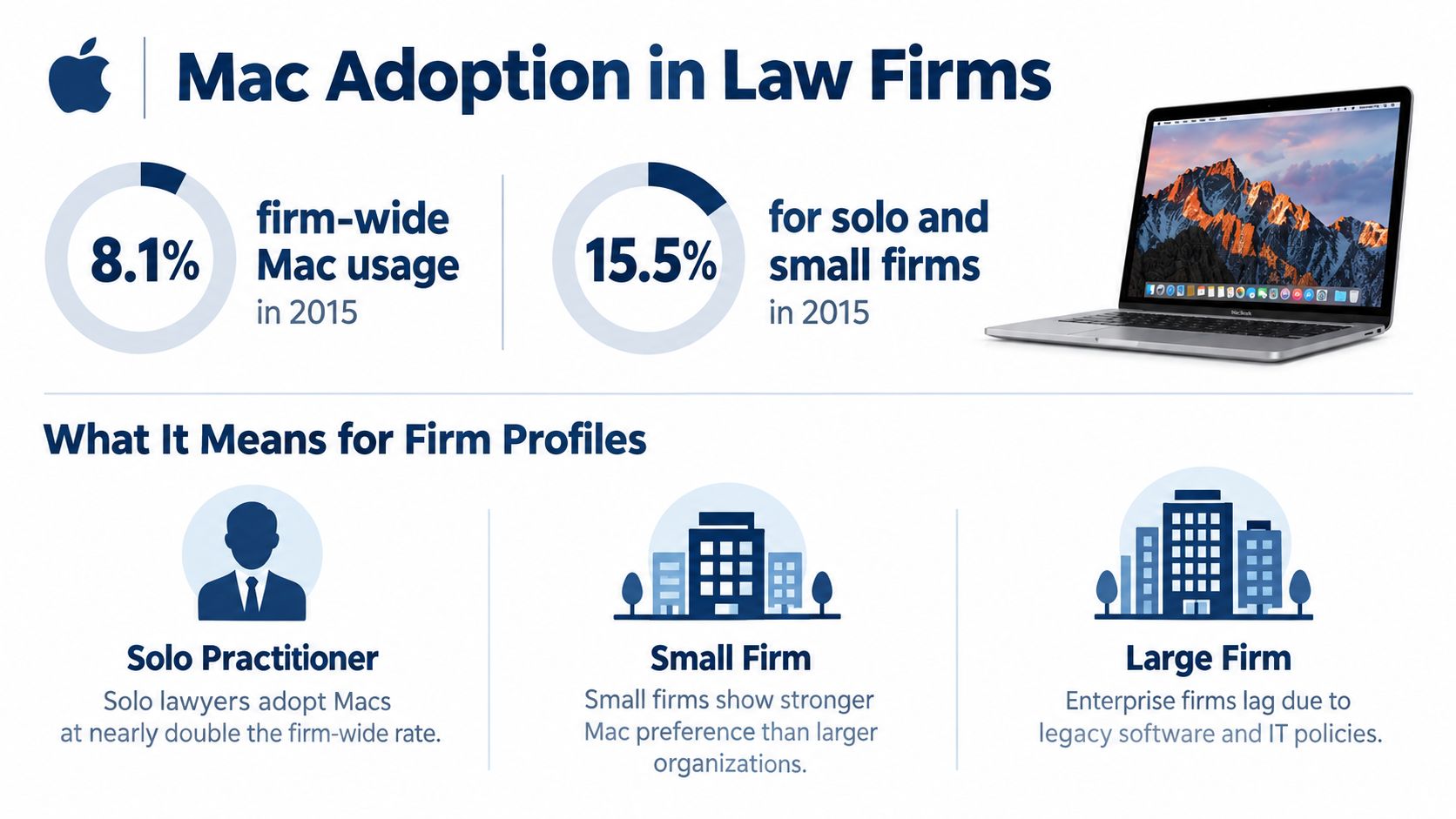
The pattern is consistent. Smaller practices adopt Macs at higher rates because the person choosing the computer is often the person using it. Larger firms move slower because they have standardized images, legacy applications, centralized IT policies, and less tolerance for one-off support problems.
It Became an Ecosystem, Not Just a Laptop Choice
A 2015 Apple-at-Law survey of 339 respondents found 29% worked in entirely Mac-based firms, 84% used iPads, 58% used MacBook Pro models, and 32% used MacBook Air models, as summarized in the Oklahoma Bar Association history of Mac-loving lawyers. That matters. Lawyers weren't just picking a different desktop operating system. They were building a mobile setup around laptops, tablets, cloud access, and work outside the office.
There's another gap worth noticing. ILTA's 2025 technology survey reportedly found only 9% of firms issue Macs, while more than one-third support Macs for remote access, according to the ILTA 2025 executive summary. Translation: plenty of lawyers use a Mac somewhere in their workday even when the firm's official endpoint is Windows.
That's a workable model if you manage it deliberately. It's a mess if remote Mac access is just something that happened during a busy year and nobody documented it.
MacBook Air vs MacBook Pro for Legal Work
For most lawyers, the MacBook Air is enough. I know that's less exciting than buying the Pro, but excitement isn't a procurement criterion.
The 13-inch MacBook Air with M4 recorded Geekbench 6 scores of approximately 3,780 single-core and 14,924 multi-core and lasted 15 hours and 14 minutes in a Wi-Fi productivity battery test at 150 nits in Tom's Hardware MacBook Air M4 testing. For document review, browser-based case management, Microsoft 365, Zoom or Teams, legal research, and constant tab abuse, that's plenty.
The Pro earns its money on sustained work. The 14-inch MacBook Pro with M4 has four performance and six efficiency cores, 120 GB/s memory bandwidth, and approximately 23% higher multi-core performance than the preceding M3 model in the specifications and testing summarized on Apple's MacBook Pro technical specifications page. Its active cooling matters when you're OCRing large files, processing evidence, working with video, or running heavy multitasking for hours instead of minutes.
MacBook Air vs MacBook Pro for Legal Workloads
| Workload | MacBook Air M4 | MacBook Pro M4 |
|---|---|---|
| Intake, email, research, cloud case management | Excellent fit, light and quiet | Capable, but more than you need |
| Large PDFs and document comparison | Strong with adequate memory | Stronger under sustained load |
| OCR, video depositions, large evidence sets | Workable for occasional jobs | Better choice for regular heavy processing |
| Multiple external displays and desk-based review | Fine for simpler setups | Better suited to workstation use |
| Court, travel, client meetings | Best portability and battery profile | Heavier, still practical |
Buy Memory Before You Buy Bragging Rights
16 GB of unified memory is the reasonable baseline in the tested configurations described in the sources above. If you regularly juggle large PDFs, a virtual machine, local AI tools, video files, and too many browser tabs, step up from there. Storage matters too, but a lawyer usually feels insufficient memory before feeling insufficient storage, especially when every application wants to stay open all day.
The Air's passive cooling and standard display are fine for ordinary legal productivity. The Pro's brighter XDR display helps with scanned pleadings and exhibits, and active cooling prevents sustained workloads from becoming a patience exercise.
My rule is simple. Default to the Air. Buy the Pro for a named workload. If you can't name the workload, you don't need the Pro.
Software Compatibility Without the Marketing
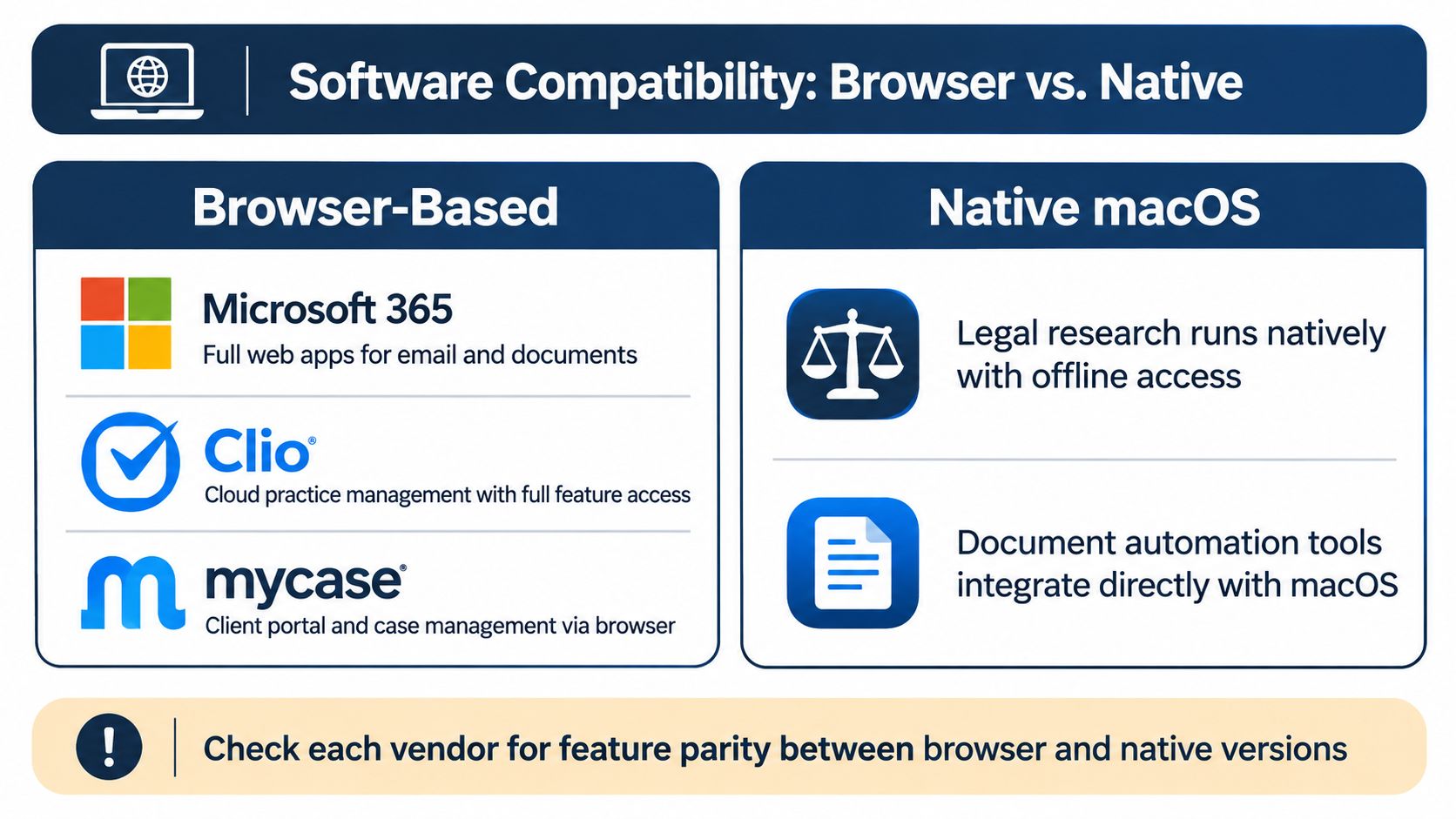
Compatibility has two meanings, and vendors love blurring them. Browser-based compatibility means you can log in and do the core work. Full-feature compatibility means integrations, add-ins, offline behavior, scanning, document assembly, and local file handling work the way your staff expects. Those aren't the same thing.
Most modern legal work now runs well on a Mac. Microsoft 365, Clio, MyCase, NetDocuments, iManage Cloud, Westlaw, Lexis, Zoom, and Teams are all practical through native apps or a browser. If your firm lives in that world, your Mac decision gets much easier. A broader review of applications for lawyers that support daily practice workflows can help you audit what your team uses before you buy hardware around assumptions.
Where Macs Still Hit Friction
Be careful with these categories:
- E-discovery and litigation support tools: Some platforms and local processing utilities still assume Windows.
- On-premises practice management: Older server-based systems may offer a web view that's technically usable and practically miserable.
- Court and agency tools: A specific filing, recording, or forms workflow may depend on Windows software or browser behavior you need to test, not guess.
- Microsoft add-ins: Word and Outlook on Mac are strong, but a niche add-in your firm relies on may not have feature parity.
Virtualization and remote desktop can bridge those gaps. They also add licensing, latency, update management, and another layer for IT to support. That can be a smart tradeoff for one critical Windows application. It's a bad plan if half the firm's day happens inside a virtual Windows session. At that point, you've bought an expensive Mac to operate a Windows computer with extra steps.
Test your five most important workflows end to end before deployment. Open the matter, edit the pleading, save it to the document system, generate the PDF, file it, bill it, and find it again tomorrow. If any step requires a workaround, write that workaround down and decide who supports it.
Security, Confidentiality, and the AI Question
A Mac isn't a confidentiality strategy. It's an endpoint. You still need policy, identity controls, vendor review, and supervision.
That matters more as AI use spreads. Thomson Reuters reported legal professional use of generative AI rose from 14% in 2024 to 26% in 2025, while 45% of law firm respondents used GenAI or planned to make it central to workflow within a year, in Thomson Reuters reporting on generative AI adoption. Adoption is moving faster than governance in many firms, which is a polite way of saying people are pasting client material into tools nobody approved.

The Questions Your Firm Must Answer
- Approved accounts only: Which AI tools may receive client information, under which accounts, and with what retention settings?
- Matter segregation: Where do prompts, uploads, and outputs live, and can you retrieve or delete them when needed?
- Browser extensions: Who controls extensions that can read email, documents, and web sessions?
- Personal devices: Is that partner's home Mac encrypted, updated, backed up, and enrolled in management, or is it just trusted because a partner owns it?
macOS privacy features help, but they don't replace firm controls. Turn on FileVault, require strong sign-in through your identity provider, enroll firm Macs in mobile device management, encrypt backups, and standardize updates. For the endpoint settings themselves, a step-by-step Mac protection walkthrough from Nerds 2 You Edmonton gives administrators a practical checklist to adapt into firm policy.
Document handling deserves the same discipline. Your Mac policy should connect directly to your approach to document management for law firms and controlled file access, including naming, permissions, retention, and who can work outside the managed system.
Practical rule: If you can't identify where client data goes when an attorney uses an AI tool on that Mac, you don't have an AI workflow. You have an incident waiting for a date.
For many small firms, the best security purchase isn't a faster chip. It's managed identity, device management, an approved AI stack, and a written redaction process people follow.
Hardware Is Downstream of Intake and Staffing Capacity
A beautiful Mac setup won't fix a broken front door. If calls go unanswered and web inquiries sit untouched, your problem isn't the laptop on the attorney's desk.
Clio's 2019 secret-shopper study found only 56% of calls to law firms were answered by a person, 39% went to voicemail, and more than half of firms that received voicemails did not return them within 72 hours, according to Clio's Legal Trends Report press release on law firm responsiveness. Technically, calling someone back four days later is follow-up. It is not particularly useful follow-up.
Speed matters even more than most firms admit. Clio also reported firms had approximately five minutes to respond to an inquiry for the greatest chance of connecting, while 64% of surveyed clients never received a response from the lawyers they contacted, in Clio's analysis of faster law firm response times. Your CRM cannot follow up with a lead if nobody puts the lead in the CRM.
What This Changes About the Mac Decision
If attorneys are also acting as receptionists, intake specialists, records clerks, and CRM janitors, they'll demand a machine that compensates for chaos. It won't. The better move is to assign ownership for answering, qualifying, scheduling, follow-up, records requests, calendaring, and file hygiene. Then the Mac becomes what it should be, a tool for legal work inside a defined system.
Firms evaluating virtual staffing solutions for dedicated legal support capacity should apply the same standard they apply to hardware. Define the workflow, the system of record, permissions, escalation rules, and quality checks. A dedicated support professional working inside your case management system needs predictable access and documented procedures, not a collection of passwords and good intentions.
This is especially true in mixed Mac and Windows firms. Remote and dedicated staff need the same files, templates, calendars, and intake dispositions regardless of which operating system an attorney prefers. Standardize the workflow in cloud systems. Let the endpoint be the flexible part.
Taking a message is not intake. Buying a Mac is not operations. Fix ownership first, then configure hardware around the people doing the work.
Recommended Mac Configurations by Firm Profile
Use profiles, not partner preferences, to standardize purchases. These three cover most small and mid-sized firms I see asking about Macs for lawyers.
Recommended Mac Configuration by Firm Profile
| Firm Profile | Recommended Mac | Key Pairing |
|---|---|---|
| Solo plaintiff attorney | 13-inch MacBook Air M4, 16 GB memory, 512 GB storage | Managed identity, 24/7 live intake, dedicated help for records and calendaring |
| Three-attorney litigation team | 14-inch MacBook Pro M4, higher memory configuration, 1 TB storage | Structured lead recovery, dedicated case support for discovery and demand packages |
| Eight-attorney multi-practice firm | Air models for intake and administrative roles, Pro models for litigators and partners | Apple Business Manager, device management, co-managed operational oversight |
The solo plaintiff attorney should keep it simple. An Air handles intake review, drafting, research, client calls, and cloud case management. Spend political capital on records discipline instead. HIPAA generally requires a covered entity to act on an access request within 30 calendar days, with one additional 30-day extension only if written notice explains the delay within the initial period, under HHS guidance on individuals' right to access health information. A visible request tracker with owner, provider, date sent, follow-up date, and fee status will move cases faster than a processor upgrade.
The three-attorney litigation team has a stronger case for Pro models. Larger productions, OCR, exhibits, video, and sustained multitasking justify active cooling and more memory. Pair that hardware with dedicated case support so attorneys aren't spending workstation time renaming files. Your attorneys went to law school to practice law. Ideally, they should occasionally get to do that.
The eight-attorney firm needs fleet thinking. Standardize two configurations, enroll everything in management, and plan replacements before failures start choosing your timeline for you. A refresh planning guide for IT managers from Beyond Surplus is useful when you're mapping device age, replacement order, and disposal across a mixed fleet.
One boundary applies to every profile. ABA guidance states a lawyer may outsource support services but remains ultimately responsible for competent legal services under Model Rule 1.1, in American Bar Association guidance on outsourcing legal work. Delegate the work. Keep the accountability.
A Short Procurement Checklist and a Frank Closing
Before you buy, confirm these items:
- Workflow test passed: Case management, research, documents, filing, billing, and video all work end to end.
- Windows exceptions named: Each exception has virtualization, remote desktop, or a Windows endpoint assigned.
- Configuration standardized: Memory chosen for the workload, storage sized for local files, accessories specified.
- Management enrolled: FileVault, identity sign-in, updates, encrypted backup, and device management are active.
- AI stack documented: Approved tools, accounts, redaction rules, and retention expectations are written down.
- Support owner assigned: Someone handles Mac troubleshooting, replacement, and loaners. Keep RepairSeeker MacBook repair tips from RepairSeeker bookmarked for basic power failure triage before a deadline turns into a hardware emergency.
A Mac can be an excellent individual lawyer's computer and still be a poor firm-wide default if you lack cross-platform governance. Buy it where the workflow supports it. Don't force it where it creates a second support universe.
If your Mac decision exposed bigger gaps in intake follow-up, records work, calendaring, or case support, Attorney Assistant provides dedicated Staffline professionals and 24/7 Frontline live intake built specifically for law firms. Frontline signs the case. Staffline carries it. Visit Attorney Assistant to identify where attorney time and new-client opportunities are being lost, then build the capacity to fix both.
Related Articles

Business Telephone Answering Service for Law Firms
How a business telephone answering service works for law firms, including 24/7 intake, qualification, warm transfers, pricing models, and what

Call Flow Customer Service for Law Firms: A Practical Guide
Design a call flow customer service system for your law firm that captures leads, qualifies matters, and signs cases. Practical guide

Fear of Talking on Phone: 7 Practical Confidence Tips
Overcome fear of talking on phone with practical scripts, role-play, exposure exercises, and intake tools built for legal teams.