Optimize your case intake workflow for more conversions

TL;DR:
- Personal injury firms lose cases daily due to leaks in their intake processes, such as missed calls and delayed follow-ups. Implementing a structured workflow with proper tools, training, and accountability significantly improves conversion rates and revenue. Regular review and continuous improvement of intake metrics are essential for sustained success.
Every day, personal injury firms lose signed cases not because they lack leads but because their intake process leaks. A potential client calls during lunch, gets voicemail, and signs with a competitor by 3 p.m. Another fills out a web form on a Saturday and never hears back until Monday. These are not edge cases. They are daily revenue losses hiding inside workflows most practice owners have never formally examined. This guide walks you through every layer of a high-converting case intake workflow, from the tools you need to the metrics that prove it is working.
Table of Contents
- Understanding the essentials of case intake workflow
- Tools and preparation you need before optimizing
- Step-by-step guide to building an effective intake workflow
- Avoiding pitfalls: Troubleshooting and common intake mistakes
- How to measure and improve your intake workflow over time
- Why most intake workflow fixes fail (and what actually works)
- Upgrade your intake workflow with Attorney Assistant
- Frequently asked questions
Key Takeaways
| Point | Details |
|---|---|
| Speed matters | Responding to leads quickly is crucial for winning more cases and increasing conversions. |
| Workflow clarity | Documented, tech-driven case intake reduces errors and ensures no opportunity slips through. |
| Continuous improvement | Measuring intake KPIs helps your firm spot weak spots and improve results over time. |
| Staff and systems | Proper roles, training, and tools create intake consistency for small to mid-sized law firms. |
Understanding the essentials of case intake workflow
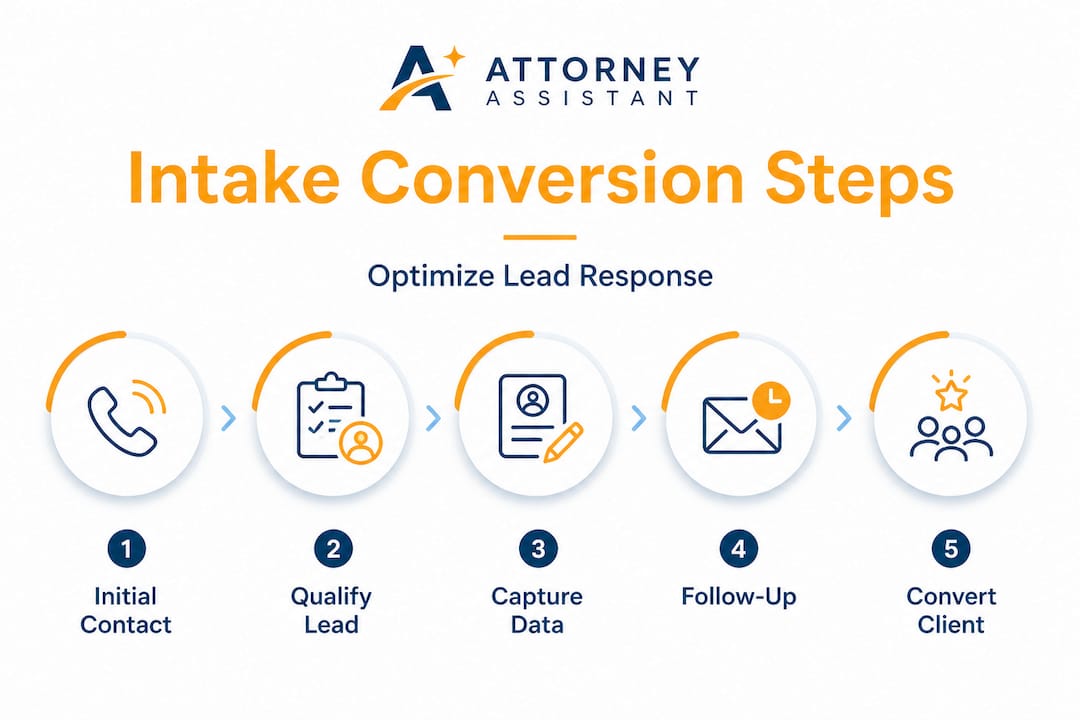
A case intake workflow is the structured sequence of steps your firm uses to receive, qualify, capture, and convert a potential client from their first contact through to a signed retainer. It covers everything: answering the initial call, collecting injury and incident details, running a conflict check, scheduling a consultation, and sending the engagement letter.
Most firms have a version of this process. Very few have it documented, trained, and consistently executed. That gap is where revenue disappears.
Common bottlenecks inside personal injury intake include:
- Missed calls going to voicemail with no callback protocol
- Inconsistent intake forms that miss critical case details
- Delayed follow-up that lets leads go cold within hours
- No assigned staff responsibility for each intake step
- Manual handoffs that break down between front office and attorneys
The business consequences are serious. Slow responses erode trust before a relationship even begins. Incomplete data capture means attorneys walk into consultations underprepared. Poor intake client onboarding experiences generate negative reviews that cost future leads. Staff who manage a chaotic intake process burn out faster, driving turnover that makes the problem worse.
Here is a snapshot of how intake performance benchmarks compare:
| Metric | Industry average | High-performing firms |
|---|---|---|
| Time to first response | 3 to 5 hours | Under 5 minutes |
| Lead to consultation rate | 20 to 30% | 55 to 70% |
| Missed call rate | 35 to 45% | Under 10% |
| Follow-up attempts before giving up | 1 to 2 | 5 to 7 |
“Clear intake workflows improve client onboarding efficiency and outcomes.”
Reviewing intake best practices used by high-volume PI firms reveals one consistent truth: structure beats hustle every time. A disciplined workflow outperforms a talented but reactive team.
Effective intake also depends on capturing the right data at the right moment. Personal injury prospects are often emotionally charged right after an accident. They want fast answers and clear next steps. A well-designed intake process delivers both, which is why firms that prioritize it consistently out-convert those that treat it as an afterthought. You can see how intake forms examples from forward-thinking firms are built to gather key details without overwhelming the caller.

Tools and preparation you need before optimizing
Before you redesign your workflow, you need the right foundation. Trying to optimize a process without the proper tools is like building on sand. The effort stalls, and teams revert to old habits within weeks.
Here is what every personal injury firm needs in place before rebuilding intake:
- CRM software (like Clio Grow, Lawmatics, or HubSpot) to track every lead from first contact through signing
- E-signature tools (DocuSign or Clio Sign) to eliminate paper delays on retainers
- Call tracking software to record calls, flag missed contacts, and measure response time
- Intake script templates specific to personal injury inquiry types (auto accident, slip and fall, medical malpractice)
- Automated lead capture forms embedded on your website and landing pages
Compare how manual versus digital intake systems perform across the dimensions that matter most:
| Factor | Paper or manual system | Digital or automated system |
|---|---|---|
| Data accuracy | Prone to errors and gaps | Validated fields reduce errors |
| Response speed | Hours to days | Minutes to instant |
| Follow-up reliability | Depends on staff memory | Automated triggers and reminders |
| Reporting capability | None or manual tallying | Real-time dashboards |
| Scalability | Breaks under volume | Scales without added headcount |
Automation in intake systems reduces human error and dramatically boosts efficiency across all firm sizes. This is not just a time saver. It is a safeguard against the random human mistakes that quietly sink conversion rates.
Team preparation matters just as much as technology. Assign clear intake roles: who answers calls, who handles web form leads, who sends the consultation confirmation, and who follows up on no-shows. Without ownership, tasks fall through. With it, accountability creates consistency.
Pro Tip: Use the law firm tech matrix to audit your current tools and identify integration gaps before you invest in anything new. Choosing tools that do not sync together creates more bottlenecks than they solve.
Also invest in intake-specific training. Role-play difficult caller scenarios. Train staff on empathy-first language for injured clients. Teach them to gather the four core data points in every call: what happened, when it happened, what injuries occurred, and whether another party was at fault.
Step-by-step guide to building an effective intake workflow
With tools and team prepped, here is how to execute a high-converting intake workflow from first contact through signed agreement.
-
Capture the lead immediately across all channels. Every phone line needs a live answer or an immediate callback system during business hours. Web forms must trigger an instant auto-reply confirming receipt. Live chat should route to a staffed response or qualify the lead automatically.
-
Follow up within five minutes. Speed is the single biggest conversion driver in personal injury intake. Immediate follow-up is critical for converting potential clients in personal injury cases, because most injured people contact multiple firms at once. The firm that responds first often wins the case.
-
Conduct a structured intake call or interview. Use a script that covers incident details, injury severity, insurance status, and relevant timelines. Good client interview strategies show that open-ended questions early in the call build rapport while gathering the facts attorneys need to assess case strength.
-
Run a conflict check before the consultation. This is a legal safeguard and a workflow step that must happen before any privileged information is shared. Build it into your CRM so it triggers automatically when a new lead is entered.
-
Schedule the consultation during the intake call. Do not end the call without a confirmed time on the calendar. Firms that book the appointment in real time see significantly higher show rates than those who follow up with scheduling links afterward.
-
Send confirmation, reminders, and documents immediately. As soon as the consultation is booked, trigger an automated confirmation email, a 24-hour reminder, and a day-of reminder. Attach or link the intake questionnaire so the client arrives prepared.
-
Get the retainer signed before or at the consultation. Use e-signature tools so clients can sign on their phone before they even walk through the door. Waiting to send paperwork after the meeting is a conversion killer.
“The firms that convert best are not the fastest talkers. They are the ones with the fastest, most reliable systems behind their conversations.”
Pro Tip: Standardize follow-up windows for every lead type. For example, web form leads get a call within five minutes and two texts within the first hour. Missed calls get a callback within two minutes and a text within five. Follow conversion best practices to set these windows based on what actually converts, not what feels reasonable.
Applying intake conversion tips consistently across your team is what separates a documented workflow from one that actually performs. The script, the timing, and the sequence all matter together.
Avoiding pitfalls: Troubleshooting and common intake mistakes
Even well-intentioned intake overhauls break down. Here is where to watch for problems and how to fix them before they cost you cases.
The most common failure points are:
- No live coverage during peak call hours (lunch, early evening, weekends)
- Untrained staff who treat intake like a receptionist task instead of a sales and service function
- CRM sync failures that lose lead data between web forms and staff notification
- Follow-up attempts that stop after one or two contacts when most leads convert on the fifth or sixth touchpoint
- No accountability system for reviewing missed calls or dropped leads
Missed follow-ups and unclear staff responsibilities lead directly to lost cases. This is not a staffing complaint. It is a system design failure.
| Common problem | Symptom | Solution |
|---|---|---|
| Missed calls | High voicemail rate, low callback conversion | Add live answering or overflow coverage |
| Slow web form response | Leads go cold within hours | Set automated instant reply plus five-minute call trigger |
| CRM not syncing | Leads missing from dashboard | Audit integrations weekly, set sync failure alerts |
| Inconsistent intake scripts | Varying data quality across staff | Require script use, review recorded calls monthly |
| No follow-up tracking | Leads disappearing without decision | Use CRM stages and automatic follow-up sequences |
“One dropped lead per day at an average PI case value of $10,000 in attorney fees equals $3.65 million in lost potential revenue annually. The math justifies the investment.”
Strong client communication strategies prevent most of these failures from happening in the first place. When clients know what to expect and staff know exactly what to do, the intake process runs without drama.
A dedicated intake specialist is often the fastest fix for firms dealing with multiple simultaneous failure points. One trained person owning intake end-to-end almost always outperforms a shared responsibility model where everyone assumes someone else handled it.
How to measure and improve your intake workflow over time
Optimization is not a one-time project. The firms that consistently outperform competitors treat intake as a living system with regular review cycles.
Start by tracking these key performance indicators every month:
| KPI | What it measures | Target benchmark |
|---|---|---|
| Time to first contact | Speed of initial response | Under 5 minutes |
| Lead to signed client rate | Overall conversion effectiveness | Above 50% |
| Missed call rate | Coverage gaps | Under 10% |
| Follow-up completion rate | Process adherence | Above 90% |
| Consultation show rate | Scheduling and reminder quality | Above 80% |
Tracking intake metrics consistently helps law firms raise conversion rates quarter over quarter rather than guessing where the leaks are.
Here is a practical intake audit cycle you can run every 90 days:
- Pull your CRM data for the period: total leads, total consultations booked, total retainers signed
- Calculate your conversion rate at each stage (lead to call, call to consultation, consultation to signing)
- Listen to five to ten recorded intake calls and score them against your script
- Review every missed call log and check whether callbacks happened and how quickly
- Identify the single biggest drop-off point in your funnel and address it before the next audit
Pair these audits with ongoing staff training. Scripts should be updated when you notice recurring objections or data gaps in your intakes. Use real call recordings as training material. Calibrated teams improve faster than teams trained only on hypothetical scenarios.
Review client retention data alongside intake metrics to see whether your onboarding experience drives long-term satisfaction. Clients who felt well-handled during intake are more likely to refer others and less likely to call your state bar.
Pro Tip: Survey new clients two weeks after signing. Ask three questions: How quickly did we respond to your first contact? How easy was the intake process? What could we do better? The answers will surface problems your internal data will never show.
Why most intake workflow fixes fail (and what actually works)
Here is something most consultants will not say plainly: the majority of intake overhauls fail within 90 days. Not because the tools were wrong or the process was poorly designed, but because nobody owned the change.
Firms invest in a new CRM, write a script, run one training session, and then slide back to the old pattern within a month. The attorney is busy. The office manager has ten other priorities. The intake script gets skipped during a hectic call. And slowly, the system reverts to whatever felt natural before.
The real problem is that most firms treat intake improvement as a technology purchase rather than a management commitment. A new tool does not change behavior. Clear accountability, regular review, and genuine leadership investment do. Proven intake best practices reinforce this point consistently: firms that succeed long-term have process ownership at the leadership level, not just staff-level compliance.
What actually works in small and mid-sized PI firms is simpler than most owners expect. Pick two or three metrics. Review them weekly, not monthly. Assign one person to own intake performance, not a committee. Make it easy to flag problems without blame, so issues surface early rather than quietly costing you cases.
Small, consistent improvements compound. A five-minute faster response time, one additional follow-up attempt per lead, and a better confirmation email together can shift your signed case rate by 20% or more over a quarter. That is real revenue. It does not require a complete overhaul. It requires discipline, clear ownership, and a willingness to review what the data actually says.
Upgrade your intake workflow with Attorney Assistant
You now have the roadmap. But knowing what to fix and having the systems to fix it reliably are two different things. Many firms stall at implementation because intake work competes with case work every single day.
Attorney Assistant was built specifically for this gap. We handle lead follow-up so no inbound inquiry sits unanswered, and we manage the administrative workflow that keeps intake running even when your team is stretched. Explore our free intake tools to see what is immediately available to improve your process today. If you want to go deeper, our intake optimization webinar walks through live firm examples with practical takeaways you can implement the same week. The firms that convert the most signed cases are not the ones with the most leads. They are the ones who stop losing the leads they already have.
Frequently asked questions
What is a case intake workflow in a personal injury law firm?
A case intake workflow is the standardized process for capturing, qualifying, and following up with potential clients to ensure no intake opportunity is missed. Clear intake workflows improve client onboarding efficiency and outcomes across all firm sizes.
How can automating intake benefit a small law firm?
Automated intake reduces errors, speeds up responses, and helps convert more qualified leads without adding headcount. Automation in intake systems directly reduces human error and boosts overall efficiency.
What KPIs should I track to measure my intake workflow?
Track time to first contact, conversion rates, missed calls, and follow-up completion rates to evaluate intake performance. Tracking intake metrics consistently helps firms raise conversion rates over time.
What are the most common mistakes in case intake workflows?
The most common mistakes are missed follow-ups, unclear staff roles, and delayed responses to client inquiries. Missed follow-ups and unclear responsibilities lead directly to lost cases that never had to be lost.
How quickly should I follow up with a new lead?
You should follow up with new leads immediately, ideally within five minutes, to maximize your chances of converting them. Immediate follow-up is critical for converting potential clients in personal injury cases because most prospects contact multiple firms at once.
Recommended
- Legal intake tips to boost case conversion in 2026 | Attorney Assistant
- Optimize law firm intake and convert 80% more leads | Attorney Assistant
- Convert more leads into signed cases for injury firms | Attorney Assistant
- Boost case conversion: Legal intake trends shaping 2026 | Attorney Assistant
- Law Firm Conversion Rate Optimization (CRO) | LawSmiths
Related Articles

Case Management System for Law Firms Explained
What a case management system actually does for law firms: core features, integrations, deployment models, and realistic ROI expectations without the hype.

Tips for Improving Case Intake at Your Law Firm
Discover essential tips for improving case intake at your law firm. Boost conversion rates and secure more clients with effective strategies.

Call Flow Customer Service for Law Firms: A Practical Guide
Design a call flow customer service system for your law firm that captures leads, qualifies matters, and signs cases. Practical guide