Workflow for Follow Up Strategies at Law Firms
TL;DR:
- A follow-up workflow for legal leads is a structured process that ensures timely and effective communication from first contact to closing a retainer. Speed-to-lead is crucial, with responses under five minutes significantly increasing conversion rates, making automation and disciplined intake systems essential. Proper measurement of KPIs and automation tools help firms reduce delays, avoid revenue loss, and improve overall client acquisition effectiveness.
A workflow for follow up strategies is a structured sequence of actions that moves a legal client lead from first contact to a signed retainer without gaps, delays, or dropped handoffs. Most law firms lose clients not because they lack leads, but because their follow up process breaks down after the first call. Legal intake has a median response time over 8 hours, and firms that respond slowly lose 68% of those clients to faster competitors. The firms that win are not necessarily the best lawyers. They are the ones with the most disciplined intake systems.
What does a workflow for follow up strategies actually require?
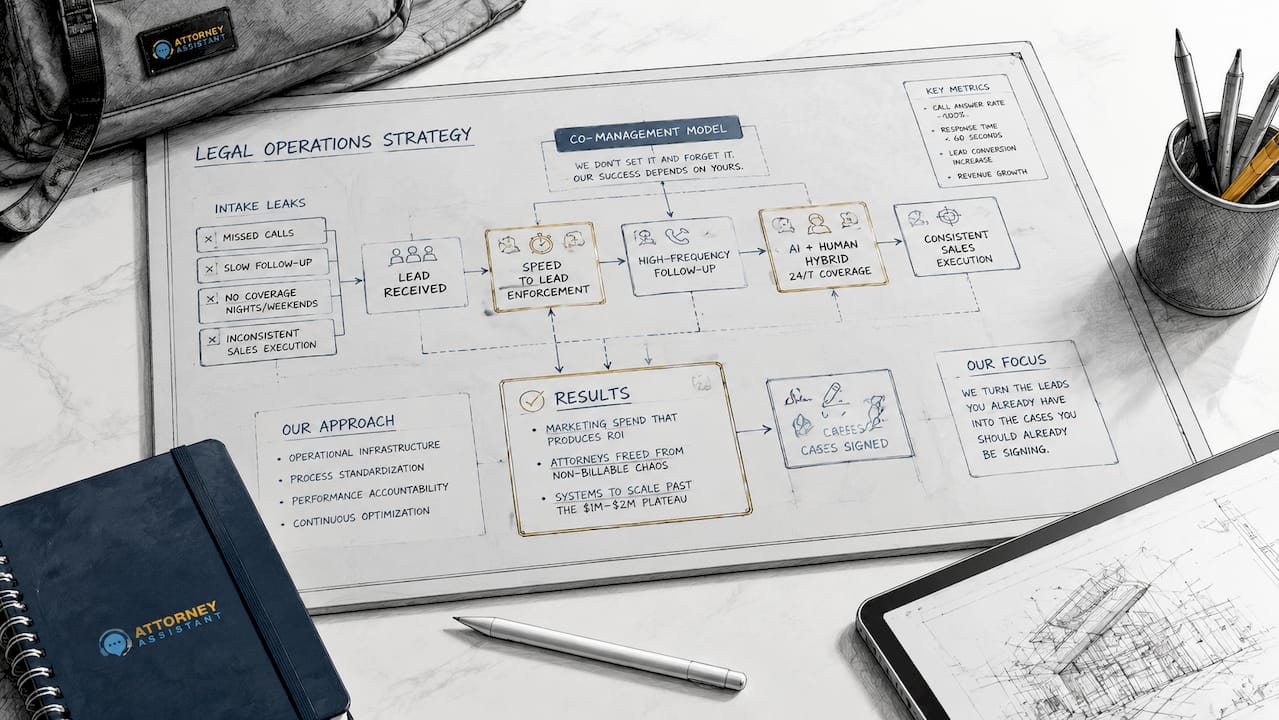
Before you build a follow up workflow, you need the right infrastructure in place. Skipping this step means automating a broken process, which only makes the problem faster.
Legal intake CRM and automation tools
A legal intake CRM is the foundation. It captures every lead, logs every interaction, and triggers the next step automatically. Without a CRM, follow up depends on memory and sticky notes, both of which fail under volume. AI and intake CRM systems increase lead conversions by about 47% and revenues by over 50%. That is not a marginal gain. It is a structural shift in how intake performs.
Core features your intake stack needs
Not every tool is equal. The features below separate a functional intake system from one that leaks revenue:
- Instant lead notifications: Your intake team must know the moment a lead comes in, regardless of channel.
- Call routing: Calls must reach a live person or a qualified automated response within seconds, not minutes.
- Real-time calendar integration: Prospects should be able to book a consultation immediately. Self-scheduled consultations have 23% higher show rates than staff-scheduled ones.
- Automated TCPA consent capture: Every text or email follow up requires documented consent. Automate this at the point of first contact.
- Conflict check automation: Running conflict checks manually creates delays. Integrate this into your intake form so it runs before a human ever picks up the phone.
| Feature category | What it does | Why it matters |
|---|---|---|
| CRM with lead tracking | Logs all contacts and triggers follow up steps | Prevents leads from falling through the cracks |
| Automated acknowledgment | Sends instant reply to new inquiries | Keeps the lead engaged before a human responds |
| Real-time scheduling | Lets prospects book without staff involvement | Increases show rates and reduces scheduling lag |
| Conflict and consent checks | Runs compliance steps automatically | Removes legal risk from the intake process |
| KPI dashboards | Tracks response time, contact rate, conversion | Gives managers visibility into workflow performance |
Pro Tip: Set a speed-to-lead KPI of under five minutes for every channel. Make it a tracked metric, not a goal. If it is not measured, it will not be met.
Staff training matters as much as the tools. Intake managers should train their teams on the specific scripts, escalation paths, and handoff protocols the system requires. A CRM does not replace judgment. It removes the friction that prevents good judgment from happening fast enough.
How to design a step-by-step follow up workflow for legal leads
The follow up process in legal intake has a narrow window. Responding within 5 minutes boosts conversion likelihood by 21x compared to responding after 30 minutes. Every step in your workflow must be designed around that constraint.
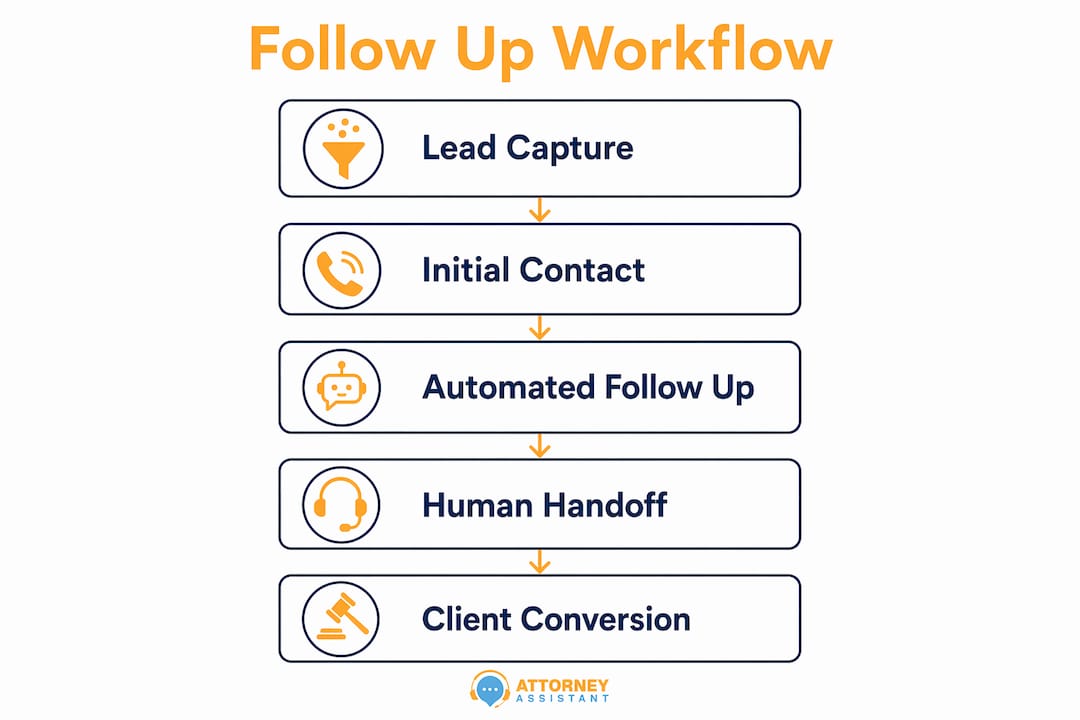
The five-step intake follow up sequence
-
Automated acknowledgment within 30 seconds. The moment a lead submits a form, calls, or sends a message, they receive an automated reply. This reply confirms receipt, sets expectations for next steps, and captures TCPA consent for future outreach. The goal is to keep the lead engaged before a human is available.
-
Qualification and conflict check within 3 minutes. An automated intake form or chatbot collects the basic case details: practice area, jurisdiction, opposing parties, and a brief description of the matter. The system runs a conflict check against your client database simultaneously. This step must stay within UPL (Unauthorized Practice of Law) boundaries. Collect facts, not legal opinions.
-
Consultation scheduling within 5 minutes. Once the conflict check clears, the system presents the prospect with a live calendar link. Firms responding within 5 minutes achieve 40–50% lead-to-client conversion versus a 14% industry average. Real-time scheduling is what makes that window achievable at scale.
-
Attorney handoff with context summary. Before the consultation, the attorney receives a one-page summary: the prospect’s name, case type, key facts, conflict check result, and any notes from the intake form. This eliminates the cold-start problem where attorneys ask questions the prospect already answered. It also signals professionalism before the first conversation begins.
-
Post-contact nurture sequence. If the prospect does not convert immediately, the workflow does not stop. A structured nurture sequence sends follow up emails or texts at defined intervals: 24 hours, 3 days, and 7 days after the initial contact. Each message should offer value, not just a reminder. A brief FAQ about the legal process, a link to a relevant resource, or a simple check-in message keeps the firm top of mind without being aggressive.
Pro Tip: Use a marketing automation checklist to audit each step of your sequence before you go live. Missing one trigger in a five-step workflow can break the entire chain.
The handoff between automation and human contact is where most workflows fail. The system should hand off to a person at the exact moment human judgment adds value, not before and not after. Defining that moment clearly is the most important design decision in your workflow.
What mistakes and bottlenecks break follow up workflows?
The most common intake failure is not a technology problem. It is a process problem that technology then inherits. Only 28% of firms respond within 5 minutes, which means 72% are actively losing leads they already paid to acquire.
The most damaging bottlenecks in legal follow up workflows include:
- Delays beyond 5 minutes: A 5-hour delay in responding can cost a firm $200,000 annually. That number reflects real revenue lost to competitors who responded faster.
- Manual steps in automated sequences: Every manual step is a potential failure point. If a staff member must manually send a confirmation email, that email will sometimes not get sent.
- No TCPA or UPL compliance layer: Firms that skip automated consent capture expose themselves to regulatory risk. Compliance checks must be built into the workflow, not added as an afterthought.
- No alerting on response time breaches: If your intake manager does not know when a lead has been waiting for 10 minutes, the problem is invisible until it becomes a pattern.
- Treating intake as administrative work: Legal firms often underestimate the operational cost of slow intake workflows. When intake is treated as a clerical function rather than a revenue function, it gets under-resourced.
Slow follow up is not a staffing problem. It is a systems problem. A firm with three intake staff and no workflow will always lose to a firm with one intake specialist and a disciplined process.
Recovering lost leads requires a specific protocol. If a lead goes cold after the first contact, a re-engagement sequence should trigger automatically at 48 hours. The message should acknowledge the gap directly: “We know timing matters. If you are still looking for representation, we are ready to help.” Firms that implement re-engagement sequences recover a meaningful share of leads that would otherwise be permanently lost.
How do you measure and improve your follow up workflow?
Measurement is what separates a workflow from a wish list. Without data, you cannot tell whether your follow up process is working or slowly failing. The KPIs that matter most in legal intake are:
- Speed-to-lead: Time from first contact to first response. Target: under 5 minutes.
- Contact rate: Percentage of leads that reach a live conversation. Target: above 70%.
- Appointment scheduling rate: Percentage of contacted leads that book a consultation.
- Consultation show rate: Percentage of booked consultations that actually occur.
- Lead-to-client conversion rate: Percentage of leads that sign a retainer.
Firms using e-signatures, online schedulers, and online forms see 12% better conversion and 20% higher revenue. Each of those tools generates data you can use to identify where leads drop out of your funnel.
| KPI | Benchmark | Action if below benchmark |
|---|---|---|
| Speed-to-lead | Under 5 minutes | Add automated acknowledgment; audit routing |
| Contact rate | Above 70% | Review call routing and after-hours coverage |
| Appointment scheduling rate | Above 50% of contacts | Integrate real-time calendar; reduce friction |
| Consultation show rate | Above 75% | Switch to self-scheduling; add reminder sequences |
| Lead-to-client conversion | Above 30% | Audit handoff quality and attorney preparation |
A/B testing works in legal intake the same way it works in any sales context. Test two versions of your acknowledgment message. Test two different follow up timing sequences. Test phone versus text as the first outreach channel. Run each test for 30 days with a consistent lead volume before drawing conclusions. The AI content optimization guide for legal marketers covers how AI tools can accelerate this testing cycle without requiring a dedicated analytics team.
Continuous improvement also means reviewing your workflow quarterly. Lead behavior changes. Practice areas shift. A workflow that performed well in january may underperform by july if the intake team has changed or the lead source has shifted. Schedule a quarterly workflow audit as a standing calendar item.
Key Takeaways
A disciplined follow up workflow is the single most effective way for law firms to increase client conversion without spending more on marketing.
| Point | Details |
|---|---|
| Speed-to-lead is the top lever | Responding within 5 minutes increases conversion by 21x compared to a 30-minute delay. |
| Automation handles the first 5 minutes | Automated acknowledgment, conflict checks, and scheduling remove human lag from the critical window. |
| Self-scheduling increases show rates | Prospects who book their own consultations show up 23% more often than those scheduled by staff. |
| Measure five core KPIs | Track speed-to-lead, contact rate, scheduling rate, show rate, and conversion to find where leads drop. |
| Slow intake has a hard dollar cost | A 5-hour response delay can cost a firm $200,000 in lost annual revenue. |
Why intake discipline is the real differentiator
I have seen law firms spend aggressively on Google Ads, SEO, and referral programs, then watch those leads evaporate because no one called back within the hour. The follow up workflow is not a back-office function. It is the front line of revenue.
What I find consistently true is that the firms with the best intake results are not the ones with the most staff. They are the ones where the practice owner treats speed-to-lead as a hard KPI, the same way they track billable hours. When intake becomes a revenue metric, behavior changes fast.
The harder shift is cultural. Intake managers often inherit a system built around administrative convenience, not conversion performance. Changing that requires buy-in from the top. It also requires giving intake teams the tools to succeed, not just the expectation to perform. Automation handles the mechanical steps. People handle the judgment calls. When those two things are properly separated, the workflow runs without constant supervision.
The firms that resist automation because they want to “keep it personal” are making a false choice. An automated acknowledgment that arrives in 20 seconds is more personal than a human call that arrives 4 hours later. Speed is the most personal thing you can offer a prospect in a stressful legal situation.
— Nicole
How Attorney Assistant supports your intake workflow
Law firms that fix their follow up process see measurable gains in signed cases without increasing their marketing spend. Attorney Assistant handles the intake, follow-up, and administrative workflows that most firms manage inconsistently.
The intake and reception service covers rapid response, conflict checks, scheduling, and attorney handoffs so your team focuses on practicing law rather than chasing leads. Firms that have moved their intake to a structured workflow report faster response times and fewer leads lost to silence. If you want to see how this applies to your practice, book a call with the Attorney Assistant team and walk through your current intake process together.
FAQ
What is a follow up workflow in legal intake?
A follow up workflow in legal intake is a structured sequence of automated and human steps that moves a prospect from first contact to a signed retainer. It defines who responds, when, through which channel, and what happens if the prospect does not convert immediately.
How fast should a law firm respond to a new lead?
Law firms should respond within 5 minutes of receiving a new lead. Firms that meet this benchmark achieve 40–50% lead-to-client conversion, compared to a 14% average for slower responders.
What KPIs should intake managers track?
Intake managers should track speed-to-lead, contact rate, appointment scheduling rate, consultation show rate, and lead-to-client conversion rate. These five metrics reveal exactly where leads exit the intake funnel.
How does automation help with legal follow up compliance?
Automation captures TCPA consent at the point of first contact and runs conflict checks before any human interaction occurs. This removes manual compliance steps that are easy to skip under volume pressure.
What is the financial cost of slow follow up for law firms?
A 5-hour response delay can cost a law firm $200,000 in lost annual revenue. Legal leads cost $200–$1,000 each to acquire, so every uncontacted lead represents direct revenue lost to a competitor.
Recommended
- Client Follow-Up Workflow for Law Firms: 2026 Guide | Attorney Assistant
- Client Follow-Up Strategy for Law Firms: 2026 Guide | Attorney Assistant
- Streamline your law firm follow-up process: convert more leads | Attorney Assistant
- Why Prompt Follow-Up Boosts Cases for Injury Firms | Attorney Assistant
Related Articles

Client Follow-Up Workflow for Law Firms: 2026 Guide
Discover how to create an effective client follow-up workflow for your law firm. Boost engagement and convert leads effortlessly!

Medical Records Coordinator: What the Role Actually Does
A medical records coordinator manages records retrieval, summaries, billing, and liens for law firms. Learn duties, KPIs, and when to outsource vs hire.

Macs for Lawyers: The Hardware and Compatibility Guide
A practical guide to Macs for lawyers covering hardware choices, software compatibility, security tradeoffs, and recommendations by firm size and workflow.