Why Automate Client Follow-Up at Your Law Firm

TL;DR:
- Automating client follow-up helps law firms respond faster, increasing lead conversion rates and revenue.
- It replaces manual processes with event-driven triggers, ensuring consistency, compliance, and visibility.
Automating client follow-up is the process of using technology to deliver timely, consistent, and compliant engagement to every prospective and current legal client without relying on manual methods. Law firms that respond to initial inquiries within 5 minutes are 21 times more likely to qualify leads than those responding in 2 hours or more. The average firm responds in 2.3 business days. That gap costs the legal industry $9.2 billion annually in lost engagements. Most firms believe they need more leads. The real problem is that they are losing the leads they already have.
Why automate client follow-up: the conversion case
The single most important reason to automate follow-up is speed. A prospective client who fills out a contact form at 9:00 PM on a Tuesday will not wait until Wednesday morning for a reply. 46% of prospects contact law firms outside business hours, which makes a 24/7 automated acknowledgment the difference between a booked consultation and a lost case.
Speed alone does not close cases. Consistency does. Manual follow-up breaks down under real case volume because staff forget, get pulled into other tasks, or simply do not have a clear system. Automation removes that variability by triggering the next step the moment a defined event occurs, regardless of who is in the office.
The numbers behind automated intake workflows are hard to ignore:
- Firms responding within 5 minutes are 400% more likely to convert leads than those waiting 2 hours or more.
- Administrative overhead drops by 50–80% when intake and follow-up are automated.
- Intake coordinator hours for a firm handling 85 clients per month fell from 272 to 128 per month after automation was introduced.
- Intake-to-active matter timelines shorten by over 60%.
That last point matters for cash flow. A faster path from inquiry to signed engagement letter means revenue arrives sooner and fewer leads slip through the cracks while waiting on a callback.
Pro Tip: Set your automated acknowledgment to fire within 90 seconds of a form submission or missed call. That single trigger buys goodwill and keeps the prospect from calling the next firm on their list.
What operational challenges does follow-up automation solve?
The root cause of most follow-up failures is not laziness. It is a lack of structure. When follow-up depends on memory, calendar reminders, or a shared spreadsheet, tasks fall through the cracks the moment volume increases or a staff member is out sick.
The most common bottlenecks in manual follow-up workflows include:
- Unclear ownership. No one knows whose job it is to follow up after the initial call.
- Fragmented communication logs. Notes live in email, sticky notes, and spreadsheets with no single source of truth.
- Generic reminders. Calendar alerts fire on fixed dates rather than in response to actual case events.
- No escalation path. When a follow-up goes unanswered, nothing happens automatically.
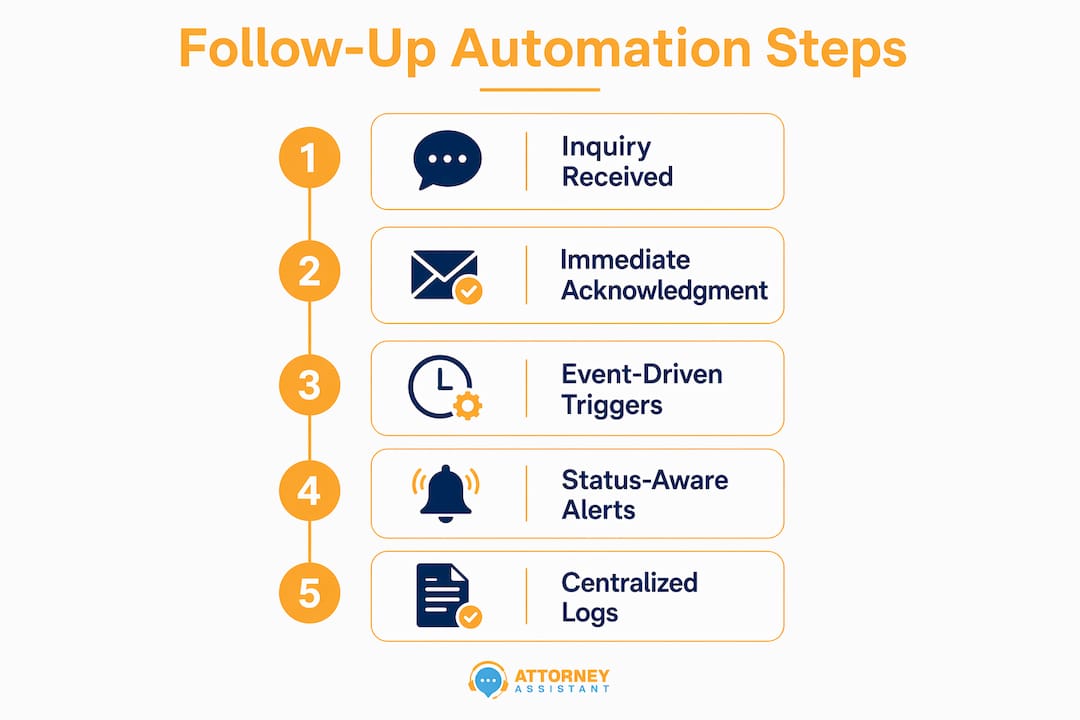
Automation solves these problems by replacing calendar-based reminders with event-driven triggers tied to case lifecycle stages. A trigger fires when a consultation is completed, an engagement letter is sent, a filing is submitted, or an invoice becomes due. Each trigger creates a task with an assigned owner and a deadline.
Status-aware automation goes one step further. If the assigned owner does not complete the task within a set window, the system escalates automatically to a supervisor. That escalation path is what prevents revenue leakage from becoming a structural problem. A firm missing 5 inquiries per month at an average matter value of $2,500 loses $12,500 every month, not from bad marketing, but from operational gaps.
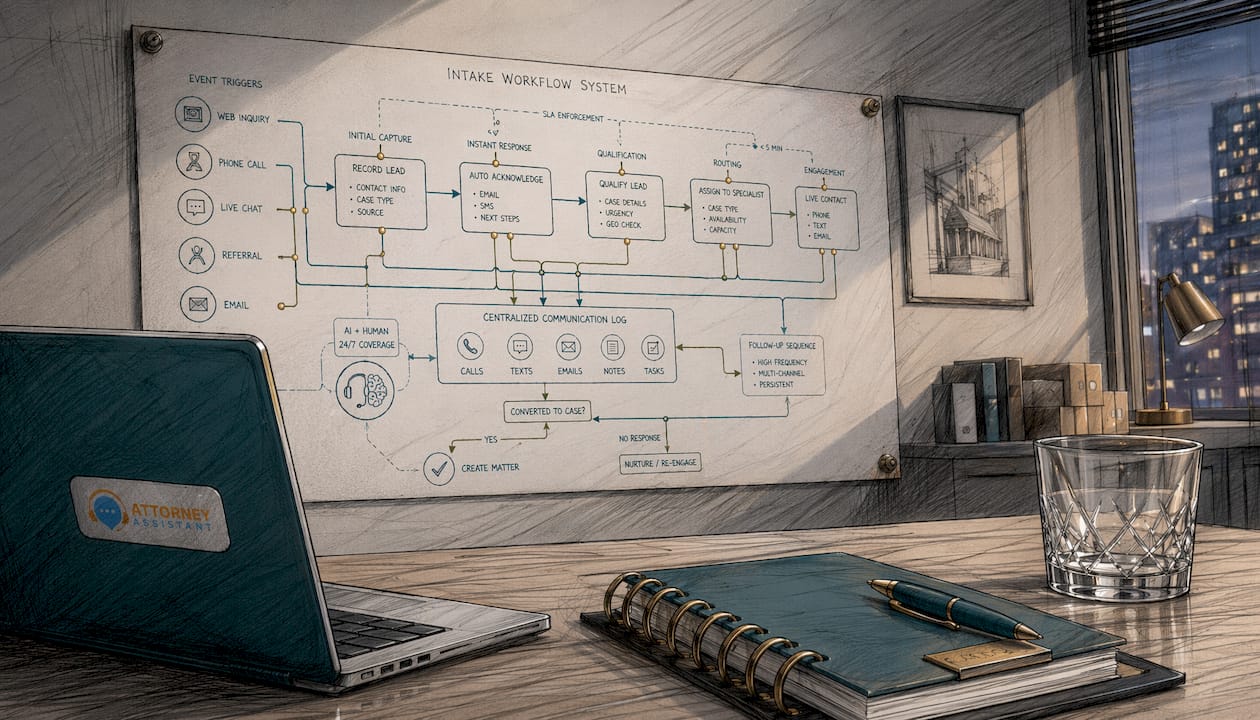
Centralized communication logs are the other critical piece. Every automated message, every reply, and every task completion gets recorded in one place. That creates an audit trail that protects the firm and gives managers real visibility into where leads are in the pipeline.
Pro Tip: Require mandatory next-task creation at every workflow stage. If a task closes without a follow-up task being created, the system should flag it. That one rule eliminates most manual handoff failures.
How to design compliant and effective automated follow-up workflows
Compliance is not optional in legal automation. Two frameworks govern how law firms can communicate with prospective clients using automated systems: ABA Model Rule 5.5 and the Telephone Consumer Protection Act (TCPA).
A well-designed automated follow-up workflow for a law firm follows this sequence:
- Automated acknowledgment. Send an immediate response confirming receipt of the inquiry. Use a UPL-safe script reviewed by a licensed attorney. The message sets expectations without providing legal advice.
- Consent capture. For SMS follow-up, obtain explicit written consent per TCPA requirements before sending any text messages. Log that consent in the client record.
- Qualification sequence. Use AI-assisted intake tools to capture case details, practice area, and urgency. Route the lead to the right attorney or intake specialist based on the answers.
- Conflict check integration. Run an automated conflict check before scheduling a consultation. Flag any conflicts for attorney review before the call is booked.
- Consultation scheduling. Trigger a real-time calendar link so the prospect can book without waiting for a staff member to call back.
- Human handoff. Once the consultation is scheduled, a trained intake specialist or attorney takes over for the relationship-building conversation.
The hybrid model combining AI-powered automation for routine tasks with human interaction for empathy and complex qualification delivers the best conversion and satisfaction outcomes. AI captures data instantly and engages around the clock. Humans provide trust and handle the conversations that require judgment.
Testing and iteration are not optional. Every automated sequence should be reviewed monthly for response rates, drop-off points, and compliance accuracy. A script that worked well in january may need updating after a regulatory change or a shift in the firm’s practice mix.
Pro Tip: Have a licensed attorney review every automated script before it goes live. A single phrase that implies legal advice can create unauthorized practice of law exposure, even in an acknowledgment email.
For firms building these workflows from scratch, a marketing automation checklist provides a useful structural framework that translates well to legal intake contexts.
What are the measurable benefits of automating client follow-up?
The benefits of automating follow-up are concrete and measurable across three categories: time, money, and client experience.
On time, the impact is immediate. Onboarding automation with parallel workflows reduces process time by over 50%. Document collection follow-up calls drop by 91% when automated reminders replace manual outreach. That frees intake staff to focus on higher-value conversations instead of chasing paperwork.
On money, the math is straightforward. Faster intake means faster signed engagements. Automated invoice reminders improve cash flow by reducing the time between service delivery and payment. Firms that measure and optimize intake response times consistently report better intake quality and higher growth rates.
On client experience, the data is equally clear. One case study recorded client satisfaction scores rising from 6.4 to 8.9 out of 10 after intake automation was introduced. First-year client retention rates increased by 18% when structured onboarding communication sequences replaced ad-hoc follow-up. 89% of clients completed the full five-message welcome sequence, which signals that well-designed automated communication feels helpful rather than intrusive.
Response time is now one of the highest-ROI operational levers a firm can optimize. The firms growing fastest in 2026 are not the ones spending more on advertising. They are the ones converting a higher percentage of the leads they already receive.
Key Takeaways
Automating client follow-up is the most direct operational lever law firms have to increase conversion rates, reduce revenue leakage, and improve client satisfaction without adding headcount.
| Point | Details |
|---|---|
| Speed drives conversion | Firms responding within 5 minutes are 21 times more likely to qualify leads than those waiting 2 hours. |
| Event-driven triggers prevent gaps | Tie follow-up actions to case milestones, not calendar dates, to guarantee the right message at the right time. |
| Compliance must be built in | ABA Model Rule 5.5 and TCPA require UPL-safe scripts, attorney review, and documented SMS consent. |
| Hybrid models outperform pure automation | AI handles data capture and 24/7 response; humans handle trust-building and complex qualification conversations. |
| Measurable gains are consistent | Firms report 50–80% overhead reduction, 91% fewer document calls, and client satisfaction scores rising from 6.4 to 8.9. |
The uncomfortable truth about follow-up automation in law firms
Most law firm owners I talk to have the same reaction when they first look at automation: they worry it will feel cold or impersonal to clients. That concern is understandable. It is also backwards.
The firms that feel cold to clients are the ones that take three days to respond, forget to follow up after a consultation, or send a generic email with no context. Automation, done correctly, makes every client feel like they are the firm’s only priority. The message arrives immediately. The next step is clear. Nothing falls through the cracks.
What I have found after working with law firms on intake and follow-up is that the real resistance is not about client experience. It is about accountability. Automation makes it visible when follow-up does not happen. Managers can see exactly where leads are in the pipeline and exactly who owns each next step. That visibility is uncomfortable for firms that have been running on informal systems for years.
The firms that commit to event-driven workflows and clear ownership rules do not just convert more leads. They build practices that can grow without adding chaos. The ones that avoid automation because it feels like a big change continue losing $12,500 a month or more to gaps that a well-designed system would close in a week.
Automation is not a replacement for good lawyers or good relationships. It is the infrastructure that makes those relationships possible at scale. The lead nurturing principles that work in other industries apply directly here: consistent, timely, relevant contact converts prospects into clients. The only question is whether your firm does it manually or systematically.
— Nicole
How Attorney Assistant helps law firms close the follow-up gap
Law firms that are serious about fixing their intake and follow-up processes need more than software. They need workflows designed around their specific case types, practice areas, and staff structure.
Attorney Assistant builds and manages those workflows. From the first automated acknowledgment to the signed engagement letter, every step is mapped, triggered, and monitored. Firms working with Attorney Assistant recover revenue by eliminating the follow-up gaps that manual systems cannot sustain. If you want to know exactly where your firm is losing leads right now, start with a free intake audit. It takes one conversation to identify the gaps. Fixing them takes less time than most firms expect. You can also explore intake solutions or book a call to talk through your specific situation.
FAQ
Why does response time matter so much for law firm leads?
Prospects contact multiple firms at once. Firms responding within 5 minutes are 21 times more likely to qualify the lead than those waiting 2 hours, because the first firm to engage earns the consultation.
What is the difference between automated reminders and event-driven follow-up?
Automated reminders fire on fixed calendar dates regardless of case status. Event-driven follow-up triggers based on actual case milestones, such as a signed engagement letter or a completed consultation, making each message timely and relevant.
How does follow-up automation comply with ABA Model Rule 5.5 and TCPA?
Compliant automation uses UPL-safe scripts reviewed by a licensed attorney, avoids providing legal advice in automated messages, and captures explicit written consent before sending SMS communications per TCPA requirements.
How much can automation reduce intake workload?
Administrative overhead drops by 50–80% with automated intake and follow-up. One firm reduced intake coordinator hours from 272 to 128 per month while handling the same client volume.
Does automation replace intake staff at law firms?
Automation handles data capture, acknowledgment, scheduling, and reminders. Trained intake specialists and attorneys remain responsible for relationship-building, complex qualification, and the conversations that require human judgment.
Recommended
Related Articles

Call Answering Service for Law Firms: What Actually Works
A call answering service for law firms should sign cases, not take messages. Learn pricing models, vendor criteria, and 24/7 intake that converts.
Case Management Notes: A Law Firm's How-To Guide
Learn how to write case management notes that hold up, with a defensible structure, privilege safeguards, handoff tips, and a smarter way to staff the work.
Medical Records Coordinator: What the Role Actually Does
A medical records coordinator manages records retrieval, summaries, billing, and liens for law firms. Learn duties, KPIs, and when to outsource vs hire.